Which email gets sent automatically at which order step, and where to configure each one individually.
Along the order lifecycle, Magento sends four independent email types, each with its own configuration section under Stores > Configuration > Sales > Sales Emails.
Order confirmation
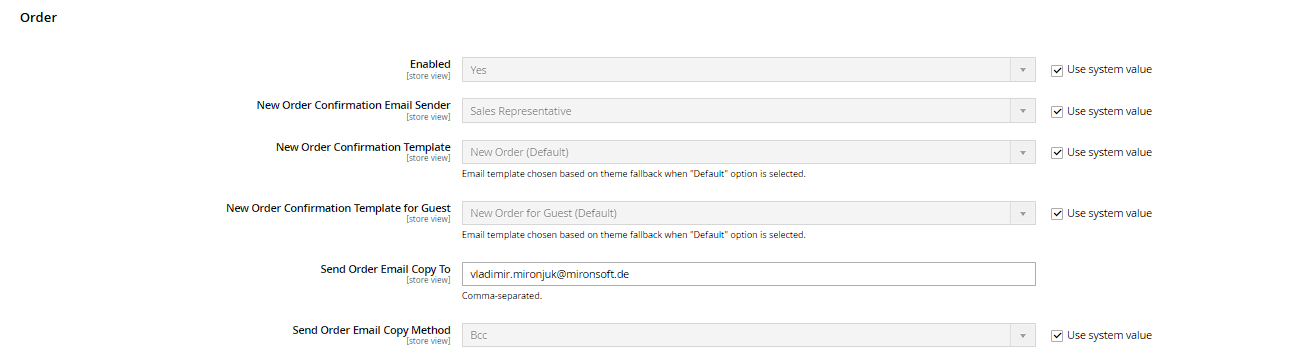
Triggered as soon as an order is successfully placed (status changes to "pending" or "processing"). Group Order: Enabled, New Order Confirmation Email Sender (which sender identity, see the next subchapter), New Order Confirmation Template (for registered customers), and a separate New Order Confirmation Template for Guest (for guest orders, often including a note about creating an account).
Invoice
Sent when an invoice is created in the backend under Sales > Orders (see the "Creating Invoices" chapter) – not automatically with every order, only at the actual invoicing step. Group Invoice with the same three fields (sender, registered template, guest template).
Shipment confirmation
Triggered when a shipment is created (see the "Shipping and Delivery" chapter), usually including the tracking number if one was entered. Group Shipment, with equivalent fields.
Credit memo
Sent when a credit memo is created (see the "Credit Memos and Refunds" chapter). Group Credit Memo, with equivalent fields.
Sending yourself a copy
Each of the four groups also offers Send Order/Invoice/Shipment/Credit Memo Email Copy To (one or more comma-separated internal email addresses) and Send Email Copy Method (Bcc or a separate copy email). This way your fulfillment team can automatically get a copy of every order confirmation, for example, without having to watch the backend.
Asynchronous sending
The Asynchronous sending option (group Email Sending Options at the very top of the page) moves the actual email delivery into a cron job instead of triggering it synchronously in the same request as the order – recommended if your mail server is slow or occasionally unreachable, so an email timeout can never block a successful checkout.