Whether prices show gross or net, and how Magento automatically checks via VIES whether a B2B customer qualifies for tax exemption.
Two practically relevant settings many store owners only miss once they've already gone live: price display and automatic VAT ID validation for EU business customers.
Price display settings
Under Stores > Configuration > Sales > Tax, group Price Display Settings, you decide separately for the catalog, cart and invoice whether prices show Including Tax, Excluding Tax, or Including and Excluding Tax (both at once, e.g. "$19.99 incl. VAT, $16.80 net"). For B2C stores in Germany, "Including Tax" across all three levels is a legal requirement (Preisangabenverordnung); B2B stores commonly show net prices with a "plus VAT" note instead.

Warnings for conflicting settings
Magento automatically shows a yellow warning in the configuration area when the chosen combination of price display and rounding settings could produce visibly different totals between the product page and the cart (e.g. when tax is rounded at line level instead of item level). Don't dismiss this warning – it points to real, customer-confusing rounding differences of a cent or two.
Enabling VAT ID validation
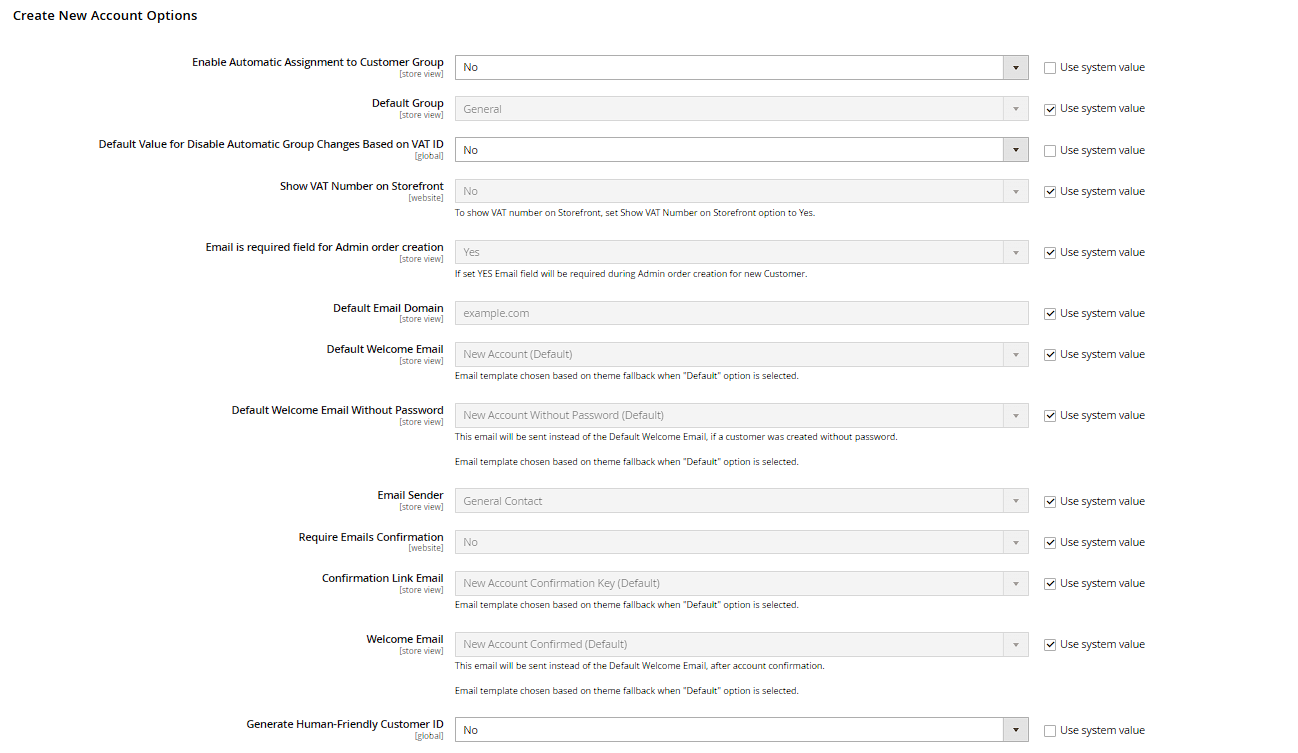
Under Stores > Configuration > Customers > Customer Configuration, group Create New Account Options, enable Enable Automatic Assignment to Customer Group together with Validate VAT Number. Magento then checks the entered VAT ID live against the EU's VIES service (VAT Information Exchange System) and automatically assigns the customer to one of three configurable groups: a valid VAT ID in the same country, a valid VAT ID in a different EU country (typically the tax-exempt reverse-charge group), or invalid/non-EU.
Limits of the automatic check
VIES only checks the format and registration of a VAT ID, not whether tax-exempt invoicing is actually justified in a specific case – if the tax office ever asks questions, the burden of proof stays with the merchant. VIES is also occasionally unavailable for short maintenance windows on the EU side; in that case Magento falls back to the manually configured default customer group and re-checks the VAT ID the next time the account is edited.