What customer groups are good for and how to use them to map different prices or tax classes.
You'll find customer groups under Customers > Customer Groups. By default Magento ships with four groups: NOT LOGGED IN (guests without an account), General (regular registered customers), Wholesale and Retailer (prepared for B2B scenarios, with no special terms by default until you configure them).

What customer groups are used for
- Different pricing: cart and catalog price rules (see the Marketing chapter) can be targeted specifically at certain customer groups, e.g. discounts only for wholesale customers.
- Tax class: each customer group is linked to its own tax class – relevant e.g. for B2B customers who should see net prices instead of gross prices.
- Visibility: combined with extensions, content or entire product areas can be restricted to specific groups (e.g. an exclusive product area only for wholesale customers).
- Automatic assignment by VAT ID: with EU VAT ID validation enabled, Magento can automatically move customers with a valid, verified VAT ID into a different group (e.g. for B2B reverse-charge tax handling).
Creating a new group
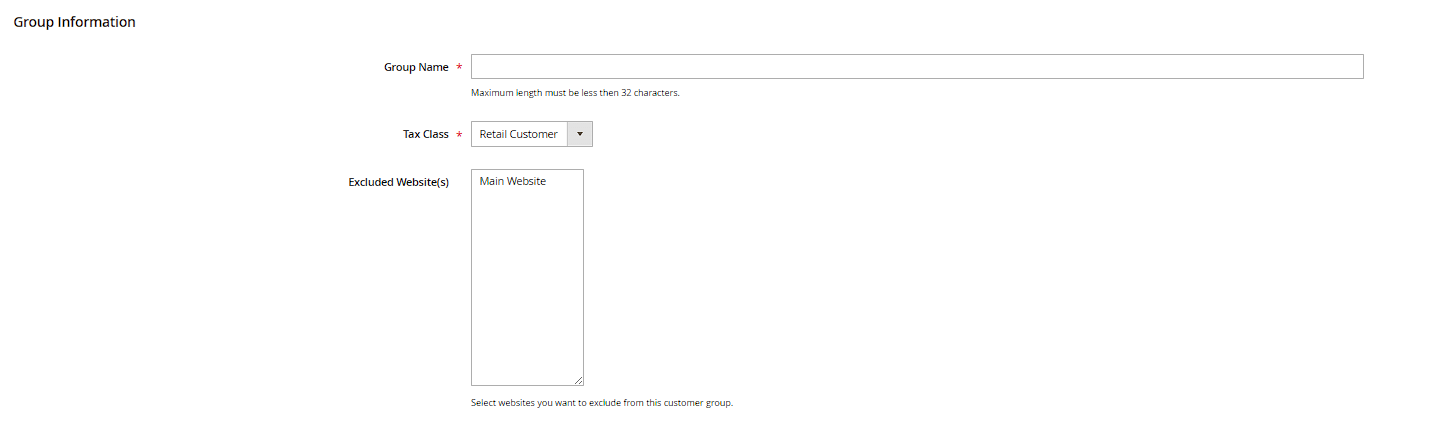
Use Add New Customer Group to create a new group – essentially just a name (Group Name) and an assigned Tax Class. A customer group's actual "effect" only comes from other configuration that references it (price rules, tax class rules, and possibly extensions).
Default group for new sign-ups
Whether and which group new customers get automatically assigned to on registration is configured under Stores > Configuration > Customers > Customer Configuration > Create New Account Options, field Default Group.
Changing an existing account's customer group
You change a single customer's group in the Account Information tab of the customer detail page via the Group field. For several customers at once, use the Assign a Customer Group bulk action in the customer grid instead (see the previous chapter) – handy when, say, a batch of existing customers should be moved into a wholesale group after the fact.
Tiered pricing by customer group (Tier Price)
Besides cart and catalog price rules, group-dependent pricing can also be set directly on the product: on the product form, the Advanced Pricing link opens a dialog with the Tier Price table. There, each row lets you combine a Customer Group, a minimum quantity (Quantity) and a price or discount – e.g. "10% off from 10 units, wholesale group only". A Website selector is also available if the catalog price scope is set to website rather than global.
Protected default groups
The two groups NOT LOGGED IN (ID 0) and General (ID 1) are system groups and can't be deleted through the admin UI – Magento returns an error if you try. Wholesale and Retailer, on the other hand, are regular groups you can rename or remove if needed, as long as no price rule or other configuration still references them.