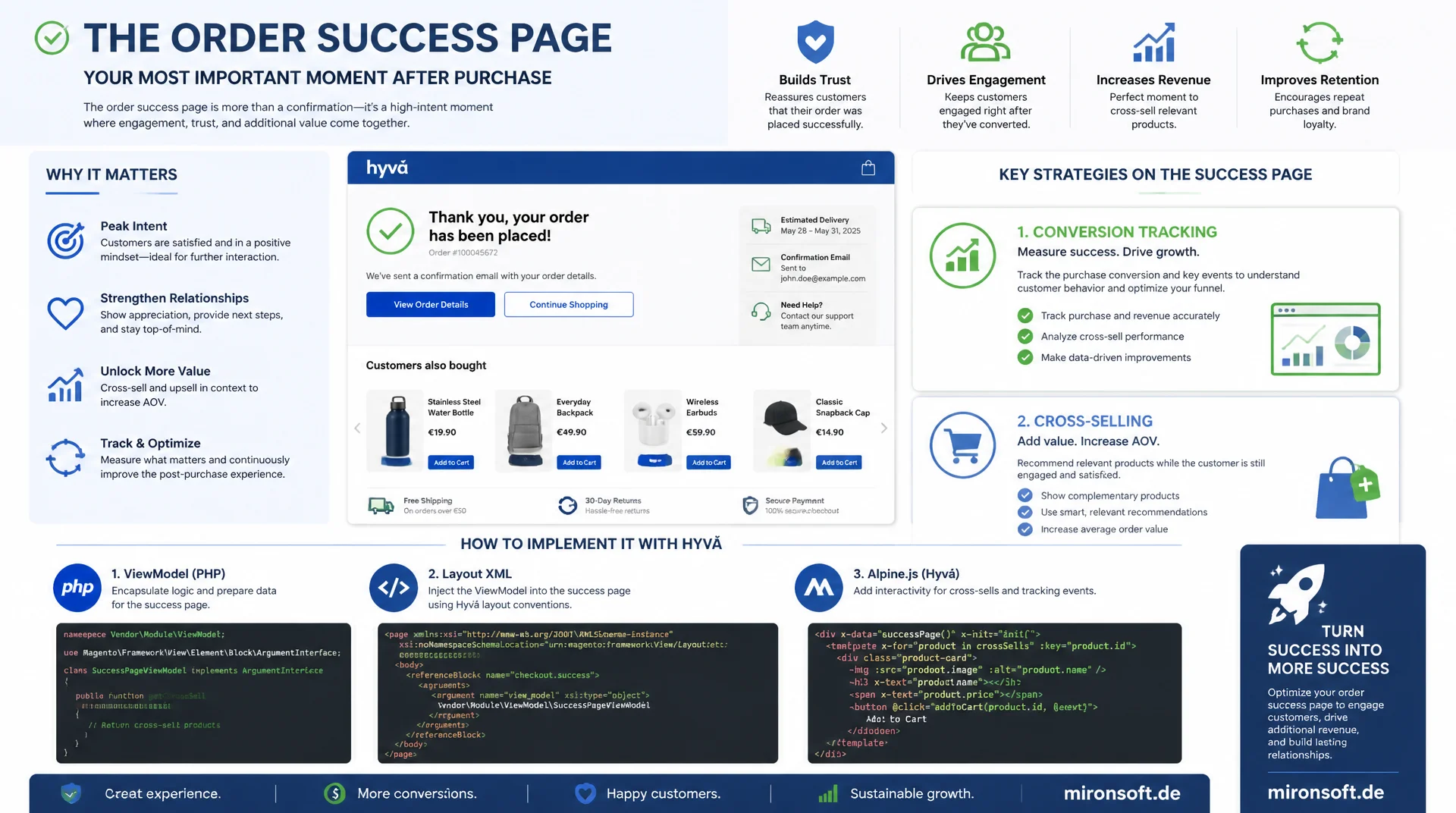
Tracking, cross-sell, and custom blocks on the Hyvä order success page
The order success page is the moment with the highest attention throughout the entire checkout: the customer has just made a purchase but is still on the page. Anyone who uses this moment for conversion tracking, cross-sell, and customer retention, without Knockout.js, jQuery, or UI components, but with clean Hyvä patterns built from ViewModels, layout XML, and Alpine.js, gets noticeably more out of the order success page than with the standard Luma output.
Table of contents
- 1. How the order success page is structured in Hyvä
- 2. Adding CSP-compliant tracking events
- 3. Adding custom blocks via layout XML
- 4. Cross-sell and product recommendations
- 5. Extending order details
- 6. Newsletter signup and account creation
- 7. Invoice download and additional links
- 8. Multi-store and multilingual considerations
- 9. Security and robustness
- 10. Summary
- 11. FAQ
1. How the order success page is structured in Hyvä
The order success page is rendered in Magento via the layout handle checkout_onepage_success, which is defined by Magento_Checkout and overridden in Hyvä at app/design/frontend/Mironsoft/default/Magento_Checkout/layout/checkout_onepage_success.xml. Unlike Luma, there are no Knockout templates and no uiComponent declarations here: the entire content lives in the block Magento\Checkout\Block\Onepage\Success, whose template in Hyvä sits at Magento_Checkout/templates/onepage/success.phtml. This template is plain PHTML with direct PHP access to the block, no data binding via data-bind, and no asynchronously loaded Knockout components.
The order data itself doesn't come from a runtime REST call, it's read server-side via Magento\Checkout\Model\Session. The block calls $this->getOrderId(), $this->getOrder(), and through it Magento\Sales\Model\Order methods such as getIncrementId(), getCustomerEmail(), or getGrandTotal(). Because checkout_onepage_success is rendered on the first call after the redirect, before the checkout session gets invalidated, accessing Magento\Checkout\Model\Session::getLastRealOrder() is the most reliable source for the most recently placed order.
For your own extensions to the order success page, this means: you generally don't work directly in success.phtml, instead you add additional blocks via layout XML into the checkout.success container. In Hyvä, this container is a simple <div> wrapper in the template that iterates over all child blocks via $block->getChildNames(), exactly like the rest of the Hyvä block system. This allows for clean extensions without overriding the core block.
<!-- app/design/frontend/Mironsoft/default/Magento_Checkout/templates/onepage/success.phtml (excerpt) -->
<?php
/** @var \Magento\Checkout\Block\Onepage\Success $block */
/** @var \Hyva\Theme\ViewModel\HyvaCsp $hyvaCsp */
?>
<div class="not-prose bg-white rounded-2xl border border-gray-200 p-6 sm:p-8">
    <h1 class="text-2xl font-bold text-gray-900 mb-2">
        <?= $block->escapeHtml(__('Thank you for your order!')) ?>
    </h1>
    <p class="text-gray-600 mb-6">
        <?= $block->escapeHtml(__('Your order number is: %1', $block->getOrderId())) ?>
    </p>

    <!-- Iterate over child blocks added via layout XML, standard Hyvä pattern -->
    <?php foreach ($block->getChildNames() as $childName): ?>
        <?= $block->getChildHtml($childName) ?>
    <?php endforeach; ?>
</div>
2. Adding CSP-compliant tracking events
Conversion tracking on the order success page is the most common customer requirement, and at the same time the most common source of CSP violations and double-counted conversions. By default, Hyvä enforces a strict Content Security Policy via the Hyva_CspCompatibility module, which blocks unregistered inline scripts. Every GA4 or Google Ads conversion event written via dataLayer.push() inside a <script> tag must therefore be released with $hyvaCsp->registerInlineScript() in the PHTML template, otherwise the browser nonce doesn't apply and the script gets silently blocked.
The second challenge is duplicate conversion counting on page reload. Since the order success page can be revisited under the same URL (browser reload, back button, bookmark), a naive dataLayer.push() in the template would send the same order ID to GA4 again on every reload. The reliable solution is server-side state: once Magento\Checkout\Model\Session::getLastOrderId() has been read and the event emitted, clearHelperData() is called, or a custom flag is set in the session, so a second call to the success block no longer triggers an event.
For GA4, you use the purchase event with the standard e-commerce parameters (transaction_id, value, currency, items), built from $order->getAllVisibleItems(). Google Ads conversion tracking runs in parallel via a second dataLayer.push() with the conversion ID, ideally through the same server-rendered JSON block, so no additional race condition arises between two inline scripts.
<?php
/** app/design/frontend/Mironsoft/default/Magento_Checkout/templates/onepage/success/tracking.phtml */
/** @var \Magento\Checkout\Block\Onepage\Success $block */
/** @var \Hyva\Theme\ViewModel\HyvaCsp $hyvaCsp */

$order = $block->getOrder();
$items = [];
foreach ($order->getAllVisibleItems() as $item) {
    $items[] = [
        'item_id'   => $item->getSku(),
        'item_name' => $item->getName(),
        'price'     => (float) $item->getPrice(),
        'quantity'  => (int) $item->getQtyOrdered(),
    ];
}

$payload = [
    'event'        => 'purchase',
    'ecommerce'    => [
        'transaction_id' => $order->getIncrementId(),
        'value'          => (float) $order->getGrandTotal(),
        'currency'       => $order->getOrderCurrencyCode(),
        'items'          => $items,
    ],
];
?>
<script>
    window.dataLayer = window.dataLayer || [];
    window.dataLayer.push(<?= /* @noEscape */ json_encode($payload, JSON_UNESCAPED_UNICODE) ?>);
</script>
<?= /* @noEscape */ $hyvaCsp->registerInlineScript() ?>
3. Adding custom blocks via layout XML
In Luma, the obvious approach would be to write a custom block class that extends \Magento\Framework\View\Element\Template and encapsulates business logic in getter methods. In Hyvä, the ViewModel pattern (Magento\Framework\View\Element\Block\ArgumentInterface) is the preferred approach: a ViewModel is bound via arguments in layout XML to a generic Magento_Checkout::template.phtml or a custom template, without needing a dedicated PHP class with constructor boilerplate for context, data, and template path for every new block.
Positioning within the checkout.success container is controlled via the before or after attribute on the <block> tag, exactly as with any other Hyvä block. It's important that custom blocks are always declared as children of checkout.success, not as a standalone container outside the existing structure, otherwise the getChildNames() iteration in success.phtml won't pick them up.
<!-- app/design/frontend/Mironsoft/default/Magento_Checkout/layout/checkout_onepage_success.xml -->
<?xml version="1.0"?>
<page xmlns:xsi="http://www.w3.org/2001/XMLSchema-instance"
      xsi:noNamespaceSchemaLocation="urn:magento:framework:View/Layout/etc/page_configuration.xsd">
    <body>
        <referenceBlock name="checkout.success">
            <!-- Custom block using the ViewModel pattern instead of a dedicated Block class -->
            <block class="Magento\Framework\View\Element\Template"
                   name="mironsoft.success.order.recommendations"
                   template="Mironsoft_OrderSuccess::recommendations.phtml"
                   after="-">
                <arguments>
                    <argument name="view_model" xsi:type="object">
                        Mironsoft\OrderSuccess\ViewModel\RecommendationsViewModel
                    </argument>
                </arguments>
            </block>
        </referenceBlock>
    </body>
</page>
4. Cross-sell and product recommendations on the success page
Product recommendations on the order success page work most cleanly in Hyvä via GraphQL rather than heavy collection loads in the block. A ViewModel first determines the categories of the most recently ordered products from $order->getAllVisibleItems(), collects the category_ids from them, and passes them as a filter to a products query against Magento\GraphQl. This query isn't executed server-side in the PHP process via the GraphQL resolver, it runs client-side via fetch() in an Alpine component, so rendering of the success page itself isn't delayed by the additional product lookup.
Display happens as a Tailwind grid using grid-cols-2 sm:grid-cols-3 lg:grid-cols-4, with each product card managing its own loading state via x-data. For lazy-loading the recommendations, you use x-intersect from the Alpine Intersect plugin, which is typically already registered via Hyva_Theme in Hyvä projects: only once the cross-sell container scrolls into the viewport is the GraphQL query actually dispatched. This significantly reduces the initial server load on the order success page, since many visitors leave the page before even scrolling down to the recommendations area.
For category selection: the last item purchased rarely makes the best recommendation, since the customer just bought exactly that product. A proven approach is to use the parent category and exclude the just-purchased SKU from the result via a sku_not_in filter, so the order success page doesn't advertise items the customer has already bought.
# GraphQL query executed client-side via fetch() after the recommendations
# container enters the viewport (Alpine x-intersect)
query CrossSellAfterOrder($categoryIds: [String], $excludeSku: String) {
  products(
    filter: {
      category_id: { in: $categoryIds }
      sku: { neq: $excludeSku }
    }
    pageSize: 8
    sort: { relevance: DESC }
  ) {
    items {
      sku
      name
      url_key
      small_image { url label }
      price_range {
        minimum_price {
          final_price { value currency }
        }
      }
    }
  }
}
5. Extending order details
Very often the order success page needs additional data that isn't part of the standard order object, such as a requested delivery date, a reference number from B2B checkout, or a purchase order number. These values are stored via a db_schema.xml extension as an additional column on sales_order, declaratively rather than via an install script, and read either through a dedicated repository or directly via Magento\Sales\Model\Order::getData('custom_reference'). Important: for access via the generic getData() call, the declarative schema extension is enough; an additional extension attribute interface is only needed if the field should also be available via the REST/GraphQL Sales API.
When outputting prices and taxes on the order success page, manual string formatting with number_format() is a common mistake, since it ignores the currency symbol, decimal separator, and rounding of the respective store view. Instead, Magento\Framework\Pricing\Helper\Data::currency(), or the $block->getOrder()->formatPrice() already available on the block, provides the correctly localized display including store-specific currency. For tax amounts, $order->getTaxAmount() combined with the same price utility delivers consistent output without duplicating tax logic in the template.
For structured additional fields reused across multiple views (success page, PDF invoice, customer account order view), a dedicated ViewModel that takes the order and provides typed getters for the individual fields is worthwhile. This avoids scattering getData('custom_reference'), with its imprecise return type, directly throughout the PHTML.
6. Newsletter signup and account creation after guest checkout
After a guest checkout, the order success page offers the last realistic opportunity to get the visitor to sign up for the newsletter or to create a customer account afterward. The form itself is implemented as an Alpine component with x-data for the email field, opt-in checkbox, and loading state, with no Knockout validation at all. The actual processing runs server-side via a dedicated controller under Mironsoft_OrderSuccess/Controller/Newsletter/Subscribe, or alternatively via a web API endpoint that calls Magento\Newsletter\Model\SubscriberFactory or Magento\Customer\Api\AccountManagementInterface::createAccount().
For GDPR-compliant opt-in logic: the checkbox must not be pre-checked, the consent text must link to the privacy policy, and the timestamp of consent is logged server-side along with the IP address, so proof exists in case of a dispute. For subsequent account creation, AccountManagementInterface::createAccount() automatically takes over the billing and shipping address from the guest order, so the customer doesn't have to re-enter address data.
The controller additionally validates that the order ID passed in actually belongs to the current checkout session before any action is taken. Without this check, a manipulated order ID could be used to attempt creating an account for someone else's order, an attack vector that's easily overlooked when extending the success page.
// Alpine component for the post-checkout newsletter/account form,
// no Knockout, no jQuery
document.addEventListener('alpine:init', () => {
    Alpine.data('postCheckoutSignup', (orderId) => ({
        email: '',
        optIn: false,
        createAccount: false,
        loading: false,
        success: false,
        error: null,

        async submit() {
            if (!this.optIn) {
                this.error = 'Please confirm the opt-in to continue.';
                return;
            }
            this.loading = true;
            this.error = null;
            try {
                const response = await fetch('/rest/V1/mironsoft-order-success/signup', {
                    method: 'POST',
                    headers: { 'Content-Type': 'application/json' },
                    body: JSON.stringify({
                        orderId: orderId,
                        email: this.email,
                        newsletterOptIn: this.optIn,
                        createAccount: this.createAccount,
                    }),
                });
                if (!response.ok) {
                    throw new Error('Request failed');
                }
                this.success = true;
            } catch (e) {
                this.error = 'Something went wrong. Please try again.';
            } finally {
                this.loading = false;
            }
        },
    }));
});
7. Invoice download and additional links
The link to the PDF invoice on the order success page uses the Magento_Sales module with the controller Magento\Sales\Controller\Order\PrintInvoice, or the route sales/order/printInvoice with the order ID as a parameter. A custom block wires this link via $this->getUrl('sales/order/printInvoice', ['order_id' => $order->getId()]), provided an invoice (Magento\Sales\Model\Order\Invoice) already exists for the order. If no invoice exists yet, for example with prepayment methods that invoice later, the link should be conditionally hidden in the template rather than pointing to an empty PDF.
Social sharing prompts on the order success page are implemented in many projects via external JS snippets from Facebook or X, which fails under Hyvä's CSP and generates additional third-party requests. The CSP-compliant alternative is plain <a> links with pre-filled share URLs (https://twitter.com/intent/tweet?text=...), which require no external script at all and leave it up to the visitor whether they actually open the link.
Other useful links on the success page include a direct jump to shipment tracking once a shipping label exists, as well as a link to the customer account order view for logged-in customers. Both links can be implemented using the same ViewModel pattern already used for the invoice link.
<!-- Invoice download and CSP-safe social sharing, no external JS -->
<?php if ($block->hasInvoice()): ?>
    <a class="inline-flex items-center gap-2 text-orange-700 hover:underline text-sm font-semibold"
       href="<?= $block->escapeUrl($block->getUrl('sales/order/printInvoice', ['order_id' => $block->getOrder()->getId()])) ?>"
       target="_blank" rel="noopener">
        <?= $block->escapeHtml(__('Download invoice (PDF)')) ?>
    </a>
<?php endif; ?>

<!-- Plain link, no third-party script, no tracking pixel -->
<a class="inline-flex items-center gap-2 text-slate-600 hover:underline text-sm"
   href="https://twitter.com/intent/tweet?text=<?= $block->escapeUrl(__('Just placed an order!')) ?>"
   target="_blank" rel="noopener">
    <?= $block->escapeHtml(__('Share on X')) ?>
</a>
8. Multi-store and multilingual considerations
In multi-store setups, the order success page must correctly serve store-dependent content, such as different cross-sell categories per website or different legal text for the newsletter opt-in. The ViewModel layer reads Magento\Store\Model\StoreManagerInterface::getStore() for this and branches the logic in the ViewModel itself rather than in the template, so the PHTML stays store-independent and the same file works across all store views.
Translations of your own blocks on the order success page run through the usual i18n CSV files under app/design/frontend/Mironsoft/default/Mironsoft_OrderSuccess/i18n/de_DE.csv and en_US.csv. Every text in the template is output via __('Text') and stored with its translated variant in the corresponding CSV. Important for custom modules: the i18n folder must live at the module level, not the theme level, if translation should work independently of the active theme, otherwise translation breaks on a theme switch.
For multilingual shops with different store views per language, the tracking script from section 2 should also be configurable per store, for example via different GA4 property IDs per store view, stored via system.xml configuration with website scope rather than globally.
| Task on the success page | Luma approach | Hyvä approach | Benefit |
|---|---|---|---|
| Adding custom logic | Custom block class with constructor boilerplate | ViewModel (ArgumentInterface) via layout XML | Less boilerplate, clear separation of template and logic |
| Form interactivity | Knockout bindings, uiComponent declaration | Alpine.js x-data directly in the template | No JS build step needed for components |
| Loading product recommendations | Server-side collection in the block, blocking rendering | GraphQL query via fetch(), x-intersect lazy loading | Faster initial rendering of the order success page |
| Adding tracking scripts | Inline script without CSP check | registerInlineScript() with nonce | Works under strict CSP, no browser block |
| Formatting prices | Manual number_format() in the template | Price utility / formatPrice() | Correct store currency and localization |
9. Security and robustness
A classic problem with the order success page is order ID reuse after a reload: if the customer visits the page a second time without a new order existing, Magento, without additional safeguards, would display the same order again or, in the worst case, trigger tracking events again. Magento solves this via Magento\Checkout\Model\Session::getLastRealOrder() combined with a targeted unsetData('last_order_id') after all order confirmation blocks have been rendered. Custom extensions should read this session value but never clear it themselves early, otherwise subsequent blocks in the same request no longer see any order data.
Access protection for non-logged-in visitors is a balancing act on the success page: the page must be reachable for guests, but must not expose someone else's order simply by incrementing the order ID. Magento secures this by reading the order ID on the page not from the URL, but exclusively from the session. Custom blocks that load additional order data must use exactly the same session order and must never load an order directly from the database based on a URL parameter without checking that it belongs to the current session.
For the test strategy of the order success page, a combination is recommended: MFTF functional tests that run through the entire checkout flow up to the success page, plus targeted PHPUnit tests for each new ViewModel. For the tracking script, it's also worth adding a simple end-to-end test that verifies the purchase event doesn't land in the dataLayer again on a second page visit with the same order ID.
Mironsoft
Hyvä development, checkout optimization, and conversion tracking
Want to get more out of your order success page?
We extend your order success page with CSP-compliant tracking, GraphQL-based cross-sell, and custom blocks, cleanly via ViewModels and layout XML, without Knockout, without jQuery, without UI components.
Tracking audit
Check GA4 and Google Ads events for CSP compliance and duplicate counting
Cross-sell integration
Implement GraphQL product recommendations with lazy loading on the success page
Custom blocks
ViewModel-based extensions for order details, invoices, and newsletter signup
10. Summary
The order success page in Hyvä isn't a rigid Luma template, it's a normal block container that can be extended purposefully via layout XML, ViewModels, and Alpine.js. The basic structure stays simple: checkout_onepage_success.xml controls the layout, Magento\Checkout\Model\Session supplies the order data, and success.phtml iterates over child blocks in the checkout.success container. Anyone adding custom tracking events, cross-sell areas, or forms should consistently rely on ViewModels instead of block classes and release every inline script via $hyvaCsp->registerInlineScript().
Especially important for a robust order success page: tracking events must not fire again on reload, order data must come exclusively from the session rather than URL parameters, and cross-sell recommendations should be lazy-loaded via GraphQL so the page's initial rendering doesn't suffer. Anyone who keeps these points in mind turns the order success page into more than a mere confirmation page: a channel for customer retention, conversion tracking, and additional revenue.
Customizing the order success page in Hyvä, the essentials at a glance
Layout and session
checkout_onepage_success.xml controls the order success page, order data comes from Magento\Checkout\Model\Session, no Knockout binding.
Tracking without double counting
dataLayer.push() only with registerInlineScript(), remove the order ID from the session after output to avoid reload duplicates.
ViewModel instead of block class
Hook custom blocks in as ArgumentInterface ViewModels via layout XML into the checkout.success container.
Cross-sell via GraphQL
Lazy-load product recommendations client-side via fetch() and x-intersect so the order success page stays fast.