for Production Redis Instances
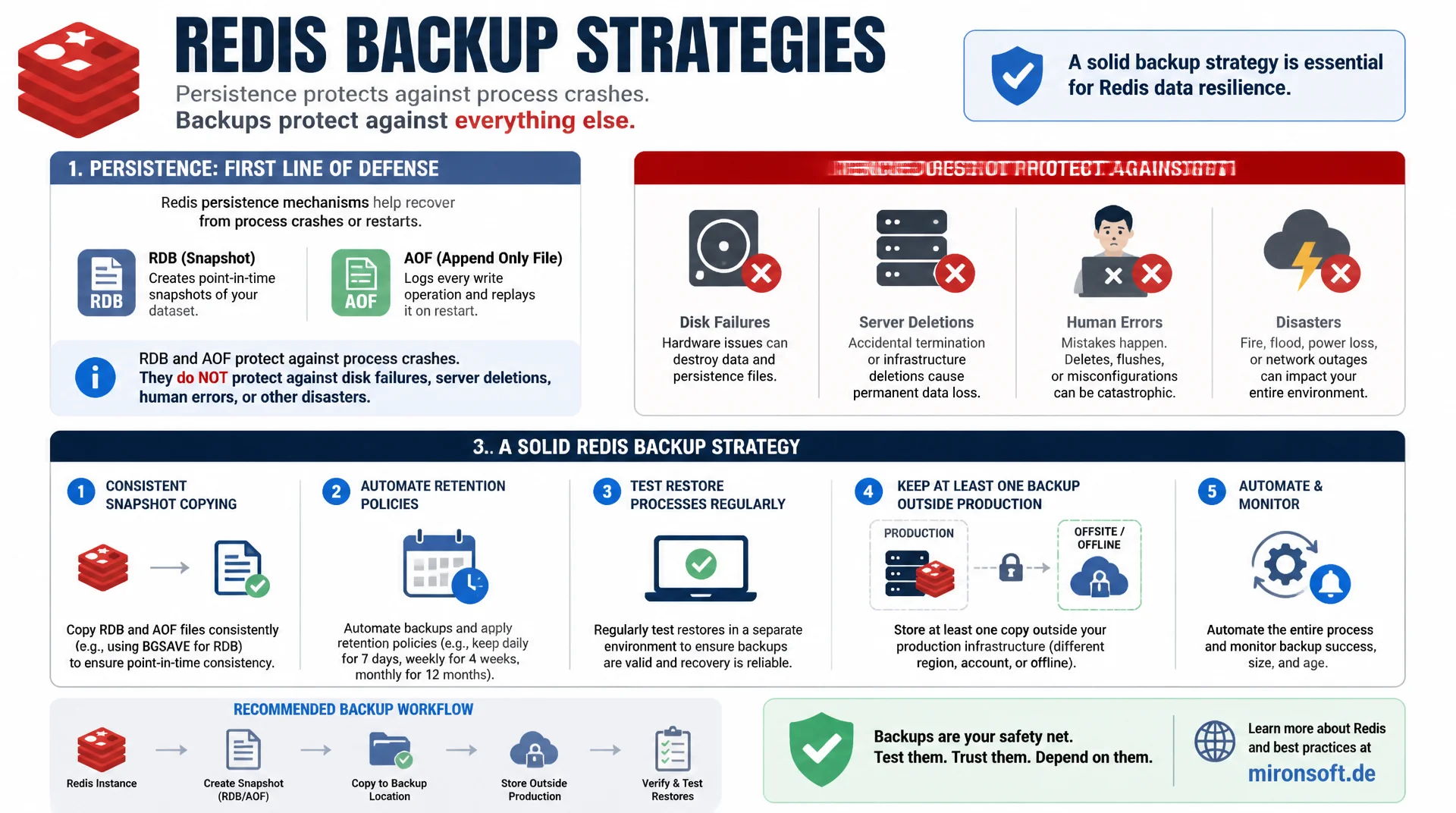
Persistence mechanisms like RDB and AOF protect against a process crash, but not against a failed disk, a deleted server, or a human mistake. A solid backup strategy for Redis copies snapshots consistently, automates retention, regularly tests restores, and keeps at least one copy outside the production infrastructure.
Table of Contents
- 1. Why Persistence Does Not Replace a Backup
- 2. Copying RDB Files Consistently
- 3. Backing Up AOF Directories: the Specifics
- 4. Automating Backup Jobs: Cron, Systemd Timers, Retention
- 5. Checking Backups for Consistency
- 6. Testing Restores Regularly, Not Just Planning Them
- 7. Off-Site Retention: the 3-2-1 Rule for Redis
- 8. The Actual Restore Process Step by Step
- 9. Common Mistakes in Backup Strategies
- 10. Summary
- 11. FAQ
1. Why Persistence Does Not Replace a Backup
A common misconception is treating RDB snapshots or AOF persistence as an already complete backup strategy. Both mechanisms protect against the same scenario: a process restart, where the memory content would otherwise be completely lost. Neither, however, protects against a failed disk, an accidentally deleted server, a corrupted hard drive, or a human error such as a mistakenly executed FLUSHALL, which gets persisted just as reliably as any other operation.
A real backup strategy differs from plain persistence in three crucial ways: it keeps multiple points in time, not just the latest state, it lives physically separate from the production instance, and it gets regularly tested for recoverability. An RDB snapshot sitting on the same disk as the running Redis instance is lost in a hardware failure just as much as the dataset itself.
This article covers the practical implementation of a robust backup strategy: consistently copying RDB and AOF files, automation with a retention policy, regular restore tests, and an off-site component. The technical fundamentals of RDB and AOF themselves are covered in the preceding articles in this series.
2. Copying RDB Files Consistently
Simply copying an RDB file with cp while the server is running sounds simple at first, but carries a consistency risk: if an automatic BGSAVE overwrites the file at exactly that moment, the copy could catch an inconsistent intermediate state. Redis writes internally through a temporary file and only renames atomically, which practically rules out the risk of a half-written file, but a backup process should still not rely on random timing.
The more robust method is to explicitly force a fresh, guaranteed-complete snapshot before copying: call redis-cli BGSAVE, wait for completion by polling rdb_bgsave_in_progress, and only then copy the file. That guarantees the backup contains exactly the state at the time of the backup run, instead of an older, potentially hours-old snapshot from an automatic save point.
#!/usr/bin/env bash
# rdb_backup.sh - Force a fresh, consistent RDB snapshot and copy it out
set -euo pipefail

RDB_DIR="/var/lib/redis"
RDB_FILE="dump.rdb"
BACKUP_DIR="/var/backups/redis"
TIMESTAMP="$(date +%Y%m%d-%H%M%S)"

mkdir -p "$BACKUP_DIR"

# Trigger a fresh snapshot and wait for it to finish
redis-cli BGSAVE
while [[ "$(redis-cli INFO persistence | grep rdb_bgsave_in_progress | cut -d: -f2 | tr -d '\r')" == "1" ]]; do
  sleep 1
done

STATUS="$(redis-cli INFO persistence | grep rdb_last_bgsave_status | cut -d: -f2 | tr -d '\r')"
if [[ "$STATUS" != "ok" ]]; then
  echo "[ERROR] BGSAVE failed, aborting backup" >&2
  exit 1
fi

# Copy the now-guaranteed-consistent file
cp "${RDB_DIR}/${RDB_FILE}" "${BACKUP_DIR}/dump-${TIMESTAMP}.rdb"
gzip "${BACKUP_DIR}/dump-${TIMESTAMP}.rdb"
echo "[OK] Backup written: ${BACKUP_DIR}/dump-${TIMESTAMP}.rdb.gz"
3. Backing Up AOF Directories: the Specifics
With AOF persistence enabled, the dataset to back up is no longer a single file, but the entire appendonlydir directory with manifest, base, and incremental files. A backup that copies only individual files from this directory, instead of the whole directory tree including the manifest, leads to an inconsistent state on restore, because the manifest describes the exact mapping between base and incremental files.
Analogous to RDB backups, it is advisable to force an explicit BGREWRITEAOF before copying, to guarantee a fresh, compact base file instead of also backing up a potentially large incremental file. It is important not to miss any file while copying the complete directory, in case Redis creates new incremental files between the start and end of the copy, for example through a rewrite running in parallel. An atomic filesystem snapshot, for instance via LVM or ZFS, avoids this problem entirely.
#!/usr/bin/env bash
# aof_backup.sh - Backup the complete AOF directory consistently
set -euo pipefail

AOF_DIR="/var/lib/redis/appendonlydir"
BACKUP_DIR="/var/backups/redis"
TIMESTAMP="$(date +%Y%m%d-%H%M%S)"

mkdir -p "$BACKUP_DIR"

# Force a fresh, compact base file before copying
redis-cli BGREWRITEAOF
while [[ "$(redis-cli INFO persistence | grep aof_rewrite_in_progress | cut -d: -f2 | tr -d '\r')" == "1" ]]; do
  sleep 1
done

# Copy the entire directory (manifest + base + increment files together)
tar -czf "${BACKUP_DIR}/aof-${TIMESTAMP}.tar.gz" -C "$(dirname "$AOF_DIR")" "$(basename "$AOF_DIR")"
echo "[OK] AOF backup written: ${BACKUP_DIR}/aof-${TIMESTAMP}.tar.gz"
4. Automating Backup Jobs: Cron, Systemd Timers, Retention
Manual backups are worthless for production operations because they inevitably get forgotten. Automation via cron or, preferred on modern Linux distributions, via systemd timers ensures backups run reliably at fixed times, independent of human memory. A systemd timer offers built-in logging via journalctl over cron, plus the Persistent=true option, which automatically catches up on missed runs after a server restart.
Just as important as execution is a clear retention policy: without automatic deletion of old backups, the backup partition eventually fills up, potentially with fatal consequences if that also causes new backups to fail. A proven schedule keeps daily backups for two weeks, weekly backups for three months, and monthly backups for a year, which keeps both short-term errors and older data states recoverable without consuming unlimited storage.
# /etc/systemd/system/redis-backup.service
[Unit]
Description=Redis RDB backup job
After=redis.service

[Service]
Type=oneshot
ExecStart=/usr/local/bin/rdb_backup.sh
User=redis

# /etc/systemd/system/redis-backup.timer
[Unit]
Description=Run Redis backup daily at 02:30

[Timer]
OnCalendar=*-*-* 02:30:00
Persistent=true

[Install]
WantedBy=timers.target

# Retention cleanup: keep 14 daily, 12 weekly, 12 monthly backups
find /var/backups/redis -name "dump-*.rdb.gz" -mtime +14 -delete
5. Checking Backups for Consistency
A backup that was merely copied successfully is not yet a verified backup. After copying, every RDB file should be checked for structural consistency with redis-check-rdb before it is marked valid. The tool reads the file completely, validates the internal structure against the RDB format, and optionally verifies the CRC64 checksum at the end of the file, as long as rdbchecksum was active when it was written.
This check surfaces problems that would not be noticed by copying alone, such as a copy corrupted by a faulty storage device or a copy operation interrupted over an unstable network. Backups that fail this check should immediately trigger an alert, instead of silently remaining in the backup inventory as supposedly valid, only for the problem to be revealed months later during an actual restore attempt.
| Backup step | Without this step | With this step |
|---|---|---|
| Explicit BGSAVE before copy | Backup can be hours old | Backup is guaranteed current |
| redis-check-rdb after copy | Corruption goes unnoticed | Broken backups caught early |
| Regular restore test | Restore process untested in a real incident | Recovery time and process are known |
| Off-site copy | Server failure destroys data and backup | Backup survives a total local outage |
6. Testing Restores Regularly, Not Just Planning Them
Arguably the most common mistake in backup strategies is testing only the backup itself, never the complete restore process. A backup whose restoration is tried for the first time in a real incident is an uncalculated risk: missing permissions, incorrectly documented paths, or a forgotten configuration step surface exactly when there is no time left to fix them.
A regular, automated restore test, for example monthly on an isolated test instance, uncovers exactly these gaps before they become a problem in a real incident. The test should run through the complete process: fetch the backup file from the archive, load it onto a fresh Redis instance, spot-check data integrity, and log the time needed. This measured recovery time is the only reliable number for a realistic recovery time objective.
#!/usr/bin/env bash
# restore_test.sh - Automated monthly restore drill on an isolated instance
set -euo pipefail

LATEST_BACKUP=$(ls -t /var/backups/redis/dump-*.rdb.gz | head -1)
TEST_DIR="/tmp/redis-restore-test"
START_TIME=$(date +%s)

mkdir -p "$TEST_DIR"
gunzip -c "$LATEST_BACKUP" > "${TEST_DIR}/dump.rdb"

# Validate structure before starting a server against it
redis-check-rdb "${TEST_DIR}/dump.rdb"

# Start an isolated instance on a non-default port for verification
redis-server --port 6390 --dir "$TEST_DIR" --daemonize yes
sleep 2

KEY_COUNT=$(redis-cli -p 6390 DBSIZE)
redis-cli -p 6390 SHUTDOWN NOSAVE

ELAPSED=$(( $(date +%s) - START_TIME ))
echo "[OK] Restore drill complete: ${KEY_COUNT} keys loaded in ${ELAPSED}s"
7. Off-Site Retention: the 3-2-1 Rule for Redis
The classic 3-2-1 backup rule applies unchanged to Redis datasets: at least three copies of the data, on at least two different storage media, with at least one copy physically located at a different site. The production RDB or AOF file counts as the first copy, a local backup on separate storage as the second, and a copy in a different data center or cloud storage bucket as the third, off-site copy.
This third copy protects against scenarios a purely local backup strategy does not cover: a fire or flood in the data center, a complete provider outage, or a compromised root account that wipes both production data and local backups simultaneously. Encrypted uploads to object storage services are well suited for transfer, and the backup file should already be encrypted locally before transfer rather than relying solely on transport encryption.
#!/usr/bin/env bash
# offsite_sync.sh - Encrypt and upload backups off-site
set -euo pipefail

BACKUP_FILE="$1"
ENCRYPTED="${BACKUP_FILE}.enc"

# Encrypt locally before leaving the host (do not rely on transport TLS alone)
openssl enc -aes-256-cbc -pbkdf2 -salt \
  -in "$BACKUP_FILE" -out "$ENCRYPTED" \
  -pass file:/etc/redis/backup.key

# Upload to off-site object storage (example: S3-compatible endpoint)
aws s3 cp "$ENCRYPTED" "s3://redis-backups-offsite/$(basename "$ENCRYPTED")" \
  --storage-class STANDARD_IA

rm -f "$ENCRYPTED"
echo "[OK] Off-site copy uploaded and local encrypted artifact removed"
8. The Actual Restore Process Step by Step
A restore always starts with stopping the target Redis instance, so no conflicting write operations occur during the restoration. Then the saved RDB file, or in the case of AOF the entire appendonlydir directory, is copied into the location configured in redis.conf, and existing, possibly damaged files should be backed up beforehand rather than simply overwritten, in case the restore itself fails.
After copying, the Redis instance is started and the logs are checked for errors during loading, in particular checksum errors or format issues. A final comparison of key count via DBSIZE against a known reference value, along with spot checks of individual critical keys, provides extra confidence that the restore was actually complete and correct, before the instance is released back to production traffic.
Mironsoft
Redis operations, persistence strategy, and backup infrastructure
Backups that actually work in a real incident?
We build automated backup pipelines for your Redis instances, including consistency checks, retention policy, off-site copies, and regular restore tests with documented recovery time.
Backup Automation
Consistent RDB and AOF backups with systemd timers and retention
Restore Drills
Regular, automated recovery tests with reporting
Off-Site Strategy
Set up encrypted off-site copies following the 3-2-1 rule
9. Common Mistakes in Backup Strategies
The most common mistake is creating backups but never testing a restore. That leaves it completely unclear whether the backup process actually works, until exactly the moment it matters. A second common mistake is storing backups on the same physical server or the same storage instance as the production data, which means a single hardware failure destroys both production data and its backup at once.
A third mistake concerns missing alerting for failed backup jobs: a cron job that has been failing for weeks without anyone being notified is functionally equivalent to having no backup at all, with the only difference being a false sense of security. Every backup job should report its exit code and log output to a monitoring system that actively alerts on failures, instead of relying on occasional manual checks.
10. Summary
A robust backup strategy for Redis differs fundamentally from plain RDB or AOF persistence: it forces fresh, consistent snapshots before every copy, automates execution with a clear retention policy, checks every backup with redis-check-rdb for structural integrity, and regularly tests the complete restore process on an isolated instance. Without these elements, a backup remains an unproven assumption rather than a reliable safeguard.
The 3-2-1 rule with at least one encrypted off-site copy additionally protects against scenarios a purely local backup does not cover, from hardware failures to compromised credentials. Combining these elements consistently turns backups from a theoretical checkbox into a genuinely functioning safety mechanism for a real incident.
Backup and Restore Strategies for Redis: the Essentials at a Glance
Consistent Copy
Force an explicit BGSAVE or BGREWRITEAOF before every backup instead of waiting on save points.
Automation
Systemd timers with a clear retention policy, alerting on every failed job.
Restore Tests
Monthly, automated recovery on an isolated instance with documented recovery time.
3-2-1 Rule
Three copies, two media, one encrypted off-site copy outside the production infrastructure.