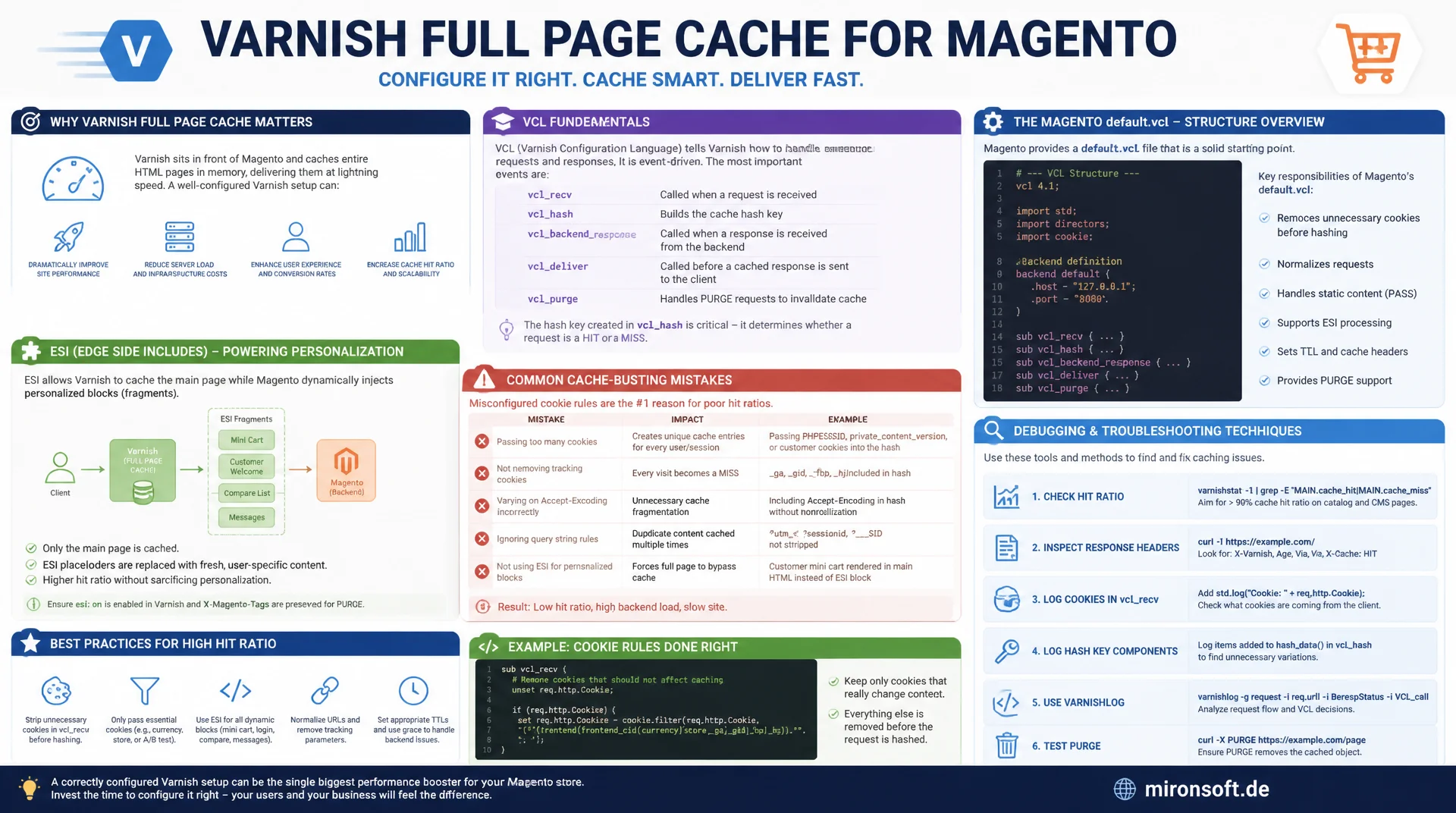
VCL, ESI, and cache debugging in practice
A correctly configured Varnish Full Page Cache serves Magento pages in a few milliseconds, yet a single misconfigured cookie rule can drop the hit ratio to zero. This article explains VCL fundamentals, Magento's default.vcl, ESI fragments for personalized blocks, and the most common cache-busting mistakes along with debugging techniques.
Table of Contents
- 1. Why Varnish belongs in front of Magento
- 2. VCL fundamentals: vcl_recv, vcl_backend_response, vcl_deliver
- 3. Hashing and the cache key in vcl_hash
- 4. Magento's default.vcl: structure and generation
- 5. ESI: personalized fragments inside cached HTML
- 6. Measuring and monitoring the cache hit ratio
- 7. Common cache-busting bugs: cookies and X-Magento-Vary
- 8. Debugging with X-Magento-Cache-Debug
- 9. HIT, MISS, and PASS compared side by side
- 10. Summary
- 11. FAQ
1. Why Varnish belongs in front of Magento
Varnish is an HTTP reverse proxy that keeps entire pages as HTML in memory and answers requests before they ever reach the PHP process. For Magento, this means: instead of parsing layout XML, rendering blocks, and running database queries on every page view, Varnish serves an already-finished HTML response in under 5 milliseconds. The difference from the PHP rendering path is substantial: an uncached category page render through PHP-FPM can take 300 to 800 milliseconds depending on catalog size, while the same page from the Varnish cache typically comes back in under 10 milliseconds.
Magento has supported Varnish as an official Full Page Cache (FPC) alongside the built-in cache since version 2.0. The built-in cache runs inside the same PHP process and saves block rendering, but not Magento's full bootstrap overhead. Varnish, on the other hand, answers requests entirely outside the application server. In production stores with meaningful traffic, Varnish is therefore practically always the right choice, especially for category pages and CMS content with a high repeat rate.
2. VCL fundamentals: vcl_recv, vcl_backend_response, vcl_deliver
VCL (Varnish Configuration Language) is a domain-specific language executed across several named subroutines as a request passes through the Varnish process. vcl_recv runs immediately after the client request is received and decides whether a request may be cached at all: cookies are inspected, query parameters are normalized, and static assets are excluded from the caching logic. If vcl_recv returns return (pass), the request is passed straight through to Magento without even consulting the cache.
vcl_backend_response runs after Varnish receives a response from the Magento backend, and determines whether and for how long that response gets stored, controlled via the TTL as well as response headers like Cache-Control and X-Magento-Tags, which Magento uses later for targeted invalidation. vcl_deliver finally runs right before the response is delivered to the client, and is the place where debug headers like X-Magento-Cache-Debug get set and internal headers get stripped so they don't accidentally end up in front of end users.
# Simplified vcl_recv logic as generated by Magento
sub vcl_recv {
    # Never forward static assets to the backend, always cache them
    if (req.url ~ "^/(media|static)/") {
        unset req.http.Https;
        set req.url = regsub(req.url, "\?.*$", "");
        return (hash);
    }

    # Certain cookies force the request into pass mode
    if (req.http.cookie ~ "X-Magento-Vary=") {
        return (pass);
    }

    # Never cache POST, PUT, DELETE
    if (req.method != "GET" && req.method != "HEAD") {
        return (pass);
    }

    # Exclude admin and checkout routes from caching entirely
    if (req.url ~ "^/(admin|checkout|customer/account)") {
        return (pass);
    }

    return (hash);
}
3. Hashing and the cache key in vcl_hash
Every cached response is identified internally by a hash key assembled in the vcl_hash subroutine. By default, the URL, the host header, and optionally the scheme (HTTP/HTTPS) feed into this hash. Magento additionally adds the value of the X-Magento-Vary cookie to this hash so that personalized page variants, such as different customer price groups in a B2B context or store-view-specific content, are cached separately instead of overwriting one another.
A common and costly mistake occurs when too many variables end up in the hash: if, for example, the entire User-Agent string is included, virtually every visitor generates their own cache entry, since browser versions and operating systems vary enormously. The result is a hit ratio that trends toward zero even though the cache is technically working, simply because almost no two requests produce the same hash. The cache key should therefore stay as lean as possible and only include dimensions that actually produce different HTML output, in practice usually the URL, host, and Magento's own vary dimension.
sub vcl_hash {
    # Base dimensions: URL and Host always go into the cache key
    hash_data(req.url);
    if (req.http.host) {
        hash_data(req.http.host);
    } else {
        hash_data(server.ip);
    }

    # Magento's own personalization dimension, kept intentionally narrow
    if (req.http.cookie ~ "X_Magento_Vary=") {
        hash_data(regsub(req.http.cookie, "^.*?X_Magento_Vary=([^;]*);*.*$", "\1"));
    }

    # Separate cache entries per scheme (HTTP vs HTTPS)
    if (req.http.X-Forwarded-Proto) {
        hash_data(req.http.X-Forwarded-Proto);
    }

    return (lookup);
}
4. Magento's default.vcl: structure and generation
Magento ships a VCL template at app/code/Magento/PageCache/etc/varnish/default.vcl with placeholders for backend host, backend port, access controls, and TTL values. Running bin/magento varnish:vcl:generate --access-list=192.168.0.1,localhost --backend-host=fastly.example --backend-port=80 --export-version=6 produces a concrete, ready-to-use varnish.vcl file that gets passed to the Varnish process via the -f flag. The --export-version parameter matters because VCL syntax differs between Varnish 4, 5, and 6, and picking the wrong version causes the Varnish daemon to fail on boot.
The generated file already contains ready-made logic for backend health checks, for handling PURGE requests that trigger targeted cache invalidation by tag, and for the grace period, during which an expired but still-stored response continues to be served while a fresh copy is fetched in the background. This grace period is especially valuable under load: instead of hundreds of concurrent requests for an expired page all hitting the PHP backend at once (a so-called cache stampede), Varnish keeps serving the stale version until exactly one request handles the refresh.
5. ESI: personalized fragments inside cached HTML
Edge Side Includes (ESI) solve a fundamental problem of the Full Page Cache: a page is 95% identical for every visitor, but contains individual blocks like the mini-cart counter or the customer greeting that differ per user. Without ESI, either the entire page would have to be excluded from the cache, or the personalized areas would incorrectly be served identically to every visitor. Magento solves this by replacing personalized blocks in the cached HTML with ESI tags such as <esi:include src="/customer/section/load"/>.
Varnish recognizes these tags while delivering the cached page and fetches the referenced fragments separately, either from a small dedicated cache entry or live from Magento. Each ESI fragment causes an additional internal request roundtrip between Varnish and the backend, typically in the range of 5 to 30 milliseconds per fragment, negligible compared to a fully uncached page render, but noticeable once ten or more ESI blocks appear on a single page. The rule of thumb: use ESI for a few, deliberately personalized blocks, not for every small dynamic component.
<!-- phtml snippet: ESI include for the mini-cart block -->
<!-- Recognized by Varnish and fetched separately from the backend -->
<esi:include src="/customer/section/load/?sections=cart,customer&format=json" />

<!-- Layout XML: mark a block as "private" so it never enters the FPC -->
<referenceBlock name="minicart.link">
    <arguments>
        <argument name="cache_lifetime" xsi:type="number">0</argument>
    </arguments>
</referenceBlock>
6. Measuring and monitoring the cache hit ratio
The cache hit ratio is the central metric for the health of a Full Page Cache: it describes the share of requests that could be answered directly from the cache without touching the backend. For a healthy Magento store with predominantly anonymous traffic, a hit ratio of 90 to 95% or higher is considered a healthy target. A rate clearly below that, say 60 to 70%, almost always points to a structural problem: TTLs that are too short, a cache key that's too broad, or a cookie rule unnecessarily forcing requests into pass mode.
varnishstat provides the relevant counters in real time directly from Varnish's shared-memory log, in particular cache_hit, cache_miss, and cache_hitpass. The hit ratio is calculated as cache_hit / (cache_hit + cache_miss + cache_hitpass). For continuous monitoring it's worth exporting these metrics via varnish_exporter to Prometheus with a Grafana dashboard, since one-off samples are easily skewed by traffic fluctuations. Looking at a 24-hour or full-week window shows much more reliably whether the hit ratio is structurally sound.
# Fetch live stats directly inside the Varnish container
varnishstat -1 | grep -E "cache_hit|cache_miss|cache_hitpass"

# Example output
# MAIN.cache_hit          8452341   1234.56 Cache hits
# MAIN.cache_miss          198320     28.91 Cache misses
# MAIN.cache_hitpass        94211     13.75 Cache hits for pass

# Calculate the hit ratio manually (here: roughly 96%)
echo "scale=4; 8452341 / (8452341 + 198320 + 94211)" | bc
7. Common cache-busting bugs: cookies and X-Magento-Vary
By far the most common cause of a collapsed hit ratio is a cookie that incorrectly forces Varnish into pass mode. The PHPSESSID cookie is the classic culprit: as soon as any third-party extension or custom module starts a PHP session even for anonymous visitors, for example by carelessly calling $this->_session->getData(), that cookie ends up in the request and the default VCL rule routes requests carrying PHPSESSID straight past the cache. Just as problematic is the persistent_shopping_cart cookie, set by the "remember my cart" feature, which also triggers a pass as soon as it's present in the request.
The X-Magento-Vary cookie itself is actually a solution, not a bug: it tells Varnish which cache variant applies to the current visitor. It becomes a problem only when a faulty cache-context provider assigns it a new, random value on every request. In that case, every single visit generates its own cache entry that's immediately orphaned, and the hit ratio effectively collapses to zero even though Varnish is technically working correctly. Inspecting the cookie values across several requests usually reveals this pattern within minutes.
8. Debugging with X-Magento-Cache-Debug
Magento's generated VCL sets the response header X-Magento-Cache-Debug by default, unless Cache-Control: no-cache in the backend response has explicitly suppressed it. This header takes one of three values: HIT means the response came entirely from the Varnish cache. MISS means the URL was generally cacheable, but no valid copy existed yet for this specific combination of URL and hash key, so Varnish contacted the backend and cached the response afterward. PASS means the request was classified as fundamentally not cacheable according to the VCL logic and goes to the backend on every single call.
The practical debugging workflow almost always starts with curl -I against the affected URL to inspect the header directly, followed by a second identical request: if the status stays permanently at PASS across repeated calls, the cause lies in the VCL logic itself or in a cookie being sent along. If the status never settles into a stable HIT and keeps flipping between MISS states, that points to an unstable cache key, often caused by session-dependent or random values feeding into the hash. Additionally, varnishlog -g request helps trace the complete decision path of a single request through every VCL subroutine live.
# Check the cache status of a category page
curl -sI https://shop.example.com/womens/dresses.html | grep -i "x-magento-cache-debug"
# X-Magento-Cache-Debug: MISS

# A second request should now return a HIT
curl -sI https://shop.example.com/womens/dresses.html | grep -i "x-magento-cache-debug"
# X-Magento-Cache-Debug: HIT

# With a cookie: forces PASS even though the page is normally cacheable
curl -sI --cookie "PHPSESSID=test123" https://shop.example.com/womens/dresses.html \
  | grep -i "x-magento-cache-debug"
# X-Magento-Cache-Debug: PASS
9. HIT, MISS, and PASS compared side by side
The three debug states differ significantly in latency and backend load. The table below shows typical root causes and the matching fix for each.
| State | Typical cause | Latency | Recommended fix |
|---|---|---|---|
| HIT | Cached page, valid hash key | < 10 ms | Target state, no action needed |
| MISS (persistent) | Unstable cache key, random cookie values | 300-800 ms | Clean up cache key, stabilize vary cookie |
| PASS (PHPSESSID) | Session started for anonymous visitors | 300-800 ms | Avoid starting sessions for guests |
| PASS (checkout) | Deliberate VCL exclusion of dynamic routes | 200-500 ms | Correct as-is, no fix needed |
| HITPASS | Backend permanently returns Cache-Control: no-cache | 200-500 ms | Fix block TTL in layout XML |
In practice, these states rarely occur in isolation: a faulty third-party module that starts sessions simultaneously generates PASS requests and, through the added traffic, degrades response time for every other request hitting the backend. Checking the cache status systematically across several page types usually surfaces such chain reactions faster than hit-ratio monitoring alone.
Mironsoft
Varnish tuning, FPC configuration, and performance audits for Magento stores
Cache hit ratio stuck at rock bottom?
We analyze your VCL configuration, uncover cache-busting bugs, and set up ESI fragments cleanly for personalized blocks, so your Full Page Cache stays in the healthy range for good.
VCL audit
Full review of vcl_recv, hashing, and TTL strategy
Cache-busting fixes
Identify cookie root causes and avoid unnecessary session starts
Monitoring setup
varnishstat export to Prometheus with hit ratio alerts
10. Summary
Varnish and the Magento Full Page Cache solve a core performance problem: instead of routing every request through the full PHP rendering path, Varnish serves cached HTML responses in a few milliseconds. The foundation is a clean interplay between vcl_recv, vcl_backend_response, and vcl_deliver, backed by a lean cache key from vcl_hash that only includes dimensions that actually matter, such as URL, host, and Magento's vary identifier. ESI fragments allow personalized blocks like the mini-cart or customer greeting to be pulled out of the cached HTML in a targeted way, without excluding the entire page from the cache.
In practice, the quality of a Full Page Cache setup rarely comes down to the overall configuration, but to details: a third-party module that starts PHP sessions without asking, a cache key that's too broad, or a misconfigured TTL for a single block. The X-Magento-Cache-Debug header and varnishstat provide the tools to identify such problems within minutes instead of days, and continuous hit ratio monitoring ensures regressions after deployments get noticed immediately.
Varnish and Magento Full Page Cache - The Essentials at a Glance
Core VCL logic
vcl_recv decides cacheability, vcl_backend_response sets the TTL, vcl_deliver attaches debug headers.
Target hit ratio 90-95%
Measured via varnishstat: cache_hit / (cache_hit + cache_miss + cache_hitpass).
ESI for personalization
Offload mini-cart and customer greeting via esi:include, 5-30 ms overhead per fragment.
Debugging
X-Magento-Cache-Debug: HIT/MISS/PASS via curl -I, detail via varnishlog -g request.