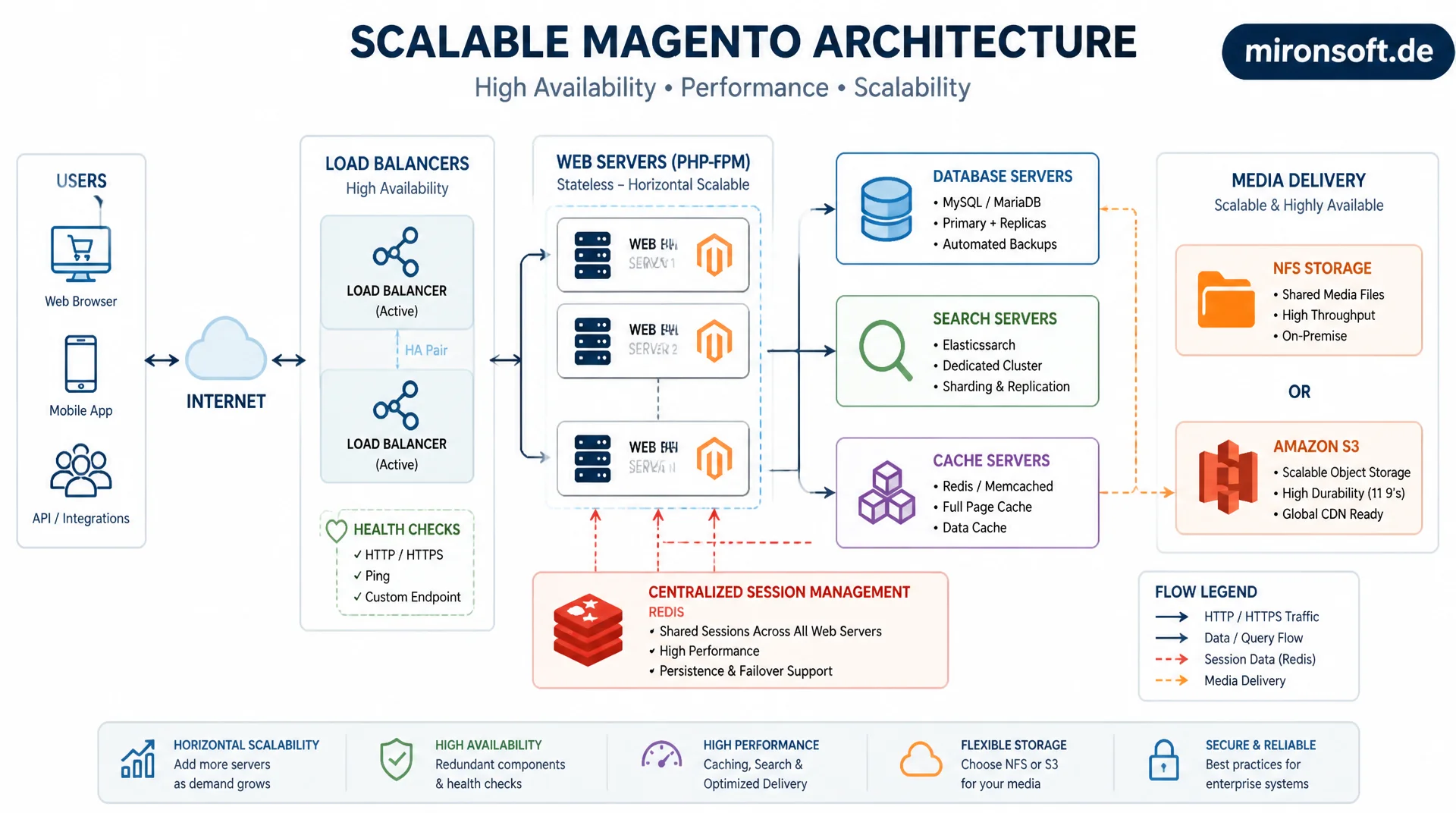
from one server to a resilient cluster
A single server inevitably hits limits as traffic grows, no matter how much RAM or CPU it gets. This article explains how Magento stores split web, database, search, and cache across dedicated servers, keep sessions centralized via Redis, deliver media consistently through NFS or S3, and run load balancers with proper health checks.
Table of Contents
- 1. When one server is no longer enough
- 2. Horizontal vs. vertical scaling
- 3. Separating web, database, search, and cache
- 4. Sessions in a multi-server setup: why Redis is mandatory
- 5. Shared media storage: NFS vs. S3
- 6. Load balancer: configuring health checks correctly
- 7. Sticky sessions vs. stateless web nodes
- 8. Database scaling: replication and read splitting
- 9. Scaling strategies compared side by side
- 10. Summary
- 11. FAQ
1. When one server is no longer enough
As long as a Magento store runs on a single server, PHP-FPM, MySQL, Elasticsearch/OpenSearch, Redis, and the web server all share the same CPU, the same RAM, and the same disk I/O. At low traffic this works fine, because the resources are rarely fully utilized at the same time. But once concurrent orders, catalog indexing, and background reindexing overlap, all processes compete for the same resources, and response times increase for every user at once, not just for the ones causing the load.
A clear warning sign is when top or htop consistently show high I/O wait during normal traffic peaks while CPU and RAM still have headroom. That indicates MySQL and the web server are blocking each other over disk access. Before investing in more servers, it's always worth first checking caching, indexer mode, and query performance. A multi-server architecture doesn't fix a poorly optimized database schema, it just shifts the problem onto more hardware, which is expensive and not sustainable long term.
2. Horizontal vs. vertical scaling
Vertical scaling means giving an existing server more CPU cores, more RAM, or faster disks (NVMe instead of SATA SSD). The advantage: no architecture change needed, Magento keeps running unchanged. The downside: there's a physical and economic ceiling, and a single server remains a single point of failure. If it goes down, the entire store is offline, regardless of how powerful the hardware was.
Horizontal scaling means running multiple smaller or equally sized servers in parallel and distributing load through a load balancer. This increases not just capacity but also resilience: if a web node fails, the remaining nodes automatically absorb the traffic. The crucial catch: horizontal scaling requires the application to become stateless. Sessions, uploaded files, and caches can no longer live locally on a single server, they need to be centrally reachable. That single requirement drives the rest of the architecture in this article.
3. Separating web, database, search, and cache
The first step away from a single-server setup is rarely immediate horizontal scaling of web servers, but rather the functional separation of services onto dedicated servers: one or more application servers for PHP-FPM and Nginx, a dedicated MySQL/MariaDB server, a dedicated OpenSearch/Elasticsearch cluster for catalog search, and a dedicated Redis server for cache and sessions. Each service gets its own resources and can be scaled and monitored independently, without a heavy reindex job dragging down web request response times.
This separation is also the natural preparation step for horizontal scaling, because it forces configuration and access paths to already use hostnames instead of localhost. In app/etc/env.php, the database host, Redis host, and search engine host are entered explicitly as their own endpoints. Important in practice: network latency between services should stay under one millisecond within the data center, ideally within the same availability zone segment, otherwise the extra round-trip time per page load adds up noticeably, especially with multiple sequential Redis calls per request.
# Typical service split across dedicated hosts (example inventory)
# web-01, web-02      : Nginx + PHP-FPM (application/frontend nodes)
# db-01 (primary)     : MySQL/MariaDB write node
# db-02 (replica)     : MySQL/MariaDB read replica
# search-01..03       : OpenSearch cluster (3 nodes, quorum for split-brain safety)
# redis-cache-01      : Redis instance for full page cache + config cache
# redis-session-01    : Separate Redis instance for session storage

# Verify connectivity from a web node before cutting over app/etc/env.php
mysql -h db-01.internal -u magento -p -e "SELECT 1;"
redis-cli -h redis-session-01.internal -p 6379 PING
curl -s http://search-01.internal:9200/_cluster/health?pretty
4. Sessions in a multi-server setup: why Redis is mandatory
By default, PHP stores sessions as files on the local filesystem (/var/lib/php/sessions or similar). In a multi-server setup without sticky sessions, that's fatal: a user gets served by web-node-1 for request 1, and their session file only exists there. If request 2 lands on web-node-2 through the load balancer, PHP finds no session file there and the user gets unexpectedly logged out, the cart is empty, or checkout breaks mid-payment. This is one of the most common bugs in naive migrations from one server to several.
The solution is a central session store reachable from every web node, in the Magento world practically always Redis. All web nodes read and write sessions through the same Redis backend, regardless of which node serves the request. Magento supports this natively via the session.save_handler entry in app/etc/env.php. Important: session Redis and cache Redis should run on separate Redis instances or at least separate databases, so that a FLUSHALL during cache clearing doesn't accidentally wipe active user sessions. For high availability, Redis Sentinel or Redis Cluster is recommended, so that a failure of the primary Redis instance doesn't destroy every session at once.
// app/etc/env.php - Redis for sessions, separated from cache/FPC backend
return [
    'session' => [
        'save' => 'redis',
        'redis' => [
            'host' => 'redis-session-01.internal',
            'port' => '6379',
            'password' => '',
            'timeout' => '2.5',
            'persistent_identifier' => '',
            'database' => '2',           // dedicated DB index, separate from cache
            'compression_threshold' => '2048',
            'compression_library' => 'gzip',
            'log_level' => '1',
            'max_concurrency' => '20',    // concurrent lock holders per session
            'break_after_frontend' => '5',
            'break_after_adminhtml' => '30',
            'first_lifetime' => '600',
            'bot_first_lifetime' => '60',
            'bot_lifetime' => '7200',
            'disable_locking' => '0',      // keep locking enabled to avoid race conditions
        ],
    ],
    'cache' => [
        'frontend' => [
            'default' => [
                'backend' => 'Cm_Cache_Backend_Redis',
                'backend_options' => [
                    'server' => 'redis-cache-01.internal',
                    'port' => '6379',
                    'database' => '0',
                ],
            ],
            'page_cache' => [
                'backend' => 'Cm_Cache_Backend_Redis',
                'backend_options' => [
                    'server' => 'redis-cache-01.internal',
                    'port' => '6379',
                    'database' => '1',
                ],
            ],
        ],
    ],
];
5. Shared media storage: NFS vs. S3
Product images, uploaded customer files, and generated static assets land in pub/media. In a single-server setup, that's a local directory. Once multiple web nodes run in parallel, that directory has to be identical and consistent across all nodes, otherwise a freshly uploaded product image shows a 404 on node 1 the moment the next request gets served by node 2. Two established solutions: an NFS mount, where every web node mounts the same network filesystem, or object storage like S3 (or an S3-compatible alternative like MinIO), which Magento connects to via a media storage module.
NFS is simpler to set up and behaves for Magento like a regular local filesystem, but has downsides under high concurrency: locking overhead and a single point of failure at the NFS server itself, unless it's built redundantly. S3-based solutions are highly available by design and pair well with a CDN, but require an additional module (e.g. magento/module-aws-s3 in Adobe Commerce, or community extensions for Open Source) and a careful migration of existing media. For new multi-server deployments, S3 is usually the more robust choice; for existing on-premise infrastructure, a redundant NFS setup (e.g. via DRBD or a storage appliance) is often the more pragmatic first step.
# Option A: NFS mount for pub/media, identical on every web node
# On the NFS server (storage-01):
#   /etc/exports: /export/magento-media  10.0.1.0/24(rw,sync,no_subtree_check,no_root_squash)

# On each web node:
sudo mount -t nfs4 storage-01.internal:/export/magento-media /var/www/magento/pub/media
echo "storage-01.internal:/export/magento-media /var/www/magento/pub/media nfs4 defaults,_netdev 0 0" | sudo tee -a /etc/fstab

# Sanity check: file written on web-01 must appear instantly on web-02
touch /var/www/magento/pub/media/.nfs-writetest
ssh web-02 "ls -la /var/www/magento/pub/media/.nfs-writetest"

# Option B: S3-backed media storage (env.php snippet, module-dependent)
# 'remote_storage' => [
#     'driver' => 'aws-s3',
#     'config' => [
#         'bucket' => 'mironsoft-magento-media',
#         'region' => 'eu-central-1',
#     ],
# ],
6. Load balancer: configuring health checks correctly
A load balancer (Nginx, HAProxy, or a cloud LB like AWS ALB) distributes incoming requests across the available web nodes. The critical part is that the load balancer reliably detects broken nodes and pulls them out of rotation before users see error pages. A simple TCP check on port 443 isn't enough, because a server whose PHP-FPM has crashed can still keep the port open (Nginx responds, but only serves a 502 Bad Gateway). What's needed is an application-level health check that sends a real HTTP request against a dedicated endpoint and checks the response status as well as, ideally, the response time.
A good health check endpoint in Magento responds quickly but verifies the critical dependencies: database connectivity and Redis reachability. It should deliberately not go through the full page bootstrap, so the check itself doesn't become a source of load. Also important is a sensible interval: overly aggressive health checks (e.g. every 1 second with a short timeout) can falsely mark a node as down when it's briefly under load, causing flapping. An interval of 5 to 10 seconds with 2-3 consecutive failures before exclusion is a robust starting point.
# nginx.conf on the load balancer: upstream with active health checks
upstream magento_backend {
    zone magento_backend 64k;
    server web-01.internal:8080 max_fails=3 fail_timeout=10s;
    server web-02.internal:8080 max_fails=3 fail_timeout=10s;
    server web-03.internal:8080 max_fails=3 fail_timeout=10s backup;
}

server {
    listen 443 ssl;
    server_name mironsoft.de;

    location / {
        proxy_pass http://magento_backend;
        proxy_set_header Host $host;
        proxy_set_header X-Real-IP $remote_addr;
        proxy_set_header X-Forwarded-For $proxy_add_x_forwarded_for;
        proxy_next_upstream error timeout http_502 http_503;
    }

    # Application-level health check, not just a TCP handshake
    location /health/check {
        proxy_pass http://magento_backend/health_check.php;
        proxy_connect_timeout 2s;
        proxy_read_timeout 3s;
        access_log off;
    }
}
The health_check.php endpoint itself should return a compact, machine-readable JSON, so the load balancer can evaluate the HTTP status code while an external monitoring system logs the detailed response. A status code 200 signals that all checked dependencies are reachable, a 503 immediately pulls the node out of rotation.
{
  "status": "ok",
  "checks": {
    "database": { "status": "ok", "latency_ms": 4 },
    "redis_session": { "status": "ok", "latency_ms": 1 },
    "redis_cache": { "status": "ok", "latency_ms": 1 }
  },
  "node": "web-02.internal",
  "timestamp": "2026-07-11T09:12:44+00:00"
}
7. Sticky sessions vs. stateless web nodes
Sticky sessions (session affinity) mean the load balancer always routes the same client to the same web node, based on a cookie or the client IP. At first glance a simple fix for the session problem, but it comes with its own downsides: if the assigned node fails, the user still loses their session, since it was stored locally on exactly that node. On top of that, load distributes less evenly, because users with long sessions stay stuck on one node instead of being dynamically balanced across available capacity.
The more robust architecture, as described in section 4, makes web nodes fully stateless: sessions live in Redis, media lives in NFS/S3, and any request can be served by any node. That makes sticky session affinity unnecessary, the load balancer can use true round-robin or least-connections balancing without constraints, and a failing node doesn't affect a single active user, since the next request simply gets picked up by another node. In practice, stateless architecture with centralized Redis session storage is almost always the better choice over sticky sessions, except in scenarios with very specific WebSocket or long-polling requirements.
8. Database scaling: replication and read splitting
While web nodes can be scaled horizontally relatively easily, the database is usually the hardest part of the architecture, because MySQL/MariaDB isn't natively designed for simultaneous horizontal writes across multiple nodes. The common approach: a primary server for write operations and one or more read replicas for read operations, connected via asynchronous or semi-synchronous replication. Magento natively supports read/write splitting through the db configuration in app/etc/env.php, where separate connection definitions can be set for default (writes) and checkout/sales (reads).
Important to understand: asynchronous replication means read replicas can lag slightly behind the primary server (replication lag). For non-critical read operations like catalog queries, that's usually harmless; for processes right after a write, such as immediately reading back an order that was just created in the checkout flow, it can lead to inconsistent results if that read accidentally targets the replica instead of the primary. Critical reads during checkout should therefore explicitly run against the primary connection, not the replica.
| Approach | Problem | Recommended solution | Effect |
|---|---|---|---|
| Session storage | Local PHP file sessions | Centralized Redis backend | User stays logged in, regardless of which node responds |
| Media storage | Local pub/media per server | NFS mount or S3 backend | Consistent images across all nodes |
| Load balancing | Sticky sessions via cookie/IP | Stateless nodes, unrestricted balancing | More even load distribution, no session loss |
| Health check | Plain TCP port check | HTTP health endpoint with DB/Redis check | Broken nodes are reliably detected |
| Database | A single MySQL server | Primary + read replicas, read/write splitting | Higher read throughput, fewer single points of failure |
The table shows a recurring pattern: almost every scaling problem in Magento comes from a silent assumption that one server is enough for everything. The fix is almost always the same core idea, namely centralizing state and keeping the rest of the architecture stateless, so horizontal scaling works without hidden side effects.
Mironsoft
Cluster architecture, Redis sessions, and load balancer configuration for Magento
Ready for more than one server?
We plan and build your multi-server architecture: session storage, shared media, load balancer health checks, and database replication, cleanly separated and without hidden single points of failure.
Architecture audit
Analysis of existing infrastructure and scaling bottlenecks
Session & storage migration
Introducing Redis sessions and NFS/S3 media storage without downtime
Load balancer setup
Health checks, failover strategies, and capacity planning
10. Summary
Multi-server and scaling architecture for Magento solves one central problem: a single server has a hard capacity ceiling and is simultaneously a single point of failure. Vertical scaling pushes that ceiling upward, horizontal scaling removes it structurally, but requires web nodes to become stateless. Sessions belong centrally in Redis, media belongs in a shared store like NFS or S3, and the database benefits from read replicas with clean read/write splitting for reads outside of critical checkout paths.
The load balancer is the connective piece of this architecture and needs genuine application-level health checks, not just a TCP port check, so broken nodes are reliably pulled from rotation. Sticky sessions are no longer necessary once session storage is properly centralized, and should be avoided, since they make load distribution uneven and still lose sessions on failure. Get these building blocks right, and web nodes can be added or removed on demand without users noticing a thing.
Multi-Server and Scaling Architecture for Magento - The Essentials at a Glance
Horizontal over vertical
More servers of similar size instead of one ever-bigger server. Requires stateless web nodes.
Sessions centralized in Redis
Never use local PHP file sessions in a multi-server setup. Separate Redis instance or DB index for sessions.
Shared media storage
NFS mount or S3 backend for pub/media, so all nodes see the same images.
Health checks & read replicas
Application-level health checks instead of a plain TCP check. Read/write splitting for database scaling.