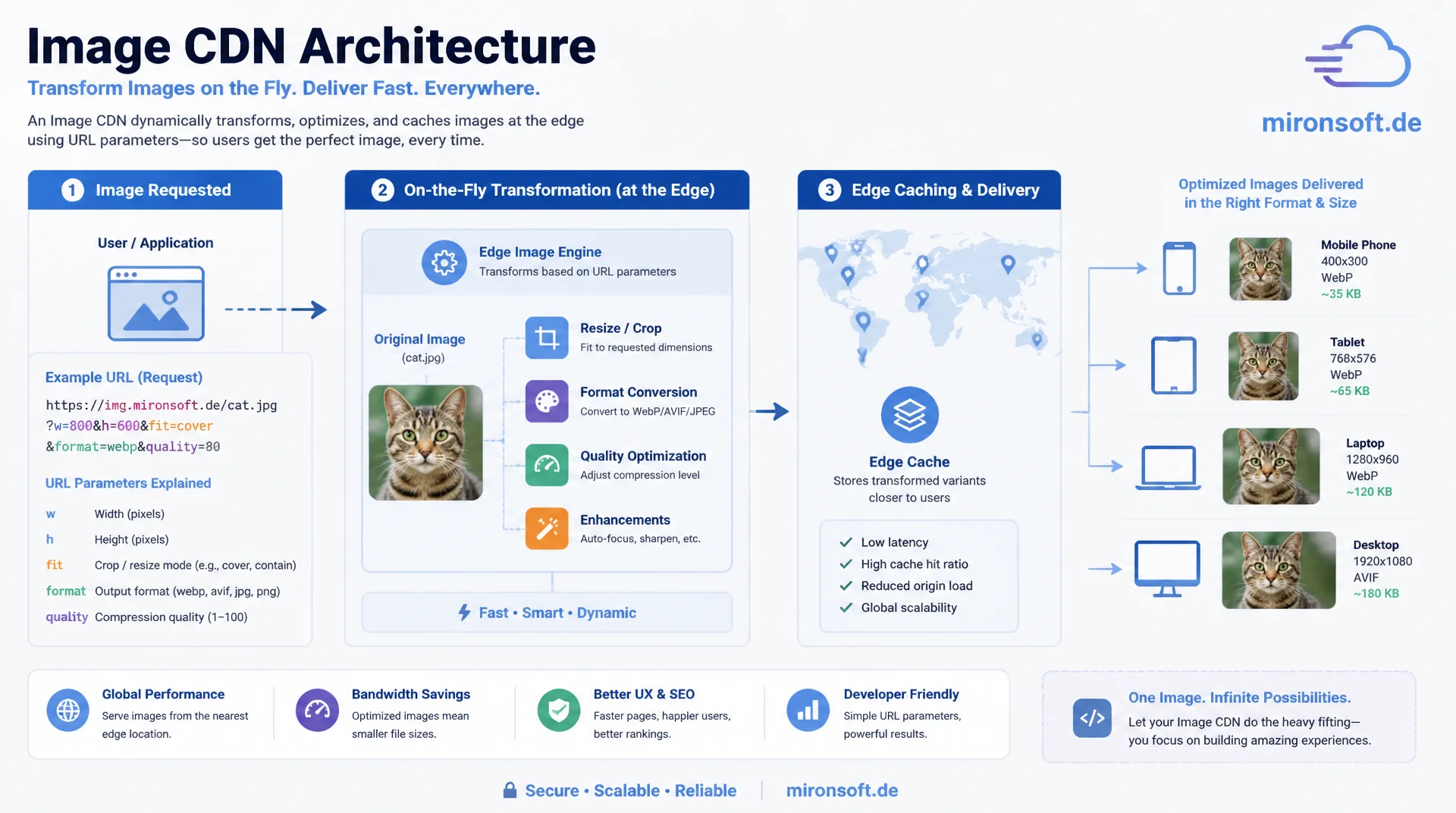
On-the-fly transformation instead of static image variants
Static, pre-generated image variants do not scale with growing catalogs and new device targets. An image CDN architecture transforms images on the fly via URL parameters, caches the results at the edge, and automatically serves the right format, size, and quality for every client, without a build step ever having to produce new assets.
Table of Contents
- 1. Why static image variants hit a wall
- 2. URL-parameter-based transformation: the architecture principle
- 3. Image CDN vs. self-hosted pipeline: the tradeoff
- 4. Caching strategy for transformed variants
- 5. Format negotiation: serving WebP and AVIF automatically
- 6. Responsive images and srcset generation
- 7. Integration with Magento's media gallery
- 8. Origin protection, signed URLs, and cost/performance tradeoffs
- 9. Monitoring and rollout strategy
- 10. Summary
- 11. FAQ
1. Why static image variants hit a wall
The classic approach to image optimization in Magento stores generates fixed image sizes at every build or import: thumbnail, small, medium, large. That works as long as the number of required variants stays manageable. But as soon as new breakpoints, new device pixel densities, or new image formats like AVIF enter the picture, the number of files that must be pre-generated grows exponentially. A catalog with 50,000 products and ten target sizes per image quickly produces half a million files, most of which are never requested.
An image CDN architecture flips this model around: instead of generating variants upfront, every transformation runs on the fly on the first request and is then kept as an edge cache entry. The origin system only stores a single high-resolution source image per product. Every target size, format, and quality level is created on demand. This drastically reduces storage consumption at the origin and turns support for a new output format into a pure configuration change instead of a full re-encoding pass over the entire catalog.
The misconception that holds many teams back: on-the-fly transformation sounds like runtime overhead on every page view. In practice, the transformation only hits the first request per variant, because the cache takes over after that. In production, the cache hit rate for stable product images regularly exceeds 98 percent past the initial ramp-up period, meaning the computational cost of transformation disappears entirely for the vast majority of requests.
2. URL-parameter-based transformation: the architecture principle
The central architectural pattern encodes the desired transformation directly in the image URL. A request like /img/w:800/h:600/q:80/f:webp/catalog/product/sample.jpg fully describes the expected width, height, quality, and target format. The transformation service parses these parameters, loads the source image from the origin or from its own cache, performs the transformation, and returns the result with appropriate cache headers. This URL is simultaneously the cache key: identical parameters deterministically produce the same URL and therefore the same cache entry.
A deliberate separation between path-based parameters and query-string parameters matters here. Path parameters are treated more reliably as cache keys by most CDN and reverse-proxy caches, because query strings have historically often been ignored or normalized inconsistently. Tools like imgproxy and Thumbor therefore rely on encrypted or signed path segments instead of open query parameters, which additionally reduces the risk of manipulation, since arbitrary parameter combinations can no longer be freely guessed.
The parameter grammar should stay small and stable: width, height, crop mode, quality, format, and optionally a blur or sharpen value cover most e-commerce use cases. Every additional parameter potentially multiplies the number of distinct cache variants, and therefore the storage footprint at the edge, which is why teams should actively limit parameter combinations rather than exposing every conceivable option.
# nginx: forward URL path parameters to imgproxy, origin bucket as source
location ~ ^/img/(?<params>.+)/(?<source_path>.+)$ {
    # imgproxy expects a base64-encoded or signed path
    proxy_pass http://imgproxy:8080/insecure/$params/plain/local:///$source_path;

    # Edge cache: 1 year for transformed variants, since the cache key is deterministic
    proxy_cache image_cache;
    proxy_cache_valid 200 365d;
    proxy_cache_key "$scheme$request_uri";
    proxy_cache_use_stale error timeout updating http_500 http_502 http_503;

    add_header X-Cache-Status $upstream_cache_status always;
    add_header Cache-Control "public, max-age=31536000, immutable" always;
}

# Example request:
# GET /img/w:800/h:600/q:80/f:webp/catalog/product/s/a/sample.jpg
3. Image CDN vs. self-hosted pipeline: the tradeoff
A hosted image CDN service such as Cloudflare Images, Cloudinary, or imgix handles transformation, caching, and global delivery as a fully managed service. The advantage lies in operational safety: no server of your own to run, no scaling worries during traffic spikes, no patch management for the image processing library. The price for that is ongoing, usually traffic- or request-based billing, which can become significant for very large image catalogs with heavy traffic, plus a degree of dependency on the provider's feature set and roadmap.
A self-hosted pipeline built on imgproxy or Thumbor behind your own CDN, such as Cloudflare or Fastly, hands full control back over the parameter grammar, caching behavior, and cost structure. The marginal cost of an additional transformation approaches zero once the infrastructure is in place, because only compute time and bandwidth are incurred, not per-image licensing fees. The price for that is operational responsibility: scaling the transformation service during load spikes, monitoring, security updates, and the need to run a CDN or reverse-proxy cache in front of it so the transformation does not re-run on every single request.
The practical rule of thumb: for stores with a manageable catalog and a limited development team, a managed image CDN is the faster, lower-risk choice. For agencies and larger operators running multiple tenants on shared infrastructure, a self-hosted solution often pays for itself within a few months, because the fixed infrastructure cost is spread across many stores, while the cost of a managed service grows linearly with every additional tenant.
4. Caching strategy for transformed variants
The cache for transformed image variants needs a clear layering. The first layer is the browser cache with a long max-age value and immutable, since a URL once generated for a given parameter set never changes its content. The second layer is an edge or CDN cache that keeps transformation results geographically close to the user and massively reduces origin load. The third, often overlooked layer is a local result cache directly at the transformation service, which avoids re-running the same transformation for the same parameter combination even when the edge cache entry has meanwhile been evicted.
Invalidation is the critical part of this architecture, because image URLs act as the cache key. When a product image is replaced in Magento, the filename at the origin typically does not change automatically, which means old, already-cached variants can linger. The robust solution is to change the filename or add a content-hash suffix on every image replacement, so a new URL is produced and old cache entries simply expire instead of having to be actively invalidated. Active invalidation via an API call to the CDN provider is the fallback option for cases where the filename cannot be changed.
On the storage side of the result cache, a least-recently-used eviction model with an S3-compatible object storage backend is worth the investment, rather than local disk storage on the transformation server. That decouples cache capacity from the server instance and allows horizontal scaling of multiple transformation servers that share the same result cache, instead of each instance holding its own, inconsistent copy.
{
  "cache_layers": [
    {
      "layer": "browser",
      "header": "Cache-Control",
      "value": "public, max-age=31536000, immutable",
      "note": "URL never changes for identical parameters"
    },
    {
      "layer": "edge_cdn",
      "ttl_seconds": 31536000,
      "purge_strategy": "content-hash-in-filename",
      "note": "New filename on image replacement instead of active purge"
    },
    {
      "layer": "transform_service_cache",
      "backend": "s3-compatible-object-storage",
      "eviction": "lru",
      "max_size_gb": 200,
      "note": "Decoupled from a single server instance, horizontally scalable"
    }
  ]
}
5. Format negotiation: serving WebP and AVIF automatically
Modern image formats like WebP and AVIF reduce file size compared to JPEG by 25 to 50 percent at comparable perceived quality, but are not supported by every client. Two mechanisms solve this problem reliably: the Accept header, which the browser sends with every image request and which lists supported formats in order of preference, and an explicit format parameter in the URL, controlled client-side via the <picture> element with multiple <source> candidates.
The Accept-header variant is more elegant, because it requires no HTML change and automatically scales with the client: the transformation service inspects Accept: image/avif,image/webp,image/*,*/* and independently selects the best supported format. The downside is that the edge cache then needs a separate cache entry per Accept-header variant, controlled via a Vary: Accept response header. Without that header, the cache can, in the worst case, serve an AVIF image to a client that cannot display it, because the first response for a given URL was cached for all subsequent requests.
The more robust variant for production Magento stores combines both approaches: the <picture> element with an explicit type attribute per <source> lets the browser decide which format to load, while the URL itself carries the target format explicitly in the path. This avoids the Vary-header complexity entirely and turns every format variant into its own, unambiguously cacheable URL, without relying on HTTP-layer content negotiation.
<!-- Hyva phtml: explicit format variants instead of Accept-header Vary -->
<picture>
    <source
        type="image/avif"
        srcset="{{$block->getImageCdnUrl($image, ['w' => 800, 'f' => 'avif'])}} 1x,
                {{$block->getImageCdnUrl($image, ['w' => 1600, 'f' => 'avif'])}} 2x">
    <source
        type="image/webp"
        srcset="{{$block->getImageCdnUrl($image, ['w' => 800, 'f' => 'webp'])}} 1x,
                {{$block->getImageCdnUrl($image, ['w' => 1600, 'f' => 'webp'])}} 2x">
    <img
        src="{{$block->getImageCdnUrl($image, ['w' => 800, 'f' => 'jpg'])}}"
        width="800"
        height="600"
        loading="lazy"
        decoding="async"
        alt="{{$block->escapeHtmlAttr($image->getLabel())}}"
        class="w-full h-auto object-cover">
</picture>
6. Responsive images and srcset generation
A single source image is not enough once viewports ranging from 320 to 3840 pixels wide need to be served. The srcset attribute with width descriptors lets the browser pick, among several offered sizes, the one matching the current viewport and pixel density, instead of always loading the largest variant. For an image CDN architecture, that means defining a limited but sufficiently granular width step list, for example 320, 480, 768, 1024, 1440, and 1920 pixels, rather than generating a separate variant for every conceivable pixel width.
This step list is a deliberate tradeoff between cache efficiency and image precision. Too few steps mean small viewports load bigger images than necessary. Too many steps multiply the number of cache entries without a perceptible quality gain, because the difference between 780 and 800 pixels width is not visually noticeable. A ViewModel that generates the srcset list centrally from a configuration class prevents different templates from using different, inconsistent width steps.
The same diligence applies to the sizes attribute: it must match the layout's actual rendering behavior, otherwise the browser picks a wrongly dimensioned variant from the srcset. A product image that takes up a third of the viewport width in the grid view but the full width in the detail view needs different sizes values per template, not one globally valid value.
<?php

declare(strict_types=1);

namespace Mironsoft\ImageCdn\ViewModel;

use Magento\Framework\View\Element\Block\ArgumentInterface;

/**
 * ViewModel for generating image CDN transformation URLs for the media gallery.
 */
final class ImageCdnUrlBuilder implements ArgumentInterface
{
    /** @var int[] Fixed width step list for srcset generation */
    private const WIDTH_STEPS = [320, 480, 768, 1024, 1440, 1920];

    /**
     * @param string $cdnBaseUrl Base URL of the image CDN service
     */
    public function __construct(
        private readonly string $cdnBaseUrl
    ) {
    }

    /**
     * Builds a srcset string with all configured width steps.
     *
     * @param string $relativeImagePath Relative path in media storage
     * @param string $format Target format, e.g. webp or avif
     * @param int $quality Target quality between 1 and 100
     * @return string Full srcset value for the img/source element
     */
    public function buildSrcset(string $relativeImagePath, string $format, int $quality = 80): string
    {
        $entries = [];
        foreach (self::WIDTH_STEPS as $width) {
            $url = $this->buildUrl($relativeImagePath, $width, $format, $quality);
            $entries[] = sprintf('%s %dw', $url, $width);
        }

        return implode(', ', $entries);
    }

    /**
     * Builds a single transformation URL for an image.
     *
     * @param string $relativeImagePath Relative path in media storage
     * @param int $width Target width in pixels
     * @param string $format Target format
     * @param int $quality Target quality between 1 and 100
     * @return string Full transformation URL
     */
    public function buildUrl(string $relativeImagePath, int $width, string $format, int $quality = 80): string
    {
        $path = ltrim($relativeImagePath, '/');

        return sprintf(
            '%s/w:%d/q:%d/f:%s/%s',
            rtrim($this->cdnBaseUrl, '/'),
            $width,
            $quality,
            $format,
            $path
        );
    }
}
7. Integration with Magento's media gallery
Magento's media gallery stores product images under pub/media/catalog/product with an additional hash-based directory structure to avoid collisions. There are two fundamental integration paths for wiring up an image CDN: either the CDN points directly at this origin path and performs the transformation live, or a sync process mirrors the images into a separate object storage bucket that the CDN uses as its source. The direct path is simpler to set up but ties the availability of the image service to the availability of the Magento web server.
In practice, a ViewModel-based approach has proven effective, one that does not replace Magento's standard image helpers such as Magento\Catalog\Helper\Image, but augments them with CDN URL generation. Instead of calling $imageHelper->getUrl() directly in the template, the ViewModel returns a CDN variant of the same relative image path information. This keeps the migration reversible: if the image CDN service goes down, a feature flag in the ViewModel can switch back to the classic, Magento-pre-generated cache images under pub/media/catalog/product/cache, without any template changes.
For CMS blocks and Page Builder, the challenge is bigger, because editors insert images freely through the WYSIWYG editor and the generated URL does not necessarily run through the ViewModel. Here it pays off to add a post-processing step in the rendering pipeline that detects <img> tags in the rendered HTML via a regular expression or DOM parser and rewrites their src attribute to the CDN transformation URL, before the page is handed over to the full page cache.
<!-- di.xml: register the ViewModel for image CDN URLs on the product image block -->
<config xmlns:xsi="http://www.w3.org/2001/XMLSchema-instance"
        xsi:noNamespaceSchemaLocation="urn:magento:framework:ObjectManager/etc/config.xsd">
    <type name="Mironsoft\ImageCdn\ViewModel\ImageCdnUrlBuilder">
        <arguments>
            <!-- CDN base URL from system.xml, switchable without a deploy -->
            <argument name="cdnBaseUrl" xsi:type="string">https://img.mironsoft.de</argument>
        </arguments>
    </type>
</config>

<!-- layout xml: assign the ViewModel to the product image block -->
<referenceBlock name="product.image">
    <arguments>
        <argument name="viewModelImageCdn" xsi:type="object">
            Mironsoft\ImageCdn\ViewModel\ImageCdnUrlBuilder
        </argument>
    </arguments>
</referenceBlock>
8. Origin protection, signed URLs, and cost/performance tradeoffs
An open, unrestricted URL-parameter grammar is an entry point for abuse: an attacker can request thousands of arbitrary size and quality combinations and deliberately force cache misses, overloading the transformation service and origin bandwidth, a pattern known as image-scraping denial of service. Two protective mechanisms work together: parameter allowlisting limits allowed values to a fixed list of widths, formats, and quality levels, and signed URLs with an HMAC hash over the parameters prevent arbitrary combinations from being processed at all without a valid signature.
The signature is computed server-side when the URL is generated, typically with a secret key known only to the Magento backend and the transformation service. Requests without a valid signature, or with a tampered one, are rejected with a 403 status before any transformation runs. This prevents not only denial-of-service attempts but also hotlinking from third-party sites trying to abuse your own image CDN traffic for someone else's content.
In the cost/performance tradeoff, bandwidth matters just as much as raw compute time: an overly aggressive quality setting saves compute time but increases the amount of data delivered, and therefore CDN traffic cost. Conversely, a very low quality setting costs more compute time for more aggressive compression, but lowers ongoing bandwidth cost. A practical baseline sits at quality 75 to 82 for JPEG/WebP and 50 to 60 for AVIF, since AVIF already delivers comparable visual results at lower quality values than JPEG does at significantly higher ones.
<?php

declare(strict_types=1);

namespace Mironsoft\ImageCdn\Service;

/**
 * Generates HMAC-signed image CDN URLs to prevent parameter tampering
 * and uncontrolled transformation load on the origin.
 */
final class SignedUrlGenerator
{
    /**
     * @param string $signingSecret Secret key known only to backend and CDN
     * @param string $cdnBaseUrl Base URL of the image CDN service
     */
    public function __construct(
        private readonly string $signingSecret,
        private readonly string $cdnBaseUrl
    ) {
    }

    /**
     * Creates a signed transformation URL for an image.
     *
     * @param string $path Relative image path in origin storage
     * @param array<string, int|string> $params Allowlist-filtered transformation parameters
     * @return string Full, signed CDN URL
     */
    public function generate(string $path, array $params): string
    {
        $paramString = $this->buildParamString($params);
        $signature = hash_hmac('sha256', $paramString . $path, $this->signingSecret);

        return sprintf(
            '%s/%s/%s/%s',
            rtrim($this->cdnBaseUrl, '/'),
            substr($signature, 0, 16),
            $paramString,
            ltrim($path, '/')
        );
    }

    /**
     * Turns an allowlist-filtered parameter array into a path fragment string.
     *
     * @param array<string, int|string> $params Parameters to encode
     * @return string URL path fragment, e.g. w:800/q:80/f:webp
     */
    private function buildParamString(array $params): string
    {
        $allowedKeys = ['w', 'h', 'q', 'f'];
        $fragments = [];

        foreach ($allowedKeys as $key) {
            if (isset($params[$key])) {
                $fragments[] = sprintf('%s:%s', $key, $params[$key]);
            }
        }

        return implode('/', $fragments);
    }
}
9. Monitoring and rollout strategy
An image CDN rollout should never happen as a hard cutover for the entire catalog. The robust path is a staged rollout via a feature flag per page type: category pages with low risk first, then product detail pages, and finally CMS content with editor-generated images last. Every stage runs in parallel with the existing solution, so a rollback is possible via a configuration change alone, without a deploy and without template changes.
For ongoing monitoring, three metrics matter most: the edge cache hit rate, the p95 latency of transformation on cache miss, and the error rate of the transformation service. A declining cache hit rate often points to an overly granular parameter grammar or to crawler traffic requesting unusual widths. Rising p95 latency on cache miss signals that the transformation service is undersized or that particularly large source images are being processed without a prior downscale step.
It also pays off to add a synthetic alert that spot-checks whether transformed images are actually smaller than the original and whether the delivered format matches the one requested. A silent configuration error, for instance one that unnoticedly falls AVIF requests back to uncompressed PNG, otherwise often goes undetected for weeks, because the page still looks visually correct, just significantly heavier than intended.
| Dimension | Managed image CDN | Self-hosted pipeline | Practical recommendation |
|---|---|---|---|
| Time to setup | Hours to a few days | Days to several weeks | Small teams: managed service |
| Marginal cost per tenant | Linear per traffic/request | Near zero after setup | Multiple stores: self-hosted pays off |
| Operational effort | Very low | Monitoring, scaling, patching required | No DevOps capacity: managed service |
| Control over parameters | Bound to provider feature set | Fully configurable | Special requirements: self-hosted |
| Format support | Usually up to date instantly | Depends on library updates | Fast adoption of new formats: managed service |
Both models can also be combined in a hybrid setup: a managed image CDN as a fast entry point, with a later migration to a self-hosted pipeline once traffic volume and tenant count justify the fixed cost of owning the infrastructure. The URL-parameter grammar from section 2 ideally stays identical throughout, so the migration happens entirely in the backend and templates remain unchanged.
Mironsoft
Image CDN architecture, caching strategies, and performance engineering for Magento
Image delivery that scales with your catalog?
We design your image CDN architecture from the URL-parameter grammar through the caching strategy to the integration with Magento's media gallery, with a clear cost/performance tradeoff for your traffic.
Architecture audit
Analyze your existing image pipeline, evaluate cache hit rate and cost model
CDN integration
Wire imgproxy, Cloudflare Images, or Cloudinary into Magento's media gallery
Rollout & monitoring
Set up a staged rollout with feature flags and a metrics dashboard
10. Summary
An image CDN architecture for automatic optimization replaces pre-generated image variants with on-the-fly transformation via URL parameters, followed by layered caching. The cache key is derived deterministically from width, quality, and format, so identical requests reliably hit the same, reusable entry. Format negotiation via explicit <picture> source elements avoids Vary-header complexity, while signed URLs with parameter allowlisting protect the origin from uncontrolled transformation load.
The choice between a managed image CDN and a self-hosted pipeline is not a one-time decision, it depends on traffic volume, tenant count, and available DevOps capacity, and can be migrated later while keeping the URL grammar unchanged. A ViewModel-based integration approach keeps Magento templates independent of the specific CDN provider and enables a staged, fully reversible rollout via feature flags per page type.
Image CDN Architecture for Automatic Optimization - The Key Points
URL parameters as cache key
Encode width, quality, and format deterministically in the URL. Identical parameters produce identical, reusable cache entries.
Layered caching
Combine a browser cache with immutable, an edge CDN cache, and a local result cache at the transformation service.
Signed URLs
HMAC signatures and parameter allowlisting prevent denial of service through arbitrary size combinations.
Staged rollout
Feature flags per page type, continuous monitoring of cache hit rate and p95 latency, fully reversible at any time.