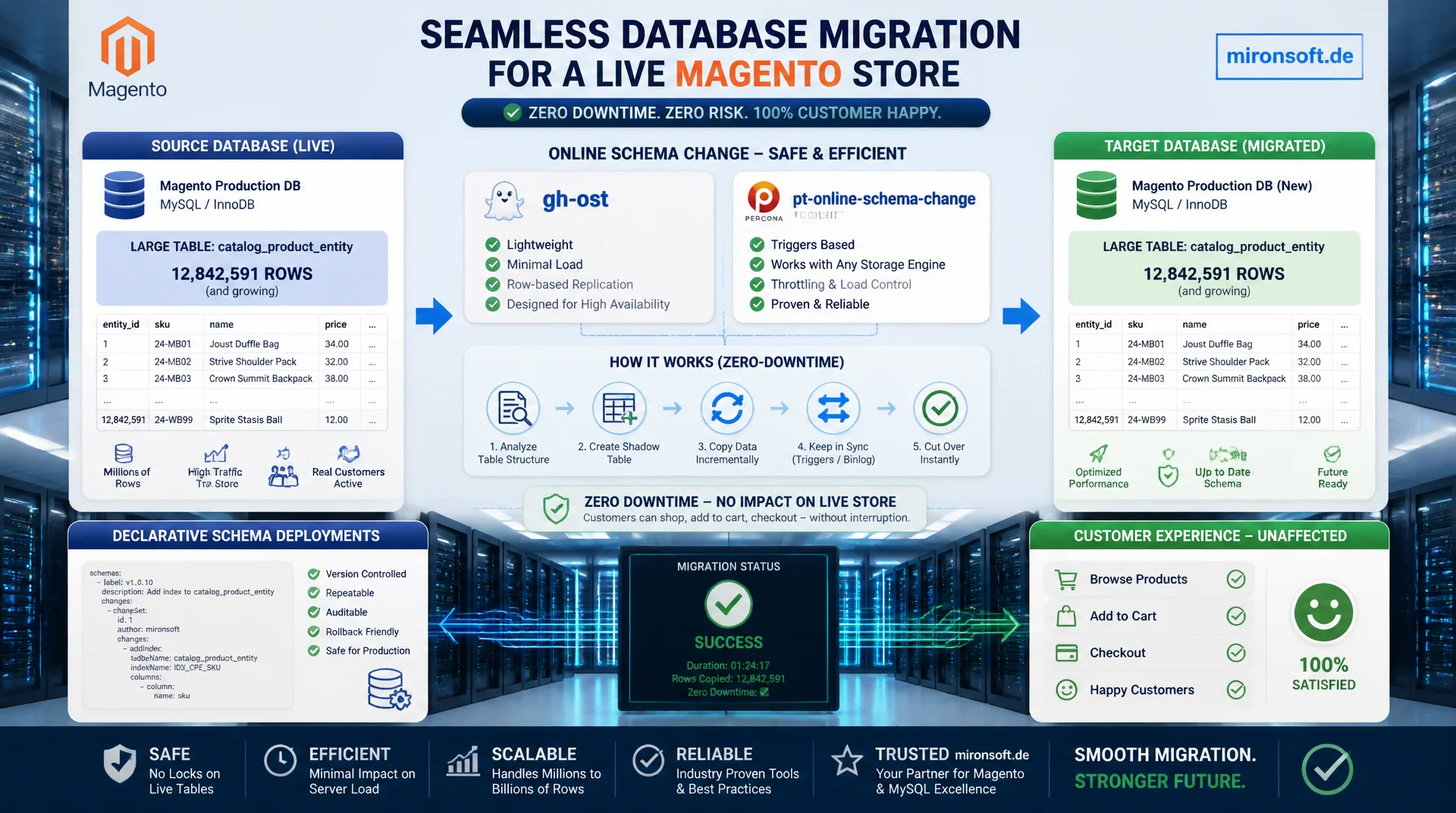
shipping database changes without an outage
Adding a column or changing an index on a table with millions of rows in a live Magento store risks long table locks and a visible outage at checkout. A well planned zero-downtime migration combines declarative schema deployments with online schema change tools such as gh-ost and pt-online-schema-change, so customers never notice a schema change happening underneath them.
Table of Contents
- 1. Why downtime happens during Magento database migrations
- 2. Declarative schema as the foundation for zero-downtime migration
- 3. bin/magento setup:upgrade in detail: locks and ordering
- 4. Online schema change tools: gh-ost and pt-online-schema-change
- 5. gh-ost in practice: migrating Magento tables without locks
- 6. pt-online-schema-change: the trigger approach and its pitfalls
- 7. Safe rollout patterns for schema changes
- 8. Large tables: sales_order, quote, catalog_product_entity
- 9. Monitoring and rollback during migration
- 10. Summary
- 11. FAQ
1. Why downtime happens during Magento database migrations
A classic ALTER TABLE statement on a large InnoDB table locks the table for writes in many cases for as long as the change runs. On a catalog_product_entity with several million rows, adding an index without a proper zero-downtime migration strategy can take anywhere from minutes to hours. During that window, write operations from checkout, price rules, and cron jobs get blocked, which surfaces to the customer as a stuck cart or a timeout at order completion.
Magento itself runs its own schema changes through bin/magento setup:upgrade, which internally generates and executes MySQL DDL statements. Without extra care, this process runs with standard ALTER TABLE semantics, which is fine for small stores but causes noticeable outages on stores with heavy write load. This is exactly where a planned zero-downtime migration comes in: it replaces blocking DDL with online schema change procedures that build a copy of the table in the background and only switch atomically at the very end.
The difference between a naive migration and a real zero-downtime migration is rarely in the target schema itself, it is in the path taken to get there. Both approaches produce the same table structure in the end, but only the second keeps the table available for reads and writes throughout the entire migration. For stores with an SLA of 99.9 percent or higher, that is not a nice-to-have, it is a hard requirement for every release pipeline.
2. Declarative schema as the foundation for zero-downtime migration
Since Magento 2.3, declarative schema in db_schema.xml replaces the old InstallSchema and UpgradeSchema scripts. The decisive advantage for a zero-downtime migration: the XML file describes the target state of the table declaratively, while Magento itself computes which ALTER TABLE statements are needed to get from the current state to the desired state. That reduces human error in hand-written migration scripts and makes schema changes versionable and reproducible.
Before every deployment, bin/magento setup:db:declaration:generate-whitelist should be run to update the generated db_schema_whitelist.json. This file documents which table changes have already shipped to production and prevents Magento from accidentally dropping columns or indexes again on a subsequent deploy. For a clean zero-downtime migration, this step belongs in every CI pipeline, right before the actual deployment job.
-- db_schema.xml (excerpt): adding a new column and index declaratively
-- File: app/code/Mironsoft/CatalogExtension/etc/db_schema.xml
<table name="catalog_product_entity" resource="default" engine="innodb">
    <column xsi:type="varchar" name="external_sku" nullable="true" length="64"
            comment="External Reference SKU for Zero-Downtime Migration Rollout"/>
    <index referenceId="CATALOG_PRODUCT_ENTITY_EXTERNAL_SKU" indexType="btree">
        <column name="external_sku"/>
    </index>
</table>

-- Generated DDL statement (produced internally by Magento, do NOT run directly)
-- Without an online schema change, this statement blocks write access:
ALTER TABLE `catalog_product_entity`
  ADD COLUMN `external_sku` VARCHAR(64) NULL COMMENT 'External Reference SKU',
  ADD INDEX `CATALOG_PRODUCT_ENTITY_EXTERNAL_SKU` (`external_sku`);
A common mistake: teams do not commit the generated db_schema_whitelist.json to their repository and then wonder why setup:upgrade behaves differently on staging than in production. For a reliable zero-downtime migration, the whitelist file must be at the same version as db_schema.xml itself, otherwise Magento generates inconsistent DDL sequences between environments.
3. bin/magento setup:upgrade in detail: locks and ordering
bin/magento setup:upgrade runs through several phases: first, every module's db_schema.xml files are read and merged into one combined schema, then Magento compares this target schema against the actual database schema and generates the necessary DDL statements. Only after that do data patches run. For a zero-downtime migration, it matters to know that Magento executes these DDL statements sequentially with standard MySQL locking, unless someone intervenes manually.
For small tables with a few thousand rows, this is unproblematic, because MySQL 8.0 already uses instant or in-place algorithms for many DDL operations, such as adding a nullable column at the end of a table. It becomes critical for operations that require a full table copy, such as changing a column type, adding a primary key, or certain index changes on very large tables like sales_order_grid or catalog_product_index_eav. Those exact cases are the starting point for using online schema change tools within a zero-downtime migration strategy.
4. Online schema change tools: gh-ost and pt-online-schema-change
Both tools solve the same underlying problem in different ways: instead of locking the original table directly, they create a shadow table with the target schema, copy data in batches, and keep synchronizing ongoing changes until a short, atomic RENAME TABLE swap replaces the old table with the new one at the very end. That swap typically takes under a second, which is the core of every successful zero-downtime migration.
pt-online-schema-change from the Percona Toolkit uses triggers installed on the original table that mirror every change into the shadow table immediately. gh-ost from GitHub takes a different route and instead reads the database binlog to apply changes asynchronously, without any triggers on the production table at all. For a resilient zero-downtime migration, a close look at both approaches pays off, because they bring different load profiles and risks.
An often underestimated aspect: both tools throttle themselves based on replication lag and system load. gh-ost checks lag on replicas by default and pauses automatically when it exceeds a threshold. This built-in throttling is the actual reason a zero-downtime migration with these tools works safely even on stores with continuous write load, while a blind ALTER TABLE takes no such consideration.
5. gh-ost in practice: migrating Magento tables without locks
For a production run of gh-ost in a Magento environment, the executing database user needs REPLICATION SLAVE and REPLICATION CLIENT privileges, because the tool acts as a replication client against the binlog. The first step in every zero-downtime migration with gh-ost is a test run in --dry-run mode, which validates the planned change without actually moving any data.
# Dry run: validate the change, no data is written
gh-ost \
  --host=db.mironsoft-shop.internal \
  --user=gh_ost_migration \
  --password="$GHOST_DB_PASSWORD" \
  --database=magento_prod \
  --table=catalog_product_entity \
  --alter="ADD COLUMN external_sku VARCHAR(64) NULL, ADD INDEX idx_external_sku (external_sku)" \
  --max-load=Threads_running=25 \
  --critical-load=Threads_running=50 \
  --chunk-size=1000 \
  --dry-run

# Production run with a controlled cutover
gh-ost \
  --host=db.mironsoft-shop.internal \
  --user=gh_ost_migration \
  --password="$GHOST_DB_PASSWORD" \
  --database=magento_prod \
  --table=catalog_product_entity \
  --alter="ADD COLUMN external_sku VARCHAR(64) NULL, ADD INDEX idx_external_sku (external_sku)" \
  --max-lag-millis=1500 \
  --chunk-size=1000 \
  --cut-over=default \
  --execute
The --max-lag-millis parameter is decisive for a zero-downtime migration on a replicated Magento cluster: gh-ost automatically pauses the copy as soon as replication lag exceeds the threshold, preventing read replicas from serving stale product data. The --cut-over=default mode performs the final table swap atomically and briefly holds writes, typically for a few hundred milliseconds, which is not perceivable by end customers.
6. pt-online-schema-change: the trigger approach and its pitfalls
The trigger-based approach of pt-online-schema-change is simpler to set up, because no binlog access is needed and the tool works directly against the primary database server. For a zero-downtime migration on smaller to mid-sized Magento installations without a complex replication topology, that is often the more pragmatic choice. The triggers themselves generate additional write load on the original table, though, because every INSERT, UPDATE, and DELETE operation gets duplicated.
pt-online-schema-change \
  --alter "ADD COLUMN external_sku VARCHAR(64) NULL, ADD INDEX idx_external_sku (external_sku)" \
  --host=db.mironsoft-shop.internal \
  --user=pt_migration \
  --ask-pass \
  --max-load="Threads_running=25" \
  --critical-load="Threads_running=50" \
  --chunk-size=1000 \
  --recursion-method=none \
  --alter-foreign-keys-method=auto \
  D=magento_prod,t=catalog_product_entity \
  --execute
A well known pitfall on foreign-key-heavy Magento tables such as sales_order or quote_item: --alter-foreign-keys-method=auto lets pt-online-schema-change decide itself whether dependent foreign keys are updated via DROP_SWAP or REBUILD_CONSTRAINTS. With many referencing tables, REBUILD_CONSTRAINTS can significantly extend the runtime of the zero-downtime migration, because every dependent table is adjusted individually. In such cases, an explicit test on a staging copy with production-scale data volume is mandatory before the command runs against production.
7. Safe rollout patterns for schema changes
A robust zero-downtime migration does not end with a successful DDL statement, it also accounts for the application code that reads and writes the new schema. The established pattern is expand and contract: first the database is extended with the new field, while the application still works only against the old schema. Then new application code that understands both schemas simultaneously is deployed. Only once that code has run stably in production does a second migration step follow that removes the old columns.
For riskier changes, a canary rollout at the application level is also recommended: a small share of traffic, typically controlled via feature flags, uses the new code path first, while the majority continues to run the stable version. Only after a defined observation period without an error increase is the new path rolled out to 100 percent of traffic. This combination of expand and contract at the database level and canary rollout at the application level is the core of every production-grade zero-downtime migration in large Magento environments.
8. Large tables: sales_order, quote, catalog_product_entity
Not every table in Magento demands the same level of caution during a zero-downtime migration. Catalogs with a few thousand products can be migrated with a classic ALTER TABLE inside a short maintenance window. On sales_order, sales_order_item, and quote with several million rows in mature B2B stores, an online schema change tool is practically the only option, because these tables are written to continuously by checkout processes.
On catalog_product_entity and its related EAV value tables, an extra layer of complexity comes into play: reindexing processes run in parallel to schema changes and generate significant write load on their own. A zero-downtime migration on these tables should therefore be planned outside the daily indexer cron windows, or the affected indexers should be temporarily switched to "Schedule" mode with an extended interval to avoid resource conflicts with the running gh-ost or pt-online-schema-change process.
# Check indexer status before the migration
bin/magento indexer:status

# Temporarily switch affected indexers to schedule mode with a longer interval
bin/magento indexer:set-mode schedule catalog_product_price catalog_product_category

# After a successful zero-downtime migration: restore mode and rebuild
bin/magento indexer:set-mode realtime catalog_product_price catalog_product_category
bin/magento indexer:reindex catalog_product_price
9. Monitoring and rollback during migration
Continuous monitoring is mandatory during every zero-downtime migration: replication lag, active threads, lock waits, and each tool's progress indicator need to be visible in real time. Both gh-ost and pt-online-schema-change periodically output status lines with percentage progress and estimated remaining time, which should be mirrored into a central logging system.
-- Monitor active threads and locks during migration
SHOW PROCESSLIST;

-- Detailed lock information (MySQL 8.0 / Percona Server)
SELECT
    r.trx_id AS blocked_trx,
    r.trx_mysql_thread_id AS blocked_thread,
    b.trx_id AS blocking_trx,
    b.trx_mysql_thread_id AS blocking_thread
FROM performance_schema.data_lock_waits w
JOIN information_schema.innodb_trx b ON b.trx_id = w.blocking_engine_transaction_id
JOIN information_schema.innodb_trx r ON r.trx_id = w.requesting_engine_transaction_id;

-- Check replication lag before triggering the final cutover
SHOW REPLICA STATUS\G
For the worst case, every zero-downtime migration needs a clear rollback plan: both gh-ost and pt-online-schema-change can be stopped cleanly via signal or control file without damaging the original table, since it remains completely untouched until the final cutover. Aborting before the cutover is therefore risk free. It only becomes critical if a problem surfaces after the table swap, which is why taking a backup immediately before the cutover point should be standard procedure.
| Criterion | gh-ost | pt-online-schema-change |
|---|---|---|
| Change capture | Binlog based, asynchronous | Triggers on original table, synchronous |
| Extra load on original table | Very low | Noticeable trigger overhead |
| Setup effort | Higher, replication privileges required | Lower, direct access is enough |
| Pause and resume | Natively supported | Only via restart |
| Recommendation for Magento | Large stores, replicated clusters | Smaller stores, simple topology |
10. Summary
A resilient zero-downtime migration for Magento stores starts with clean declarative schema in db_schema.xml and a maintained whitelist file. For small tables, bin/magento setup:upgrade with standard DDL is enough. As soon as tables like catalog_product_entity, sales_order, or quote carry several million rows and permanent write load, gh-ost and pt-online-schema-change are the right tools to avoid locks and keep the final table swap under a few hundred milliseconds.
The second success factor sits at the application level rollout pattern: expand and contract cleanly separates the database change from the code change, while canary rollouts minimize risk for the entire traffic. Continuous monitoring of replication lag and lock waits during migration, plus a clear rollback plan before the cutover, turns a risky schema change into a plannable, repeatable zero-downtime migration that keeps working reliably as data volume grows.
Zero-Downtime Migration for Magento Stores, the essentials at a glance
Declarative schema
db_schema.xml plus a maintained whitelist file is the foundation of every traceable zero-downtime migration.
Online schema change
gh-ost for replicated clusters, pt-online-schema-change for simpler topologies, both avoid long table locks.
Rollout pattern
Expand and contract separates schema and code changes, canary rollouts limit risk in live operation.
Monitoring & rollback
Watch replication lag and lock waits live, take a backup immediately before the final cutover.