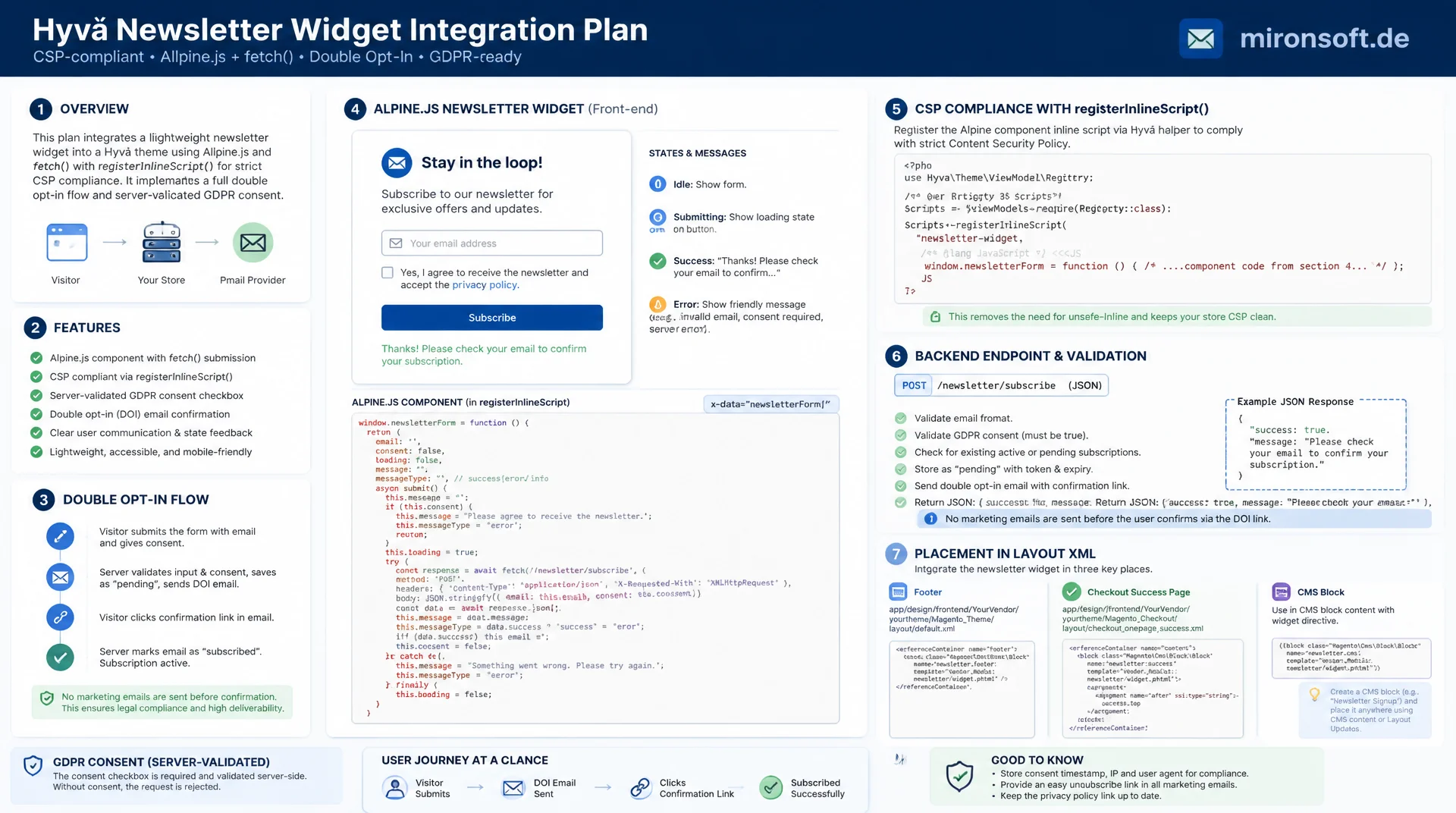
CSP-compliant, via AJAX, without a page reload
Copying Luma's newsletter widget straight into a Hyvä theme collides with the strict Content Security Policy and produces a form that silently fails in the browser. A clean newsletter integration instead needs registerInlineScript(), a lean Alpine.js component with fetch(), a properly communicated double opt-in flow, and a server-validated GDPR consent checkbox, placed cleanly via layout XML in the footer, checkout success page and CMS block.
Table of Contents
- 1. Why Copying Luma's Widget Breaks Under Hyvä's CSP
- 2. Hyvä's Content Security Policy and registerInlineScript() in Detail
- 3. The Alpine.js Component for the Signup Form
- 4. fetch() Against the Subscribe Controller: form_key and Response Handling
- 5. The Double Opt-in Flow: What Magento Handles Server Side
- 6. GDPR Consent: Checkbox as a Client Gate and Server-Side Revalidation
- 7. Placing the Form: Footer, Checkout Success and CMS Block via Layout XML
- 8. ViewModel: Subscription Status for Logged-in Customers
- 9. CSP-Breaking Approach vs. Recommended Hyvä Pattern
- 10. Summary
- 11. FAQ
1. Why Copying Luma's Widget Breaks Under Hyvä's CSP
Many teams start their newsletter integration by copying Magento_Newsletter/templates/subscribe.phtml from the Luma theme and swapping the classes for Tailwind. The form looks right afterward, but it does not work in the browser: clicking the button raises a CSP violation in the console, because the Luma template relies on onclick attributes, jQuery Ajax calls and in places Knockout bindings, all of which Hyvä's Content Security Policy blocks outright. Hyvä ships a strict script-src directive through Hyvä_Csp and the underlying Magento CSP module, one that only allows explicitly registered scripts, everything else is silently dropped.
The result is particularly tricky because there is no visible error on the page. The click happens, nothing reacts, and only the browser console shows Refused to execute inline script because it violates the following Content Security Policy directive. In practice this often only surfaces in live operation, once support requests come in about a newsletter form that supposedly does not work. A second, subtler variant of the same problem: the copied form does work, but triggers a full page reload on every submit, because no AJAX handler was registered and a classic form POST with a redirect fires instead, which is particularly disruptive on the checkout success page.
This article describes a working newsletter integration from the ground up: the CSP fundamentals and registerInlineScript(), an Alpine.js component with fetch()-based AJAX subscribe, the server-side double opt-in flow including frontend communication, a GDPR consent checkbox with client- and server-side validation, and placing the form via layout XML in several locations across the theme.
2. Hyvä's Content Security Policy and registerInlineScript() in Detail
Magento's CSP module works with a script-src directive based on either nonces or hashes. Under a nonce-based policy, every allowed <script> block gets a random, one-time nonce attribute value on each page load, one that also appears in the CSP response header. If the attribute and header match, the browser executes the script, any other inline script without a matching nonce gets dropped. Hyvä wraps this mechanism in the HyvaCsp ViewModel and the registerInlineScript() method, which injects the correct nonce into the script tag internally, so template authors never have to touch nonce generation themselves.
For a CSP-compliant implementation this means concretely: every inline <script> block in a phtml template must be immediately followed by a call to $hyvaCsp->registerInlineScript(). If that call is missing, the script gets silently blocked in the browser, exactly the behavior a naively copied Luma widget shows. The registration call is usually placed right at the end of the template, after all inline scripts in the markup have already been output, so Hyvä can capture the full script content for the hash or nonce assignment.
<?php
/** @var \Magento\Framework\View\Element\Template $block */
/** @var \Hyva\Theme\ViewModel\HyvaCsp $hyvaCsp */
$hyvaCsp = $viewModels->require(\Hyva\Theme\ViewModel\HyvaCsp::class);
?>
<div class="my-4">
  <button id="scroll-hint" class="text-sm text-orange-700 underline">
    Scroll to top
  </button>
</div>

<script>
  // WITHOUT registerInlineScript() below, the CSP silently blocks this block
  document.getElementById('scroll-hint').addEventListener('click', () => {
    window.scrollTo({ top: 0, behavior: 'smooth' });
  });
</script>
<?php $hyvaCsp->registerInlineScript(); ?>
Important for debugging: the call to registerInlineScript() must happen in the same phtml rendering pass as the script block itself, an include in a separate template does not work reliably. Anyone who wants to debug the policy in a running system can switch the CSP module to Report-Only in the Magento admin. Violations are then only logged instead of blocked, which is especially useful when such an integration pulls in third-party scripts such as an external tracking pixel for signups, and additional script-src hosts need to be allowed through the etc/csp_whitelist.xml file.
3. The Alpine.js Component for the Signup Form
Instead of a redirect-based form POST, a small Alpine.js component takes over the full lifecycle of the signup form. The component knows five states: idle before the first submit, loading while the request is in flight, success on immediate confirmation, confirmation_pending when double opt-in is active, and error for invalid input or server errors. Each state controls which text is visible in the form exclusively through x-show and x-text, never through direct DOM manipulation outside of Alpine.
The email address is bound with x-model, and submission is intercepted with x-on:submit.prevent so no classic form POST and therefore no page reload is triggered. The entire state lives in an Alpine.data() definition that sits alongside the markup in the same template and, as described in the previous section, must be unlocked via registerInlineScript(). For a robust newsletter integration it matters that loading state and error text are kept separate, so a user can resubmit after an error without the component getting stuck in an inconsistent intermediate state.
<?php
/** @var \Magento\Framework\View\Element\Template $block */
/** @var \Hyva\Theme\ViewModel\HyvaCsp $hyvaCsp */
/** @var \Hyva\Theme\Model\ViewModelRegistry $viewModels */
$hyvaCsp = $viewModels->require(\Hyva\Theme\ViewModel\HyvaCsp::class);
$formKey = $viewModels->require(\Hyva\Theme\ViewModel\FormKey::class);
$subscribeUrl = $block->getUrl('newsletter/subscriber/new');
?>
<div x-data="newsletterSignup('<?= $block->escapeJs($subscribeUrl) ?>', '<?= $block->escapeJs($formKey->getFormKey()) ?>')"
     class="rounded-xl border border-slate-200 p-6 bg-white">
  <form x-on:submit.prevent="subscribe()" class="flex flex-col sm:flex-row gap-3">
    <input type="email" x-model="email" :disabled="state === 'loading'"
           placeholder="you@email.com" required
           class="flex-1 rounded-lg border border-slate-300 px-4 py-2 text-sm" />
    <label class="flex items-center gap-2 text-xs text-slate-600">
      <input type="checkbox" x-model="consent" class="rounded border-slate-300" />
      I agree to the data processing described in the privacy policy.
    </label>
    <button type="submit" :disabled="state === 'loading' || !consent"
            class="bg-orange-700 disabled:opacity-50 text-white font-semibold rounded-lg px-5 py-2 text-sm">
      <span x-show="state !== 'loading'">Subscribe</span>
      <span x-show="state === 'loading'">Sending …</span>
    </button>
  </form>
  <p class="mt-3 text-sm" :class="state === 'error' ? 'text-red-600' : 'text-green-700'"
     x-show="message" x-text="message"></p>
</div>

<script>
  document.addEventListener('alpine:init', () => {
    Alpine.data('newsletterSignup', (endpoint, formKey) => ({
      email: '',
      consent: false,
      state: 'idle',
      message: '',
      async subscribe() {
        // Client-side gate: no request is sent without explicit consent
        if (!this.consent) {
          this.state = 'error';
          this.message = 'Please confirm the privacy policy first.';
          return;
        }
        this.state = 'loading';
        this.message = '';
        try {
          const response = await fetch(endpoint, {
            method: 'POST',
            headers: {
              'Content-Type': 'application/x-www-form-urlencoded',
              'X-Requested-With': 'XMLHttpRequest'
            },
            body: new URLSearchParams({
              email: this.email,
              form_key: formKey,
              consent: this.consent ? '1' : '0'
            })
          });
          const data = await response.json();
          this.state = data.status;
          this.message = data.message;
        } catch (e) {
          this.state = 'error';
          this.message = 'Connection error, please try again later.';
        }
      }
    }));
  });
</script>
<?php $hyvaCsp->registerInlineScript(); ?>
4. fetch() Against the Subscribe Controller: form_key and Response Handling
The default newsletter/subscriber/new controller is originally built for a classic form POST followed by a redirect and a session message, not for JSON responses. An AJAX-capable newsletter integration therefore needs either a small plugin extension that returns a Magento\Framework\Controller\Result\Json instance instead of a redirect whenever an X-Requested-With: XMLHttpRequest header is detected, or a dedicated AJAX controller that internally reuses the same SubscriberFactory and the same validation logic. In both cases it matters that the regular non-JS fallback keeps working in case Alpine fails to initialize for whatever reason.
The form_key must be sent with every POST request, since Magento's built-in CSRF protection otherwise rejects the request with a 302 redirect back to the form page, which arrives in the fetch() callback as HTML instead of JSON and produces a parse error on the response.json() call. The most reliable way to obtain the current form_key is Hyvä's FormKey ViewModel, resolved once in the template and passed as a parameter to the Alpine component, rather than reading it from a cookie on the frontend. Error handling should distinguish between HTTP errors (status outside 200 to 299), network errors caught in the catch block, and business errors inside an otherwise successful JSON response, so the user sees a different message for an invalid email address than for a server outage.
One detail that is often overlooked in practice: the submit button must be disabled while state === 'loading', otherwise an impatient click can trigger duplicate requests and, in the worst case, duplicate confirmation emails. The component shown above solves this through the :disabled binding on the button, combined with the state variable, without any additional debouncing or external libraries.
5. The Double Opt-in Flow: What Magento Handles Server Side
Magento_Newsletter models the subscription status through the constants STATUS_SUBSCRIBED, STATUS_NOT_ACTIVE, STATUS_UNCONFIRMED and STATUS_UNSUBSCRIBED on the Subscriber model. If the newsletter/subscription/confirm store configuration is enabled, subscribe() does not set the status directly to STATUS_SUBSCRIBED, but to STATUS_UNCONFIRMED, generates a random confirmation code, and sends a confirmation email through the transactional email mechanism with a link to the newsletter/subscriber/confirm controller, which carries the subscriber ID and code as parameters. Only clicking that link finally sets the status to confirmed.
For the frontend side of the newsletter integration this means: after a successful AJAX request, the Alpine component must not simply display "Thanks for signing up", but must distinguish between immediate success (double opt-in disabled) and the intermediate confirmation_pending state, where the text points to the inbox, for example "Please confirm your signup via the link in the email we just sent you". Likewise, a customer who signs up again with an already fully confirmed address must see a dedicated message instead of a generic error, and a previously unsubscribed customer who reactivates goes through the full double opt-in cycle again, depending on configuration.
{
  "status": "confirmation_pending",
  "message": "Please confirm your signup via the link in the email.",
  "subscriber_status": "unconfirmed"
}

// Immediate success: double opt-in disabled in store configuration
{
  "status": "success",
  "message": "Thanks, your signup was successful.",
  "subscriber_status": "subscribed"
}

// Already confirmed address tries to subscribe again
{
  "status": "already_subscribed",
  "message": "This email address is already subscribed to the newsletter.",
  "subscriber_status": "subscribed"
}

// Missing GDPR consent: re-validated server side even though the client already gates this
{
  "status": "error",
  "message": "Please confirm the privacy policy before signing up.",
  "subscriber_status": null
}
6. GDPR Consent: Checkbox as a Client Gate and Server-Side Revalidation
A legally sound newsletter integration requires explicit consent before any personal data is even transmitted to the server. In the Alpine component code from Section 3, the subscribe() method checks the value of consent before a fetch() call is executed at all: if the checkbox is not ticked, the method aborts immediately and shows a validation message without a single byte going to the server. That is a pure client gate, it improves the user experience, but it does not replace server-side validation.
Since the native Magento_Newsletter module has no consent field, the consent must be enforced server side through a custom extension, either as a plugin around the subscribe controller or as an observer on a suitable event before the subscriber is saved. A request without the consent parameter, or with a value of 0, must be rejected there with a clear error message, regardless of what the frontend displays, because a manipulated or scripted request can bypass the client gate. For the accountability requirement under Article 7 GDPR, it is also worth logging the timestamp and an IP hash of the consent in a dedicated table or as a subscriber attribute.
<?php

declare(strict_types=1);

namespace Mironsoft\NewsletterConsent\Plugin;

use Magento\Framework\App\RequestInterface;
use Magento\Framework\Exception\LocalizedException;
use Magento\Newsletter\Controller\Subscriber\NewAction;

/**
 * Re-validates GDPR consent server side, independent of the client-side gate
 * inside the Alpine.js signup component.
 */
class ValidateConsentPlugin
{
    /**
     * @param RequestInterface $request Current HTTP request instance.
     */
    public function __construct(
        private readonly RequestInterface $request,
    ) {
    }

    /**
     * Aborts the subscribe action when consent was not explicitly granted.
     *
     * @param NewAction $subject Intercepted subscribe controller action.
     * @return void
     * @throws LocalizedException When the consent flag is missing or falsy.
     */
    public function beforeExecute(NewAction $subject): void
    {
        $consent = (string) $this->request->getParam('consent', '0');

        if ($consent !== '1') {
            throw new LocalizedException(
                __('Please confirm the privacy policy before signing up.')
            );
        }
    }
}
7. Placing the Form: Footer, Checkout Success and CMS Block via Layout XML
To keep the same newsletter integration from ending up tripled across the theme, exactly one phtml template is built, configurable through block arguments such as a heading, a compact mode for the footer, and a fuller mode for the checkout success page. Layout XML then wires this single block into three places: in default.xml for the footer, in the checkout_onepage_success.xml handle right after the order confirmation, and through a CMS widget block that lets editors insert the form into any CMS page via a widget, without developers having to write any extra code for it.
This reuse follows the usual Hyvä UI component pattern: one block with ViewModel injection, one template configured exclusively through $block->getData() or passed-in arguments, and no copy of the markup scattered across the theme. Changes to the form, such as new consent wording or an additional input field, therefore only need to be maintained in a single place and automatically apply to the footer, checkout success page and CMS block alike.
<!-- app/design/frontend/Mironsoft/default/Magento_Theme/layout/default.xml -->
<referenceContainer name="footer-container">
    <block class="Magento\Framework\View\Element\Template"
           name="footer.newsletter.signup"
           template="Magento_Newsletter::signup/form.phtml">
        <arguments>
            <argument name="heading" xsi:type="string">Subscribe to newsletter</argument>
            <argument name="variant" xsi:type="string">compact</argument>
        </arguments>
    </block>
</referenceContainer>

<!-- app/design/frontend/Mironsoft/default/Magento_Checkout/layout/checkout_onepage_success.xml -->
<referenceContainer name="content">
    <block class="Magento\Framework\View\Element\Template"
           name="checkout.success.newsletter.signup"
           template="Magento_Newsletter::signup/form.phtml"
           after="checkout.success">
        <arguments>
            <argument name="heading" xsi:type="string">Stay in the loop</argument>
            <argument name="variant" xsi:type="string">full</argument>
        </arguments>
    </block>
</referenceContainer>

<!-- Editors additionally embed the same template via a CMS widget,
     no further code required. -->
8. ViewModel: Subscription Status for Logged-in Customers
For logged-in customers, the form should not ask for the email address again on every page load, let alone present an already-subscribed customer with an empty form. A lean ViewModel that implements ArgumentInterface and injects the SubscriberFactory plus a CustomerSession through constructor property promotion encapsulates exactly this logic: a method isSubscribed(): bool and a method getCustomerEmail(): ?string, which let the template either pre-fill the form, hide it entirely, or render it directly in the "already subscribed" state, without waiting for the first AJAX round trip.
This ViewModel is injected into the shared block through the same layout XML arguments as in Section 7, so the footer, checkout success page and CMS block all show the same behavior for logged-in customers. In the template, the Alpine x-data call initializes the starting state directly from PHP, for example state: '<?= $viewModel->isSubscribed() ? 'already_subscribed' : 'idle' ?>', so the newsletter integration avoids a visible flash of the empty form for already-subscribed customers and the perceived load time drops noticeably.
9. CSP-Breaking Approach vs. Recommended Hyvä Pattern
The table below summarizes the key differences between the naively copied Luma approach and the newsletter integration described in this article. Each row corresponds to a concrete spot where a copied widget typically breaks.
| Task | CSP-breaking approach | Recommended Hyvä pattern | Advantage |
|---|---|---|---|
| Submit handler | onclick="subscribe()" |
x-on:submit.prevent |
CSP-compliant, no nonce handling needed |
| Form response | Full-page reload with redirect | fetch() + JSON + x-text |
No reload, instant feedback |
| Inline script | without CSP registration | $hyvaCsp->registerInlineScript() |
Script runs instead of being silently blocked |
| GDPR consent | checked client side only | Client gate + server-side revalidation | Legally sound and auditable |
| Form placement | hard-duplicated per page | one template + layout XML arguments | Maintainable, DRY across footer, checkout, CMS |
Every row carries the same underlying idea: Hyvä forces behavior to be declared explicitly, instead of working implicitly through inline handlers or redirects. That costs a bit more care the first time such a solution is built, but pays off in maintainability, CSP compliance, and a measurably better user experience without a page reload.
10. Summary
A CSP-compliant newsletter integration in Hyvä is not a single trick, but the interplay of several cleanly separated building blocks: registerInlineScript() unlocks inline scripts within the strict Content Security Policy, an Alpine.js component with fetch() replaces the classic form POST with AJAX and no page reload, and the double opt-in flow is managed server side by Magento_Newsletter but must be communicated in the frontend as its own intermediate state. The GDPR consent checkbox acts as a client gate, but it never replaces server-side validation, since only that is safe against manipulated requests.
Anyone who additionally embeds the form as a single reusable template via layout XML in the footer, checkout success page and CMS block, and exposes the subscription status for logged-in customers through a lean ViewModel, ends up with a newsletter integration that is maintained in exactly one place in the code and works consistently across multiple locations in the theme, entirely without the CSP pitfalls of a copied Luma widget.
Newsletter Integration in Hyvä Themes: The Essentials at a Glance
CSP & registerInlineScript()
Every inline script block needs the call right after it, otherwise Hyvä's strict Content Security Policy silently blocks it.
Alpine.js & fetch()
An Alpine component with fetch() against the subscribe controller replaces the form POST, correctly with form_key and JSON response handling.
Double Opt-in & Consent
Magento_Newsletter manages the confirmation flow server side, the frontend must clearly communicate the intermediate state, consent is checked client and server side.
Layout XML & ViewModel
One template for footer, checkout success and CMS block, one ViewModel for the subscription status of logged-in customers.
11. FAQ: Newsletter Integration in Hyvä Themes
1Why doesn't Luma's widget just work in Hyvä?
2What exactly does registerInlineScript() do?
3How do I avoid form_key errors?
4Single opt-in vs. double opt-in?
5How do I show 'please confirm your email'?
6Does the GDPR checkbox need server-side validation?
7Form in the footer and on checkout success?
8Preventing duplicate signups on a double click?
9What happens on resignup after unsubscribing?
10Is extra JavaScript needed outside of Alpine.js?
Mironsoft
Hyvä theme development and CSP-compliant Magento 2 integrations
Newsletter integration that doesn't break under Hyvä's CSP?
We implement it CSP-compliant with Alpine.js, correct double opt-in and GDPR consent, placed cleanly via layout XML in the footer, checkout and CMS blocks.
CSP Audit
Check existing theme templates for CSP violations and missing registerInlineScript() calls
Alpine Components
Build AJAX forms with fetch(), clean states and no page reload
GDPR Consulting
Secure and document consent flows client and server side, legally sound