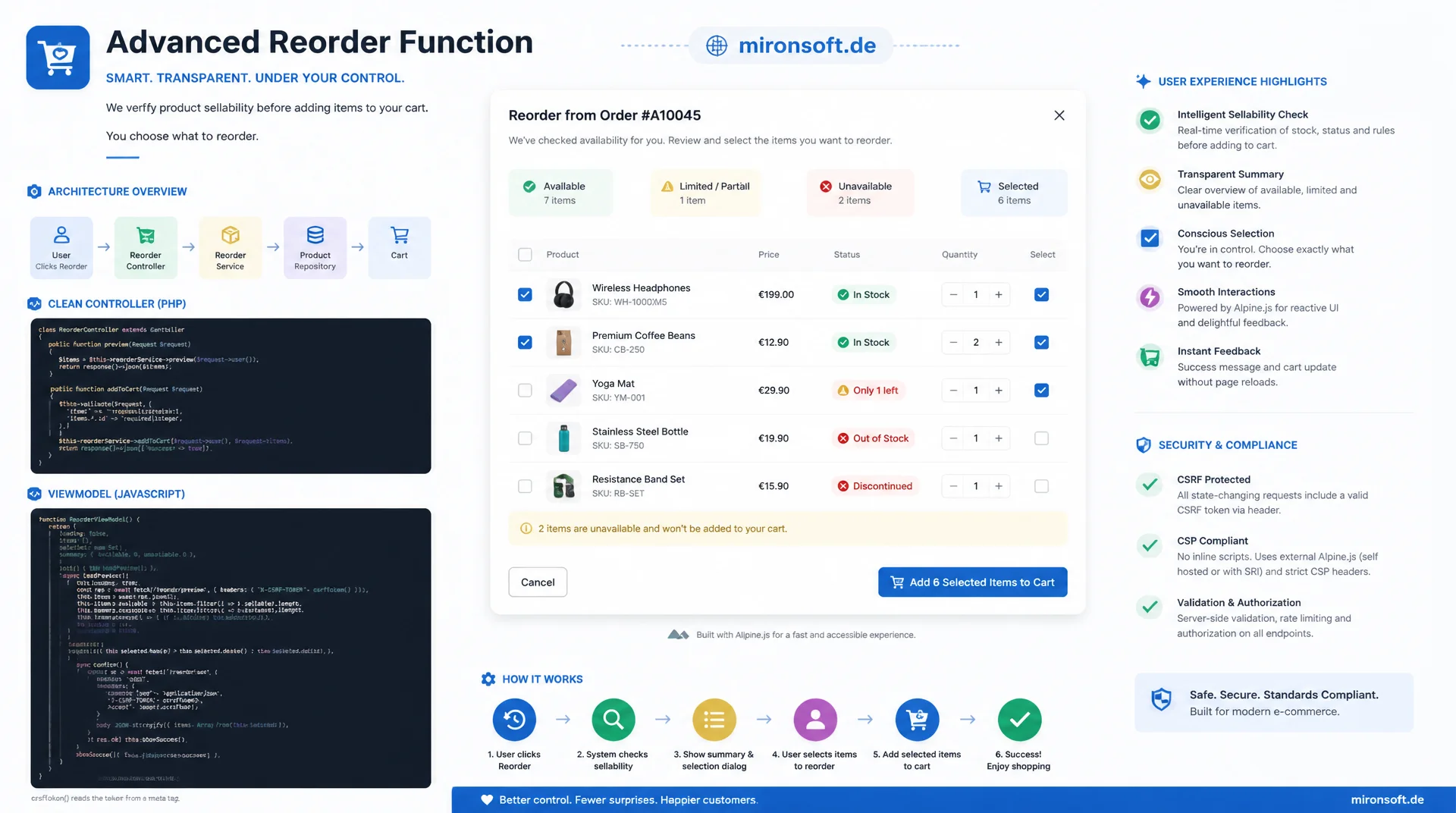
from a naive cart button to a checked partial order
A robust reorder function does more than blindly copy order items into the cart: it checks before the click whether products are still sellable, surfaces missing items transparently, and lets customers decide consciously, through an Alpine.js confirmation dialog, which items are actually reordered, all backed cleanly by a controller, a ViewModel, CSRF protection and CSP-compliant scripts.
Table of Contents
- 1. Why "add all items to cart" is not enough
- 2. Order history and order view in Hyvä: where the reorder button lives
- 3. Module architecture: a custom module instead of a core override
- 4. Controller: loading the order and determining sellable items
- 5. ViewModel: checking availability before the click
- 6. Template: button and inline warning in the order history
- 7. Alpine.js confirmation dialog for the partial reorder
- 8. CSP compliance and store view configuration
- 9. Reorder function compared: patterns side by side
- 10. Summary
- 11. FAQ
1. Why "add all items to cart" is not enough
The obvious idea for a reorder function sounds simple: the customer clicks "Reorder", every item from the old order lands in the cart, done. In practice this assumption rarely survives the first real test case. Products get disabled or deleted entirely between the original order and the reorder attempt, stock runs out, a configurable product's option combination no longer exists, and prices have changed since the last purchase. Each of these cases breaks a naive implementation at a different point, usually silently.
It becomes especially unpleasant when a reorder function swallows errors instead of reporting them: the customer ends up in the cart, counts only three items instead of the five expected, and has to figure out on their own which two are missing and why. That generates support tickets and erodes trust exactly at the point where a repeat purchase should have been frictionless. The following sections therefore build a reorder function that checks availability before the click, names problems transparently, and gives the customer a conscious choice over a partial order.
2. Order history and order view in Hyvä: where the reorder button lives
Magento_Sales renders the list of past orders via order/history.phtml and the detail view of a single order via order/view.phtml. Both templates already ship with a reorder link out of the box that points to the route sales/order/reorder, handled by Magento\Sales\Controller\Order\Reorder. This core controller iterates the order items and calls Magento\Checkout\Model\Cart::addOrderItem() for each one, with no prior saleability check whatsoever. This exact mechanism is the root of the problems described in the first section, it is not a theoretical assumption but the actual default behavior.
In Luma the reorder link is additionally wrapped by a Knockout widget with a confirmation dialog. Hyvä replaces that widget entirely with plain phtml markup and Tailwind classes, without Knockout.js, without UI components and without a jQuery dependency. For a custom reorder button that means: rather than reusing the core controller and only swapping out the confirmation dialog, the cleaner path is a dedicated controller that checks saleability from the very start instead of only surfacing errors once the customer is already in the cart.
3. Module architecture: a custom module instead of a core override
A custom module, referred to here as Mironsoft_Reorder, uses layout XML to replace the default reorder link in order/view.phtml and order/history.phtml with a custom block pointing to a custom route. This avoids any core override of Magento_Sales templates and stays compatible across Magento updates, because the work is purely additive via referenceBlock and a new controller class. The new route, say reorder/order/confirm, replaces the previous GET link with a POST form, which is unavoidable for the CSRF protection via form_key covered later.
The module structure follows the usual Hyvä layout: a controller in the namespace Mironsoft\Reorder\Controller\Order, a ViewModel under Mironsoft\Reorder\ViewModel, a system.xml for store view configuration, and an acl.xml for the admin permission of that configuration. The actual reorder function lives almost entirely in the controller and the ViewModel, the template remains pure presentation and simply binds the availability check's result to Alpine.js.
4. Controller: loading the order and determining sellable items
The controller loads the order through OrderRepositoryInterface, verifies that the order actually belongs to the logged-in customer, and then determines for each item whether the associated product is still sellable. For the sellable items, the original order item's BuyRequest is reused, a DataObject carrying quantity and selected options that Magento\Sales\Model\Order\Item::getBuyRequest() already provides. The customer's active quote is loaded, or created if needed, through CartRepositoryInterface, then extended with the checked items via addProduct().
<?php

declare(strict_types=1);

namespace Mironsoft\Reorder\Controller\Order;

use Magento\Customer\Controller\AbstractAccount;
use Magento\Customer\Controller\AccountInterface;
use Magento\Customer\Model\Session as CustomerSession;
use Magento\Framework\App\Action\Context;
use Magento\Framework\App\Action\HttpPostActionInterface;
use Magento\Framework\Controller\Result\RedirectFactory;
use Magento\Framework\Controller\ResultInterface;
use Magento\Framework\Exception\LocalizedException;
use Magento\Quote\Api\CartManagementInterface;
use Magento\Quote\Api\CartRepositoryInterface;
use Magento\Sales\Api\OrderRepositoryInterface;
use Mironsoft\Reorder\Model\SellableItemFilter;

/**
 * Adds still-sellable items from a past order back into the customer's active quote.
 */
class Confirm extends AbstractAccount implements HttpPostActionInterface, AccountInterface
{
    /**
     * @param Context $context Request/response context required by AbstractAccount.
     * @param CustomerSession $customerSession Current logged-in customer session.
     * @param OrderRepositoryInterface $orderRepository Loads the source order by id.
     * @param CartRepositoryInterface $cartRepository Loads and persists the active quote.
     * @param CartManagementInterface $cartManagement Creates a quote if none exists yet.
     * @param SellableItemFilter $sellableItemFilter Splits order items into sellable and skipped.
     * @param RedirectFactory $redirectFactory Builds the redirect result after processing.
     */
    public function __construct(
        Context $context,
        private readonly CustomerSession $customerSession,
        private readonly OrderRepositoryInterface $orderRepository,
        private readonly CartRepositoryInterface $cartRepository,
        private readonly CartManagementInterface $cartManagement,
        private readonly SellableItemFilter $sellableItemFilter,
        private readonly RedirectFactory $redirectFactory
    ) {
        parent::__construct($context);
    }

    /**
     * Reorder the selected, still-sellable items into the active customer quote.
     *
     * @return ResultInterface
     */
    public function execute(): ResultInterface
    {
        $orderId = (int) $this->getRequest()->getParam('order_id');
        $selectedItemIds = (array) $this->getRequest()->getParam('items', []);
        $customerId = (int) $this->customerSession->getCustomerId();

        $order = $this->orderRepository->get($orderId);

        // Guard: never let a customer reorder another customer's order
        if ((int) $order->getCustomerId() !== $customerId) {
            throw new LocalizedException(__('This order does not belong to your account.'));
        }

        $result = $this->sellableItemFilter->filter($order->getItems(), $selectedItemIds);

        $quoteId = $this->cartManagement->getCartForCustomer($customerId)->getId();
        $quote = $this->cartRepository->get($quoteId);

        foreach ($result->getSellableItems() as $orderItem) {
            $buyRequest = $orderItem->getBuyRequest();
            $quote->addProduct($orderItem->getProduct(), $buyRequest);
        }

        $quote->setTotalsCollectedFlag(false);
        $this->cartRepository->save($quote);

        $resultRedirect = $this->redirectFactory->create();

        if ($result->getSkippedCount() > 0) {
            $this->messageManager->addWarningMessage(
                __('%1 of %2 items could not be reordered and were skipped.', $result->getSkippedCount(), $result->getTotalCount())
            );
        }

        $this->messageManager->addSuccessMessage(__('The available items have been added to your cart.'));

        return $resultRedirect->setPath('checkout/cart');
    }
}
The guard clause against foreign orders is essential: without the customer ID comparison, a manipulated order_id could theoretically reorder any other customer's order, a classic insecure-direct-object-reference bug. The actual separation of sellable from non-sellable items deliberately does not live in the controller itself, but in a dedicated SellableItemFilter class, which also makes the same check available to the ViewModel in the next section without duplicating logic.
5. ViewModel: checking availability before the click
The real strength of a clean reorder function shows up before the controller is even invoked, at the moment the order view is rendered. A ViewModel implementing ArgumentInterface runs the same availability check as the controller ahead of the click and hands the template a structured result, from which an inline warning like "2 of 5 items are no longer available" can be derived directly.
<?php

declare(strict_types=1);

namespace Mironsoft\Reorder\ViewModel;

use Magento\Catalog\Api\ProductRepositoryInterface;
use Magento\Framework\Exception\NoSuchEntityException;
use Magento\Framework\View\Element\Block\ArgumentInterface;
use Magento\InventorySalesApi\Api\IsProductSalableInterface;
use Magento\Sales\Api\Data\OrderInterface;
use Magento\Store\Model\StoreManagerInterface;

/**
 * Pre-checks saleability of order items so the order view can warn before reorder.
 */
class ReorderAvailability implements ArgumentInterface
{
    /**
     * @param ProductRepositoryInterface $productRepository Loads the current product state.
     * @param IsProductSalableInterface $isProductSalable Checks saleable status per sales channel.
     * @param StoreManagerInterface $storeManager Resolves the current website for the stock check.
     */
    public function __construct(
        private readonly ProductRepositoryInterface $productRepository,
        private readonly IsProductSalableInterface $isProductSalable,
        private readonly StoreManagerInterface $storeManager
    ) {
    }

    /**
     * Build a per-item availability report for the given order.
     *
     * @param OrderInterface $order Order whose items should be pre-checked.
     * @return array<int, array{item_id: int, name: string, sellable: bool, reason: string|null}>
     */
    public function getAvailabilityReport(OrderInterface $order): array
    {
        $websiteId = (int) $this->storeManager->getWebsite()->getId();
        $report = [];

        foreach ($order->getItems() as $item) {
            if ($item->getParentItem() !== null) {
                continue; // Skip child rows of configurable/bundle items
            }

            $sellable = false;
            $reason = null;

            try {
                $product = $this->productRepository->getById((int) $item->getProductId());
                $sellable = $product->isSalable()
                    && $this->isProductSalable->execute((string) $product->getSku(), $websiteId);
                $reason = $sellable ? null : 'out_of_stock_or_disabled';
            } catch (NoSuchEntityException) {
                $reason = 'product_deleted';
            }

            $report[] = [
                'item_id' => (int) $item->getItemId(),
                'name' => (string) $item->getName(),
                'sellable' => $sellable,
                'reason' => $reason,
            ];
        }

        return $report;
    }

    /**
     * Number of order items that are no longer sellable.
     *
     * @param OrderInterface $order Order whose items should be counted.
     * @return int
     */
    public function getUnavailableCount(OrderInterface $order): int
    {
        return count(array_filter($this->getAvailabilityReport($order), static fn (array $row): bool => !$row['sellable']));
    }
}
The try/catch block on NoSuchEntityException covers the case where a product was deleted entirely between the order and the call to the order view, a case that isSalable() alone cannot handle because there is no product left to load in the first place. The IsProductSalableInterface from the Inventory module additionally accounts for multi-source stock per website, which a simple look at StockItem::getIsInStock() could not provide.
The template calls getAvailabilityReport(), encodes the result as JSON and hands it to the Alpine.js component. For an order with five items, two of which are no longer sellable, the resulting structure looks like this:
[
  { "item_id": 4501, "name": "Cotton T-Shirt, Size M", "sellable": true, "reason": null },
  { "item_id": 4502, "name": "Cotton T-Shirt, Size XXL", "sellable": false, "reason": "out_of_stock_or_disabled" },
  { "item_id": 4503, "name": "Running Shoes Model 2024", "sellable": false, "reason": "product_deleted" },
  { "item_id": 4504, "name": "Wool Socks 3-Pack", "sellable": true, "reason": null },
  { "item_id": 4505, "name": "Baseball Cap", "sellable": true, "reason": null }
]
6. Template: button and inline warning in the order history
In the order/view.phtml template, the custom block replaces the default reorder link. The ViewModel supplies the availability data, which is written directly as JSON into x-data so the Alpine component starts without an additional Ajax request. The inline warning only appears when items are actually missing, and it names the exact count instead of issuing a blanket warning to the customer.
<?php
/** @var \Mironsoft\Reorder\ViewModel\ReorderAvailability $viewModel */
$viewModel = $block->getData('view_model');
/** @var \Magento\Sales\Api\Data\OrderInterface $order */
$order = $block->getOrder();
$report = $viewModel->getAvailabilityReport($order);
$unavailableCount = $viewModel->getUnavailableCount($order);
?>
<div class="reorder-function-wrapper"
     x-data="reorderModal(<?= /* @noEscape */ json_encode($report) ?>, <?= (int) $order->getEntityId() ?>)">

    <template x-if="unavailableCount > 0">
        <div class="bg-amber-50 border border-amber-200 rounded-lg px-4 py-2 mb-3 text-sm text-amber-800">
            <span x-text="unavailableCount + ' <?= $escaper->escapeHtml(__('of')) ?> ' + items.length + ' <?= $escaper->escapeHtml(__('items are no longer available')) ?>'"></span>
        </div>
    </template>

    <button type="button" @click="open = true"
            class="inline-flex items-center gap-2 bg-slate-800 text-white font-semibold px-4 py-2 rounded-lg hover:bg-slate-700 transition-colors">
        <?= $escaper->escapeHtml(__('Reorder')) ?>
    </button>

    <!-- Alpine.js confirmation modal, see next section for the component logic -->
    <div x-show="open" x-cloak class="fixed inset-0 bg-black/50 flex items-center justify-center z-50">
        <div class="bg-white rounded-2xl p-6 max-w-md w-full mx-4">
            <p class="font-bold text-lg mb-4"><?= $escaper->escapeHtml(__('Confirm reorder')) ?></p>
            <template x-for="item in items" :key="item.item_id">
                <label class="flex items-center gap-3 py-2 border-b border-slate-100">
                    <input type="checkbox" x-model="selected" :value="item.item_id" :disabled="!item.sellable">
                    <span :class="item.sellable ? 'text-slate-800' : 'text-slate-400 line-through'" x-text="item.name"></span>
                </label>
            </template>

            <form method="post" action="<?= $escaper->escapeUrl($block->getUrl('reorder/order/confirm')) ?>" @submit="submitting = true">
                <input type="hidden" name="form_key" value="<?= $escaper->escapeHtmlAttr($block->getFormKey()) ?>">
                <input type="hidden" name="order_id" value="<?= (int) $order->getEntityId() ?>">
                <template x-for="itemId in selected" :key="itemId">
                    <input type="hidden" name="items[]" :value="itemId">
                </template>
                <p x-show="selected.length === 0" x-text="validationMessage" class="text-red-600 text-sm mb-3"></p>
                <div class="flex gap-3 mt-4">
                    <button type="button" @click="open = false" class="px-4 py-2 rounded-lg border border-slate-300"><?= $escaper->escapeHtml(__('Cancel')) ?></button>
                    <button type="submit" :disabled="selected.length === 0 || submitting"
                            class="px-4 py-2 rounded-lg bg-slate-800 text-white font-semibold disabled:opacity-50">
                        <span x-show="!submitting"><?= $escaper->escapeHtml(__('Confirm reorder')) ?></span>
                        <span x-show="submitting" x-text="'<?= $escaper->escapeHtml(__('Processing...')) ?>'"></span>
                    </button>
                </div>
            </form>
        </div>
    </div>
</div>
What stands out in this template is that not a single mustache double-brace appears, even though Alpine.js is known for exactly that syntax. Instead of the usual mustache notation around item.name, every place uses x-text="item.name", because Magento templates would interpret double curly braces as their own directive, creating a conflict with the rendering pipeline. This convention is not optional in any reorder function built on Hyvä, it is a precondition for working markup.
7. Alpine.js confirmation dialog for the partial reorder
The Alpine component reorderModal handles three responsibilities: opening and closing the dialog, pre-selecting every sellable item as already checked, and client-side validation that disables the submit button as long as not a single item is selected. The actual POST happens as a normal form submission with form_key, not as a fetch request, so the dialog still works as a simple redirect even without JavaScript, preserving progressive enhancement.
// File: app/code/Mironsoft/Reorder/view/frontend/web/js/reorder-modal.js
document.addEventListener('alpine:init', () => {
    Alpine.data('reorderModal', (report, orderId) => ({
        items: report,
        orderId: orderId,
        open: false,
        submitting: false,
        // Pre-select every sellable item id, skip the rest by default
        selected: report.filter((row) => row.sellable).map((row) => row.item_id),

        get unavailableCount() {
            return this.items.filter((row) => !row.sellable).length;
        },

        get validationMessage() {
            return this.selected.length === 0
                ? 'Please select at least one item to reorder.'
                : '';
        },

        toggleAll(checked) {
            this.selected = checked
                ? this.items.filter((row) => row.sellable).map((row) => row.item_id)
                : [];
        }
    }));
});
Because the form is submitted normally via POST, Magento's own session message system takes care of the success and error messages after the redirect, Alpine does not need to manage its own state after submission. The only client-side state logic stays deliberately lean: submitting prevents an accidental double click, and validationMessage prevents an empty submit before a request ever reaches the backend. This division of labor, Alpine for instant browser feedback, Magento messages for the result after the redirect, keeps the confirmation dialog easy to maintain.
8. CSP compliance and store view configuration
Every inline <script> in a Hyvä template must be registered immediately afterward with $hyvaCsp->registerInlineScript(), otherwise the Content Security Policy silently blocks the script in the browser. Since the Alpine component here already ships as an external file under view/frontend/web/js/reorder-modal.js, this registration is not needed for the component itself, because Hyvä's CSP only restricts inline scripts. Should the reorder function instead work with an inline <script> block directly in the template, calling registerInlineScript() after every single block is mandatory, otherwise the dialog stays visually present but becomes completely unresponsive, an error that is easy to miss in local development where CSP is not enabled.
Whether the reorder function is active at all should be configurable per store view, for instance because a B2B store wants to use it while another store wants to keep it disabled for process reasons. A system.xml field under mironsoft_reorder/general/enabled with website scope covers this, read via ScopeConfigInterface::isSetFlag() in the ViewModel, which then also controls the visibility of the button itself. The corresponding acl.xml only governs which administrators may change this configuration in the backend under Stores > Configuration, that applies solely to the backend and has nothing to do with frontend visibility.
9. Reorder function compared: patterns side by side
The following table contrasts, for every central sub-task, the naive approach that breaks in practice with the recommended pattern for a robust reorder function. The right column corresponds to what was built step by step in the previous sections.
| Task | Naive / fragile approach | Recommended Hyvä pattern | Benefit |
|---|---|---|---|
| Adding items to cart | Cart::addOrderItem() unchecked in a loop |
CartRepositoryInterface + sellable check per item |
Only sellable items ever reach the cart |
| Unavailable products | Silent skip, customer notices only in the cart | ViewModel check before the click with an inline warning | Transparency before the action, no guesswork |
| Changed options | getBuyRequest() reused blindly |
Options checked against current product state | No broken cart rows |
| Confirmation before action | Immediate redirect without confirmation | Alpine.js modal with partial reorder selection | Customer consciously decides on every item |
| CSRF protection | Reorder via GET link without a form | POST form with form_key |
No cart-mutation attack through a simple link |
What stands out is that none of the recommended patterns require noticeably more effort than the naive path, it is essentially the same code, just extended at the right place: a check before adding, a confirmation before the redirect, a form instead of a link. Whoever implements these five points consistently reduces support tickets around the repeat-purchase process noticeably, because customers see problems before they ever occur.
10. Summary
A robust reorder function in Hyvä replaces the naive core mechanism that copies order items into the cart unchecked with a multi-step verification: a ViewModel already reports at render time of the order view which items are no longer sellable. An Alpine.js dialog lets the customer consciously decide which available items should actually be reordered. A controller using CartRepositoryInterface transfers only the checked, sellable items into the active quote, secured against CSRF via form_key and with a clear customer ID check against foreign orders.
Two details are most commonly overlooked in practice: $hyvaCsp->registerInlineScript() after every inline script, without which the Content Security Policy silently blocks interactivity, and consistently avoiding mustache double braces in favor of x-text, since Magento interprets double curly braces itself. Whoever treats reorder function, ViewModel availability checking and Alpine confirmation as one unit rather than three separate tasks builds a repeat-purchase process that stays reliable even when product data changes.
Reorder Function in Hyvä: the key takeaways
Avoid the naive approach
The core reorder link copies items unchecked and only reports problems in the cart, never before the click.
Controller & quote
CartRepositoryInterface plus getBuyRequest() only transfer sellable items into the active quote.
ViewModel check
Availability is checked before the click, the inline warning names the exact count of missing items.
Alpine, CSP & ACL
Confirmation dialog with x-text, form_key form, registerInlineScript(), toggle per store view.
11. FAQ: Implementing a Reorder Function in Hyvä
1What exactly is a reorder function in Hyvä?
2Why isn't the default reorder link enough?
3How is missing availability detected?
4What happens with changed options?
5How does the confirmation dialog work?
6Why no mustache double braces?
7How is CSRF protection implemented?
8What if registerInlineScript() is missing?
9How do I disable it per store view?
10Possible for guests too?
Mironsoft
Hyvä development, customer account features and checkout-adjacent functionality
A robust reorder function for your Hyvä store?
We implement the controller, the ViewModel availability check and the Alpine.js confirmation dialog, CSP-compliant and without overriding a single core template.
Concept
Analysis of the existing order history and planning of the repeat-purchase flow, including partial reorder
Implementation
Module, controller, ViewModel and Alpine.js components built to Hyvä standards
CSP & ACL
CSP-compliant scripts, store view configuration and form key protection