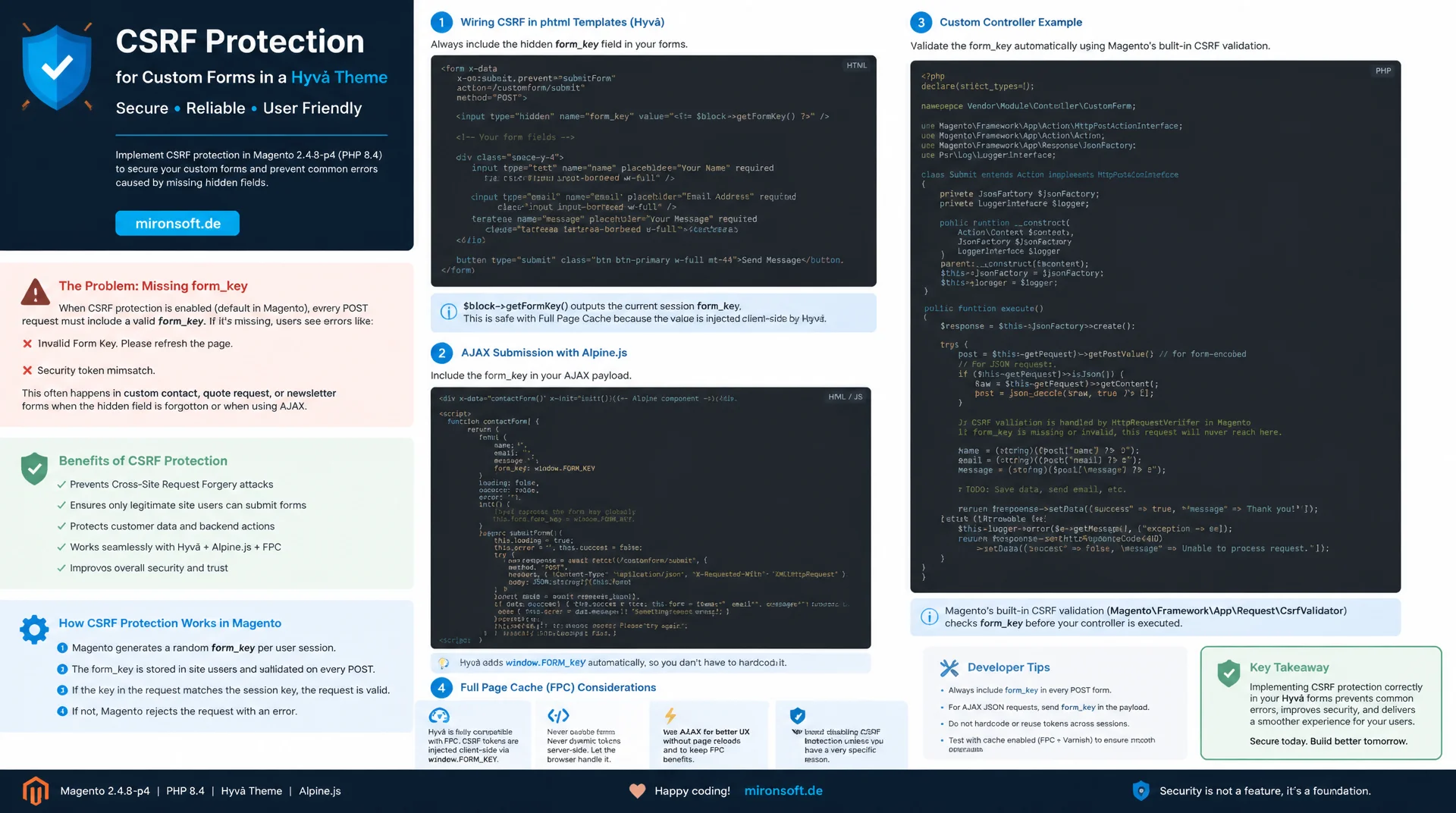
not a bug, just a missing hidden field
Anyone building a custom contact, quote request or newsletter form in a Hyvä theme regularly forgets one single, inconspicuous hidden field, then wonders about error messages that look like a bug. This article shows how form key CSRF protection works under the hood in Magento and how to wire it up cleanly in phtml templates, AJAX requests with Alpine.js, custom controllers and alongside full page cache, with real code examples from Magento 2.4.8-p4 and PHP 8.4.
Table of Contents
- 1. Why custom forms in Hyvä themes often forget the form key
- 2. How Magento's form key mechanism works under the hood
- 3. Embedding the form key correctly in custom phtml forms
- 4. AJAX forms with Alpine.js: sending the form key with the request
- 5. Controller-side validation: implementing CsrfAwareActionInterface correctly
- 6. Form key vs. CSRF token for REST and GraphQL endpoints
- 7. Form key and full page cache: stale keys in a cached form
- 8. Common mistakes: missing form key after AJAX login and stale cache responses
- 9. Additional hardening: SameSite cookies and rate limits
- 10. Summary
- 11. FAQ
1. Why custom forms in Hyvä themes often forget the form key
In Luma, the field behind form key CSRF protection was almost invisible, because many core blocks rendered it automatically through shared template fragments or UI components. Hyvä deliberately removed that entire substructure: no Knockout.js, no UI components, no jQuery widget system quietly injecting a hidden field in the background. Anyone building a custom contact form, a quote request form or a bespoke newsletter field in a Hyvä theme usually writes the phtml template completely from scratch, and in doing so misses exactly the one element Luma used to supply invisibly.
The result is a form that looks and behaves completely normally until the user clicks submit and gets an error like "Invalid Form Key. Please refresh the page and try again." For developers who are not thinking about form key CSRF protection, this looks like a bug in the theme, when in fact a single hidden field is simply missing from the form. In practice, this exact mistake shows up most often in quickly built add-on forms: request buttons on product pages, custom quote forms, or bespoke callback request forms that were never checked against the reference implementation in Magento_Customer or Magento_Newsletter.
2. How Magento's form key mechanism works under the hood
Form key CSRF protection is not based on a plain cookie value, it relies on a random string stored server-side in the session. The class \Magento\Framework\Data\Form\FormKey generates a random string on first access via getFormKey() and stores it in the session, managed through \Magento\Framework\Session\SessionManagerInterface. That value is then rendered into a hidden field on every page load and compared against the value stored in the session on the next POST request. If both match, the request is considered legitimate, otherwise validation fails.
The session cookie, usually PHPSESSID, only serves to map the browser to a server session, it does not itself carry a comparison value. The actual form key CSRF protection only emerges from the comparison between the server-stored value and the value submitted with the form, an attacker on a foreign domain cannot know that value even if the browser automatically attaches the session cookie. This is exactly where Magento's approach differs from simpler double-submit-cookie patterns, where the comparison value itself lives in the cookie.
Important for understanding the following sections: the form key is bound to the concrete session, not to the user or the device. Whenever the session changes, for example through session regeneration after a login or a new anonymous session after cookie expiry, the valid form key value inevitably changes too. A value previously rendered into the DOM becomes invalid even though nothing changed on the form itself.
3. Embedding the form key correctly in custom phtml forms
Per project convention, ViewModels are preferred over block classes, and that applies to form key CSRF protection in custom templates as well. Instead of fetching the form key through a custom block class with object manager access, a lean ViewModel injects \Magento\Framework\Data\Form\FormKey directly via constructor property promotion and exposes a single public getFormKey() method. That keeps the template logic testable and decouples it from a concrete block implementation.
In the phtml template itself, a single hidden field is enough, with its value output through escapeHtmlAttr() so that even a manipulated form key value cannot turn into an XSS issue inside the attribute. For a reliable form key CSRF protection it also matters that this hidden field is freshly generated on every server render, not copied from a static fragment cached on the client.
<!-- app/design/frontend/Mironsoft/default/Mironsoft_Core/templates/form/quote-request.phtml -->
<?php
/** @var \Magento\Framework\View\Element\Template $block */
/** @var \Mironsoft\Core\ViewModel\FormKeyProvider $viewModel */
$viewModel = $block->getViewModel();
?>
<form action="<?= $block->escapeUrl($block->getUrl('mironsoft_core/form/submit')) ?>"
      method="post" class="space-y-4" id="quote-request-form">
    <!-- Hidden field carrying the current session form key -->
    <input type="hidden" name="form_key" value="<?= $block->escapeHtmlAttr($viewModel->getFormKey()) ?>">

    <label class="block text-sm font-medium text-slate-700">Email</label>
    <input type="email" name="email" required
           class="w-full rounded-lg border border-slate-300 px-3 py-2">

    <button type="submit"
            class="bg-orange-600 text-white font-semibold px-5 py-2.5 rounded-lg">
        Send request
    </button>
</form>
<?php
declare(strict_types=1);

namespace Mironsoft\Core\ViewModel;

use Magento\Framework\Data\Form\FormKey;
use Magento\Framework\View\Element\Block\ArgumentInterface;

/**
 * Provides the current session form key to custom Hyva phtml forms.
 */
class FormKeyProvider implements ArgumentInterface
{
    /**
     * @param FormKey $formKey Magento core form key generator/reader.
     */
    public function __construct(
        private readonly FormKey $formKey
    ) {
    }

    /**
     * Returns the current form key value for the active session.
     *
     * @return string
     */
    public function getFormKey(): string
    {
        return $this->formKey->getFormKey();
    }
}
4. AJAX forms with Alpine.js: sending the form key with the request
As soon as a form is no longer submitted via a classic full-page POST but instead through fetch() from an Alpine.js component, the browser's automatic form-encoding mechanism disappears entirely. Form key CSRF protection only works reliably for AJAX requests when the value is explicitly read from the hidden field and sent to the server, either in the JSON body or as its own header. A forgotten value leads to exactly the same 302 redirect with an error message as a completely missing field.
It is also crucial to read the form key value fresh from the DOM on every submit instead of copying it once into a JavaScript variable when the Alpine component initializes and caching it permanently. If the session expires in the meantime or gets regenerated by an intervening login, the component would keep reading the old, invalid value from memory while the hidden field already holds a new one. For robust form key CSRF protection in AJAX forms, the rule is therefore: read the value right before the request, never cache it beforehand.
<!-- app/design/frontend/Mironsoft/default/Mironsoft_Core/templates/form/quote-request-ajax.phtml -->
<div x-data="quoteRequestForm()">
    <form @submit.prevent="submitForm" class="space-y-4">
        <input type="hidden" name="form_key" x-ref="formKeyField"
               value="<?= $block->escapeHtmlAttr($viewModel->getFormKey()) ?>">
        <input type="email" name="email" x-model="email" required
               class="w-full rounded-lg border border-slate-300 px-3 py-2">
        <button type="submit" :disabled="loading"
                class="bg-orange-600 text-white font-semibold px-5 py-2.5 rounded-lg">
            <span x-show="!loading">Send request</span>
            <span x-show="loading">Sending...</span>
        </button>
        <p x-show="message" x-text="message" class="text-sm text-slate-600"></p>
    </form>
</div>

<script>
function quoteRequestForm() {
    return {
        email: '',
        loading: false,
        message: '',
        async submitForm() {
            this.loading = true;
            // Read the form key fresh from the DOM right before sending the request
            const formKey = this.$refs.formKeyField.value;
            const response = await fetch('/mironsoft_core/form/submit', {
                method: 'POST',
                headers: {
                    'Content-Type': 'application/json',
                    'X-Requested-With': 'XMLHttpRequest'
                },
                body: JSON.stringify({ form_key: formKey, email: this.email })
            });
            const data = await response.json();
            this.message = data.message;
            this.loading = false;
        }
    };
}
</script>
<?php /* $hyvaCsp->registerInlineScript(); */ ?>
5. Controller-side validation: implementing CsrfAwareActionInterface correctly
Since the 2.3.x releases, every custom frontend POST controller in Magento must either build on the standard form validation path or explicitly implement \Magento\Framework\App\CsrfAwareActionInterface, otherwise the framework throws an exception while registering the route. For clean form key CSRF protection at the controller level, this specifically means: the validateForCsrf() method decides whether a custom validation path applies or whether the standard form key check is delegated to by returning null, while createCsrfValidationException() produces the appropriate redirect exception on failure.
In most cases it is enough to simply return null from both methods, thereby relying on the built-in form key check, but a common mistake is accidentally returning true, which fully disables any CSRF check for that controller. Anyone who wants to deliberately extend form key CSRF protection for a custom AJAX endpoint with additional checks, for example an extra header comparison, should always add that on top of the standard check, never as a replacement for it.
<?php
declare(strict_types=1);

namespace Mironsoft\Core\Controller\Form;

use Magento\Framework\App\Action\Action;
use Magento\Framework\App\Action\Context;
use Magento\Framework\App\CsrfAwareActionInterface;
use Magento\Framework\App\Request\InvalidRequestException;
use Magento\Framework\App\RequestInterface;
use Magento\Framework\Controller\Result\Json;
use Magento\Framework\Controller\Result\JsonFactory;

/**
 * Handles quote request form submissions with explicit CSRF awareness.
 */
class Submit extends Action implements CsrfAwareActionInterface
{
    /**
     * @param Context $context Standard action context.
     * @param JsonFactory $resultJsonFactory Factory for JSON responses.
     */
    public function __construct(
        Context $context,
        private readonly JsonFactory $resultJsonFactory
    ) {
        parent::__construct($context);
    }

    /**
     * Creates the exception thrown when CSRF validation fails.
     *
     * @param RequestInterface $request
     * @return InvalidRequestException|null
     */
    public function createCsrfValidationException(RequestInterface $request): ?InvalidRequestException
    {
        return null;
    }

    /**
     * Explicitly validates the request for CSRF, null delegates to the default form key check.
     *
     * @param RequestInterface $request
     * @return bool|null
     */
    public function validateForCsrf(RequestInterface $request): ?bool
    {
        return null;
    }

    /**
     * Processes the submitted quote request.
     *
     * @return Json
     */
    public function execute(): Json
    {
        $result = $this->resultJsonFactory->create();

        return $result->setData(['message' => 'Thank you for your request.']);
    }
}
6. Form key vs. CSRF token for REST and GraphQL endpoints
For classic /rest/V1 endpoints, form key CSRF protection plays practically no role, because authentication happens via a bearer token or OAuth rather than the automatically attached session cookie. An attacker luring a user onto a foreign page can get the browser to attach the session cookie automatically, but cannot guess a valid bearer token that must be transmitted separately in the Authorization header. That is precisely why the REST API deliberately skips the form key check, the underlying threat model is simply different from form-based session requests.
GraphQL mutations over /graphql get murkier as soon as a customer is authenticated through the regular session cookie instead of an explicit bearer token, because then the classic CSRF risk of ambiently attached credentials applies again. A custom GraphQL resolver module that deliberately relies on the customer session instead of a token must be aware of this difference and cannot assume that the GraphQL route automatically ships the same form key CSRF protection as a classic frontend controller, because webapi_rest and graphql routes are deliberately exempt from the standard form key middleware.
{
  "_comment_rest": "REST calls authenticate via Bearer token, not via form_key/session",
  "request_rest": {
    "method": "POST",
    "url": "/rest/V1/carts/mine/items",
    "headers": {
      "Authorization": "Bearer eyJhbGciOi...",
      "Content-Type": "application/json"
    }
  },
  "_comment_graphql": "Cookie-authenticated GraphQL mutations still need their own CSRF safeguards",
  "request_graphql_session_based": {
    "method": "POST",
    "url": "/graphql",
    "headers": {
      "Content-Type": "application/json",
      "X-Requested-With": "XMLHttpRequest"
    },
    "body": "mutation { addProductsToCart(cartId: \"abc\", cartItems: []) { cart { id } } }"
  }
}
7. Form key and full page cache: stale keys in a cached form
Full page cache stores the rendered HTML of a page including every hidden field within it. If a block containing an embedded form key field is accidentally treated as cacheable, the form key CSRF protection value valid at the moment the cache entry was generated becomes permanently baked into the stored HTML, regardless of which session a later visitor actually has. Every user who gets served that cached page sees the same, long-outdated form key value in the form, while their own session expects a completely different value.
The consequence is a form that fails with "Invalid Form Key" for every visitor of the cached page, until the full page cache is invalidated or the user manually reloads the page. The correct way to handle such a form block is therefore either cacheable="false" in the layout XML or, much cleaner, moving the form key field into a fragment loaded via Hyvä's private content or Ajax reload mechanism, so that the cached HTML response itself never contains a session-dependent value.
8. Common mistakes: missing form key after AJAX login and stale cache responses
A particularly tricky mistake involves AJAX logins through an Alpine.js modal: for security reasons, Magento regenerates the session ID after a successful login to prevent session fixation attacks. That automatically invalidates the form key value previously rendered into the DOM, even though nothing visibly changed on the page. If a full page reload is not triggered after login, form key CSRF protection is guaranteed to fail on the next form submit, because the hidden field still holds the old value that was valid before the login.
A second, related source of errors is the browser back-forward cache combined with full page cache: if a user navigates back to a previously logged-in page after logging out, the browser may show a stale version served from bfcache with a form key value belonging to the old session. When debugging, checking bin/log exception.log for "Invalid Form Key" entries, combined with comparing the form_key value sent in the DevTools network tab against the current session cookie value, usually reveals immediately whether it is a cache issue or a session issue.
9. Additional hardening: SameSite cookies and rate limits for sensitive forms
Form key CSRF protection is the primary line of defense against cross-site request forgery, but it should not be the only one. An additional, independent layer of protection comes from the SameSite attribute on the session cookie: with SameSite=Lax or, where functionally possible, SameSite=Strict, the session cookie is not sent at all on cross-site requests, causing an attack attempt to fail already at the cookie level, before the form key comparison would even need to kick in.
For particularly sensitive forms like login, password reset or contact forms with file upload, a server-side rate limit is also worth adding, for example via limit_req in Nginx or a custom plugin around the controller's execute() method. That does not directly protect against CSRF, but it prevents a compromised or misconfigured endpoint from being abused for automated mass requests. It is important to keep these hardening measures clearly separate from the Content Security Policy: CSP protects against injected script code, not against forged form requests, both mechanisms complement form key CSRF protection but do not replace it.
Situations compared directly: The following overview shows which concrete configuration decisions strengthen form key CSRF protection in practice, or unknowingly undermine it.
| Situation | Wrong | Recommended | Effect |
|---|---|---|---|
| Hidden field | Form without a form_key field |
Field rendered via ViewModel | Request accepted instead of blocked |
| AJAX request | Plain POST without header/body value | Form key in body plus X-Requested-With | Consistent validation on every submit |
| Controller | No CsrfAwareActionInterface | Interface implemented, null delegates | Controlled instead of random exception |
| Caching | Form block cacheable with baked-in key | cacheable="false" or Ajax reload |
No stale form key baked into the HTML |
| Session cookie | No SameSite attribute set | SameSite=Lax as extra protection |
Cookie missing on cross-site requests |
Mironsoft
Hyvä development, security audits and Magento 2 operations
Custom forms, but shaky on the form key?
We review your Hyvä forms, AJAX endpoints and controllers for clean form key CSRF protection, and make sure full page cache and security do not work against each other.
Review of every custom form, controller and AJAX endpoint for CSRF gaps
Implementation
ViewModels, CsrfAwareActionInterface and cache-safe form blocks in the theme
Hardening
SameSite cookies and rate limits for login, reset and sensitive forms
10. Summary
Reliable form key CSRF protection in custom Hyvä forms does not happen by chance, it comes from three deliberate decisions: the hidden field is rendered through a ViewModel instead of a block class, every custom controller explicitly implements CsrfAwareActionInterface instead of silently relying on legacy behavior, and AJAX requests read the form key value fresh from the DOM immediately before submitting. Implementing these three points consistently avoids most of the common support tickets around "Invalid Form Key" errors from the outset.
The second important building block concerns the interplay with infrastructure: clean form key CSRF protection does not help much if full page cache permanently freezes a stale value, or if REST and GraphQL endpoints are wrongly treated with the same threat model as classic session-based forms. SameSite cookies and rate limits add further protection but do not replace it, and CSP remains responsible for a completely different attack scenario.
Form Key CSRF Protection: The Essentials at a Glance
phtml embedding
Hidden field via ViewModel and \Magento\Framework\Data\Form\FormKey, not a custom block class.
AJAX & Alpine.js
Read the form key from the DOM right before the request, never cache it at init time.
Controller validation
Implement CsrfAwareActionInterface, null delegates to the standard check.
Caching & hardening
Keep form blocks uncacheable, SameSite cookies and rate limits as extra protection.