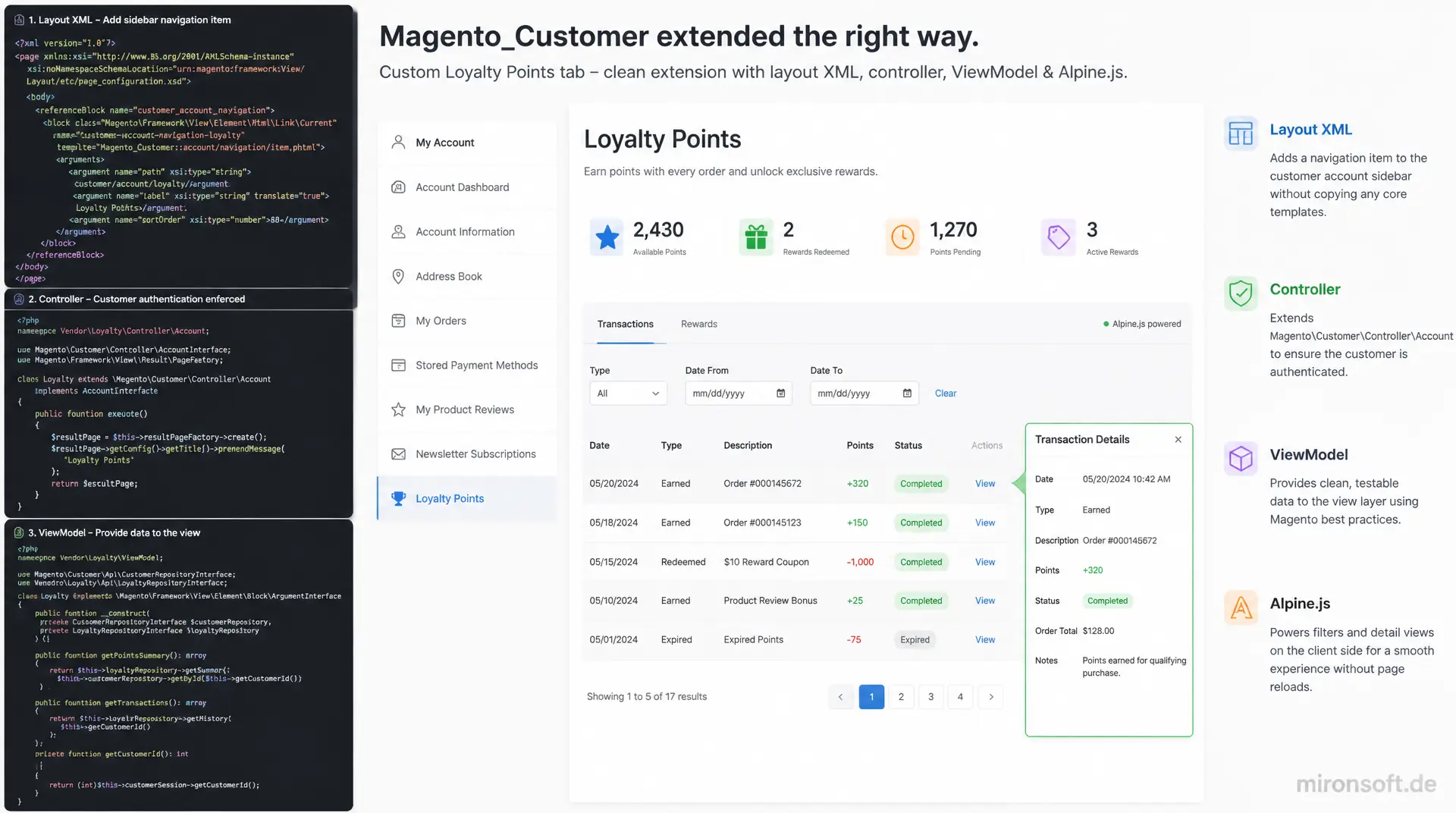
a custom tab with a ViewModel and Alpine.js instead of a core override
A custom loyalty points tab in the customer account dashboard shows exactly how to extend Magento_Customer cleanly: a layout XML addition for the sidebar navigation, a controller with proper customer authentication, a ViewModel for the data and Alpine.js for filtering and detail views without a page reload, all without copying a single core template.
Table of Contents
- 1. Why teams extend the customer account dashboard
- 2. Account navigation in Magento_Customer: customer_account.xml and the sidebar
- 3. Layout XML: registering a new tab in the sidebar
- 4. Controller class: a dedicated route for the new tab
- 5. ViewModel: supplying data to the new tab
- 6. Template: the markup of the new tab
- 7. Alpine.js: progressive enhancement without a page reload
- 8. ACL and visibility: who sees the new tab
- 9. Customer account dashboard patterns compared
- 10. Summary
- 11. FAQ
1. Why teams extend the customer account dashboard
Magento's standard My Account area covers orders, addresses and account details, but that is not enough for many projects. As soon as a shop wants to offer loyalty points, B2B approval workflows or customer-specific documents, the customer account dashboard needs extra tabs that slot seamlessly into the existing sidebar navigation. In this article we build an example loyalty points tab, and the pattern transfers one to one to a documents area or a B2B approval overview.
What matters is how this extension is implemented technically. Anyone who copies Magento_Customer core templates or replaces blocks through a preference loses the connection to core on every Magento update and risks merge conflicts. The following sections show the additive path: a dedicated module, layout XML, a controller with correct customer authentication, a ViewModel for the data, and Alpine.js for the interactivity in the new area.
2. Account navigation in Magento_Customer: customer_account.xml and the sidebar
The sidebar navigation of the customer account dashboard is built by Magento_Customer through the layout handle customer_account.xml. The central piece is the container customer_account_navigation, into which every single menu item is hooked as its own block of type Magento\Framework\View\Element\Html\Link\Current. Each link receives a path, a label and a sortOrder argument that controls its position in the sidebar. There is no central, hardcoded list of menu items at all, just a set of blocks assembled through layout XML.
In Luma this container is rendered through a widget with Knockout bindings, including observables and client templates. Hyvä replaces that with a plain phtml template that iterates the sorted child blocks and outputs plain HTML with Tailwind classes, with no Knockout.js and no UI components at all. For extending this area that means a new menu item is simply another Html\Link\Current block in the same container, with no need to touch the navigation template itself.
3. Layout XML: registering a new tab in the sidebar
The additive path starts with two layout files in a dedicated module. The first one references customer_account_navigation and hooks in the new link for the loyalty points tab, including a sort position relative to an existing link. The second file is bound to the layout handle of the new route and defines which block with which template renders in the content area once the tab in the customer account dashboard is opened.
<!-- File: app/code/Vendor/LoyaltyPoints/view/frontend/layout/customer_account.xml -->
<?xml version="1.0"?>
<page xmlns:xsi="http://www.w3.org/2001/XMLSchema-instance"
      xsi:noNamespaceSchemaLocation="urn:magento:framework:View/Layout/etc/page_configuration.xsd">
    <body>
        <referenceBlock name="customer_account_navigation">
            <!-- Insert a new sidebar link into the existing Hyvä navigation container -->
            <block class="Magento\Framework\View\Element\Html\Link\Current"
                   name="customer-account-navigation-loyalty-points-link"
                   after="customer-account-navigation-orders-link">
                <arguments>
                    <argument name="path" xsi:type="string">loyaltypoints/index/index</argument>
                    <argument name="label" xsi:type="string" translate="true">Loyalty Points</argument>
                    <argument name="sortOrder" xsi:type="number">25</argument>
                </arguments>
            </block>
        </referenceBlock>
    </body>
</page>

<!-- File: app/code/Vendor/LoyaltyPoints/view/frontend/layout/loyaltypoints_index_index.xml -->
<?xml version="1.0"?>
<page xmlns:xsi="http://www.w3.org/2001/XMLSchema-instance"
      xsi:noNamespaceSchemaLocation="urn:magento:framework:View/Layout/etc/page_configuration.xsd">
    <!-- Inherit the account wrapper, header and sidebar from customer_account.xml -->
    <update handle="customer_account"/>
    <body>
        <referenceContainer name="content">
            <block class="Magento\Framework\View\Element\Template"
                   name="customer.loyalty.points.tab"
                   template="Vendor_LoyaltyPoints::tab/history.phtml">
                <arguments>
                    <argument name="view_model" xsi:type="object">Vendor\LoyaltyPoints\ViewModel\LoyaltyPointsProvider</argument>
                </arguments>
            </block>
        </referenceContainer>
    </body>
</page>
The line <update handle="customer_account"/> is the key to giving the new tab the same sidebar, the same header and the same wrapper markup as any other area of the account. Without this line the new page would technically exist, but it would look visually isolated, with no navigation and no account context.
4. Controller class: a dedicated route for the new tab
For the new tab in the customer account dashboard to be reachable only by logged-in customers, the controller must implement the marker interface Magento\Customer\Controller\AccountInterface. A Magento_Customer plugin checks on every dispatch whether the invoked action implements this interface, and automatically redirects visitors who are not logged in to the login page, including a bounce back to the originally requested page after a successful login. You do not have to write that check yourself.
<?php

declare(strict_types=1);

namespace Vendor\LoyaltyPoints\Controller\Account;

use Magento\Customer\Controller\AbstractAccount;
use Magento\Customer\Controller\AccountInterface;
use Magento\Framework\App\Action\Context;
use Magento\Framework\App\Action\HttpGetActionInterface;
use Magento\Framework\Controller\Result\PageFactory;
use Magento\Framework\Controller\ResultInterface;

/**
 * Renders the loyalty points tab inside the customer account dashboard.
 */
class Index extends AbstractAccount implements HttpGetActionInterface, AccountInterface
{
    /**
     * @param Context $context Request/response context required by AbstractAccount.
     * @param PageFactory $resultPageFactory Builds the CMS-style result page.
     */
    public function __construct(
        Context $context,
        private readonly PageFactory $resultPageFactory
    ) {
        parent::__construct($context);
    }

    /**
     * Build the page result for the loyalty points tab.
     *
     * @return ResultInterface
     */
    public function execute(): ResultInterface
    {
        $resultPage = $this->resultPageFactory->create();
        $resultPage->getConfig()->getTitle()->set((string) __('Loyalty Points'));

        return $resultPage;
    }
}
Because the controller inherits from AbstractAccount, it gets the same base infrastructure as any other action in the account area. Constructor property promotion from PHP 8.4 keeps the class compact, without manually mapping dependencies onto property fields. The actual data logic deliberately does not belong in the controller, but in a ViewModel, which is what the next section builds.
5. ViewModel: supplying data to the new tab
A ViewModel that implements ArgumentInterface is the preferred way to pass data into a phtml template without forcing business logic into a block class. For the new tab in the customer account dashboard the ViewModel takes on two jobs: computing the current point balance and providing the chronological history of point transactions, both bound to the logged-in customer from the customer session.
<?php

declare(strict_types=1);

namespace Vendor\LoyaltyPoints\ViewModel;

use Magento\Customer\Model\Session;
use Magento\Framework\View\Element\Block\ArgumentInterface;
use Vendor\LoyaltyPoints\Model\PointsHistoryRepository;

/**
 * Supplies loyalty points balance and history to the account dashboard tab.
 */
class LoyaltyPointsProvider implements ArgumentInterface
{
    /**
     * @param Session $customerSession Current frontend customer session.
     * @param PointsHistoryRepository $pointsHistoryRepository Reads point transactions.
     */
    public function __construct(
        private readonly Session $customerSession,
        private readonly PointsHistoryRepository $pointsHistoryRepository
    ) {
    }

    /**
     * Current point balance of the logged-in customer.
     *
     * @return int
     */
    public function getBalance(): int
    {
        $customerId = (int) $this->customerSession->getCustomerId();

        return $this->pointsHistoryRepository->getBalanceForCustomer($customerId);
    }

    /**
     * Chronological list of point transactions for the current customer.
     *
     * @return array<int, array{date: string, points: int, reason: string}>
     */
    public function getHistory(): array
    {
        $customerId = (int) $this->customerSession->getCustomerId();

        return $this->pointsHistoryRepository->getHistoryForCustomer($customerId);
    }
}
This separation pays off most clearly in tests: the ViewModel can be instantiated and checked in isolation, without rendering a full layout tree. For the template of the new tab it also means that no repository or session calls ever appear directly in the phtml file, the template stays a pure presentation layer.
6. Template: the markup of the new tab
In the template, the ViewModel is retrieved through $block->getData('view_model'). The history is written as JSON into the Alpine expression so the component starts directly with the data already delivered by the server, without an extra Ajax request. That matches the usual Hyvä pattern: the server delivers the data, Alpine takes care exclusively of the interaction in the browser, no Knockout, no jQuery.
<!-- File: app/code/Vendor/LoyaltyPoints/view/frontend/templates/tab/history.phtml -->
<?php
/** @var \Vendor\LoyaltyPoints\ViewModel\LoyaltyPointsProvider $viewModel */
$viewModel = $block->getData('view_model');
$history = $viewModel->getHistory();
?>
<div class="customer-account-dashboard-loyalty"
     x-data="loyaltyPointsTab(<?= /* @noEscape */ json_encode($history) ?>)">
    <p class="text-lg font-semibold mb-4">
        <?= $escaper->escapeHtml(__('Current balance')) ?>:
        <span x-text="balance"></span> <?= $escaper->escapeHtml(__('points')) ?>
    </p>

    <input type="text" x-model="query"
           placeholder="<?= $escaper->escapeHtmlAttr(__('Filter by reason')) ?>"
           class="border rounded-lg px-3 py-2 mb-4 w-full sm:w-64">

    <ul class="divide-y divide-slate-200">
        <template x-for="entry in filtered" :key="entry.date + entry.reason">
            <li class="py-3 cursor-pointer" @click="entry.open = !entry.open">
                <div class="flex justify-between">
                    <span x-text="entry.date"></span>
                    <span x-text="entry.points"></span>
                </div>
                <div x-show="entry.open" x-collapse class="text-sm text-slate-500 mt-1" x-text="entry.reason"></div>
            </li>
        </template>
    </ul>
</div>

<script>
    // Alpine.js component: client-side filtering and expand/collapse, no page reload
    document.addEventListener('alpine:init', () => {
        Alpine.data('loyaltyPointsTab', (history) => ({
            history: history.map((entry) => ({ ...entry, open: false })),
            query: '',
            get balance() {
                return this.history.reduce((sum, entry) => sum + entry.points, 0);
            },
            get filtered() {
                return this.history.filter((entry) =>
                    entry.reason.toLowerCase().includes(this.query.toLowerCase())
                );
            }
        }));
    });
</script>
<?php $hyvaCsp->registerInlineScript(); ?>
Notice the last line: every inline <script> block in a Hyvä template must be registered immediately afterwards with $hyvaCsp->registerInlineScript(), otherwise the content security policy blocks the script in the browser silently. Without that line the loyalty points tab in the customer account dashboard would still render visually, but stay completely unresponsive, an error that is easy to overlook during development because it does not show up in a PHPStorm preview.
7. Alpine.js: progressive enhancement without a page reload
The Alpine.js component from the previous section handles two typical requirements for interactive areas in the customer account dashboard: filtering a list by text input through the computed getter filtered, and expanding or collapsing individual rows on click through entry.open combined with x-show and x-collapse. Both happen entirely in the browser, without a single additional server request, which feels noticeably faster on long history lists than a form submit with a page reload.
// File: app/code/Vendor/LoyaltyPoints/view/frontend/web/js/loyalty-points-tab.js
// Alternative to the inline script: an external module needs no CSP hash
// registration at all, because Hyvä's CSP only restricts inline scripts.
document.addEventListener('alpine:init', () => {
    Alpine.data('loyaltyPointsTab', (history) => ({
        history: history.map((entry) => ({ ...entry, open: false })),
        query: '',
        sortKey: 'date',

        get balance() {
            return this.history.reduce((sum, entry) => sum + entry.points, 0);
        },

        get filtered() {
            return this.history
                .filter((entry) => entry.reason.toLowerCase().includes(this.query.toLowerCase()))
                .sort((a, b) => (a[this.sortKey] > b[this.sortKey] ? 1 : -1));
        },

        toggleSort(key) {
            this.sortKey = key;
        }
    }));
});
If the component is instead shipped as an external file in the module's web/js directory and referenced in the head through layout XML, the registerInlineScript() call becomes unnecessary entirely, because Hyvä's CSP only restricts inline scripts, not externally loaded files. For a component that is only needed in this one tab, the inline variant is usually more pragmatic, for components reused across several tabs the external file is worth it.
8. ACL and visibility: who sees the new tab
Two different access concepts work together here. The classic acl.xml governs which administrators can even see and change the loyalty points module's configuration under Stores > Configuration in the backend, that is pure admin permission and has nothing to do with the frontend. Whether the tab in the customer account dashboard is visible to a specific end customer is instead decided by a combination of a scope config flag and, optionally, the customer group.
In practice this check lives in the ViewModel as a method isVisible(): bool, which evaluates the configuration value through ScopeConfigInterface and, if needed, the customer group ID from the session. The template wraps the entire tab content in <?php if ($viewModel->isVisible()): ?>. More important, though, is suppressing the navigation link itself when the tab is disabled, because a visible link to an empty page looks unfinished in the customer account dashboard. For that, a dedicated block class replaces the generic Html\Link\Current and overrides _toHtml() to return an empty string once configuration disables the tab, so the link disappears from the sidebar entirely instead of just being hidden through CSS.
9. Customer account dashboard patterns compared
The following table sets the unsafe or outdated approach against the recommended Hyvä pattern for each of the tasks discussed above. The differences look small at first glance, but they add up over the course of a project to significantly less maintenance effort on every Magento update.
| Task | Unsafe / outdated approach | Recommended Hyvä pattern | Benefit |
|---|---|---|---|
| New menu item | Copying the Luma navigation widget | Block in customer_account_navigation |
No core template duplicated |
| Data for the template | Logic straight in the block class | ViewModel (ArgumentInterface) |
Separation of rendering and data access |
| Filtering/sorting | Form submit with a page reload | Alpine.js x-data / x-for |
Instant feedback in the browser |
| Controlling visibility | If/else chains in the template | ViewModel::isVisible() + scope config | Centrally configurable per store view |
| Inline JS in the tab | Script without CSP registration | $hyvaCsp->registerInlineScript() |
No CSP violation, works with a strict policy |
What stands out is that none of the recommended patterns requires extra effort compared to the unsafe approach, it is simply a different starting point in the layout XML or block structure. Anyone who applies these five patterns consistently reduces the attack surface for broken deployments substantially on every Magento minor update.
10. Summary
An additional tab in the customer account dashboard can be implemented in Hyvä in a fully additive way: a layout XML addition hooks the navigation link into customer_account_navigation, a second layout file binds a controller and template to the new route, a controller with AccountInterface automatically takes care of customer authentication, and a ViewModel separates data access from presentation. For interactivity inside the tab, Alpine.js is enough, it replaces form submits and page reloads with reactive filtering and collapsible elements directly in the browser.
Two points get overlooked most often in practice: the line <update handle="customer_account"/>, without which the new tab falls visually out of frame, and the call $hyvaCsp->registerInlineScript() after every inline script, without which the content security policy silently blocks the interactivity. Anyone who keeps these two details in mind can extend the account area with as many further tabs as needed, without the maintenance risk growing with every new area.
Extending the customer account dashboard: the essentials at a glance
Navigation
New menu item as an Html\Link\Current block in the customer_account_navigation container, no template override needed.
Controller & auth
AbstractAccount and AccountInterface take care of customer authentication automatically on dispatch.
ViewModel
An ArgumentInterface ViewModel supplies data to the template, separate from rendering logic and easy to test.
Alpine.js & CSP
x-data, x-for, x-show for interactivity, registerInlineScript() after every inline script.
11. FAQ: Extending the Hyvä Customer Account Dashboard
1What exactly is a customer account dashboard in Hyvä?
2How do I add a new menu item?
3Do I have to override core templates?
4What is the ViewModel needed for?
5How does filtering without a page reload work?
6Why no double curly braces in Alpine.js?
7How do I control visibility?
8What if registerInlineScript() is missing?
9Usable for B2B approvals or documents too?
10How do I test the integration?
Mironsoft
Hyvä development, ViewModels and tailored customer account areas
A custom customer account dashboard for your Hyvä shop?
We extend your customer account dashboard with loyalty points, documents or B2B approvals, cleanly through layout XML, a ViewModel and Alpine.js, without overriding a single core template.
Discovery
Analysis of the existing account navigation and planning of new tabs in the customer account dashboard
Implementation
Module, layout XML, controller, ViewModel and Alpine.js components built to Hyvä standards
ACL & CSP
Visibility control, permissions and CSP-compliant inline scripts