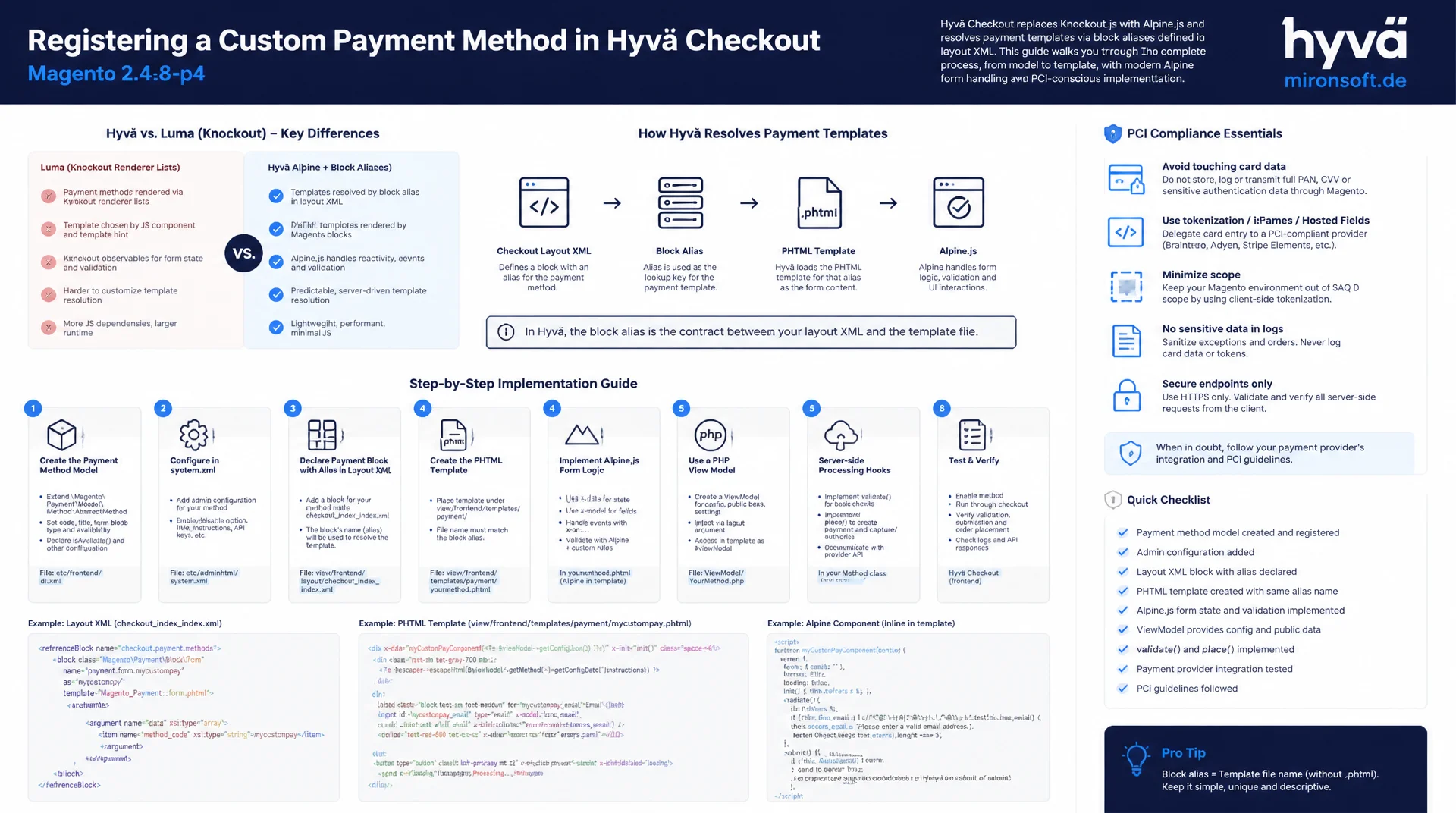
from the payment method model to Alpine.js validation
Anyone who wants to register a custom payment method in the Hyvä checkout will not get far with the classic Knockout renderer lists from the Luma checkout. Hyvä checkout resolves payment templates through block aliases in layout XML, while all form logic is built entirely with Alpine.js, phtml templates and PHP view models. This article walks through the full path from the payment method model to template registration, Alpine validation and server-side hooks, all the way to PCI compliance considerations for Magento 2.4.8-p4.
Table of Contents
- 1. How payment methods are rendered in the Hyvä checkout frontend
- 2. Backend: your own payment method model
- 3. Frontend registration of the template
- 4. Building your own phtml template for the payment method
- 5. Client-side validation of payment data before order completion
- 6. Server-side order placement hooks
- 7. Redirect-based payment methods
- 8. Error handling and error display in the frontend
- 9. Security and PCI compliance considerations
- 10. Summary
- 11. FAQ
1. How payment methods are rendered in the Hyvä checkout frontend
The free Hyvä default theme deliberately ships without its own checkout. In checkout_index_index.xml there is no layout at all, only a notice that either Hyvä Checkout, the Luma Fallback Checkout compatibility layer, or an alternative solution must be installed. This is the decisive fork in the road for a custom payment method in the Hyvä checkout: only the module Hyva_Checkout (composer package hyva-themes/magento2-hyva-checkout) actually gets you an Alpine.js-based payment step without Knockout.js, jQuery and UI components. The Luma Fallback Checkout variant still renders payment methods through the classic Knockout renderer list from checkout_index_index.xml with js/view/payment/method-renderer/... components, a path this article deliberately does not cover.
In Hyvä checkout, every available payment method is resolved as a child block of the container checkout.payment.methods. The block alias (the as attribute) must match exactly the Magento payment method code returned by Magento\Payment\Helper\Data::getPaymentMethods(). If there is no matching block alias for an active payment method, that method stays invisible in the selection, a common debugging pitfall when adding a new custom payment method in the Hyvä checkout. The companion npm package hyva-checkout provides the build pipeline that compiles Tailwind classes and Alpine.js components out of the checkout templates, similar to the main theme build.
The practical effect: instead of one JS bundle per payment method that has to be mapped through requirejs-config.js, a single phtml template plus one layout XML entry is enough. The block receives the current payment method as a Magento\Quote\Api\Data\PaymentMethodInterface instance through $block->getData('method'). That makes the entire rendering chain for a custom payment method in the Hyvä checkout declarative and server-side, without any Knockout observable bindings.
2. Backend: your own payment method model
Before any template gets rendered at all, every custom payment method needs a backend model that either implements Magento\Payment\Model\MethodInterface or, the usual path for offline and simple redirect methods, extends Magento\Payment\Model\Method\AbstractMethod. The property protected $_code defines the unique method code, $_isOffline controls whether an invoice rather than a payment capture is expected after order completion, and $_canUseCheckout / $_canUseInternal determine whether the method appears in the storefront checkout and in the admin order-creation grid respectively.
Registration itself happens through config.xml below <default><payment>: a node mironsoft_advancepayment with active, model, order_status, title, allowspecific and specificcountry. Only this entry actually makes the method visible to Magento\Payment\Helper\Data, without it no payment option shows up even with a correctly registered Hyvä checkout template. Visibility conditions are controlled by two methods: canUseForCountry($countryCode) restricts the method geographically, while canUseCheckout() or an override of isAvailable($quote) allows additional conditions such as a minimum order value or a customer group restriction.
The example below implements a custom payment method in the Hyvä checkout: advance payment with a 2% early payment discount, only available for DACH countries and above a minimum order value of 50 euros. assignData() additionally transfers the fields submitted by the checkout form into additional_information, which section 6 builds on.
<?php

declare(strict_types=1);

namespace Mironsoft\Payment\Model;

use Magento\Framework\DataObject;
use Magento\Payment\Model\Method\AbstractMethod;
use Magento\Quote\Api\Data\CartInterface;

/**
 * Custom offline payment method: advance payment with early payment discount.
 * Registered under payment/mironsoft_advancepayment in config.xml.
 */
class AdvancePayment extends AbstractMethod
{
    /**
     * @var string
     */
    protected $_code = 'mironsoft_advancepayment';

    /**
     * @var bool
     */
    protected $_isOffline = true;

    /**
     * @var bool
     */
    protected $_canUseCheckout = true;

    /**
     * @var bool
     */
    protected $_canUseInternal = true;

    /**
     * Restrict the payment method to DACH countries configured in system config.
     *
     * @param string|null $countryCode
     * @return bool
     */
    public function canUseForCountry($countryCode): bool
    {
        $allowed = ['DE', 'AT', 'CH'];

        return in_array($countryCode, $allowed, true);
    }

    /**
     * Hide the method below a minimum order value, on top of the default checks.
     *
     * @param CartInterface|null $quote
     * @return bool
     */
    public function isAvailable($quote = null): bool
    {
        if (!parent::isAvailable($quote)) {
            return false;
        }

        if ($quote !== null && (float) $quote->getGrandTotal() < 50.0) {
            return false;
        }

        return true;
    }

    /**
     * Persist additional checkout data submitted by the Alpine.js payment form.
     *
     * @param DataObject $data
     * @return $this
     */
    public function assignData(DataObject $data): static
    {
        parent::assignData($data);

        $additional = $data->getData('additional_data') ?? [];

        $this->getInfoInstance()->setAdditionalInformation(
            'invoice_reference',
            (string) ($additional['invoice_reference'] ?? '')
        );
        $this->getInfoInstance()->setAdditionalInformation(
            'early_discount_accepted',
            (bool) ($additional['early_discount_accepted'] ?? false)
        );

        return $this;
    }
}
3. Frontend registration of the template
Once the backend model is registered, the custom payment method needs a template assigned in the Hyvä checkout frontend. This happens in view/frontend/layout/hyva_checkout_components.xml of your own module, through a referenceBlock targeting checkout.payment.methods. The new child block gets the exact payment method code mironsoft_advancepayment as its as attribute and references the phtml template using the usual ModuleName::path notation. On top of that, etc/frontend/di.xml can be used to configure the block with further constructor arguments, for example when a view model is meant to be reused across several payment methods project-wide.
The arguments element in the layout XML also injects the PHP view model Mironsoft\Payment\ViewModel\AdvancePayment into the block, the preferred alternative to a dedicated block class in the Hyvä context. Since version 1.0.5, Hyvä checkout additionally supports metadata arguments for icons (icon/svg, or icon/src for raster images since 1.1.22) and subtitles (metadata/subtitle), which appear directly in the payment method list without any extra template.
Important for every custom payment method in the Hyvä checkout: if the block alias does not match the payment method code defined in config.xml exactly, the method will be reported as available by the backend but will not render in the frontend, silently. That is the most common stumbling block during template registration and is worth checking first whenever a new payment method is missing from the checkout selection.
<?xml version="1.0"?>
<!-- Registers the custom payment method template with Hyva Checkout -->
<page xmlns:xsi="http://www.w3.org/2001/XMLSchema-instance"
      xsi:noNamespaceSchemaLocation="urn:magento:framework:View/Layout/etc/page_configuration.xsd">
    <body>
        <referenceBlock name="checkout.payment.methods">
            <!-- The "as" alias must match the Magento payment method code exactly -->
            <block name="checkout.payment.method.mironsoft_advancepayment"
                   as="mironsoft_advancepayment"
                   template="Mironsoft_Payment::component/payment/method/advancepayment.phtml">
                <arguments>
                    <!-- Inject the ViewModel used inside the phtml template -->
                    <argument name="advancePaymentViewModel" xsi:type="object">
                        Mironsoft\Payment\ViewModel\AdvancePayment
                    </argument>
                    <!-- Optional metadata rendered directly in the payment method list -->
                    <argument name="metadata" xsi:type="array">
                        <item name="subtitle" xsi:type="string">Advance payment with 2% early discount</item>
                        <item name="icon" xsi:type="array">
                            <item name="svg" xsi:type="string">payment-icons/invoice</item>
                        </item>
                    </argument>
                </arguments>
            </block>
        </referenceBlock>
    </body>
</page>
4. Building your own phtml template for the payment method
The phtml template is where the custom payment method in the Hyvä checkout actually gets its form fields. Unlike the Luma checkout, there are no Knockout observable bindings, the entire form state lives in an Alpine.js x-data object defined right on the template's root element. The block delivers the current payment method as a PaymentMethodInterface through $block->getData('method'), and the injected view model supplies project-specific extras such as discount conditions or free-text labels.
In the example below, a text field captures an internal order reference and a checkbox captures the discount terms. Both fields are bound via x-model to the Alpine component advancePaymentForm() (see section 5), which is loaded from a separate JS file. Important for CSP-compliant Hyvä themes: since x-data is used here as an HTML attribute rather than a <script> block, no call to $hyvaCsp->registerInlineScript() is required, that would only be needed for actual inline <script> tags.
The form field names (mironsoft_advancepayment[invoice_reference]) must follow the naming scheme that Hyvä checkout expects when the order form is submitted, and that is passed to assignData() in the backend as the additional_data array. Deviating from this naming scheme produces a working-looking form with empty fields in additional_information.
<?php
/** @var Magento\Framework\View\Element\Template $block */
/** @var Magento\Quote\Api\Data\PaymentMethodInterface $method */
$method = $block->getData('method');
?>
<div class="mt-4 rounded-lg border border-gray-200 p-4"
     x-data="advancePaymentForm()"
     x-on:payment-method-changed.window="touched = false"
>
    <label class="block text-sm font-medium text-gray-700 mb-1">
        <?= $block->escapeHtml(__('Your internal order reference')) ?>
    </label>
    <input
        type="text"
        name="mironsoft_advancepayment[invoice_reference]"
        x-model="invoiceReference"
        x-on:blur="touched = true"
        class="w-full rounded-md border-gray-300 focus:border-orange-500 focus:ring-orange-500"
        placeholder="<?= $block->escapeHtmlAttr(__('e.g. cost center 4711')) ?>"
    >

    <label class="flex items-start gap-2 mt-4 text-sm text-gray-700">
        <input
            type="checkbox"
            name="mironsoft_advancepayment[early_discount_accepted]"
            x-model="discountAccepted"
            class="mt-0.5 rounded border-gray-300 text-orange-600 focus:ring-orange-500"
        >
        <span><?= $block->escapeHtml(__('I will pay within 7 days and use the 2% early discount.')) ?></span>
    </label>

    <p class="mt-2 text-xs font-semibold text-red-600" x-show="touched && errorMessage !== ''" x-text="errorMessage" x-cloak></p>
</div>
5. Client-side validation of payment data before order completion
For a custom payment method in the Hyvä checkout, server-side validation alone is not enough, because customers would only find out about a missing required field after a full page round trip. Hyvä checkout provides the interface EvaluationInterface with the method evaluateCompletion() for exactly this purpose, letting a payment method block order completion until all conditions are met server-side. This server-side check should still always be complemented by immediate, purely client-side Alpine.js validation, so users get feedback without any delay.
The Alpine component advancePaymentForm() is registered globally through Alpine.data() and extracted into its own JS file, rather than kept as a giant inline object in the phtml. Getters such as isValid and errorMessage reactively compute whether the form is complete, without any manual watcher required. The order button in the payment step calls validateBeforeSubmit() before actually submitting; if the function returns false, submission is prevented and an Alpine event payment-validation-failed is dispatched instead, which other components can react to.
This combination of immediate Alpine feedback and server-side EvaluationInterface checking prevents two typical failure modes: customers triggering an order despite incomplete form data, and customers being blocked by overly aggressive client-side validation even though the server would actually accept the data. It is important that both validation layers implement the same rules, otherwise contradictory error messages appear between frontend and backend.
/**
 * Alpine component for client-side validation of the advance payment form.
 * Registered globally so the phtml template can bind via x-data="advancePaymentForm()".
 */
document.addEventListener('alpine:init', () => {
    Alpine.data('advancePaymentForm', () => ({
        invoiceReference: '',
        discountAccepted: false,
        touched: false,

        get isValid() {
            return this.invoiceReference.trim().length >= 4 && this.discountAccepted;
        },

        get errorMessage() {
            if (!this.touched) {
                return '';
            }
            if (this.invoiceReference.trim().length < 4) {
                return 'Please provide at least 4 characters.';
            }
            if (!this.discountAccepted) {
                return 'Please confirm the early discount terms.';
            }
            return '';
        },

        /**
         * Called from the payment step before the "place order" button dispatches.
         * Returning false blocks the native submit handler.
         */
        validateBeforeSubmit() {
            this.touched = true;
            if (!this.isValid) {
                this.$dispatch('payment-validation-failed', { method: 'mironsoft_advancepayment' });
                return false;
            }
            return true;
        }
    }));
});
6. Server-side order placement hooks
As soon as the order is actually placed, the form data collected by Alpine.js ends up in additional_information of the order payment via assignData(), as shown in section 2. For any further logic that goes beyond plain storage, a plugin on Magento\Sales\Api\OrderManagementInterface::place() is a good fit. An afterPlace plugin can, for example, adjust the order status depending on the discount flag or trigger a notification to accounting whenever a custom payment method in the Hyvä checkout was used with deviating terms.
Alternatively, for more complex payment methods with an external gateway integration, Magento\Payment\Gateway\Command\CommandPoolInterface can be used, where a dedicated command in the command pool fully replaces the order placement logic instead of relying on AbstractMethod. For offline methods like the example, however, a plugin on OrderManagementInterface is the leaner and more maintainable path, since no full gateway command system needs to be built.
A central point for every custom payment method in the Hyvä checkout: additional_information is stored serialized in the sales_order_payment.additional_information column and can be read back at any later point, admin grid, invoice creation, observer, through $payment->getAdditionalInformation('field_name'). Sensitive values must explicitly not go in here, more on that in section 9.
<?php

declare(strict_types=1);

namespace Mironsoft\Payment\Plugin;

use Magento\Sales\Api\Data\OrderInterface;
use Magento\Sales\Api\OrderManagementInterface;
use Psr\Log\LoggerInterface;

/**
 * Persists advance-payment specific data on the order payment
 * once the order has been placed through the Hyva checkout.
 */
class PersistAdvancePaymentDataPlugin
{
    /**
     * @param LoggerInterface $logger
     */
    public function __construct(
        private readonly LoggerInterface $logger
    ) {
    }

    /**
     * Set a distinct order status for advance payments with accepted discount,
     * because the invoice amount differs from the quote grand total.
     *
     * @param OrderManagementInterface $subject
     * @param OrderInterface $order
     * @return OrderInterface
     */
    public function afterPlace(OrderManagementInterface $subject, OrderInterface $order): OrderInterface
    {
        $payment = $order->getPayment();

        if ($payment === null || $payment->getMethod() !== 'mironsoft_advancepayment') {
            return $order;
        }

        $discountAccepted = (bool) $payment->getAdditionalInformation('early_discount_accepted');

        if ($discountAccepted) {
            $order->setStatus('pending_advance_discount');
            $this->logger->info(sprintf(
                'Order #%s placed with 2%% early payment discount, invoice reference: %s',
                $order->getIncrementId(),
                (string) $payment->getAdditionalInformation('invoice_reference')
            ));
        }

        return $order;
    }
}
7. Redirect-based payment methods
Many external payment gateways expect the customer to be redirected to a hosted payment page after order completion. For such a custom payment method in the Hyvä checkout, the payment method model implements the method getOrderPlaceRedirectUrl() from MethodInterface, which Hyvä checkout automatically honors after a successful place() call and redirects the browser there instead of showing the standard success page. The return from the gateway is handled by a dedicated controller below Controller\Redirect\Response, which verifies the gateway's signature and, depending on the result, creates an invoice or cancels the order.
If the customer cancels the payment on the external page or the session expires, restoring the cart is critical for conversion. A controller Controller\Redirect\Cancel calls Magento\Checkout\Model\Session::restoreQuote() for that purpose, which reactivates the quote that had previously been converted into an order and makes it usable in the checkout again, instead of forcing the customer to start over. Without this step, the cart stays empty and the order gets stuck in the pending_payment status.
For failure scenarios where the gateway sends an asynchronous webhook rather than a browser redirect, verification should be strictly separated from the plain redirect logic: a dedicated controller, exempt from CSRF checking, accepts server-to-server callbacks, verifies a signature or an HMAC token, and updates the order through OrderManagementInterface, regardless of whether the customer even still has the browser tab open.
8. Error handling and error display in the frontend
For a custom payment method in the Hyvä checkout, there are two distinct error channels that should be handled deliberately separately. Magento's Magento\Framework\Message\ManagerInterface with addErrorMessage() is the right path for errors that trigger a full page reload, for example a declined payment after a redirect return, or a session timeout situation. These messages are rendered through the global message block and work independently of the page's Alpine state.
For anything that happens during interaction with the form itself, an empty required field, an invalid format, an unchecked checkbox, a purely local Alpine error state is the better choice, as shown in section 5. The advantage: the error message appears instantly, without a server request, and disappears automatically once the input is corrected. It is important that error texts are phrased understandably for end customers and do not expose technical details such as exception class names or gateway error codes, those belong in the log via Psr\Log\LoggerInterface instead.
For asynchronous requests, for example when validation runs server-side through EvaluationInterface, a third state deserves attention: the loading state during the request. A simple x-data="{ loading: false }" with :disabled="loading" on the order button prevents double clicks and makes it visible to the customer that something is happening, rather than the page appearing unresponsive.
9. Security and PCI compliance considerations
The most important principle for every custom payment method in the Hyvä checkout handling card data: sensitive payment data such as full card numbers or CVV codes must never end up in the Alpine x-data state, nor in localStorage. Alpine state is visible at any time through the browser devtools, and localStorage even survives tab switches, both disqualify these storage locations for PCI DSS-relevant data. Instead, tokenization SDKs from the respective payment gateways (hosted iframe fields or hosted-fields components) take over the direct transmission of card data to the gateway server, without it ever passing through your own shop server or the Alpine frontend at all.
Only the token returned by the gateway is subsequently passed through the regular form field to assignData() and stored in additional_information, never the raw card data. This separation significantly reduces the PCI DSS scope of your own shop, because no card data ever touches your own server. External payment scripts required for hosted fields or iframe widgets additionally need to be included in a CSP-compliant way: the relevant domains belong in etc/csp_whitelist.xml, and genuine inline scripts in Hyvä themes additionally require a call to $hyvaCsp->registerInlineScript().
A common mistake in practice: out of convenience, the content security policy gets relaxed for the entire checkout page instead of allowlisting individual gateway domains specifically. That undermines the actual protective purpose of the CSP and should be explicitly checked in every code review for a new custom payment method in the Hyvä checkout, ideally with a dedicated CSP configuration per payment method rather than a blanket exception for the whole domain.
The table below compares the classic Knockout renderer-list approach from the Luma checkout with the Hyvä checkout template approach, for typical tasks when integrating a custom payment method in the Hyvä checkout.
| Task | Knockout renderer list (Luma) | Hyvä checkout template | Benefit |
|---|---|---|---|
| Register payment method | js/view/payment/method-renderer/*.js in checkout_index_index.xml |
Block alias in hyva_checkout_components.xml | No Knockout bundle, no RequireJS mapping |
| Manage form state | ko.observable() chains in the view model |
Alpine.data() with local x-data state | Direct reactivity, no virtual rebuild |
| Show/hide fields | data-bind="visible: ..." |
x-show / x-if |
Declarative in markup, no bundle rebuild |
| Assign a template | requirejs-config.js + component registration | One phtml + one block alias in layout XML | A single place for the mapping |
| Lock order button on errors | Global Knockout computed in the payment view model | :disabled + local Alpine validation + EvaluationInterface | Instant feedback without global bindings |
Mironsoft
Magento 2 and Hyvä theme development with a focus on checkout and payment
Need a custom payment method in the Hyvä checkout?
We implement custom payment methods in the Hyvä checkout, from the payment method model through Alpine.js forms to PCI-compliant gateway integration, including redirect handling and server-side order hooks.
Payment Integration
Backend model, template registration and Alpine validation for custom payment methods
Checkout Audit
Reviewing existing Hyvä checkout integrations for security and CSP compliance
Gateway Integration
Tokenization, redirect flows and webhook verification for external payment gateways
10. Summary
Registering a custom payment method in the Hyvä checkout follows a clear, repeatable pattern: a payment method model extends AbstractMethod and gets activated through config.xml under payment/, a block alias in hyva_checkout_components.xml maps a phtml template exactly to that method, and Alpine.js takes over the entire client-side form logic without Knockout.js, jQuery or UI components. Visibility conditions such as canUseForCountry() and minimum order values control whether the method appears at all, while assignData() and an OrderManagementInterface plugin persist the submitted form data into additional_information.
For redirect-based gateways, getOrderPlaceRedirectUrl() and a clean cart restoration through restoreQuote() round things out, while error handling is deliberately split between the server-side message manager and a local Alpine error state. On the security side: no card data in the Alpine state or in localStorage, tokenization through the gateway SDK, and a targeted, CSP-compliant inclusion of external payment scripts instead of a blanket relaxation of the content security policy. Whoever assembles these nine building blocks consistently ends up with a custom payment method in the Hyvä checkout that stays maintainable, performant and PCI compliant.
Custom Payment Method in the Hyvä Checkout: The Key Points at a Glance
Backend Model & Visibility
AbstractMethod, config.xml under payment/, canUseForCountry() and isAvailable() for visibility rules.
Frontend Registration
The block alias in hyva_checkout_components.xml must match the payment method code exactly.
Validation & Hooks
Alpine.data() for instant feedback, EvaluationInterface server-side, an OrderManagementInterface plugin for persistence.
Security & PCI
No card data in the Alpine state or localStorage. Tokenization through the gateway SDK, CSP allowlisting instead of a global relaxation.