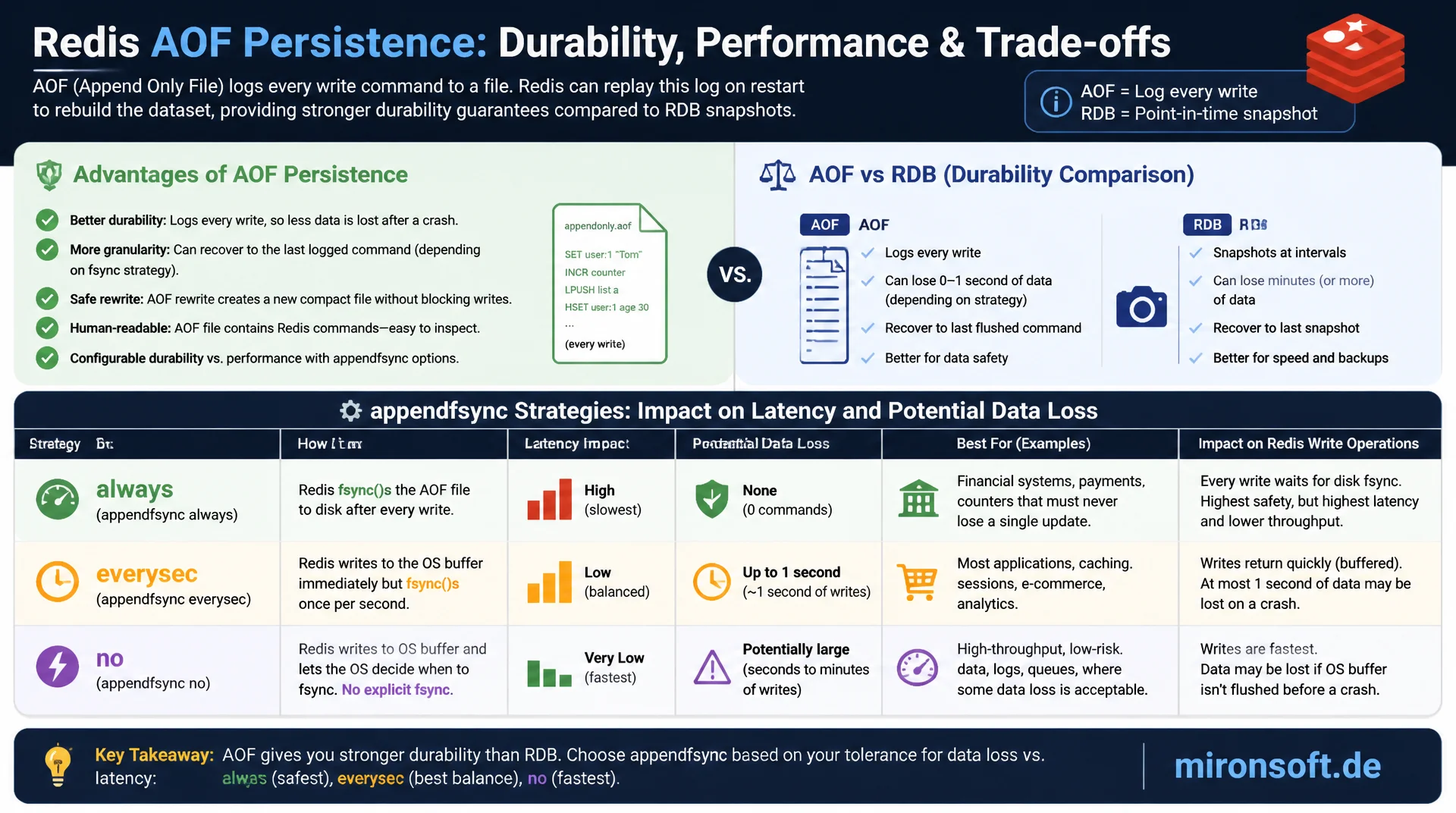
fsync Strategies Compared
AOF persistence logs every write operation as a command in an append-only file, giving Redis a much tighter durability guarantee than plain RDB snapshots. Choosing the appendfsync strategy among always, everysec, and no directly decides how many milliseconds of latency get traded for how many seconds of potential data loss.
Table of Contents
- 1. What Sets AOF Persistence Apart From RDB
- 2. Enabling AOF: appendonly and the Basic Configuration
- 3. appendfsync in Detail: always, everysec, no
- 4. The AOF File Format: Manifest, Base, and Incremental Files
- 5. The AOF Rewrite Process in Detail
- 6. Configuring and Controlling Rewrite Triggers
- 7. Performance Impact of fsync Strategies
- 8. Checking and Repairing AOF Files
- 9. Common Mistakes With AOF Persistence
- 10. Summary
- 11. FAQ
1. What Sets AOF Persistence Apart From RDB
AOF persistence, short for append-only file, takes a fundamentally different approach than RDB snapshots: instead of periodically saving the entire dataset, AOF logs every single write operation as a command in a continuously growing file. A SET key value is appended to the end of the AOF file exactly as that command, and so is an LPUSH. On restart, Redis replays these commands in the same order and reconstructs the exact final state.
The central advantage of AOF persistence lies in the granularity of the durability guarantee: while RDB snapshots can leave a window of minutes open, AOF can shrink the loss window to one second or even zero, depending on the chosen fsync strategy. The price is a larger file size compared to a compact RDB snapshot and a slower restart with very long command histories, unless a recent rewrite has already happened.
In practice, AOF persistence is mostly used where Redis serves not just as a cache but as a primary data source, for example for queues, counters, session stores with strict requirements, or rate-limiting state, where losing seconds of write operations would matter for the business. Combining both mechanisms, AOF and RDB together, is covered head-to-head in the next article in this series.
2. Enabling AOF: appendonly and the Basic Configuration
AOF persistence is enabled via the appendonly yes directive in redis.conf, disabled by default. Once enabled, Redis writes all write commands in addition to the existing RDB mechanisms into the AOF directory, configured via appenddirname, usually a subfolder called appendonlydir relative to the main dir. Since Redis 7, this directory consists of multiple files rather than a single monolithic AOF file, covered in more detail in the file format section.
It is important that enabling AOF at runtime via CONFIG SET appendonly yes immediately triggers an initial AOF rewrite that writes the current dataset as a base file before new commands get appended. This activation should never happen under full load without prior capacity planning, because the initial rewrite uses the same fork-based mechanism as BGSAVE and correspondingly needs copy-on-write memory.
# redis.conf - Basic AOF configuration

# Enable append-only file persistence
appendonly yes

# Directory for AOF files (relative to "dir")
appenddirname "appendonlydir"

# Base filename prefix for AOF manifest and files
appendfilename "appendonly.aof"

# fsync strategy (see next section)
appendfsync everysec
3. appendfsync in Detail: always, everysec, no
The appendfsync directive is the most important lever in AOF persistence, because it defines exactly when Redis forces the operating system buffer of the AOF file physically onto storage via fsync(). A write() system call alone does not guarantee persistence yet: the data first lands in the kernel page cache and could be lost in a power outage before the kernel writes it to disk on its own. fsync() forces exactly that physical write.
With appendfsync always, Redis calls fsync() after every single write command. That delivers the strongest durability guarantee, practically no data loss on a crash, but costs massive latency because every write operation waits on the slowest part of the system: the physical storage device. On spinning disks that can limit throughput to a few hundred operations per second, and even on fast NVMe SSDs a noticeable latency overhead in the low millisecond range remains per write.
With appendfsync everysec, the recommended default, a separate background thread performs fsync() at most once per second. That bounds potential data loss on a crash to one second of write operations, while latency for the client remains practically unaffected, because write() itself is fast and the expensive fsync() call runs asynchronously in the background. With appendfsync no, Redis leaves the timing of the physical write entirely to the operating system, which delivers the best performance but also the largest loss risk, typically 30 seconds or more of data, depending on kernel dirty-page settings.
# redis.conf - appendfsync strategies compared

# Strongest durability: fsync after every write command
# Slowest option, use only when zero data loss is mandatory
appendfsync always

# Recommended default: fsync at most once per second
# Bounded loss window of ~1 second, minimal latency impact
appendfsync everysec

# No explicit fsync by Redis, kernel decides when to flush
# Fastest, largest loss window (often 30s+), rarely recommended
appendfsync no
4. The AOF File Format: Manifest, Base, and Incremental Files
Since Redis 7 the AOF file format was fundamentally reworked and no longer consists of a single growing file, but of several components inside the appendonlydir directory. A manifest file, usually appendonly.aof.manifest, lists all associated files in the correct order: a base file with a .base.rdb or .base.aof suffix that holds the state at the time of the last rewrite in RDB or AOF format, plus one or more incremental files with a .incr.aof suffix that hold all commands executed since then.
This multi-part format solves a practical problem of the old single-file architecture: a rewrite used to have to rewrite the entire file while simultaneously buffering new commands, which caused memory pressure on very large datasets. With the new format, a rewrite simply writes a new base file and starts a new, empty incremental file, while the old incremental file is only deleted after successful completion. That substantially reduces the risk of inconsistent state on a crash during a rewrite.
# Inspect the AOF directory structure (Redis 7+ multi-part format)
ls -la /var/lib/redis/appendonlydir/
# appendonly.aof.1.base.rdb     <- base snapshot from last rewrite
# appendonly.aof.1.incr.aof     <- incremental commands since rewrite
# appendonly.aof.manifest       <- ordered list of active files

cat /var/lib/redis/appendonlydir/appendonly.aof.manifest
# file appendonly.aof.1.base.rdb seq 1 type b
# file appendonly.aof.1.incr.aof seq 1 type i
5. The AOF Rewrite Process in Detail
Without a rewrite, an AOF file would grow indefinitely, even if the same key gets overwritten hundreds of times, because every single command is logged. The BGREWRITEAOF process solves this problem by, analogous to BGSAVE, forking a child process via fork() that writes the current, compact dataset as a new base file instead of preserving the entire command history. A hash overwritten ten times appears in the new base file only with its final value, not as ten separate commands.
While the child process writes the new base file, the parent process keeps buffering incoming write commands into a new incremental file. After the child process finishes the rewrite, Redis atomically adopts the new base file together with the incremental file collected during the rewrite and updates the manifest file accordingly. The old base and incremental files are only deleted afterward, which ensures that a consistent, loadable state always exists even on a crash during the rewrite.
As with BGSAVE, the same applies to BGREWRITEAOF: the fork itself briefly costs CPU time for duplicating the page table, and copy-on-write increases memory demand proportionally to write load during the rewrite. A manual call via redis-cli BGREWRITEAOF is possible at any time, for example after a known phase of intense write load, to proactively reduce AOF size instead of waiting for the automatic trigger.
| appendfsync | Max. data loss | Latency overhead | Recommendation |
|---|---|---|---|
| always | ~0 (practically none) | High, every write waits on disk | Only for mandatory zero-loss requirements |
| everysec | Up to 1 second | Minimal, fsync in background | Recommended default for most setups |
| no | 30s+ (kernel dependent) | Very low | Only when performance clearly outweighs durability |
6. Configuring and Controlling Rewrite Triggers
Redis triggers an automatic AOF rewrite based on two configurable thresholds: auto-aof-rewrite-percentage defines by how many percent the AOF size must have grown since the last rewrite, 100 percent by default, meaning a doubling. auto-aof-rewrite-min-size prevents unnecessarily frequent rewrites on very small AOF files, 64 megabytes as the lower bound by default. Both conditions must be true before Redis automatically calls BGREWRITEAOF.
These thresholds are a direct tradeoff between file size and rewrite frequency: a low percentage keeps the AOF file compact but causes more frequent fork operations with corresponding CPU and memory overhead. A high percentage reduces rewrite frequency but lets the file grow more in the meantime, which increases both disk space usage and load time on restart, unless a recent rewrite happened right before.
# redis.conf - AOF rewrite trigger thresholds

# Trigger a rewrite once the AOF has grown 100% since the last rewrite
auto-aof-rewrite-percentage 100

# But never rewrite below this absolute size (avoids rewrite storms
# on small, freshly started instances)
auto-aof-rewrite-min-size 64mb

# Prevent BGSAVE and BGREWRITEAOF from running simultaneously
# (both fork; running together doubles COW pressure)
no-appendfsync-on-rewrite no
7. Performance Impact of fsync Strategies
The choice of fsync strategy affects not just the latency of individual write operations, but also overall throughput under load. With appendfsync always, every single write command is effectively serialized through a physical disk write, which on classic hard disks means a few hundred operations per second, and even on fast NVMe drives noticeably reduces throughput compared to everysec, because every write must wait for the previous fsync() to complete.
An often overlooked parameter is no-appendfsync-on-rewrite. Set to no by default, Redis continues to perform fsync calls normally even during a running AOF rewrite. On systems with slow I/O this can cause increased latency during a rewrite, because the rewrite child process and the regular fsync calls compete for the same I/O bandwidth. Setting this parameter to yes pauses fsync calls completely during the rewrite, which in the worst case raises the loss risk to the duration of the entire rewrite, but in exchange avoids latency spikes during the rewrite.
In practice, most production Redis setups achieve an optimal balance between durability and throughput with everysec, while always is justified only for very specific compliance or financial use cases with an explicit zero-loss requirement, where the latency cost is knowingly accepted.
8. Checking and Repairing AOF Files
Redis ships redis-check-aof, a dedicated tool for checking AOF files for consistency, especially after a hard crash where the last write operation may have been written incompletely to disk. A truncated last command at the end of the file is a known and tolerable scenario with AOF: Redis detects such a truncation issue on startup and, as long as aof-load-truncated yes is set, can fix it automatically by discarding the incomplete last line.
For deeper repairs, run redis-check-aof --fix on the affected incremental file. The tool reads the file sequentially, validates each command against the RESP protocol format, and truncates the file at the last fully valid command. Important: always make a copy of the original file before any --fix call, because the repair is destructive and in the worst case discards more data than was actually damaged.
#!/usr/bin/env bash
# check_aof_integrity.sh - Validate AOF files before a risky restart
set -euo pipefail

AOF_DIR="/var/lib/redis/appendonlydir"
BACKUP_DIR="/var/backups/redis/aof-precheck-$(date +%Y%m%d-%H%M%S)"

mkdir -p "$BACKUP_DIR"
cp -a "$AOF_DIR"/. "$BACKUP_DIR/"

for incr_file in "$AOF_DIR"/*.incr.aof; do
  echo "Checking: $incr_file"
  if ! redis-check-aof "$incr_file"; then
    echo "[WARN] Issues found in $incr_file, backup preserved at $BACKUP_DIR" >&2
  fi
done

echo "[OK] AOF integrity check complete, backup at $BACKUP_DIR"
9. Common Mistakes With AOF Persistence
A common mistake is using appendfsync always in environments with slow storage without measuring the throughput loss beforehand. On network storage with high fsync latency, this setting can reduce effective write throughput by an order of magnitude, which frequently goes unnoticed in load tests, because those usually test smaller data volumes and lower concurrency than production.
A second mistake is letting BGSAVE and BGREWRITEAOF run at the same time without accounting for no-appendfsync-on-rewrite. Both operations fork the process and create copy-on-write pressure, so the combined memory overhead when they run concurrently is noticeably higher than when each runs separately. Redis tries by default to avoid overlapping rewrites, but manually triggered backups via BGSAVE running alongside an automatic AOF rewrite can still overlap.
A third, subtler mistake is assuming that AOF persistence automatically protects against data corruption from application bugs. AOF logs exactly the commands the application sends, including faulty delete or overwrite operations. An accidental FLUSHALL is persisted just as reliably and replayed on the next restart like any other command. AOF therefore does not replace a separate backup strategy with point-in-time recovery.
Mironsoft
Redis operations, persistence strategy, and backup infrastructure
The right fsync strategy for your Redis setup?
We analyze your write load, measure the actual latency impact of appendfsync options, and configure AOF rewrite triggers that match your data volume and availability requirements.
Durability Analysis
Weigh appendfsync strategies against your actual loss tolerance
Rewrite Tuning
Tune auto-aof-rewrite-percentage and min-size to your data volume
Incident Readiness
Establish redis-check-aof processes and recovery runbooks
10. Summary
AOF persistence logs every write operation as a command and therefore allows a much tighter loss window than plain RDB snapshots. Choosing the appendfsync strategy is the central decision: always for maximum durability with noticeable latency overhead, everysec as the recommended compromise with one second of potential loss, no for maximum performance with greater risk. The AOF rewrite process keeps file size under control via BGREWRITEAOF, controlled by auto-aof-rewrite-percentage and auto-aof-rewrite-min-size.
The multi-part file format since Redis 7, with manifest, base, and incremental files, makes rewrites more robust against crashes than the old single-file format. redis-check-aof remains the central tool for diagnosis and repair after a hard crash. It stays important that AOF persistence protects against technical data loss, not against logical application errors like an accidental FLUSHALL, for which a separate backup strategy is still needed.
AOF Persistence in Detail: the Essentials at a Glance
fsync Strategies
always for zero loss, everysec as the default, no only with a clear performance priority.
AOF Rewrite
BGREWRITEAOF compacts the command history, controlled by percentage and min-size triggers.
File Format
Manifest, base file, and incremental file since Redis 7, more robust against crashes during rewrite.
Repair
redis-check-aof --fix after a hard crash, always make a copy of the original file first.