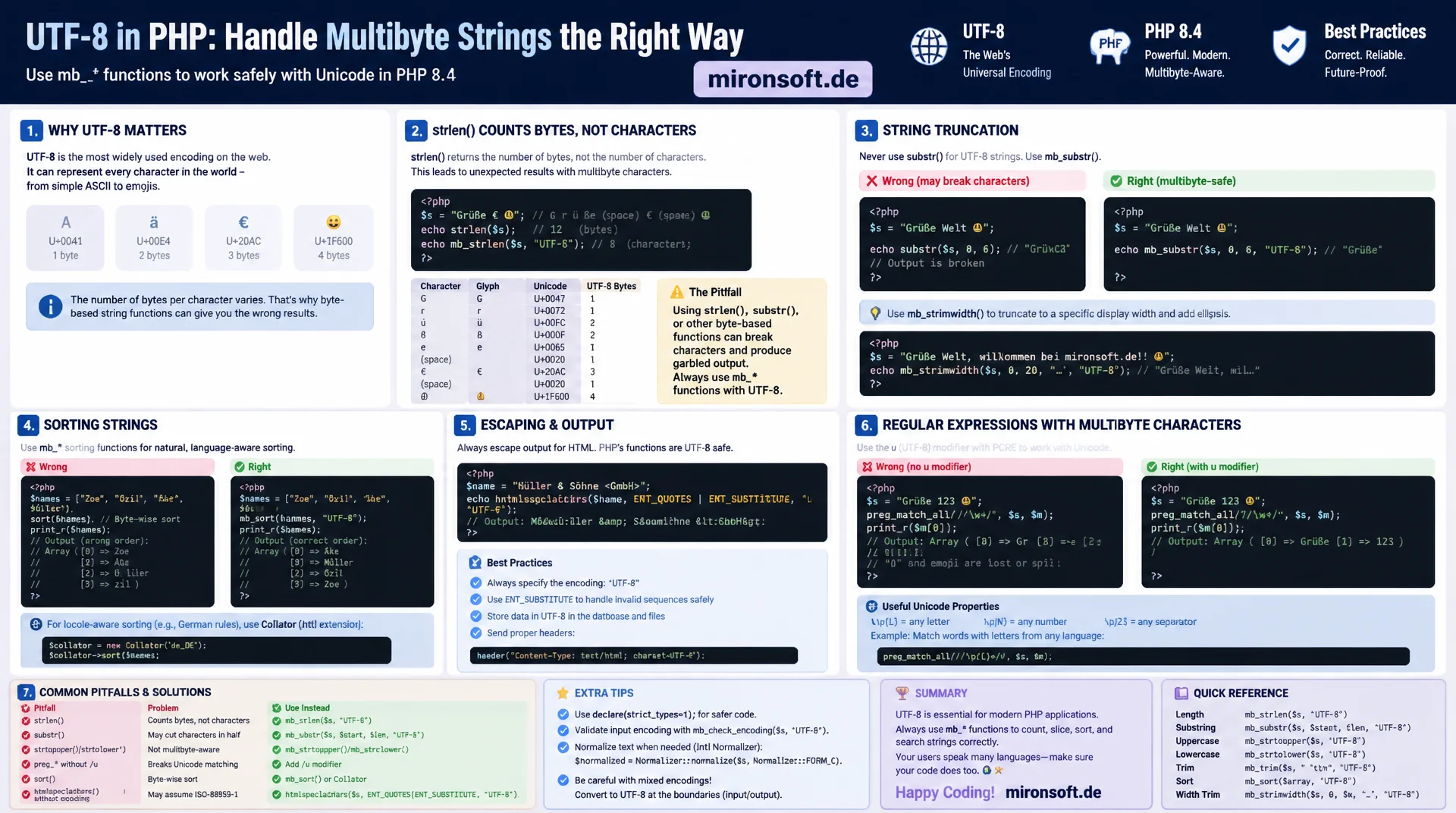
Getting umlauts, UTF-8 and mb_ functions right
strlen() counts bytes, not characters, and returns wrong values for umlauts and Unicode characters almost every time. This guide explains how UTF-8 encoding works, why mb_ functions are essential for multibyte strings, and how truncation, sorting, escaping and regular expressions with umlauts work reliably in PHP 8.4.
Table of Contents
- 1. Why strlen() returns wrong results for umlauts and Unicode
- 2. Bytes vs. characters: how UTF-8 encoding works and why it matters
- 3. The mbstring extension: using mb_strlen, mb_substr, mb_strtoupper correctly
- 4. Pitfalls in substr(), str_split() and strpos() with multibyte characters
- 5. Case conversion and sorting with umlauts
- 6. Encoding detection and conversion: mb_detect_encoding, mb_convert_encoding, iconv
- 7. HTML output and escaping: htmlspecialchars with the correct encoding parameter
- 8. Regular expressions with Unicode: preg_match and the u modifier
- 9. mb_internal_encoding, php.ini settings and project best practices
- 10. Summary
- 11. FAQ
1. Why strlen() returns wrong results for umlauts and Unicode
The strlen() function counts bytes, not characters. As long as a string consists only of ASCII characters, that is not a problem, because every ASCII character occupies exactly one byte. But as soon as umlauts, the German eszett (ß), or other Unicode characters appear in a string, strlen() returns a value that is higher than the actual number of characters. The string "Größe" has five characters but seven bytes, because ö and ß each take up two bytes in UTF-8. Anyone who does not know this ends up building validation logic on top of strlen() that systematically produces wrong results for multibyte strings.
This is not an academic edge case, it affects everyday tasks: length validation on form fields, truncating product names for meta tags, limiting comment lengths, or cutting text for preview snippets. If substr() is used instead of mb_substr() in these situations, a multibyte character can be cut right in the middle. The result is an invalid UTF-8 byte sequence, which can show up in the browser as a replacement glyph, as a box with a question mark, or in the worst case as a completely empty string after an escaping function has been applied.
In German-speaking projects, this problem is particularly relevant because umlauts and the eszett can appear in practically any data set: customer names, addresses, product descriptions, free-text fields. A shop system that uses strlen() to validate the maximum length of a company name effectively truncates names with many umlauts earlier than the user expects, and this bug usually only surfaces in production once a real customer enters a name containing special characters.
<?php

declare(strict_types=1);

// German product attribute containing umlauts (5 characters, 7 bytes in UTF-8)
$label = 'Größe';

echo strlen($label) . PHP_EOL;     // 7 - counts bytes, not characters
echo mb_strlen($label) . PHP_EOL;  // 5 - counts actual characters

// Byte-based truncation can cut a multibyte character in half
$brokenCut = substr($label, 0, 3);
$correctCut = mb_substr($label, 0, 3);

// $brokenCut ends with a lone lead byte of "oe" (0xC3) - invalid UTF-8
// $correctCut is "Grö" - three full characters, valid UTF-8
var_dump(mb_check_encoding($brokenCut, 'UTF-8'));  // false
var_dump(mb_check_encoding($correctCut, 'UTF-8')); // true
2. Bytes vs. characters: how UTF-8 encoding works and why it matters
UTF-8 is a variable-length encoding. ASCII characters (code points 0 to 127) occupy exactly one byte and are identical to classic 7-bit ASCII, which makes UTF-8 backward compatible. Characters outside that range, such as German umlauts, the eszett, or Cyrillic and Asian script characters, occupy two, three, or four bytes. The lead byte of a multibyte sequence encodes in its upper bits how many continuation bytes belong to the sequence, and every continuation byte itself begins with the bit pattern 10. This structure makes it possible to recognize and validate a UTF-8 sequence at any point in the string without having to parse it from the very beginning.
This exact structure is what gets violated when a byte-oriented function like substr() or str_split() cuts a multibyte sequence in the middle. The result is no longer valid UTF-8, but a string with an orphaned lead byte or continuation byte. Many downstream functions do not react to invalid UTF-8 with an exception, but with silent misbehavior: htmlspecialchars() can return an empty string without the right fallback, json_encode() fails and returns false, and database drivers can discard the entire remainder of the string. The bug originates at one point in the code but often only becomes visible several function calls later.
It is also important to distinguish between Unicode code points and so-called grapheme clusters. A single visible character can consist of multiple code points, for example a letter combined with a separate combining accent mark, or an emoji with a skin tone modifier. PHP's mb_ functions operate at the code point level, not at the grapheme level. For the vast majority of German-language use cases with umlauts and the eszett, this is sufficient, because those characters are encoded as single, precomposed code points. Anyone working with complex emoji combinations or writing systems that use combining characters should additionally consider the grapheme_* functions from the intl extension.
3. The mbstring extension: using mb_strlen, mb_substr, mb_strtoupper correctly
The mbstring extension provides a multibyte-aware counterpart for practically every native string function, one that operates on characters instead of bytes. mb_strlen() counts characters, mb_substr() cuts on character boundaries, and mb_strtoupper() and mb_strtolower() convert case while respecting the encoding that is passed in. In most modern PHP distributions, including standard Docker images, mbstring is already enabled by default and usually does not need to be installed separately, but it should still be explicitly declared as ext-mbstring in composer.json so the dependency is documented and checked during deployments.
Every mb_ function accepts an optional encoding parameter that specifies which encoding the input should be interpreted with. If the parameter is omitted, PHP falls back to the internal encoding, which is set via mb_internal_encoding() and defaults to UTF-8. In practice, it makes sense to pass the encoding parameter explicitly anyway whenever a function works with data from an untrusted source, such as file uploads or external APIs whose encoding is not guaranteed to be UTF-8.
One detail that is often overlooked: by default, mb_strtoupper() does not automatically treat the German eszett as "SS", because the classic uppercase rule for the eszett was historically handled inconsistently, and the actual capital letter ẞ was only officially added to the German Duden dictionary in 2017. Depending on the ICU version and PHP build, the result can vary, which is why legally relevant output such as invoice addresses deserves an explicit test with the project's own target data.
<?php

declare(strict_types=1);

$productName = 'Bücherregal für Küchenutensilien';

// Correct character count regardless of umlauts
$charCount = mb_strlen($productName, 'UTF-8');

// Safe substring: always cuts on character boundaries, never mid-byte
$excerpt = mb_substr($productName, 0, 20, 'UTF-8');

// Correct uppercase conversion for German umlauts
$upper = mb_strtoupper($productName, 'UTF-8');

// Naive strtoupper() leaves multibyte characters untouched (ASCII-only)
$naiveUpper = strtoupper($productName);

echo $charCount . PHP_EOL;   // 32
echo $excerpt . PHP_EOL;     // "Bücherregal für Küch" (exactly 20 characters)
echo $upper . PHP_EOL;       // "BÜCHERREGAL FÜR KÜCHENUTENSILIEN"
echo $naiveUpper . PHP_EOL;  // "BüCHERREGAL FüR KüCHENUTENSILIEN" - ü stays lowercase
4. Pitfalls in substr(), str_split() and strpos() with multibyte characters
substr() fundamentally works with byte offsets. As long as the start and end positions happen to fall on character boundaries, the call appears to work correctly, but that is pure coincidence and breaks with the next text change. str_split() is affected even more directly: by default, the function splits a string into blocks of a fixed byte length, with no regard for character boundaries whatsoever. For a string containing umlauts, str_split($text, 1) therefore does not produce a list of individual characters, but a list of individual bytes, some of which are no longer valid UTF-8 on their own.
strpos() returns a byte position on success, not a character position. If that return value is then passed to a plain substr(), everything stays internally consistent, because both functions work with bytes. But as soon as a developer compares the return value of strpos() with a character count coming from mb_strlen(), or passes it to mb_substr(), an offset bug appears, because a byte index and a character index get mixed together. These bugs are particularly nasty because they do not show up as a crash, but as slightly shifted, seemingly almost-correct text excerpts.
The rule of thumb is therefore: as soon as a string can potentially contain umlauts, the eszett, or other non-ASCII characters, the mb_ variant should be used consistently everywhere, not just in isolated spots. Mixing strpos() and mb_substr() within the same data flow is one of the most common causes of hard-to-reproduce encoding bugs in mature codebases.
| Standard function | Behavior with umlauts/Unicode | mb_ counterpart | Recommendation |
|---|---|---|---|
| strlen() | counts bytes, value too high with umlauts | mb_strlen() | always use for character length validation |
| substr() | can cut a multibyte character in half | mb_substr() | use for any user-facing text output |
| strtoupper() | leaves ä, ö, ü, ß unchanged (ASCII-only) | mb_strtoupper() | call with an explicit encoding parameter |
| str_split() | splits into bytes instead of characters | mb_str_split() | always use the mb_ variant for character arrays |
| strpos() | returns a byte offset, not a character offset | mb_strpos() | never mix the offset with mb_substr() |
5. Case conversion and sorting with umlauts
Beyond plain case conversion, sorting strings that contain umlauts is a problem in its own right. The native sort() function compares strings byte by byte. In UTF-8, the bytes of umlauts and other non-ASCII characters are numerically well above the bytes of ASCII letters, because their lead byte starts with the bit pattern 110 or higher. This causes words that start with an umlaut to end up at the bottom of a byte-sorted list, well behind words starting with "Z", which contradicts the intuitive German alphabetical order.
For correct, locale-aware sorting, the intl extension provides the Collator class. A Collator instantiated with the de_DE locale sorts according to the actual German collation rules: umlauts are placed near their base letter, case is usually ignored during the primary comparison and only used as a tie-breaker when strings are otherwise identical. This matches the sorting behavior end users expect from address books, product listings, and phone directories.
A similar rule applies to database queries: sorting should preferably happen inside the database itself, using an appropriate collation such as utf8mb4_de_0900_ai_ci in MySQL, rather than loading unsorted records and then sorting them in PHP with sort(). Where sorting in PHP is still necessary, for example after merging several data sources, Collator is the only reliable choice for text containing umlauts.
<?php

declare(strict_types=1);

$words = ['Apfel', 'Öl', 'Zug', 'Über', 'ärgerlich'];

// Byte-based sort() compares raw UTF-8 byte values - umlauts land in the wrong place
$byteSorted = $words;
sort($byteSorted);

// Locale-aware sort with the intl extension respects German collation rules
$collator = new Collator('de_DE');
$localeSorted = $words;
$collator->sort($localeSorted);

// $byteSorted places every umlaut-starting word after ASCII "Zug" (wrong for German)
// $localeSorted follows the expected German dictionary order (Apfel, aergerlich, Oel, Ueber, Zug)
print_r($byteSorted);
print_r($localeSorted);
6. Encoding detection and conversion: mb_detect_encoding, mb_convert_encoding, iconv
Not every data source reliably delivers UTF-8. CSV exports from older ERP systems, Windows applications, and some email clients frequently deliver ISO-8859-1 or Windows-1252, in which umlauts are encoded as a single byte that represents a different character than the corresponding UTF-8 code point. If such data is fed into a UTF-8 system without conversion, the classic mojibake appears: readable but wrong characters, such as "ä" instead of "ä".
mb_detect_encoding() tries to determine a string's encoding heuristically, but without an explicit candidate list it is unreliable, because many byte sequences are valid in several encodings at once. In practice, the function should always be called with a restricted, plausible list of possible encodings, such as ['UTF-8', 'Windows-1252', 'ISO-8859-1'], and in strict mode, so that only truly valid sequences are recognized. mb_convert_encoding() then performs the actual conversion into the internal target encoding, which in nearly every modern PHP project is UTF-8.
As an alternative or complement, iconv() is available, which works through the operating system's libiconv library and offers additional options via the //TRANSLIT and //IGNORE suffixes: //TRANSLIT replaces characters that do not exist in the target encoding with the closest approximation, for example an umlaut with its spelled-out substitute, while //IGNORE silently drops characters that cannot be converted. These options are especially useful when multibyte strings need to be converted into pure ASCII contexts, such as file names, URL slugs, or systems that do not support Unicode.
<?php

declare(strict_types=1);

// CSV export from a legacy system, often Windows-1252 or ISO-8859-1
$rawLine = file_get_contents('legacy-export.csv');

// Detect encoding with an explicit candidate list - never trust blind auto-detection
$detected = mb_detect_encoding($rawLine, ['UTF-8', 'Windows-1252', 'ISO-8859-1'], true);

// Convert to a known internal encoding before any further processing
$normalized = mb_convert_encoding($rawLine, 'UTF-8', $detected ?: 'ISO-8859-1');

// iconv as an alternative, with transliteration for non-ASCII target systems
$transliterated = iconv('UTF-8', 'ASCII//TRANSLIT//IGNORE', $normalized);

var_dump(mb_check_encoding($normalized, 'UTF-8')); // true after normalization
echo $transliterated . PHP_EOL; // umlauts approximated as ASCII, e.g. ae, oe, ue
7. HTML output and escaping: htmlspecialchars with the correct encoding parameter
htmlspecialchars() is the central function for safely outputting user-generated content into HTML and preventing XSS attacks via angle brackets and quotes. Until PHP 8.1, the default encoding of this function was ISO-8859-1, even though most projects had long since moved to UTF-8. When a UTF-8 string containing umlauts hit this wrong default assumption, htmlspecialchars() could historically return an empty string as soon as the function encountered a byte sequence that was invalid for the assumed encoding. Since PHP 8.1, UTF-8 is the default value, which defuses this class of bugs for new projects, but the risk remains in legacy code with an explicitly set ISO-8859-1 parameter.
In addition to the encoding parameter, the flag combination ENT_QUOTES | ENT_SUBSTITUTE is recommended. ENT_QUOTES escapes both double and single quotes, which matters in HTML attributes that use single quotes. ENT_SUBSTITUTE ensures that invalid byte sequences are replaced with the Unicode replacement character U+FFFD, instead of silently turning the entire output into an empty string. Especially for multibyte strings coming from untrusted sources, such as free-text fields or imported data, this behavior is decisive, because an empty output does not stand out as an error, while a visible replacement character immediately signals an encoding problem.
8. Regular expressions with Unicode: preg_match and the u modifier
PCRE, the regular expression engine behind preg_match() and related functions, is byte-oriented by default. Character classes such as \w or \d refer exclusively to the ASCII range unless told otherwise. An umlaut or the eszett is simply not captured by \w without a modifier, because the lead byte of these characters lies outside the ASCII range and the continuation bytes are likewise not recognized as word characters. The result: a pattern like /\w+/ splits "Straße" into the fragments "Stra" and "e", and "Königsallee" into "K" and "nigsallee", because the character class breaks at every umlaut or eszett position.
The u modifier switches PCRE into UTF-8 mode. The pattern then interprets the input as a sequence of Unicode code points instead of a sequence of individual bytes, which lets \w correctly recognize umlauts and other letters from the extended Unicode range as word characters. In addition, the u modifier unlocks access to Unicode property classes such as \p{L} for any letter from any writing system, or \p{N} for numbers, which is particularly relevant for internationally used forms.
An important security aspect: if the input contains invalid UTF-8, preg_match() with the u modifier does not return 0, it returns false, and preg_last_error() reports PREG_BAD_UTF8_ERROR. If the return value is carelessly interpreted as a plain boolean, for example with a simple if (!preg_match(...)), this error case gets treated like a simple non-match, which in a validation routine can let genuinely malformed input pass through as valid. That is why input going into a /u pattern should be checked beforehand with mb_check_encoding().
<?php

declare(strict_types=1);

$input = 'Straße Königsallee 42';

// Without the u modifier, \w only matches ASCII word characters
preg_match_all('/\w+/', $input, $withoutU);

// With the u modifier, PCRE switches to UTF-8 mode and \w includes umlauts
preg_match_all('/\w+/u', $input, $withU);

print_r($withoutU[0]); // ["Stra", "e", "K", "nigsallee", "42"] - broken at every umlaut/eszett
print_r($withU[0]);    // ["Straße", "Königsallee", "42"] - words stay intact

// Always validate encoding before running a /u pattern - invalid UTF-8 makes
// preg_match() return false instead of 0, which is easy to miss in validation code
if (!mb_check_encoding($input, 'UTF-8')) {
    throw new InvalidArgumentException('Input is not valid UTF-8');
}
9. mb_internal_encoding, php.ini settings and project best practices
mb_internal_encoding() sets the default encoding that all mb_ functions use whenever no explicit encoding parameter is passed. In most current PHP installations the default value is already UTF-8, but it is still good practice to set this value explicitly once, centrally, in the application bootstrap, rather than relying on the configuration of whichever server environment happens to be running the code. The previously common php.ini directive mbstring.internal_encoding was removed in PHP 8.0, so the encoding must now be controlled exclusively through the function call or through mb_internal_encoding() in code, no longer through a global server setting.
Consistency across the entire stack is the decisive success factor: HTTP response headers should declare charset=UTF-8, the HTML page should include a matching <meta charset="UTF-8">, database tables should be created with utf8mb4 rather than the legacy utf8, which only covers part of the Unicode range in MySQL, and the database driver's connection encoding should likewise be explicitly set to UTF-8. A single misconfigured link in this chain, for example a database connection using latin1, can render umlauts unusable throughout the entire system, even if the PHP code itself works correctly with mb_ functions.
Since static analysis tools like PHPStan cannot automatically detect the incorrect use of strlen() instead of mb_strlen(), because both functions are syntactically valid calls with correct types, it is worth adding a project-specific coding standard rule or a custom sniff that flags byte-oriented string functions when they operate on user-generated data. In addition, every code review of new string operations should ask whether the string being handled is guaranteed to be pure ASCII, because only then is skipping the mb_ variant actually safe.
10. Summary
Multibyte strings are the rule, not the exception, in any German-language PHP project, because umlauts and the eszett are omnipresent in names, addresses, and free text. PHP's byte-oriented native string functions, above all strlen(), substr(), str_split(), and strpos(), ignore character boundaries and systematically produce wrong results for multibyte strings: lengths that are too high, characters cut in half, and byte offsets instead of character offsets. The mbstring extension, with mb_strlen(), mb_substr(), mb_strtoupper(), and mb_str_split(), solves these problems by consistently operating at the character level instead of the byte level.
Beyond that, sorting, encoding conversion, HTML escaping, and regular expressions each require their own Unicode-aware tools: Collator for locale-correct sorting, mb_detect_encoding() and mb_convert_encoding() for data coming from foreign systems, htmlspecialchars() with ENT_QUOTES | ENT_SUBSTITUTE for safe escaping, and the u modifier for Unicode-capable regular expressions. Anyone who applies these tools consistently and project-wide, rather than sporadically, avoids the typical hard-to-reproduce encoding bugs that only surface in production once real customer data is involved.
Multibyte Strings in PHP 8.4, the essentials at a glance
Lengths and substrings
Always use mb_strlen() and mb_substr() instead of strlen() and substr() for multibyte strings containing umlauts or Unicode characters.
Sorting
Use Collator from the intl extension for locale-correct sorting with umlauts, never the byte-comparing sort().
Encoding conversion
Check foreign data with mb_detect_encoding() and an explicit candidate list, then normalize it to UTF-8 with mb_convert_encoding().
Regex and escaping
Consistently use the u modifier for Unicode regex and ENT_QUOTES | ENT_SUBSTITUTE with htmlspecialchars().
11. FAQ: Multibyte Strings and Umlauts in PHP
1What is the difference between strlen() and mb_strlen()?
2Why does strlen() return a value that is too high for umlauts?
3Is mbstring available by default in PHP 8.4?
4How do I safely truncate a multibyte string?
5Why doesn't strtoupper() work with umlauts?
6How do I correctly sort strings with umlauts?
7What does the u modifier do in regular expressions?
8How do I check for valid UTF-8?
9mb_convert_encoding or iconv?
10Should I always call mb_internal_encoding()?
Mironsoft
PHP development with clean encoding and Unicode safety
Is your PHP code still fighting umlauts and broken characters?
We audit your codebase for byte-oriented string functions, encoding inconsistencies, and faulty regex patterns, and replace them with robust, multibyte-safe solutions that hold up reliably with real customer data.
Encoding audit
Systematic review for strlen()/substr() usage on multibyte strings and missing mb_ calls
Refactoring
Consistent migration to mbstring functions, Collator-based sorting, and safe escaping
Stack consistency
Ensuring UTF-8 consistency across database, HTTP headers, and frontend