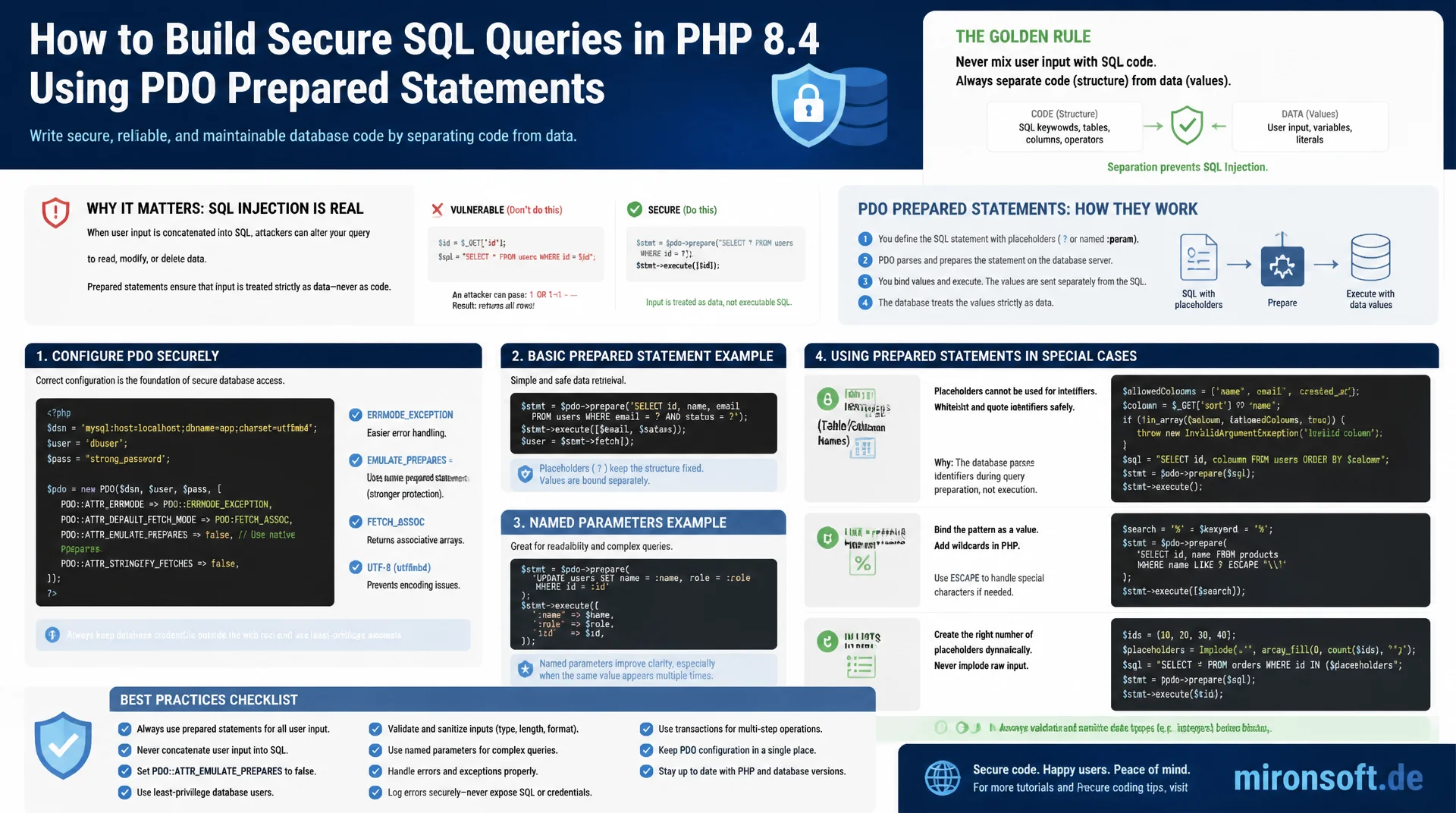
from named placeholders to safe identifier whitelisting
Building SQL queries through string concatenation opens one of the oldest and still one of the most dangerous vulnerability classes in web development. PDO prepared statements structurally separate code from data and rule out SQL injection regardless of what the input contains, provided they are configured correctly and applied properly to identifiers, LIKE patterns and IN lists. This article walks through the full technical implementation with PDO in PHP 8.4.
Table of Contents
- 1. Why SQL injection is still widespread despite a decades-old fix
- 2. How SQL injection works technically
- 3. Using PDO prepared statements correctly
- 4. Disabling emulated prepares: PDO::ATTR_EMULATE_PREPARES
- 5. bindValue vs. bindParam and data types
- 6. Dynamic identifiers: safely whitelisting table and column names
- 7. Safely parametrizing LIKE queries and IN clauses
- 8. Second-order SQL injection and stored data
- 9. Unsafe vs. safe query patterns compared
- 10. Summary
- 11. FAQ
1. Why SQL injection is still widespread despite a decades-old fix
SQL injection has sat in the OWASP Top 10 under the Injection category for more than two decades, and the technical fix has been known for just as long: prepared statements strictly separate code from data. Yet audits and penetration tests keep turning up applications that concatenate user input directly into SQL query strings. The reason is rarely ignorance of prepared statements, it is the convenience of a seemingly simpler line of code: a string gets built through concatenation, the query passes in testing, and nobody thinks about the one input that changes the entire syntax. That exact convenience is what makes SQL injection one of the longest-lived vulnerability classes there is.
The real-world damage from a successful SQL injection ranges from unauthorized read access to entire customer databases, through tampering with order and payment data, all the way to dropping tables outright. Legacy code bases, quickly assembled internal tools and scripts without any framework support often lack any automatic protection, because there is no ORM and no query builder layer standing between the developer and raw concatenation. In a framework-agnostic PHP context in particular, where developers work directly with PDO, the responsibility for safe queries rests entirely with the developer, and a single overlooked string build is enough to create a critical hole.
2. How SQL injection works technically
A naive login query in unsafe code often looks like this: the username is inserted directly into a SQL string, for example as "SELECT * FROM users WHERE username = '" . $username . "'". As long as the input consists of ordinary characters, this query behaves as expected. If an attacker instead submits the value admin' OR '1'='1, the query becomes SELECT * FROM users WHERE username = 'admin' OR '1'='1'. The single quote in the input value closes the string boundary the developer intended prematurely, and the trailing expression OR '1'='1' evaluates to true for every row in the table. The WHERE clause no longer filters for a specific user, it returns the entire table, and depending on the application logic that alone can be enough to bypass authentication.
Beyond this simple example, attack techniques go considerably further: UNION SELECT can smuggle data from entirely different tables into the result of an otherwise harmless query, and with some drivers stacked queries even allow appending additional statements such as DROP TABLE. Older approaches like addslashes tried to escape dangerous characters in the input before it was inserted into the string. That approach is fragile because it depends on the character set and driver in use, and it has repeatedly been bypassed through encoding tricks in the past. The actual problem is not missing escaping, it is that code and data get mixed inside the same string. That is precisely what PDO solves structurally with prepared statements, without relying on escaping heuristics at all.
3. Using PDO prepared statements correctly
PDO supports two forms of placeholders: named placeholders such as :username, and positional placeholders in the form of plain question marks. Named placeholders are considerably more readable in queries with several parameters, because the mapping from value to placeholder happens through a descriptive name rather than through array order. Positional placeholders are more compact and suit short queries with one or two values, but they demand strict ordering between the query and the array passed to execute(). There is another practical difference: a named placeholder can be referenced multiple times within the same query, whereas a positional placeholder in PDO can only be used once per occurrence.
The decisive difference from string concatenation lies in how PDO handles the query internally. With a genuine prepared statement, PDO first sends only the query template with its placeholders to the database server, which parses it there and prepares an execution plan. Only afterward are the actual values transmitted separately as data and inserted into the prepared placeholders. The values never pass through the SQL parser at any point, so they cannot alter the structure of the query, no matter which characters they contain. This structural separation of code and data solves the problem at its root, not by filtering dangerous characters, but by making sure values can never be interpreted as SQL syntax in the first place. The example below places the vulnerable version directly next to the correct implementation using a named placeholder.
<?php

declare(strict_types=1);

// WRONG: user input concatenated directly into the SQL string
$username = $_POST['username'] ?? '';
$sql = "SELECT id, email FROM users WHERE username = '" . $username . "'";
$statement = $pdo->query($sql); // vulnerable to admin' OR '1'='1

// RIGHT: named placeholder, value is never parsed as SQL
$sql = 'SELECT id, email FROM users WHERE username = :username';
$statement = $pdo->prepare($sql);
$statement->execute(['username' => $username]);
$user = $statement->fetch();
4. Disabling emulated prepares: PDO::ATTR_EMULATE_PREPARES
PDO offers two fundamentally different implementations for prepared statements. With native prepares, the query, as described in the previous section, is actually sent to the database server and prepared there. With emulated prepares, PDO itself builds the final query client-side, escaping the bound values locally and inserting them into the query template before anything is even sent to the server. For the PDO MySQL driver this emulation was historically the default setting, among other reasons for performance with frequently repeated queries and because of missing native support for certain placeholder constructs in older MySQL versions.
The problem with emulated prepares is that the separation of code and data no longer happens at the protocol level inside the database server, it depends entirely on PDO's client-side escaping logic instead. In the past there were documented cases where faulty character set configurations, for example with certain multi-byte encodings, could undermine that client-side escaping. For this reason, PDO::ATTR_EMULATE_PREPARES should be explicitly set to false when the connection is established, so that genuinely native prepared statements are used on the server side. In addition, PDO::ATTR_ERRMODE should be set to PDO::ERRMODE_EXCEPTION, so database errors are thrown as exceptions instead of silently returning a false return value that a developer can easily miss.
<?php

declare(strict_types=1);

$dsn = 'mysql:host=127.0.0.1;dbname=shop;charset=utf8mb4';

$options = [
    // Use real, server-side prepared statements instead of client-side emulation
    PDO::ATTR_EMULATE_PREPARES => false,
    // Fail loudly instead of silently returning false on error
    PDO::ATTR_ERRMODE => PDO::ERRMODE_EXCEPTION,
    // Return associative arrays by default
    PDO::ATTR_DEFAULT_FETCH_MODE => PDO::FETCH_ASSOC,
];

try {
    $pdo = new PDO($dsn, 'app_user', 'secret', $options);
} catch (PDOException $exception) {
    throw new RuntimeException('Database connection failed', previous: $exception);
}
5. bindValue vs. bindParam and data types
bindValue and bindParam look interchangeable at first glance, but they differ fundamentally in how they bind. bindValue binds the supplied value to the placeholder immediately, at the point of the call, by value. If the underlying PHP variable changes afterward, that has no effect on the value already bound. bindParam, on the other hand, binds the variable by reference, and the actual value is only read when execute() is called. That is useful in loops where a variable changes between several execute() calls, but it can lead to subtle bugs if the variable unexpectedly takes on a different value between binding and execution.
For both methods, the data type can be specified explicitly using the PDO::PARAM_* constants, such as PDO::PARAM_INT, PDO::PARAM_STR or PDO::PARAM_BOOL. If no type is given, PDO treats the value as a string by default, which can lead to unexpected type juggling in comparisons against numeric columns on some drivers. Explicitly specifying PDO::PARAM_INT matters in particular for LIMIT and OFFSET values, which some database drivers reject with a syntax error when bound as strings. For values arriving from external sources such as HTTP parameters or JSON payloads, which therefore always start out as strings, a deliberate type conversion before binding also adds clarity about the intended semantics of the query.
<?php

declare(strict_types=1);

// bindValue: value is bound immediately, by value
$statement = $pdo->prepare(
    'SELECT * FROM orders WHERE customer_id = :id AND is_active = :active'
);
$statement->bindValue(':id', $customerId, PDO::PARAM_INT);
$statement->bindValue(':active', true, PDO::PARAM_BOOL);
$statement->execute();

// bindParam: value is bound by reference, read only at execute() time
$statement = $pdo->prepare('INSERT INTO log_entries (message) VALUES (:message)');
$statement->bindParam(':message', $message, PDO::PARAM_STR);

foreach ($messages as $message) {
    $statement->execute(); // reads the current value of $message on every call
}
6. Dynamic identifiers: safely whitelisting table and column names
An important point many developers overlook with prepared statements: placeholders only work for values, never for identifiers such as table or column names. That follows from the protocol itself, a bound placeholder is always treated as a data literal, never as part of the SQL grammar. Trying to bind a table name through a placeholder, say for a dynamic sort column, either produces a syntax error or causes the name to be mistakenly interpreted as a string literal, which renders the query functionally useless. Dynamic sort orders, table names in multi-tenant systems, or configurable report columns therefore need a different approach than prepared statements.
The only safe solution is a fixed whitelist of allowed values in the form of an array in code, against which the user input is checked before the identifier gets inserted into the query. If the supplied value does not appear in the whitelist, an exception is thrown and the query is never built at all. Under no circumstances should raw user input be interpolated directly into an identifier, not even after supposed sanitization through regular expressions, because such filters are, in practice, consistently incomplete and get bypassed over time. The whitelist check happens entirely in PHP, so the database ultimately only ever sees a fixed, verified identifier that is hard-coded in the source.
<?php

declare(strict_types=1);

final class OrderSorter
{
    /** @var string[] */
    private const array ALLOWED_COLUMNS = ['created_at', 'total', 'status'];

    public function __construct(private readonly PDO $pdo)
    {
    }

    /**
     * @param string $column Column name requested by the caller, must be whitelisted.
     * @param string $direction Sort direction, ASC or DESC.
     * @return array<int, array<string, mixed>>
     */
    public function fetchSorted(string $column, string $direction): array
    {
        if (!in_array($column, self::ALLOWED_COLUMNS, true)) {
            throw new InvalidArgumentException('Column is not allowed for sorting');
        }

        $direction = strtoupper($direction) === 'DESC' ? 'DESC' : 'ASC';

        // $column comes only from the fixed whitelist above, never from raw input
        $sql = sprintf('SELECT * FROM orders ORDER BY %s %s', $column, $direction);
        $statement = $this->pdo->query($sql);

        return $statement->fetchAll();
    }
}
7. Safely parametrizing LIKE queries and IN clauses
LIKE queries come with a quirk that goes beyond pure SQL injection prevention. The characters % and _ carry special meaning inside a LIKE pattern, acting as placeholders for any number of characters or exactly one character. If a search term that itself contains a percent sign or an underscore is inserted unchanged into a LIKE pattern, for example as '%' . $searchTerm . '%', the meaning of the search changes even though the value is correctly bound through a prepared statement placeholder. That is not SQL injection in the classic sense, but it is a functional bug that produces false matches or unexpectedly broad result sets. The fix is to escape the literal % and _ characters inside the search term itself before it is inserted into the pattern, and to add a matching ESCAPE clause to the query.
IN clauses come with a different limitation: a single placeholder can only ever bind a single value, never a variable list of values for an IN(...) construct. The common but unsafe workaround is to concatenate the values directly into the query as a comma-separated string. The safe path is to generate a separate named placeholder at runtime for every value in the array, for example :id0, :id1, :id2, insert those placeholders into the query separated by commas, and then bind each individual value normally through bindValue. That way, the number of placeholders stays exactly coupled to the number of actual values, and no value can ever influence the query structure.
<?php

declare(strict_types=1);

/**
 * @param int[] $ids Product IDs to fetch.
 * @return array<int, array<string, mixed>>
 */
function fetchProductsByIds(PDO $pdo, array $ids): array
{
    if ($ids === []) {
        return [];
    }

    $placeholders = [];
    $params = [];

    foreach (array_values($ids) as $index => $id) {
        $key = ':id' . $index;
        $placeholders[] = $key;
        $params[$key] = $id;
    }

    $sql = sprintf(
        'SELECT * FROM products WHERE id IN (%s)',
        implode(', ', $placeholders)
    );

    $statement = $pdo->prepare($sql);
    foreach ($params as $key => $value) {
        $statement->bindValue($key, $value, PDO::PARAM_INT);
    }
    $statement->execute();

    return $statement->fetchAll();
}
8. Second-order SQL injection and stored data
Second-order SQL injection describes a scenario that audits regularly miss: a value is stored correctly through a prepared statement during the first write, for example a company name entered at registration time that happens to contain a single quote. That first query is entirely safe, because the value was never interpreted as SQL syntax. The problem arises when that already stored value is later read from the database, say while generating a report or an export, and reused in a second query through string concatenation instead of being bound through a placeholder again. At that second point, the exact same vulnerability as with direct user input reappears, just delayed in time and routed through the database in between.
The common misjudgment here is assuming a value is automatically safe simply because it is already sitting in the database and was apparently processed successfully once before. That assumption ignores the fact that the trust boundary does not lie at the origin of the data, it lies at every single point where a SQL query gets newly assembled. Every query construction has to consistently use prepared statements regardless of where the value originally came from, whether it comes straight from a form field or arrived in the database months earlier through another, equally safe query. Consistency across the entire code base matters more here than securing individual input points in isolation.
9. Unsafe vs. safe query patterns compared
The table below summarizes the scenarios covered in this article and places each unsafe pattern directly next to the corresponding safe PDO pattern. It works well as a quick reference for code reviews and for locating comparable spots in existing code.
| Scenario | Unsafe | Safe PDO pattern | Benefit |
|---|---|---|---|
| String concatenation | "...WHERE name='" . $name . "'" |
:name with bindValue |
Values never pass through the SQL parser |
| LIKE wildcard injection | '%' . $searchTerm . '%' unescaped |
Escape % and _, add ESCAPE clause | Correct match set instead of an overly broad search |
| IN clause with values | IN (" . implode(',', $ids) . ")" |
Dynamically generated :id0, :id1, ... |
Value count stays exactly coupled to placeholders |
| Dynamic table name | "SELECT * FROM " . $_GET['table'] |
Whitelist array of allowed names | Identifiers never interpolated from raw input |
| Missing type binding | bindValue without a type (default string) |
bindValue(..., PDO::PARAM_INT) |
No type juggling, correct driver semantics |
What stands out is that the same underlying principle applies in every row: values belong exclusively in bound placeholders, never in the query string itself. Identifiers are the one exception, since there is no placeholder mechanism for them at all, and a whitelist becomes mandatory instead. Using this table as a checklist in code reviews reliably catches the majority of SQL injection relevant patterns before they ever reach production.
10. Summary
The most important insight for preventing SQL injection is structural, not cosmetic: PDO prepared statements separate code from data at the protocol level, so values can never be interpreted as SQL syntax regardless of what characters they contain. That separation only holds up, though, if PDO::ATTR_EMULATE_PREPARES is set to false, if values are consistently bound through bindValue or bindParam with the correct type, and if identifiers such as table and column names are secured through a fixed whitelist, since placeholders simply do not work for them.
Particular attention deserves the edge cases that many code reviews miss: LIKE patterns with unescaped wildcard characters, dynamically generated IN clauses, and second-order scenarios where already stored data later gets processed unsafely in a second query. Consistently checking a codebase against all nine patterns covered in this article closes the large majority of practically relevant SQL injection entry points, without hurting the readability or maintainability of the code.
Preventing SQL Injection with PDO Prepared Statements, the key points at a glance
Prepared Statements
Separate code and data structurally: named or positional placeholders instead of string concatenation, for every query without exception.
Disable emulated prepares
Set PDO::ATTR_EMULATE_PREPARES => false and PDO::ATTR_ERRMODE => PDO::ERRMODE_EXCEPTION on every connection.
Type binding
Use bindValue with explicit PDO::PARAM_* constants instead of implicit string binding, especially for integer values.
Identifier whitelisting
Never interpolate table or column names from raw input, always validate against a fixed whitelist array.
11. FAQ: SQL Injection and PDO Prepared Statements
1What exactly is SQL injection?
2Are prepared statements alone enough?
3bindValue vs. bindParam?
4Why ATTR_EMULATE_PREPARES to false?
5Bind a table name as a placeholder?
6Safely escape % and _ in LIKE?
7IN clause with a variable count?
8What is second-order SQL injection?
9Does an ORM protect me automatically?
10Minimum PDO attributes to set?
Mironsoft
PHP security audits, database hardening and penetration test remediation
Are your database queries actually protected against SQL injection?
We review existing PHP code for unsafe query patterns, harden the PDO database layer with correct prepared statement configuration, and close the gaps that penetration tests typically flag, from string concatenation to missing identifier whitelisting.
Query security review
Systematic review of all database access for string concatenation, missing type binding and unprotected LIKE and IN queries
PDO hardening
Correct PDO configuration with emulated prepares disabled, strict error mode and a clean separation of code and data
Pentest remediation
Fixing SQL injection findings from penetration tests, including regression tests for the affected queries