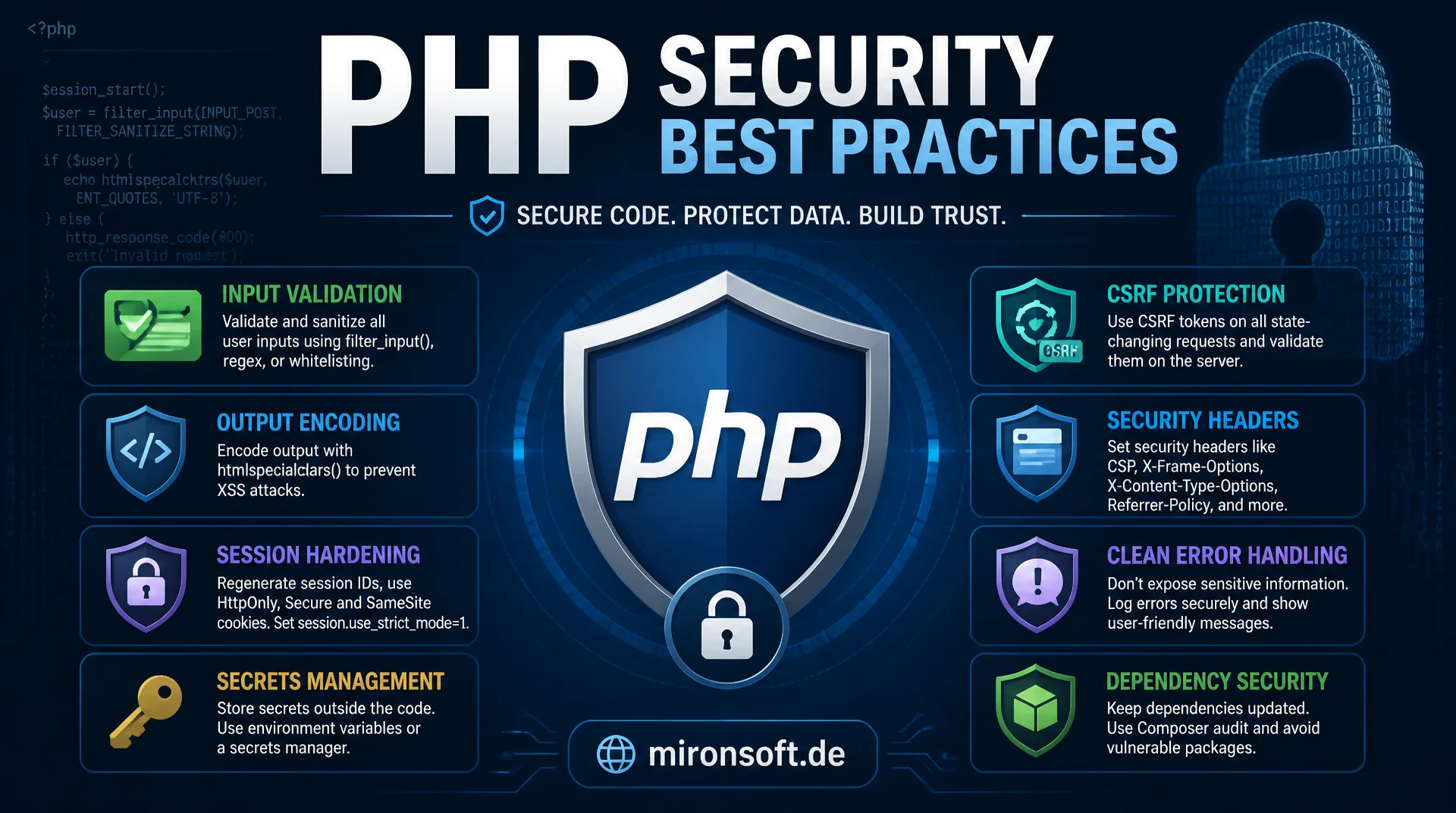
from input validation to dependency security
PHP security is more than a single function or a framework feature, it encompasses input validation, output encoding, session hardening, secrets management, CSRF protection, security headers, clean error handling and dependency security as one coherent system. This article gives the complete overview of the security best practices that every production PHP application needs, regardless of the framework in use.
Table of Contents
- 1. Why security is not a feature, but a mindset
- 2. Input validation: whitelisting instead of blacklisting
- 3. Output encoding: reliably preventing XSS
- 4. Session security: cookie flags, regeneration, fixation
- 5. Secrets management: environment variables instead of hardcoding
- 6. CSRF protection: the token based pattern
- 7. Security headers: CSP, HSTS, X-Content-Type-Options
- 8. Error handling without information leaks
- 9. Dependency security: composer audit and supply chain
- 10. Summary
- 11. FAQ
1. Why security is not a feature, but a mindset
Anyone who treats PHP security as a one-time checklist before go-live has missed the underlying problem. Security best practices are not boxes that get ticked once and then forgotten, they are a continuous practice that runs through every line of code, every deployment and every new dependency. An application that was considered secure at launch can become vulnerable months later because a dependency changed, a new endpoint was added without validation, or a feature flag accidentally left a debug mode active in production. Teams that take PHP security seriously therefore establish processes instead of one-off checks: code reviews with a security focus, automated scans in the CI pipeline, and a culture in which security questions are understood as part of normal development work rather than as a brake on it. This mindset is exactly what separates teams that react after a security incident from teams that experience incidents far less often in the first place.
A central principle of robust PHP security is defense in depth: multiple independent protective layers that back each other up, so that the failure of a single layer does not immediately lead to a full compromise. Input validation, output encoding, secure session configuration, security headers and restrictive error handling each already work against certain classes of attack on their own, together they form a system in which an attacker has to overcome several independent hurdles at the same time. Two particularly critical areas that already have their own dedicated articles are deliberately kept brief here: SQL injection and its mitigation via PDO prepared statements, and password hashing with Argon2 and bcrypt. Both topics deserve the full technical depth of their own deep-dive article and are therefore only briefly framed in this overview, before the focus shifts to the remaining, equally important building blocks of robust PHP applications.
2. Input validation: whitelisting instead of blacklisting
Every piece of input that reaches a PHP application from outside, whether via $_GET, $_POST, $_COOKIE, HTTP headers or an uploaded file, must be validated at the system boundary before it reaches any business logic. This boundary is the only place where PHP security can be enforced reliably, because once a value has made its way deep into the application, it becomes hard to track where it came from and which assumptions it needs to satisfy. The built-in function filter_var() covers the most common validation cases: FILTER_VALIDATE_EMAIL checks the structure of an email address, FILTER_VALIDATE_INT ensures a value is actually an integer rather than merely looking like one, FILTER_VALIDATE_URL checks URL syntax. Importantly, validation does not just check the type but also the format and the allowed value range. An age value that is technically an integer but negative or greater than three hundred is still invalid and must be rejected as such, not silently accepted.
The most important conceptual distinction in input validation is whitelisting versus blacklisting. A blacklist lists known dangerous patterns and blocks them, such as certain special characters or keywords. The problem: a blacklist can, by definition, only cover what was known at the time it was written, and attackers reliably find new encodings, case variations, or character set tricks that bypass it. Whitelisting flips the principle around: instead of excluding known bad values, only an explicitly allowed set of values, formats or characters is accepted, everything else is rejected, regardless of whether it looks dangerous or not. For PHP security this means concretely: a sort parameter is checked against a fixed list of allowed column names, a status value against an enum, a file extension against a short list of allowed formats. This strictness feels restrictive at first, but it prevents entire classes of attacks that could never be fully covered by even the most extensive blacklist.
<?php

declare(strict_types=1);

// WRONG: raw request data used directly, no boundary check
$email = $_POST['email'] ?? '';
$age = $_POST['age'] ?? '';
$sortColumn = $_GET['sort'] ?? 'id';

// RIGHT: validate type, format and allowed range at the application boundary
$email = filter_var($_POST['email'] ?? '', FILTER_VALIDATE_EMAIL);
if ($email === false) {
    throw new InvalidArgumentException('Invalid email address');
}

$age = filter_var(
    $_POST['age'] ?? '',
    FILTER_VALIDATE_INT,
    ['options' => ['min_range' => 0, 'max_range' => 130]]
);
if ($age === false) {
    throw new InvalidArgumentException('Invalid age value');
}

// Whitelisting: only explicitly allowed values pass, everything else is rejected
const ALLOWED_SORT_COLUMNS = ['id', 'created_at', 'name'];

$sortColumn = $_GET['sort'] ?? 'id';
if (!in_array($sortColumn, ALLOWED_SORT_COLUMNS, true)) {
    throw new InvalidArgumentException('Sort column is not allowed');
}
3. Output encoding: reliably preventing XSS
While input validation checks data as it enters the application, output encoding ensures that data cannot be interpreted as active code when it leaves the application, that is, when it is rendered into a response. This is the central building block against cross-site scripting, or XSS, one of the most widespread vulnerability classes in web applications overall. The basic rule of PHP security is: every value that comes from a source that is not fully trusted, that is, from user input, from the database, or from an external API, must be encoded appropriately for its context when output as HTML. htmlspecialchars() is the central function for this, but only with the ENT_QUOTES flag, which converts both double and single quotes into their HTML entities. Without this flag, single quotes remain unchanged, which creates a gap in attribute contexts using single quotes through which an attacker can break out of the attribute and inject their own markup. A second mandatory argument is the explicit character set, usually UTF-8, to rule out encoding based bypasses.
Output encoding is also context dependent, a single encoding mechanism is not enough for every output location. Text in the HTML body needs htmlspecialchars() with ENT_QUOTES, a value inside an HTML attribute needs the same function, but attributes must additionally be consistently quoted. Values embedded in a JavaScript context, for example inside a <script> block, need JSON encoding rather than HTML encoding, because HTML entities are not automatically decoded inside JavaScript strings. Values in a URL, for example as a query parameter, belong through urlencode() or rawurlencode(). Anyone who instead tries to prevent XSS through a blacklist of dangerous tags like <script>, by stripping such strings from the input, regularly fails: an attacker can vary case, use event handler attributes like onerror that need no script tag at all, or use nested tags that form a valid tag again after a single removal pass. Context-aware output encoding is the only approach that works structurally, because it does not rely on recognizing known attack patterns but instead makes every value safe regardless of its content.
<?php

declare(strict_types=1);

$userComment = $_POST['comment'] ?? '';
$userName = $_POST['name'] ?? '';

// WRONG: raw value echoed directly into HTML, script tags execute in the browser
echo '<div class="comment">' . $userComment . '</div>';

// RIGHT: context-aware encoding for the HTML body
echo '<div class="comment">' . htmlspecialchars($userComment, ENT_QUOTES, 'UTF-8') . '</div>';

// WRONG: unescaped value inside an HTML attribute, single quotes break out
echo '<input value=\'' . $userName . '\'>';

// RIGHT: same function, but the attribute value is also htmlspecialchars-encoded
echo '<input value="' . htmlspecialchars($userName, ENT_QUOTES, 'UTF-8') . '">';
4. Session security: cookie flags, regeneration, fixation
The PHP session is one of the most sensitive pieces of state in a web application, because whoever knows the session ID of a logged in user can take over their session without needing a password or a second factor. PHP security for sessions starts with the cookie flags set via session_set_cookie_params() before the session is started. The httponly flag prevents access to the session cookie from JavaScript and thereby rules out an entire class of XSS-based session theft, even if an XSS gap exists elsewhere. The secure flag ensures the cookie is transmitted exclusively over HTTPS connections and never travels unencrypted in plain text over the network. The samesite flag, with a value of Lax or Strict, restricts under which circumstances the cookie is sent along with cross-site requests, additionally reducing the risk of CSRF attacks on top of dedicated CSRF tokens. All three flags together form the minimum for a production-ready session cookie.
A second critical building block is regenerating the session ID with session_regenerate_id(true) after every security-relevant transition, in particular right after a successful login, but also on every change of permissions within the same session, for example when switching into an administrative area. The reason for this is session fixation: an attacker sets a known session ID for a target person in advance, for example via a crafted link or a manipulated cookie, and waits for the target person to log in with exactly that ID. Without regeneration, the session ID the attacker supplied remains valid after login, the attacker can continue to use it and is thereby fully logged in without ever knowing a password. session_regenerate_id(true) creates a new session ID and deletes the old session file on the server, so an ID set before login becomes worthless after the login. The true parameter is critical here, without it the old session file remains and an attacker could in theory still access it.
<?php

declare(strict_types=1);

// Set hardened cookie flags before the session is started
session_set_cookie_params([
    'lifetime' => 0,
    'path' => '/',
    'domain' => '',
    'secure' => true,     // cookie only sent over HTTPS
    'httponly' => true,   // not accessible via JavaScript
    'samesite' => 'Lax',  // not sent on most cross-site requests
]);

session_start();

function loginUser(int $userId): void
{
    // ... verify credentials elsewhere (see the dedicated password hashing article) ...

    // Prevent session fixation: issue a fresh session ID after privilege change
    session_regenerate_id(true);

    $_SESSION['user_id'] = $userId;
    $_SESSION['logged_in_at'] = time();
}
5. Secrets management: environment variables instead of hardcoding
A surprisingly common finding in security audits is database passwords, API keys or encryption keys that are hardcoded directly as string literals in PHP code and distributed via the version control system. For robust PHP security, credentials fundamentally never belong in the source code, but in environment variables that are loaded at runtime from the server environment or from an .env file that is itself not part of the repository. Access happens via getenv() or a configuration layer that reads environment variables centrally and passes them on to the application in a typed manner. The .env file itself belongs in .gitignore and is only kept locally or directly on the target server, never checked in. For every environment, development, staging and production, a separate .env exists with its own values, so that a compromised development credential never automatically exposes production credentials as well. This separation is one of the simplest and yet most effective steps in the entire practice of PHP security.
For larger teams and production infrastructure, a simple .env file often is not enough anymore. Secret managers such as HashiCorp Vault, AWS Secrets Manager or the secret management of the respective cloud platform additionally offer access control per application, audit logs for every access to a secret, and the ability to rotate credentials without deploying code. Regular rotation is important because an once compromised secret otherwise stays valid indefinitely, even after the original path of compromise has long been closed. A particularly underestimated risk is secrets that have ever made it into the git history: even if a file is later deleted again, the old commit with the plaintext secret remains in the history and stays visible via git log or a simple clone of the repository. A checked in API password is therefore not fixed by deleting it afterwards, only by rotating the affected secret and, ideally, by cleaning up the history. This is one of the most expensive lessons in practical PHP security.
6. CSRF protection: the token based pattern
Cross-site request forgery, or CSRF, exploits the fact that a browser automatically sends a domain's cookies along with every request to that domain, even if the request was triggered by a completely different, malicious website. If a user is logged into an application and, at the same time, visits a crafted page that silently triggers a form submission to the target application in the background, that request executes with the user's valid session cookies without the user noticing anything. The established countermeasure in PHP security is the synchronizer token pattern: for every session, or even more strictly for every individual form request, a random token is generated on the server, stored in the session and embedded as a hidden field in the form. When the form is submitted, the server compares the submitted token against the value stored in the session. If they match, the request is considered legitimate, otherwise it is rejected. Since a foreign website cannot know this token and cannot send it along, the forged request reliably fails.
The token comparison itself must use hash_equals() instead of the plain comparison operator, because a naive string comparison can take different amounts of time depending on the implementation, based on where the strings first differ. These timing differences can theoretically be measured and exploited for timing attacks, hash_equals() compares in constant time instead. SameSite cookies, in particular with a value of Lax or Strict, usefully complement token protection by not even sending the session cookie along on most cross-site requests in the first place. What matters for solid PHP security though: SameSite is an additional protective layer in the sense of defense in depth, not a replacement for the synchronizer token pattern. Older browsers do not fully support SameSite in every case, certain subdomain constellations do not apply in every scenario, and some legitimate cross-site scenarios deliberately require relaxed settings. Anyone who relies solely on SameSite risks gaps in exactly these edge cases, while the token pattern works reliably regardless of the browser's cookie behavior.
<?php

declare(strict_types=1);

// Generate a per-session CSRF token, done once when the session starts
function csrfToken(): string
{
    if (empty($_SESSION['csrf_token'])) {
        $_SESSION['csrf_token'] = bin2hex(random_bytes(32));
    }

    return $_SESSION['csrf_token'];
}

// Embed the token as a hidden field in every state-changing form
// <input type="hidden" name="csrf_token" value="<?= htmlspecialchars(csrfToken(), ENT_QUOTES) ?>">

// Verify the submitted token on the receiving end
function verifyCsrfToken(string $submittedToken): void
{
    $expected = $_SESSION['csrf_token'] ?? '';

    // hash_equals() compares in constant time, immune to timing attacks
    if ($expected === '' || !hash_equals($expected, $submittedToken)) {
        throw new RuntimeException('Invalid or missing CSRF token');
    }
}
7. Security headers: CSP, HSTS, X-Content-Type-Options
HTTP security headers are a server-set protective layer that is binding for the browser, applying on top of the actual application logic, which makes them a central building block of modern PHP security. The Content Security Policy, or CSP, defined via the Content-Security-Policy header, determines from which sources the browser is even allowed to load scripts, stylesheets, images and other resources. A restrictive CSP such as script-src 'self' only allows JavaScript from the application's own domain and blocks inline scripts as well as loading from foreign domains, which still protects even if an XSS gap in output encoding was overlooked, because the injected code simply is not allowed to execute. HTTP Strict Transport Security, or HSTS, set via the Strict-Transport-Security header with a max-age directive, instructs the browser to use exclusively HTTPS connections for the given domain going forward, even if a user accidentally opens an http URL. This prevents downgrade attacks, in which an attacker on the network deliberately downgrades a connection to unencrypted HTTP in order to read the traffic.
X-Frame-Options, or the more modern CSP directive frame-ancestors, prevents the site itself from being embedded in an <iframe> on a foreign domain, which rules out clickjacking attacks, in which an attacker places the actual page invisibly on top of a crafted interface in order to trick users into clicking on elements that are actually hidden. X-Content-Type-Options with the only valid value nosniff instructs the browser to strictly respect the content type sent by the server, instead of guessing the content type itself based on the file contents. Without this header, a browser can misinterpret an innocent-looking uploaded file as HTML or JavaScript and execute it, even if the server serves it as a plain image or text document. These headers can be set centrally via the web server configuration or via a small PHP middleware that applies automatically on every response, instead of repeating them manually in every single controller. For PHP security audits, these headers are among the fastest to check and, at the same time, among the most frequently missing protections.
8. Error handling without information leaks
One of the most easily avoidable, but in practice surprisingly common, vulnerabilities is displaying full error messages and stack traces directly in the browser of a production application. The PHP setting display_errors must be set to off in every production environment, while log_errors stays enabled so errors are still captured, just not in the response sent to the client. A user who hits an internal server error should only ever see a generic, friendly worded error page, without any technical hint about the cause. This separation between internal diagnostics and external communication is a core principle of robust PHP security: everything needed for debugging must be available to the development team, but none of it may ever be disclosed to a potential attacker who calls up the exact same error page in order to gather information about the system architecture. In the development environment, errors may of course remain visible, because diagnostic speed matters more there than hiding internal details.
An uncaught stack trace typically reveals significantly more than is visible at first glance: absolute file paths, the server's directory structure, names of internal classes and methods, and sometimes even snippets of SQL queries with real table and column names, if a database exception is passed through unfiltered. All of this makes the reconnaissance phase of a targeted attack considerably easier for an attacker. The professional approach for PHP security is structured logging via set_error_handler() and set_exception_handler(): both handlers centrally catch errors and unhandled exceptions, write a complete, structured message including stack trace, timestamp and context into a log file or a log aggregation system, and at the same time return only a generic message with a reference number to the user, which can later be used to find the specific incident in the log. That way, the full diagnostic information stays available to the team, without a single detail ever reaching the client. This separation between internal and external error communication is one of the most underrated levers in PHP security.
<?php

declare(strict_types=1);

function logIncident(Throwable $error): string
{
    $referenceId = bin2hex(random_bytes(8));

    // Full technical detail goes only into the internal log, never to the client
    error_log(sprintf(
        '[%s] ref=%s %s in %s:%d%s%s',
        date('c'),
        $referenceId,
        $error->getMessage(),
        $error->getFile(),
        $error->getLine(),
        PHP_EOL,
        $error->getTraceAsString()
    ));

    return $referenceId;
}

set_exception_handler(function (Throwable $error): void {
    $referenceId = logIncident($error);

    http_response_code(500);
    // The client only ever sees a generic message plus a lookup reference
    echo 'An unexpected error occurred. Reference: ' . htmlspecialchars($referenceId, ENT_QUOTES);
});

set_error_handler(function (int $severity, string $message, string $file, int $line): bool {
    logIncident(new ErrorException($message, 0, $severity, $file, $line));
    return true; // mark the error as handled, do not fall through to the default handler
});
9. Dependency security: composer audit and supply chain
Modern PHP applications consist to a substantial degree of third-party code brought in via Composer, and every one of these dependencies extends the attack surface of the application with its own, possibly unknown, vulnerabilities. composer audit checks the package versions recorded in composer.lock against a database of known security vulnerabilities and reports which installed packages are affected by publicly documented issues. This command belongs as a fixed step in every CI pipeline, so that a newly disclosed security problem in a dependency is caught automatically, instead of only being discovered during a rare, manual audit. The lockfile itself, composer.lock, absolutely must be checked in and never excluded from the repository, because only that guarantees that development, staging and production install exactly the same package versions. Without a lockfile, different environments could load different, potentially differently vulnerable, versions of the same dependency, which considerably complicates debugging and security assessment.
Beyond automated audits, dependency security also includes deliberately checking the provenance of packages: packages should only be sourced from Packagist or verified private repositories, and the number of downloads and the activity of the maintainers give initial indications of a package's trustworthiness. Supply chain attacks, in which an attacker compromises an existing, widely used package or publishes a malicious package with a name similar to a popular original, so-called typosquatting, have been observed in the last few years in practically every package ecosystem, and PHP is no exception. Another often underestimated lever is simply reducing the dependency surface: every additional package that is only pulled in for a single, small function is one more vector that must be maintained, updated and monitored. Regularly removing unused dependencies and consciously weighing custom implementation against an additional dependency belong to PHP security just as much as the actual scanning for known vulnerabilities.
The following overview summarizes the most important risk areas of the security best practices from this article and directly contrasts the insecure pattern with the recommended pattern in each row. It serves as a quick reference for code reviews and for prioritizing hardening measures in existing code.
| Risk Area | Insecure Pattern | Recommended Pattern | Benefit |
|---|---|---|---|
| Input handling | Using $_GET/$_POST directly | filter_var() with a whitelist | Only expected values reach the business logic |
| Output encoding | Echoing raw values directly into HTML | htmlspecialchars(..., ENT_QUOTES) | XSS ruled out regardless of context |
| Session cookies | Default cookie without flags | httponly, secure, samesite set | Protection against session theft and CSRF |
| Error display | display_errors on in production | Generic page plus internal logging | No information leaks about architecture |
| Dependency management | Applying updates without checking | composer audit plus lockfile in CI | Known vulnerabilities caught early |
What stands out is that the same principle applies in every row: trust is never assumed, it is actively checked at every system boundary, whether for input, output, sessions, error messages or dependencies. Anyone using this table as a checklist in code reviews reliably covers the vast majority of patterns relevant to PHP security before they reach production.
10. Summary
Robust PHP security does not come from a single function, but from the interplay of several protective layers: input validation with whitelisting at the system boundary, context-aware output encoding against XSS, hardened session cookies with regeneration after login, secrets in environment variables instead of in code, a token-based CSRF pattern, consistently set security headers such as CSP and HSTS, and a strict separation between internal error diagnostics and external error display. Each of these security best practices solves a concrete problem on its own, together they form the defense-in-depth foundation on which production PHP applications can run stably.
Two of the most important individual topics, SQL injection prevention with PDO prepared statements and secure password hashing with Argon2 and bcrypt, deliberately received only a brief mention here, because they are already covered in full in their own, more in-depth articles. Anyone who consistently implements the nine building blocks described in this overview in their own codebase, and additionally consults the dedicated deep-dive articles on SQL injection and password hashing, covers the vast majority of practically relevant security risks in PHP applications, without noticeably restricting maintainability or development speed.
PHP Security: Best Practices, the Essentials at a Glance
Input & Output
Whitelisting for every input with filter_var(), context-aware htmlspecialchars(..., ENT_QUOTES) for every output.
Session & CSRF
httponly, secure and samesite cookie flags, session_regenerate_id(true) after login, synchronizer tokens against CSRF.
Secrets & Headers
Credentials only in environment variables, never in code. Set CSP, HSTS and X-Content-Type-Options on the server.
Errors & Dependencies
display_errors off in production, structured logging instead of stack traces. composer audit fixed in the CI pipeline.
11. FAQ: PHP Security and Security Best Practices
1PHP security as a mindset instead of a checklist?
2What is defense in depth?
3Whitelisting instead of blacklisting?
4Reliably preventing XSS in output?
5What is session fixation?
6Why no credentials in the code?
7How does CSRF protection work?
8Which security headers matter?
9Why is display_errors dangerous in production?
10What does composer audit check?
Mironsoft
PHP security audits, application hardening and incident follow-up
Is your PHP application really secured according to current security best practices?
We review existing PHP code for insecure input and output patterns, harden sessions, secrets management and security headers, and close the gaps typically found in penetration tests, from missing whitelist validation to open error pages in production.
Security code review
Systematic review of input validation, output encoding, session configuration and CSRF protection in existing code
Application hardening
Implementing security headers, secrets management and structured error handling for production operation
Incident follow-up
Fixing security findings after audits or incidents, including regression tests for the hardened areas