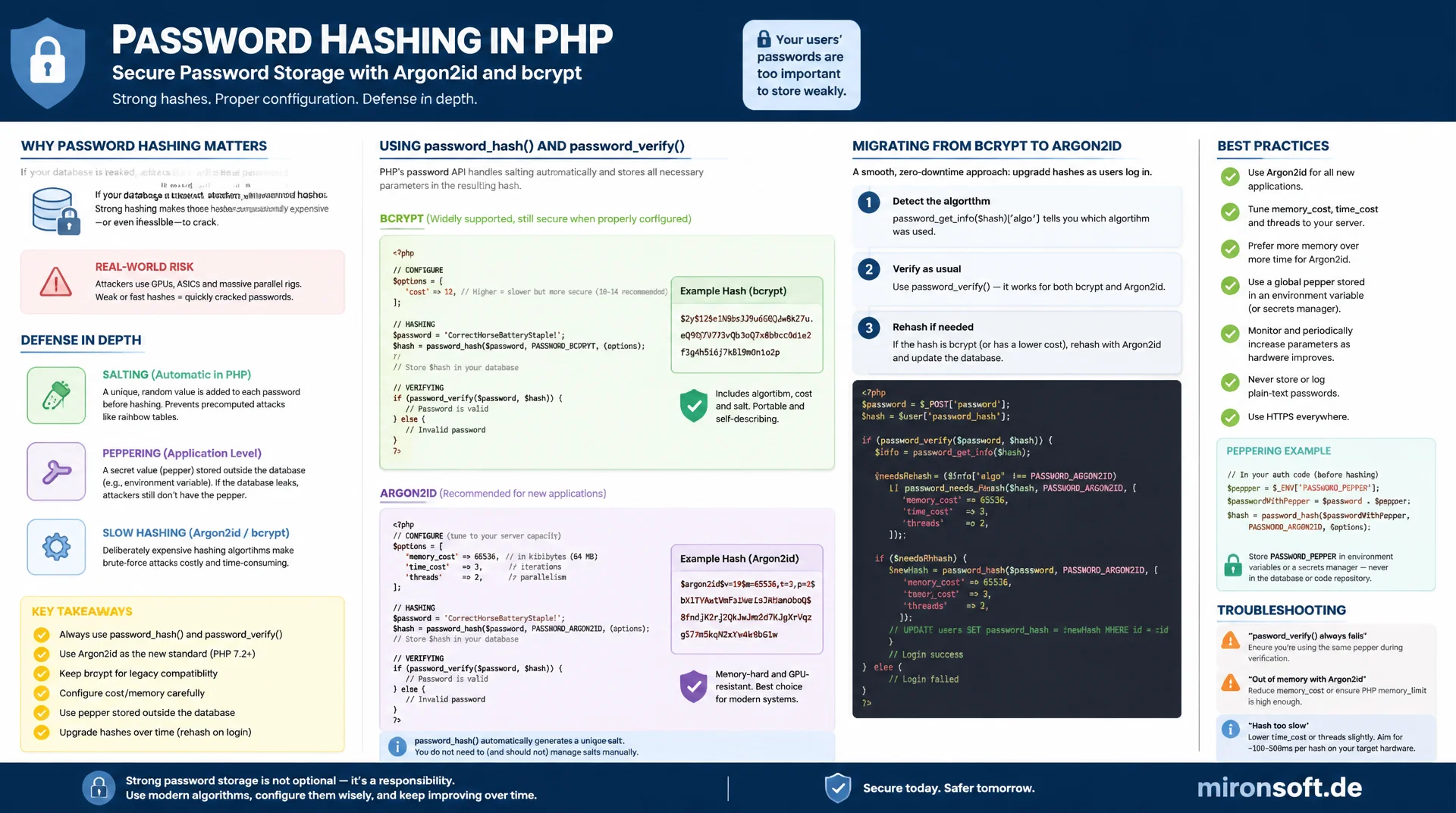
From password_hash() to a secure rehashing workflow
Password hashing directly determines how expensive it is for an attacker to crack each individual password after a database leak. Argon2id is now considered the preferred algorithm because it is memory-intensive and therefore resistant to GPU- and ASIC-backed attacks, while bcrypt with its CPU-bound cost function has worked as a solid standard for decades. This article shows how to correctly configure, salt, pepper, and migrate both algorithms in production using the PHP standard API password_hash() and password_verify().
Table of Contents
- 1. Why password hashing is not encryption
- 2. password_hash() and password_verify() as the PHP standard API
- 3. bcrypt in detail: cost factor and the 72-byte limit
- 4. Argon2i vs. Argon2id: differences and recommendation
- 5. Configuring Argon2 parameters correctly
- 6. Salting: automatic, but important to understand
- 7. Pepper as an additional layer of defense
- 8. Migration and rehashing with password_needs_rehash()
- 9. Argon2 vs. bcrypt head to head
- 10. Summary
- 11. FAQ
1. Why Password Hashing Is Not Encryption
To encrypt a password means transforming it reversibly with a key: whoever holds the key can recover the plaintext at any time. Password hashing is exactly the opposite. A cryptographic hash function maps an input of arbitrary length to a fixed-length output, and this process is deliberately not reversible. There is no key to lose, steal, or mismanage, because there simply is no way back from the hash to the plaintext. This one-way property is precisely why serious systems never encrypt passwords, they only hash them.
The practical consequence affects the entire authentication workflow: during registration the password is hashed once and only the hash is stored, the plaintext password never exists anywhere in the system afterward. During login the entered password is hashed again and the new hash is compared with the stored hash, a stored value is never decrypted. If an application is able to email a user their existing password or display it in plaintext in an admin area, that is a reliable warning sign that reversible encryption is being used somewhere in the system instead of real password hashing, and that is a security flaw regardless of the framework in use.
2. password_hash() and password_verify() as the PHP Standard API
PHP has shipped a complete, audited standard API for password hashing with password_hash() and password_verify() since version 5.5. Anyone who instead uses md5(), sha1(), or a plain hash('sha256', $password) call makes themselves responsible for salting, cost parameters, and choosing a suitable algorithm, and experience from countless security audits shows that this regularly goes wrong. These hash functions were optimized for speed, which is desirable for a checksum but exactly the opposite of what you need for passwords: a fast hash can be tried billions of times per second on specialized hardware.
The PASSWORD_DEFAULT constant currently points to bcrypt, because that algorithm was historically the first to become the default in PHP, but it can change in future PHP versions once a stronger algorithm becomes the new default. Anyone using PASSWORD_DEFAULT automatically benefits from such improvements, but must accept that the length and format of the generated hash can change, which is why the database field for the hash should be sized generously, as a VARCHAR(255) for instance, rather than a tightly sized fixed field.
A key advantage of this API is that the returned string already contains all the information needed later for verification: algorithm identifier, cost parameters, and salt are encoded directly in the hash string. Developers never have to manage salt and parameters separately anywhere, password_verify() reads this metadata out of the stored hash itself and reconstructs the exact same parameters for the comparison. The following code shows the complete registration and login flow using this API.
<?php

declare(strict_types=1);

/**
 * Registration: hash the password once, store only the hash string.
 * PASSWORD_DEFAULT currently maps to bcrypt but may change in future PHP releases.
 */
function registerUser(string $email, string $plainPassword, PDO $pdo): void
{
    $hash = password_hash($plainPassword, PASSWORD_DEFAULT);

    if ($hash === false) {
        throw new RuntimeException('Password hashing failed, check available algorithms.');
    }

    $stmt = $pdo->prepare(
        'INSERT INTO users (email, password_hash) VALUES (:email, :hash)'
    );
    $stmt->execute(['email' => $email, 'hash' => $hash]);
}

/**
 * Login: hash the submitted password again and compare it
 * against the stored hash using a timing-attack-safe comparison.
 */
function verifyLogin(string $email, string $plainPassword, PDO $pdo): bool
{
    $stmt = $pdo->prepare('SELECT password_hash FROM users WHERE email = :email');
    $stmt->execute(['email' => $email]);
    $storedHash = $stmt->fetchColumn();

    if ($storedHash === false) {
        // Run verify against a dummy hash anyway to avoid leaking
        // via response-time whether the email exists at all.
        password_verify($plainPassword, '$2y$12$UnknownUnknownUnknownUuU');
        return false;
    }

    // password_verify() itself is constant-time internally.
    return password_verify($plainPassword, $storedHash);
}
3. bcrypt in Detail: Cost Factor and the 72-Byte Limit
PASSWORD_BCRYPT implements the Blowfish-based bcrypt algorithm with a configurable cost parameter that sets the number of internal rounds as a power of two. Raising the cost value by one doubles the required computation time, because the number of rounds grows exponentially with the parameter. The default is 10, in practice a value between 12 and 14 is usually recommended for current server hardware, so that a single hashing operation takes somewhere between 100 and 300 milliseconds, barely noticeable for legitimate logins but expensive at scale for brute-force attempts.
An often overlooked property of bcrypt is its hard 72-byte limit on the input. Anything beyond that limit is silently truncated by the underlying implementation, with no error or warning. Concretely, this means two passphrases that differ only after the 72nd byte produce the same bcrypt hash and are both accepted as valid by password_verify(). With very long passphrases, as generated by password managers or deliberately long memorable phrases, this behavior can unnoticeably undermine actual security, because part of the entered entropy simply never makes it into the hash.
The usual mitigation is to pre-hash the input with a fixed-output-length cryptographic hash function before handing it to password_hash(). A base64- or hex-encoded SHA-384 hash reliably stays below the 72-byte limit regardless of how long the original password was, and the full entropy of the input is guaranteed to flow into the bcrypt hash. With Argon2id this problem practically does not exist, because a hash function is also applied internally to the input first and no comparable short hard limit exists.
<?php

declare(strict_types=1);

/**
 * bcrypt with an explicit cost factor. Cost 12 is a reasonable
 * baseline for current server hardware (roughly 100-300ms per hash).
 */
$options = ['cost' => 12];
$hash = password_hash($plainPassword, PASSWORD_BCRYPT, $options);

/**
 * Demonstration of the 72-byte truncation problem: these two
 * passphrases only differ after byte 72 and therefore hash identically.
 */
$passphraseA = str_repeat('a', 72) . 'first-suffix';
$passphraseB = str_repeat('a', 72) . 'second-suffix';

$hashA = password_hash($passphraseA, PASSWORD_BCRYPT);
var_dump(password_verify($passphraseB, $hashA)); // true - silently truncated!

/**
 * Mitigation: pre-hash long passphrases with a fixed-length digest
 * before handing them to password_hash(). This preserves full entropy.
 */
function safeBcryptHash(string $plainPassword): string
{
    $preHashed = hash('sha384', $plainPassword, true);

    return password_hash(base64_encode($preHashed), PASSWORD_BCRYPT, ['cost' => 12]);
}
4. Argon2i vs. Argon2id: Differences and Recommendation
Argon2 won the Password Hashing Competition in 2015 and exists in two usable variants in PHP. PASSWORD_ARGON2I was specifically optimized to make side-channel attacks harder, attacks in which an attacker draws conclusions about the processed data from memory access patterns or cache timing. This property makes Argon2i relevant in environments where an attacker might have access to the same physical host, in shared cloud environments for instance, but it alone is no longer sufficient for modern threat models.
PASSWORD_ARGON2ID combines the side-channel resistance of Argon2i with the resistance of Argon2d against GPU- and ASIC-backed brute-force attacks, by combining both internal access patterns at different phases of the computation. This hybrid construction makes Argon2id the right choice for almost every practical use case, because it unites the advantages of both predecessor variants without leaving either attack vector unprotected. For this reason, the IETF explicitly recommends Argon2id as the default variant for password hashing, and PASSWORD_ARGON2ID should be the preferred algorithm in new PHP projects as soon as the target environment supports it.
5. Configuring Argon2 Parameters Correctly
Argon2id in PHP accepts three configurable parameters: memory_cost in kibibytes, time_cost as the number of iterations, and threads as the degree of parallelism. The memory_cost parameter is the decisive difference from bcrypt, because it makes the algorithm memory-intensive: an attacker trying to crack many hashes in parallel on specialized hardware needs the full configured amount of memory for every parallel computation, which significantly raises the cost of mass attacks on GPUs with limited memory per compute unit.
The PHP defaults, PASSWORD_ARGON2_DEFAULT_MEMORY_COST at 65536 KiB (that is, 64 MiB), PASSWORD_ARGON2_DEFAULT_TIME_COST at 4, and PASSWORD_ARGON2_DEFAULT_THREADS at 1, are a reasonable starting point, but every production environment should adjust them to the actual server hardware. An application server with limited RAM under heavy concurrent login load can itself become a bottleneck if memory_cost is set too high, while a value that is too low undoes Argon2id's actual protective effect.
The pragmatic path to correct configuration is benchmarking on the target hardware: you raise memory_cost and time_cost step by step and measure the actual hashing duration until a target of roughly 250 to 500 milliseconds per hashing operation is reached, a value that is barely noticeable for legitimate logins but massively slows brute-force attempts. This benchmark should be repeated under realistic load, because parallel logins with tight server RAM can cause unwanted swapping if memory_cost was chosen too generously.
<?php

declare(strict_types=1);

/**
 * Argon2id with explicit tuning parameters.
 * memory_cost is given in KiB: 65536 = 64 MiB per hashing operation.
 */
$options = [
    'memory_cost' => 65536, // 64 MiB - raise for stronger memory-hardness
    'time_cost'   => 4,     // number of iterations
    'threads'     => 2,     // parallel lanes, tune to available CPU cores
];

$hash = password_hash($plainPassword, PASSWORD_ARGON2ID, $options);

/**
 * Simple benchmark loop to find parameters that hash in ~300ms
 * on the actual production hardware.
 */
function benchmarkArgon2id(string $sample, int $memoryCost, int $timeCost): float
{
    $start = hrtime(true);

    password_hash($sample, PASSWORD_ARGON2ID, [
        'memory_cost' => $memoryCost,
        'time_cost'   => $timeCost,
        'threads'     => 2,
    ]);

    return (hrtime(true) - $start) / 1_000_000; // milliseconds
}
6. Salting: Automatic, but Important to Understand
A salt is a random value combined with the password before hashing, and its most important purpose is to render precomputed rainbow tables useless. Without a salt, two users with the same password would produce the same hash, and an attacker could match a single table of precomputed hashes against the entire database. With a unique salt per password, an attacker has to perform a separate computation for every single hash, even if two users happen to have chosen identical passwords.
password_hash() automatically generates a cryptographically secure, random salt on every call using the operating system's random number generator and encodes it directly into the returned hash string, so developers never have to worry about generating, storing, or passing the salt themselves. It is still important to understand why this is the case: a static salt hard-coded for all passwords would be almost as weak as no salt at all, because an attacker could then precompute a single rainbow table for that one salt value. The practice sometimes found in older, homegrown solutions of using a global salt from a configuration file should therefore be consistently avoided.
7. Pepper as an Additional Layer of Defense
While the salt is unique per password and stored visibly in the hash, a pepper is a single secret value that applies to the entire application and is kept outside the database, as an environment variable, in a secrets manager, or in a hardware security module for instance. The pepper is combined with the password before the actual password_hash() call, so it never appears in any of the stored hash values and cannot be reconstructed from a pure database dump.
The practical benefit shows up in a concrete threat scenario: if the database is exfiltrated through a SQL injection or a backup leak, but the application code and environment variables remain untouched, an attacker cannot run valid offline brute-force attacks against the passwords without the pepper, despite having the full hash table. This additional separation between database compromise and application compromise is the central value a pepper adds beyond plain salting.
Technically, the pepper is usually not appended directly to the password, but combined via hash_hmac() with a strong algorithm like SHA-256 before the result is passed to password_hash(). This approach avoids length issues in the combination and ensures the output has a fixed, secure structure regardless of the length of the original password.
<?php

declare(strict_types=1);

/**
 * Pepper: application-wide secret, loaded from environment,
 * never stored in the database alongside the hash.
 */
function pepperedInput(string $plainPassword): string
{
    $pepper = getenv('PASSWORD_PEPPER');

    if ($pepper === false || $pepper === '') {
        throw new RuntimeException('PASSWORD_PEPPER environment variable is not set.');
    }

    // Combine password and pepper via HMAC before hashing.
    return hash_hmac('sha256', $plainPassword, $pepper);
}

function hashWithPepper(string $plainPassword): string
{
    return password_hash(pepperedInput($plainPassword), PASSWORD_ARGON2ID, [
        'memory_cost' => 65536,
        'time_cost'   => 4,
        'threads'     => 2,
    ]);
}

function verifyWithPepper(string $plainPassword, string $storedHash): bool
{
    return password_verify(pepperedInput($plainPassword), $storedHash);
}
8. Migration and Rehashing with password_needs_rehash()
Security requirements change over time: a cost factor that was adequate five years ago may be too weak today, and a switch from bcrypt to Argon2id requires a strategy to migrate existing user accounts without forcing a password reset. password_needs_rehash() solves exactly this problem: the function checks whether a stored hash was generated with the currently desired algorithm and the currently desired parameters, and returns true if that is not the case.
The usual place for this check is immediately after a successful login, because that is exactly the moment the password is available in plaintext, which is required to generate a new hash. If password_needs_rehash() suggests renewing the hash, a new hash is transparently generated in the background with the current target parameters and the old value is replaced in the database, without the user noticing anything or having to enter their password again. Over many logins, all active accounts thus gradually migrate to the new parameters automatically, while inactive accounts are only updated on their next login.
For migrating truly outdated hash formats like md5 or sha1 from legacy systems, the same mechanism can be extended: you recognize from the format of the stored value, its length for instance, or the fact that it does not start with $2y$ or $argon2id$, that it is a legacy hash, check the entered password against that legacy hash using the old method, and immediately generate a new hash with password_hash() upon success. This way, an entire legacy system can be migrated step by step to the modern API without a forced reset.
<?php

declare(strict_types=1);

/**
 * Called after a successful login. Transparently upgrades the
 * stored hash if it uses outdated algorithm or cost parameters.
 */
function loginAndMaybeRehash(string $email, string $plainPassword, PDO $pdo): bool
{
    $stmt = $pdo->prepare('SELECT id, password_hash FROM users WHERE email = :email');
    $stmt->execute(['email' => $email]);
    $row = $stmt->fetch(PDO::FETCH_ASSOC);

    if ($row === false) {
        return false;
    }

    $storedHash = $row['password_hash'];
    $legacyFormat = !str_starts_with($storedHash, '$2y$')
        && !str_starts_with($storedHash, '$argon2id$');

    // Legacy migration path: verify against md5, then upgrade on success.
    if ($legacyFormat) {
        if (!hash_equals($storedHash, md5($plainPassword))) {
            return false;
        }
    } elseif (!password_verify($plainPassword, $storedHash)) {
        return false;
    }

    $targetOptions = ['memory_cost' => 65536, 'time_cost' => 4, 'threads' => 2];

    if ($legacyFormat || password_needs_rehash($storedHash, PASSWORD_ARGON2ID, $targetOptions)) {
        $newHash = password_hash($plainPassword, PASSWORD_ARGON2ID, $targetOptions);

        $update = $pdo->prepare('UPDATE users SET password_hash = :hash WHERE id = :id');
        $update->execute(['hash' => $newHash, 'id' => $row['id']]);
    }

    return true;
}
9. Argon2 vs. bcrypt Head to Head
Both algorithms are suitable for password hashing and both are supported by the PHP standard API, but they differ in resource profile, configurable parameters, and resistance to specialized attack hardware. The following table summarizes the key differences and gives a concrete recommendation for each criterion.
| Criterion | bcrypt | Argon2id | Recommendation |
|---|---|---|---|
| Max. input length | 72 bytes, silent truncation | practically unlimited | Pre-hash long passphrases with bcrypt |
| Resource profile | purely CPU-bound | memory-hard (CPU + RAM) | Argon2id raises the cost of mass hardware attacks |
| Side-channel / GPU resistance | medium | high | Prefer Argon2id for new systems |
| Configurable parameters | cost only | memory_cost, time_cost, threads | Argon2id offers finer-grained tuning |
| PHP default availability | since PHP 5.5, always available | since PHP 7.3, requires libargon2 | Check availability in advance with password_algos() |
For new projects on current infrastructure, PASSWORD_ARGON2ID is the technically superior choice, because its memory requirements significantly raise the cost of specialized attack hardware. Where Argon2id is unavailable for compatibility reasons, on legacy hosting without libargon2 support for instance, bcrypt with a reasonable cost factor and correct handling of the 72-byte limit remains a solid and sufficiently secure option for password hashing.
10. Summary
Secure password hashing starts with the realization that passwords are never encrypted, only ever hashed. The PHP standard API password_hash() and password_verify() takes the error-prone detail work of salt generation, algorithm encoding, and safe comparison off developers' hands. Between the two available algorithms, Argon2id is the more robust choice against modern, hardware-backed attacks thanks to its memory-intensive design, while bcrypt with a correctly set cost factor and protection against the 72-byte limit remains practical.
A pepper as an additional secret layer stored outside the database considerably increases security in the event of a pure database leak, and password_needs_rehash() ensures that existing accounts gradually migrate to stronger parameters without a forced reset. Anyone who consistently combines these building blocks, algorithm choice, cost tuning, salting, peppering, and rehashing, runs an authentication system that still effectively protects the vast majority of passwords even after a database compromise.
Password Hashing with Argon2 and bcrypt, the Essentials
Always Use the Standard API
password_hash() and password_verify() instead of md5, sha1, or your own salt logic. Salt and parameters are encoded automatically in the hash string.
Argon2id as the Default Choice
Memory-hard and resistant to GPU attacks. bcrypt remains valid but needs care with passphrases over 72 bytes.
Pepper as a Second Layer
A secret, application-wide value combined via hash_hmac() before hashing, stored outside the database.
Transparent Rehashing
Check password_needs_rehash() after every successful login and migrate hashes to current parameters without a forced reset.
11. FAQ: Password Hashing with Argon2 and bcrypt
1What is the difference between password hashing and encryption?
2PASSWORD_DEFAULT or explicitly PASSWORD_ARGON2ID?
3What happens with bcrypt over 72 bytes?
4Argon2i vs. Argon2id?
5How do I choose memory_cost and time_cost?
6Do I need to handle salting myself?
7What does a pepper add on top?
8How do I migrate old md5 or sha1 hashes?
9What exactly does password_needs_rehash() do?
10Is bcrypt still secure enough today?
Mironsoft
PHP security, authentication, and credential hardening
Is your password hashing actually up to date?
We review existing authentication flows, transparently migrate outdated md5 or sha1 hashes to Argon2id, and implement pepper strategies, cost tuning, and rehashing logic to current best practice.
Auth Flow Review
A complete review of registration, login, and session handling for security gaps
Legacy Hash Migration
Transparent migration from md5, sha1, or weak bcrypt to Argon2id without a forced reset
Credential Security Audit
Setting up a pepper strategy, cost parameters, and rehashing processes for your stack