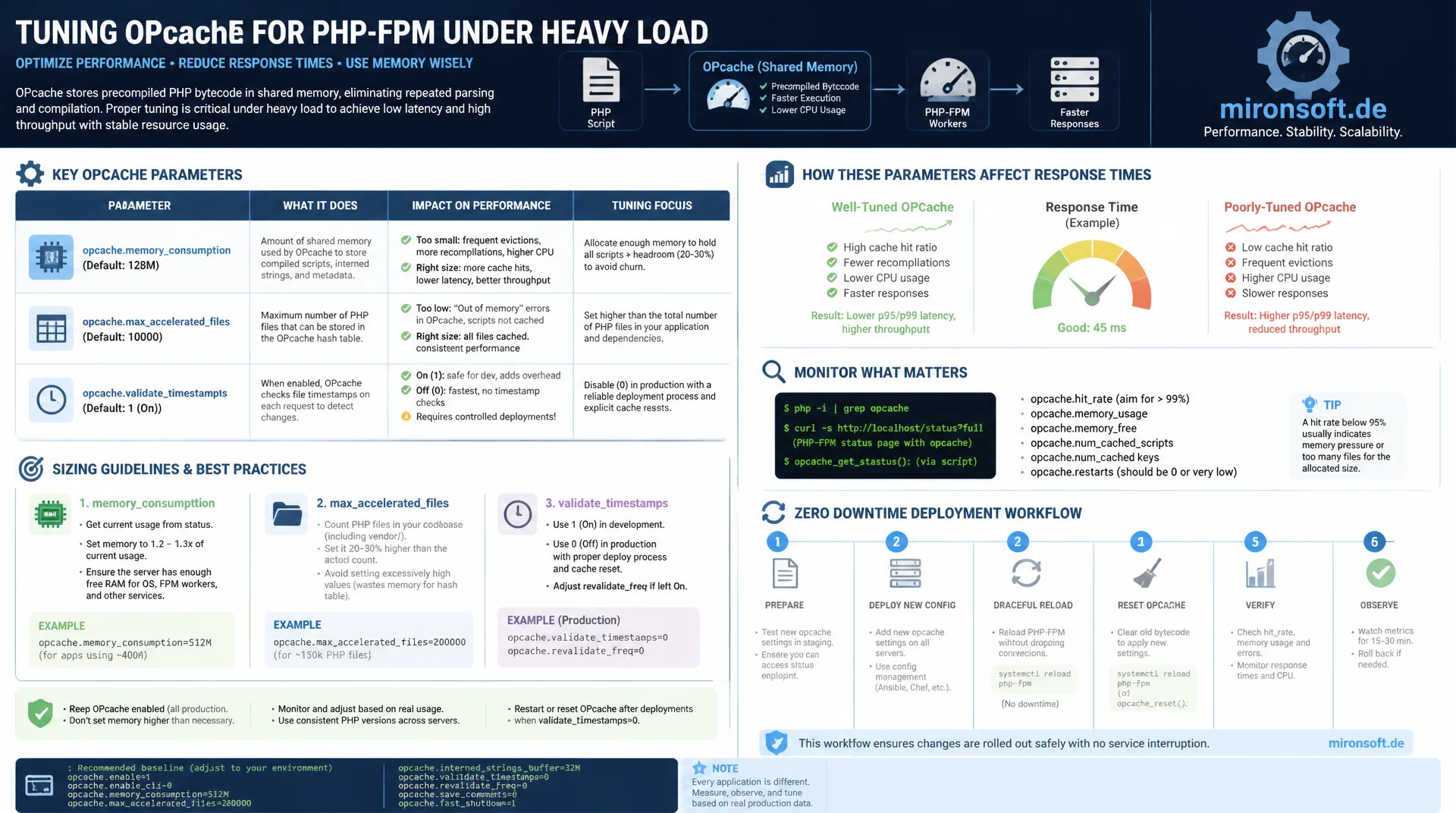
The values that actually matter
OPcache's factory defaults were designed for a developer laptop, not a PHP-FPM pool under heavy load. If you have never touched memory_consumption, max_accelerated_files, or validate_timestamps, you are leaving measurable response time on the table and risking wasted memory, hash collisions, and unnecessary filesystem stats on every single request. This guide walks through the OPcache Tuning parameters that genuinely have measurable impact, how to size them correctly, and what a safe zero downtime deployment workflow looks like around them.
Table of Contents
- 1. What OPcache actually does
- 2. Sizing memory_consumption and interned_strings_buffer correctly
- 3. max_accelerated_files: determining the correct file count
- 4. validate_timestamps and revalidate_freq: dev vs. production
- 5. save_comments and its effect on attributes and reflection
- 6. OPcache preloading: benefits and pitfalls
- 7. File cache for CLI scripts and restart persistence
- 8. Monitoring via opcache_get_status()
- 9. Zero downtime deployment: opcache_reset() vs. rolling restart
- 10. Summary
- 11. FAQ
1. What OPcache actually does
OPcache translates PHP source code into opcodes (the compiled bytecode of the Zend Engine) exactly once and keeps that structure in the process's shared memory. Without OPcache, PHP parses and compiles every included file again on every single request, regardless of whether anything changed since the last call. For a typical application with several thousand PHP files, that means thousands of parse and compile operations per second, all of which can be eliminated entirely through OPcache Tuning, because the bytecode is executed directly from shared memory instead.
The problem: the factory defaults, as shipped in a standard php.ini or the default OPcache build, are calibrated for a broad range of use cases, not for a specific production workload. opcache.memory_consumption defaults to 128 MB, which is too tight for larger codebases. opcache.validate_timestamps is enabled by default and causes a stat() syscall per included file on every request to detect changes, an overhead you do not need in production because the code does not change between deployments.
OPcache Tuning therefore does not mean enabling OPcache (that is already the default in practically every current PHP installation), it means deliberately aligning the parameters with the actual workload: enough memory for the entire codebase, no filesystem checks on every request, a correctly sized interned strings buffer, and a deployment process that refreshes the cache reliably and without downtime. The following sections walk through each of these levers in detail.
2. Sizing memory_consumption and interned_strings_buffer correctly
opcache.memory_consumption defines how much shared memory OPcache reserves for compiled bytecode, specified in megabytes. If the value is set too low, OPcache starts evicting older cache entries once memory fills up, a process known as a cache wrap or restart, which forces already-compiled files to be parsed again. This shows up in opcache_get_status() as a rising opcache_restarts value and is a clear signal of insufficient memory, regardless of how healthy the hit rate currently looks.
The correct size is determined by observing used_memory from opcache_get_status() under realistic load and adding a safety margin of 30 to 50 percent to absorb growth from new files or additional deployments. For mid-sized applications with a few thousand PHP files, 256 to 512 MB is a common starting point, while large monolithic codebases or applications with many vendor packages may need 512 MB to 1 GB. It is important to check wasted_memory regularly: a high proportion of wasted memory relative to used_memory does not indicate too little memory, but fragmented memory, usually caused by frequent recompilation of individual files while validate_timestamps is active.
opcache.interned_strings_buffer is a separate memory area for interned strings, meaning identical string literals that PHP deduplicates internally to save memory. The default of 8 MB is sufficient for small scripts but fills up quickly with frameworks that use many class names, constants, and string literals. Once the buffer is full, PHP can no longer deduplicate reliably, which shows up as higher memory consumption per worker process without being directly visible in opcache_get_status(). A value between 16 and 32 MB is sufficient for most production applications and is a central, often overlooked building block of OPcache Tuning.
3. max_accelerated_files: determining the correct file count
opcache.max_accelerated_files limits how many individual PHP files OPcache can hold in the cache at the same time. Internally, OPcache manages these files in a fixed-size hash table, which is internally rounded up to the next prime number above the configured value for optimization. If the configured value is lower than the actual number of PHP files in the project, OPcache starts evicting entries once the limit is reached, with the same negative effects as too little memory_consumption: re-parsing, higher latency, declining hit rate.
The actual file count of a project is easy to determine, including all vendor dependencies, since third-party libraries end up in the same cache. A simple counting command over the entire project directory provides the basis for sizing, and that basis is exactly the starting point for any serious OPcache Tuning effort.
# Count all PHP files in the project, including vendor dependencies
find . -name "*.php" -not -path "*/node_modules/*" | wc -l

# Example output for a mid-sized application with framework and dependencies
# 14832

# Cross-check against currently cached files at runtime
php -r 'var_dump(opcache_get_status(false)["opcache_statistics"]["num_cached_scripts"]);'

# Compare against the configured limit
php -i | grep opcache.max_accelerated_files
The common recommendation is to round the determined value up to the next sensible order of magnitude and plan a buffer of 20 to 30 percent for future growth. For around 15,000 files, a value of 20,000 to 30,000 is a solid choice. The maximum allowed value is 1,000,000, and since the internal hash table overhead per additional slot is minimal, there is rarely a reason to be too conservative here, a value set too low costs significantly more in production than a few extra megabytes of management overhead. Watching opcache_restarts together with num_cached_scripts sitting close to the configured limit is the most reliable signal that max_accelerated_files is set too low.
4. validate_timestamps and revalidate_freq: dev vs. production
opcache.validate_timestamps controls whether OPcache checks a file's modification time on every access (or at the interval defined by opcache.revalidate_freq) to determine whether recompilation is needed. In development this is essential: without this check, a changed file would only be picked up after a manual cache reset, which would considerably slow down the development workflow. Here, opcache.revalidate_freq=0 combined with active validate_timestamps makes sense, checking on every request and delivering immediate feedback on code changes.
In production, this exact check is unnecessary overhead. The code does not change between deployments, yet every stat() call per included file costs time that adds up across thousands of requests per second, especially on filesystems with higher I/O latency such as network storage or certain cloud volumes. The correct production setting is opcache.validate_timestamps=0, which disables the timestamp check entirely. OPcache then assumes that once-compiled code never changes again and reads it exclusively from shared memory.
The deployment implication is decisive: with validate_timestamps=0, PHP no longer automatically detects code changes after a deployment. Simply overwriting files on the server is no longer sufficient, the OPcache state must be explicitly invalidated after every deployment, either via opcache_reset(), an FPM restart, or reloading the file cache. Anyone who forgets this step in the deployment script keeps serving the old code version from the cache after deployment, a classic and hard-to-diagnose bug, because the new code already sits on disk while the running worker processes still execute the old opcodes.
5. save_comments and its effect on attributes and reflection
opcache.save_comments controls whether doc comments (the /** */ blocks) are kept in the bytecode during compilation or discarded. In very old OPcache versions it was recommended to disable this value for maximum performance, because doc comments take up additional memory in the cache. That recommendation is wrong and potentially dangerous in the vast majority of cases today.
The reason: reflection-based libraries, dependency injection containers, ORMs, and validation frameworks frequently read metadata from doc comment annotations, for example in a format like @ORM\Column or similar annotation schemes. If save_comments is disabled, these comments disappear from the compiled bytecode, and any reflection-based logic that depends on them breaks at runtime, often without a clear error message, simply through missing metadata mapping.
Native PHP attributes (the #[Attribute] syntax, available since PHP 8.0) are unaffected by this setting, since they are part of the language syntax rather than the comment system and always remain in the bytecode. Nevertheless, opcache.save_comments should be left at 1 (enabled, the default) in practically every modern production environment, since many libraries still rely on annotations and the memory overhead from retained comments is negligible compared to the risk of broken reflection logic. An OPcache Tuning effort that saves here is saving in the wrong place.
6. OPcache preloading: benefits and pitfalls
Preloading, introduced in PHP 7.4, goes a step further than regular caching: opcache.preload specifies a PHP file that runs when each FPM worker process starts (or when the master process starts, depending on the SAPI), loading classes and functions into memory ahead of time, before the first request even arrives. These preloaded classes stay in memory for the entire lifetime of the worker process and, unlike regular OPcache content, are not invalidated on timestamp changes.
The performance benefit is real: frequently used base classes, interfaces, and core components of a framework no longer need to be resolved from the regular cache on every request, class resolution disappears entirely because the classes are already fully loaded and linked in memory. For applications with deep inheritance hierarchies or many interface implementations, this can produce noticeable latency reduction.
The central pitfall is state leaking between requests. Since preloaded classes remain in the worker process's memory, static properties or singleton instances in preloaded classes must not hold request-specific state, otherwise state from one request leaks into the next request handled by the same worker process, a subtle and hard-to-reproduce bug that only surfaces under load and with specific worker assignments. opcache.preload_user defines which system user the preload script runs as, important for correct filesystem permissions. Preloading should be firmly integrated into the deployment process: after every deployment, the FPM process must be restarted so the updated preload script takes effect, a simple opcache_reset() is not sufficient for this, since preloaded classes are unaffected by it. Anyone using preloading as part of their OPcache Tuning should anchor this restart step firmly in the deployment script instead of relying on manual discipline.
7. File cache for CLI scripts and restart persistence
opcache.file_cache enables a second cache layer that writes compiled bytecode to disk in addition to shared memory. The main benefit shows up in two scenarios: short-lived CLI processes and restarts of the web server or FPM pool. CLI scripts typically start a new PHP process per invocation and normally do not benefit from the shared-memory cache of a long-lived FPM worker. With the file cache enabled, a CLI invocation reads the already-compiled bytecode from disk instead of parsing the entire source code again, which noticeably saves time especially for cron jobs and batch scripts that run frequently, sometimes every second.
When an FPM pool restarts, the shared-memory cache is normally cleared entirely, so the first requests after a restart hit a cold cache and must recompile every file, producing a brief phase of elevated latency. With an active file cache, OPcache can instead load the already-compiled bytecode from disk, which considerably speeds up the cold start. opcache.file_cache_only=1 is a special configuration for environments without shared memory, for example certain restricted container setups, here OPcache runs exclusively through the file-based cache, which is slower than shared memory but still considerably faster than no caching at all.
8. Monitoring via opcache_get_status()
The function opcache_get_status() returns an array with all relevant runtime metrics of OPcache and is the foundation of any serious OPcache Tuning effort. The most important metric is the hit rate, the ratio of cache hits to total accesses. A hit rate below 99 percent in production is a clear warning sign and almost always points to max_accelerated_files or memory_consumption configured too low. wasted_memory shows memory occupied by discarded but not yet cleaned up cache entries, a persistently high proportion indicates frequent recompilations, usually caused by active validate_timestamps combined with frequently changing files.
current_wasted_percentage is the percentage of wasted memory relative to total memory. If this value exceeds the threshold configured in opcache.max_wasted_percentage (default 5 percent), OPcache automatically triggers a full cache restart, which briefly causes elevated latency. A threshold that is regularly exceeded is a symptom that should be fixed, not masked by raising the threshold.
<?php

declare(strict_types=1);

/**
 * Minimal OPcache monitoring script for periodic health checks.
 * Run via cron or an internal admin endpoint, never expose publicly.
 */
function checkOpcacheHealth(): array
{
    $status = opcache_get_status(false);

    if ($status === false) {
        return ['error' => 'OPcache is not enabled'];
    }

    $stats = $status['opcache_statistics'];
    $memory = $status['memory_usage'];

    $hitRate = $stats['opcache_hit_rate'];
    $wastedPercentage = $memory['current_wasted_percentage'];
    $restarts = $stats['opcache_restarts'];
    $cachedScripts = $stats['num_cached_scripts'];
    $maxScripts = ini_get('opcache.max_accelerated_files');

    $warnings = [];

    if ($hitRate < 99.0) {
        $warnings[] = sprintf('Hit rate low: %.2f%% (expected >= 99%%)', $hitRate);
    }

    if ($wastedPercentage > 5.0) {
        $warnings[] = sprintf('Wasted memory high: %.2f%%', $wastedPercentage);
    }

    if ($cachedScripts >= (int) $maxScripts * 0.9) {
        $warnings[] = sprintf(
            'Approaching max_accelerated_files limit: %d / %d',
            $cachedScripts,
            (int) $maxScripts
        );
    }

    return [
        'hit_rate' => $hitRate,
        'wasted_percentage' => $wastedPercentage,
        'restarts' => $restarts,
        'cached_scripts' => $cachedScripts,
        'warnings' => $warnings,
    ];
}

$result = checkOpcacheHealth();
echo json_encode($result, JSON_PRETTY_PRINT), PHP_EOL;
A script like this can easily be integrated into a monitoring system that polls the metrics periodically and triggers alerts when thresholds are exceeded. Access control needs to be handled cleanly, an endpoint that exposes internal cache metrics should never be reachable publicly on the network, but should sit behind authentication or exclusively on an internal network interface.
9. Zero downtime deployment: opcache_reset() vs. rolling restart
After every deployment with validate_timestamps=0 active, the OPcache state must be refreshed so the new code version is actually served. The obvious approach is calling opcache_reset(), which clears the entire cache and rebuilds it on the next request. The problem: opcache_reset() only takes effect within the process that calls it. In an FPM pool with multiple worker processes, each worker has its own PHP interpreter state, but they share the same shared-memory cache area through the SHM segments. A single reset call triggered by an HTTP request therefore only hits the one worker that handled that request, while the remaining workers keep serving the old bytecode from shared memory until they trigger a reset themselves or are restarted.
This creates a window in which different workers of the same pool serve different code versions, an inconsistent state that can lead to contradictory responses on API requests and, in the case of database migrations that must go hand in hand with new code, to real data integrity problems. A simple, uncoordinated opcache_reset() per request is therefore a risk in production environments with multiple workers, not a reliable solution.
The more robust alternative is a rolling restart of the FPM pool, in which worker processes are restarted one after another (not simultaneously), so that enough workers with either old or new code remain available at all times to serve incoming requests without the service being unavailable as a whole. In practice this can be achieved through a graceful reload of the FPM master process, which starts new workers with a fresh OPcache state and only terminates old workers after they finish their current requests. Alternatively, for systems with multiple servers behind a load balancer, a classic blue-green or rolling server-by-server deployment works, where each server is individually taken out of the load balancer, restarted, and added back. In both cases, the decisive point is that the cache state is updated consistently across the entire pool, rather than relying on individual, uncoordinated reset calls.
| Setting | Development | Production | Benefit / Effect |
|---|---|---|---|
| validate_timestamps | 1 (enabled) |
0 (disabled) |
No stat() overhead per request in production |
| revalidate_freq | 0 (every request) |
0 (irrelevant, since validate_timestamps is off) |
Immediate feedback in dev, no effect in prod |
| memory_consumption | 128-256 MB | 256-1024 MB depending on codebase | Prevents cache wraps and restarts |
| preload | usually disabled | active for core classes | Eliminates per-request class resolution, risky with state |
| file_cache | optional | active for CLI/workers | Faster cold start, saves re-parsing for cron jobs |
10. Summary
Effective OPcache Tuning in production environments comes down to a handful of decisive parameters. opcache.memory_consumption and opcache.interned_strings_buffer must be sized large enough to avoid cache restarts, determined from used_memory and wasted_memory under real load. opcache.max_accelerated_files must exceed the project's actual file count including vendor dependencies, determinable with a simple find command. opcache.validate_timestamps=0 saves the stat() overhead per request in production, but in return requires a reliable cache invalidation step in the deployment process.
opcache.save_comments should remain enabled so reflection-based libraries keep working. Preloading and the file cache are advanced levers for additional performance, but come with their own pitfalls, state leaks with preloading, limited freshness with the file cache. Monitoring through opcache_get_status() makes the effect of every setting measurable instead of guessed. And when it comes to deployment: a single opcache_reset() call in a multi-worker pool is risky, a coordinated rolling restart is the safe alternative for genuine zero downtime deployment. OPcache Tuning is therefore not a one-time setting of values, but an ongoing alignment between configuration, codebase, and deployment process.
OPcache Tuning for Production Environments - The essentials at a glance
Memory sizing
memory_consumption and interned_strings_buffer sized from used_memory and wasted_memory under load, with a 30-50% buffer.
File count
max_accelerated_files must exceed the real PHP file count, determined with find . -name "*.php" | wc -l.
Production vs. development
validate_timestamps=0 in production, enabled in dev. Requires reliable cache invalidation on deployment.
Safe deployment
Rolling restart instead of a single opcache_reset() in multi-worker pools, to avoid inconsistent code versions.
11. FAQ: OPcache Tuning for Production Environments
1What does OPcache Tuning change vs. the factory defaults?
2How large should memory_consumption be in production?
3How do I determine the correct max_accelerated_files count?
4Why set validate_timestamps to 0 in production?
5What happens without cache invalidation after deployment?
6Should I disable save_comments?
7Biggest pitfall with preloading?
8What is file_cache useful for?
9Most important metric from opcache_get_status()?
10Why is opcache_reset() risky in a multi-worker pool?
Mironsoft
PHP performance tuning, server configuration, and deployment infrastructure
Never properly tuned OPcache in your production environment?
We analyze your PHP-FPM configuration, size memory_consumption and max_accelerated_files correctly, and build a zero downtime deployment workflow that handles cache invalidation without risk.
OPcache audit
Analysis of hit rate, wasted memory, and restart frequency based on real metrics
Configuration tuning
memory_consumption, max_accelerated_files, and preloading matched to your codebase
Deployment pipeline
Rolling restarts instead of risky opcache_reset() calls in multi-worker pools