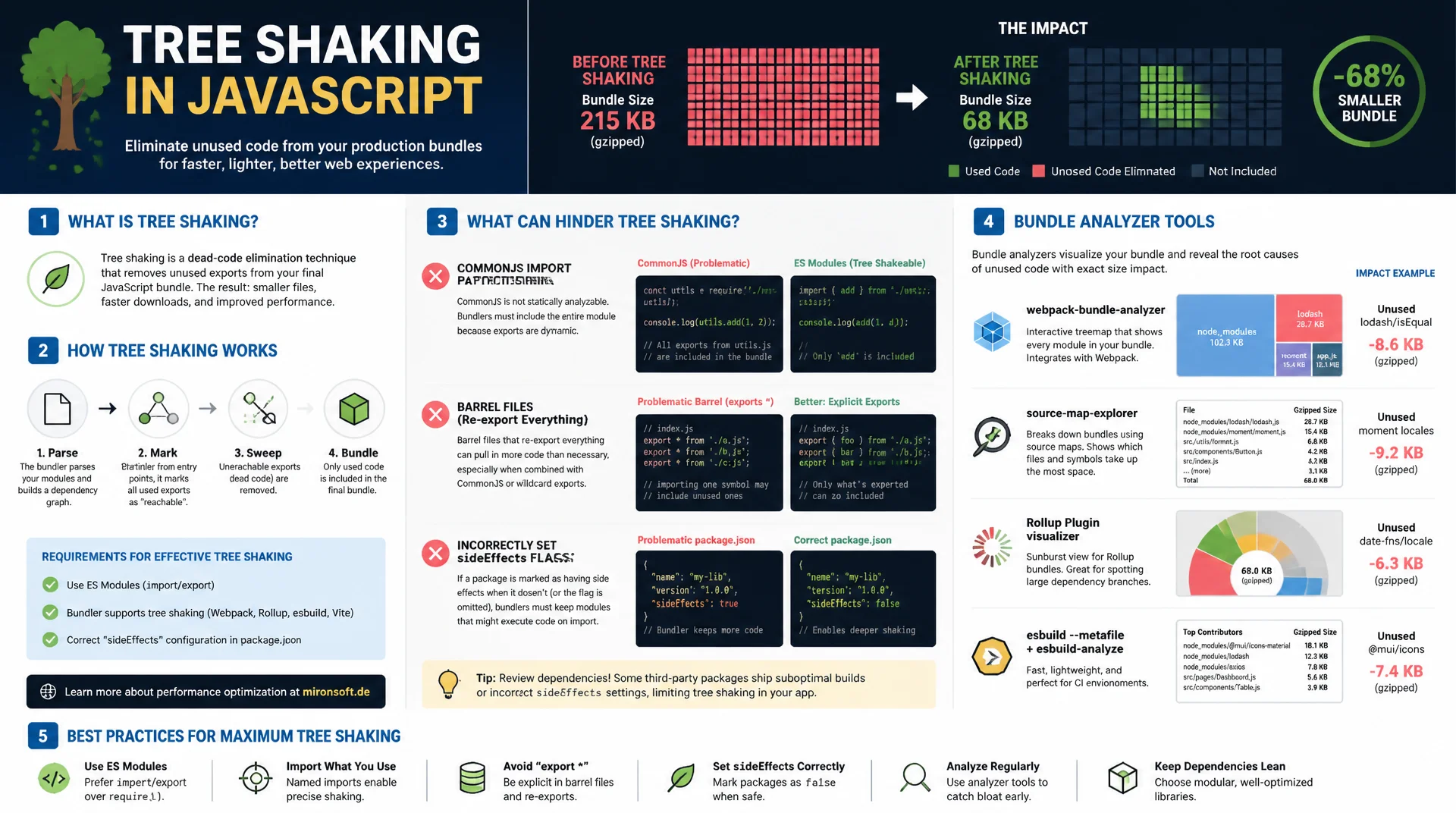
in Practice
Unused code surprisingly often still ends up in the production bundle, because CommonJS imports, barrel files, or a wrongly set sideEffects flag prevent the bundler from removing it. This article shows mechanically how tree shaking works, which patterns block it, and how bundle analyzer tools make the root causes visible with concrete kilobyte numbers.
Table of Contents
- 1. How tree shaking works mechanically
- 2. The sideEffects flag in package.json
- 3. CommonJS as a tree-shaking blocker
- 4. Barrel files and their hidden cost
- 5. Recognizing side-effectful imports
- 6. Bundle analyzers in action: webpack-bundle-analyzer
- 7. Alternatives: source-map-explorer and rollup-plugin-visualizer
- 8. A practical workflow: finding and removing dead code
- 9. A before/after example with real numbers
- 10. Summary
- 11. FAQ
1. How tree shaking works mechanically
Tree shaking isn't magic, it's static analysis of an import/export graph. At the start of a build, the bundler constructs a complete dependency tree from every module: each import statement becomes an edge between two nodes, each export becomes a potential entry point. Because ES module imports and exports are static, meaning they're fixed at compile time rather than computed at runtime, the bundler can determine exactly which exports are actually referenced anywhere and which are not. Unreferenced exports get marked as dead.
Actually removing the dead code is usually not done by the bundler itself, but by the downstream minifier, typically Terser or esbuild. The bundler marks unused code with comments like /*#__PURE__*/ or strips the corresponding export bindings from the module graph, and the minifier then performs the actual dead code elimination during compression. That explains why an unminified development bundle often still contains the full, unshaken code, even though tree shaking was technically already active.
The decisive reason this only works with ESM and not CommonJS: with import { debounce } from 'lodash-es', the bundler already knows at parse time which binding is being imported. With require('lodash'), the whole expression can only be evaluated at runtime, because require() is a plain function that could theoretically be called with any arbitrary string. This fundamental property of the module system is the root of almost every tree-shaking problem you'll encounter in practice.
2. The sideEffects flag in package.json
Even with pure ESM, a bundler cannot automatically know whether executing a module has a relevant effect independent of its exports, such as registering a custom element, patching a global prototype, or pulling in CSS. That's why the sideEffects flag exists in package.json. It's an explicit assertion from the package author to the bundler: "these modules have no observable effects beyond their exports, you're free to remove unused imports entirely."
"sideEffects": false is the most aggressive setting and allows the bundler to remove any module whose exports are unused anywhere, even if the module theoretically executes code on import. This is only safe if no module in the package genuinely has global effects. A more realistic configuration is usually an array of explicit exceptions, such as ["*.css", "./src/polyfills.js"], for files with real side effects that must never be eliminated regardless of whether their exports are used.
The risk of misconfiguration is real: setting sideEffects: false on a package that actually has global effects, for example a polyfill that extends Array.prototype, causes the bundler to remove the module because no export is directly referenced, and the polyfill silently disappears at runtime. Bugs like this often only surface in production, because development builds frequently skip aggressive optimization and mask the failure.
{
  "name": "@mironsoft/ui-kit",
  "version": "2.4.0",
  "type": "module",
  "sideEffects": [
    "*.css",
    "./src/polyfills/intl-polyfill.js",
    "./src/global-styles.js"
  ]
}
3. CommonJS as a tree-shaking blocker
require() is an ordinary JavaScript function, not a language construct. It can be called with a computed variable, inside a conditional, or in a loop. A bundler can only statically analyze this call if the argument is a string literal, and even then it remains unclear which properties of the returned module.exports object are actually used, because property access in JavaScript can be arbitrarily dynamic (obj[key]). Importing from a pure CommonJS package therefore usually pulls the entire module.exports object into the bundle, even if only a single function is used.
Modern bundlers like Webpack and Rollup partially compensate for this by wrapping CommonJS modules in a synthetic ESM shell via an interop plugin and attempting, through static analysis, to detect unused property accesses. This works for simple, flat exports, but frequently fails with re-exports, dynamically constructed objects, or when the package uses Object.defineProperty at runtime to define its exports.
To check a dependency's module format, it's worth looking at its package.json: a "type": "module" field or a separate "module" field alongside "main" indicates an ESM build exists. If both are missing and the package only ships a main file with module.exports, it's pure CommonJS, and an import is guaranteed to pull in the whole package.
// CommonJS: require() is a plain function call, not statically analyzable.
// The bundler cannot know which exports are actually used at build time.
const { debounce } = require('lodash');
// Result: the entire lodash package (~70 KB minified) is included,
// even though only one function is referenced.

// ESM: static import/export bindings, resolvable at parse time.
import { debounce } from 'lodash-es';
// Result: only the debounce module and its direct dependencies
// are pulled into the bundle (a few KB).
4. Barrel files and their hidden cost
A barrel file is an index.js that centrally re-exports every module in a folder, typically with export * from './button'; export * from './modal'; export * from './tooltip';. The pattern is convenient for consumers, since a single import path is enough, but it's a well-known tree-shaking risk factor. Whether the bundler can still remove the unused re-exports depends heavily on the specific bundler version, module resolution behavior, and the package's sideEffects configuration.
The practical problem gets worse when one of the re-exported modules itself has a side effect, such as automatically registering a global instance. If the barrel file isn't explicitly marked with sideEffects: false, the bundler has to stay conservative and keep the entire module, including all sibling exports, because it can't rule out that an import triggers some necessary effect. In large component libraries with hundreds of exports in a single barrel file, this can be the difference between a 15 KB bundle and a 400 KB bundle.
The most reliable countermeasure is importing directly from the specific file instead of the barrel: import { Button } from '@ui/components/button' instead of import { Button } from '@ui/components'. This sidesteps the uncertainty entirely, because the bundler only has to resolve exactly the referenced modules. Tools like babel-plugin-transform-imports or the built-in optimization some frameworks ship (for example Next.js's optimizePackageImports) automate this rewrite so developers don't have to adjust their imports by hand.
// index.js: barrel file that re-exports the entire component folder
export * from './button';
export * from './modal';
export * from './tooltip';
export * from './data-table'; // pulls in a heavy charting dependency

// Consumer code: only Button is needed, but the bundler may still
// have to keep the whole barrel graph if sideEffects isn't declared.
import { Button } from '@ui/components';

// Fix: import directly from the specific file, bypassing the barrel.
import { Button } from '@ui/components/button';
5. Recognizing side-effectful imports
Not every seemingly unused import can be safely removed. Classic examples are CSS imports like import './styles.css', which have no JavaScript export but must still be included in the stylesheet output during the build. The same goes for polyfills like import 'core-js/stable', which extend prototypes globally, or modules that register something in a registry on load, such as import './icons/register-all', which registers icon components in a global store without exporting anything that's directly referenced elsewhere.
These imports need to be explicitly marked as side effects, either through the sideEffects array in package.json, or, for internal project code, through the equivalent bundler configuration. If that marking is missing and sideEffects: false is set globally, the bundler eliminates the import on the next build because it finds no referenced export, and the application breaks at runtime in a way that's hard to spot in code review, since the import statement itself remains unchanged in the source.
A reliable practical test: after every change to the sideEffects configuration, run a full production build including minification and test the application end-to-end, not just in development mode. Development builds usually disable aggressive tree shaking entirely, so bugs caused by incorrectly marked side effects only surface in the production build, or worse, in production itself.
6. Bundle analyzers in action: webpack-bundle-analyzer
webpack-bundle-analyzer visualizes a Webpack bundle's contents as an interactive treemap: each rectangle is a module, and its area corresponds to its size in the bundle. Modules that appear in multiple chunks are highlighted in color, which makes duplicated code immediately visible, a common problem with misconfigured code splitting. The treemap distinguishes between "stat size" (before minification), "parsed size" (after minification), and "gzip size", which helps estimate how much a module actually contributes to the network payload that gets shipped.
When reading the treemap, it's worth looking for unusually large rectangles in unexpected places: a moment/locale folder that suddenly takes up 300 KB because all locale files got imported instead of just the needed ones is a classic find. Equally telling are multiple versions of the same library appearing at once, for example lodash@3 and lodash@4 both in the tree, because different dependencies had conflicting version requirements and the package manager couldn't deduplicate them.
Getting started barely requires any configuration: the plugin can be run temporarily via the CLI without permanently changing the Webpack configuration, which makes it ideal for quick spot checks, for instance right after a dependency update, to verify whether the bundle size changed unexpectedly.
# Quick one-off analysis without permanently changing webpack.config.js
npx webpack --profile --json > stats.json
npx webpack-bundle-analyzer stats.json dist/ --port 8888

# Or wired into the config for repeated use during development
# webpack.config.js
const { BundleAnalyzerPlugin } = require('webpack-bundle-analyzer');

module.exports = {
  plugins: [
    new BundleAnalyzerPlugin({
      analyzerMode: 'static',
      openAnalyzer: false,
      reportFilename: 'bundle-report.html',
    }),
  ],
};
7. Alternatives: source-map-explorer and rollup-plugin-visualizer
source-map-explorer uses existing source maps to trace the bundle's composition back to the original source code, regardless of which bundler produced the bundle. That makes it particularly useful for setups that aren't Webpack-based, or for legacy build pipelines with multiple chained tools where a Webpack-specific analyzer plugin isn't directly usable. It requires a production build with source maps enabled (devtool: 'source-map' in Webpack, or the equivalent Rollup setting), which is often disabled by default in production environments for security reasons and needs to be temporarily re-enabled.
rollup-plugin-visualizer is the counterpart for Rollup- and Vite-based projects, and likewise generates a treemap, or optionally a sunburst or network diagram, directly from the Rollup build process. Since Vite uses Rollup internally for production builds, the plugin works seamlessly in Vite projects and also shows which chunk originated from a dynamic import(), which helps when evaluating route-based code splitting.
Neither visual tool is directly suited to CI integration and budget enforcement, since they're primarily designed for manual inspection. Instead, they're combined with bundlesize or Webpack's built-in performance.maxAssetSize option, which fails the build once a defined KB budget is exceeded. The analyzer reports are then saved as a pipeline artifact and consulted for root-cause analysis when the budget is exceeded, rather than being opened automatically on every build.
# source-map-explorer: works with any bundler that emits source maps
npx source-map-explorer dist/main.js dist/main.js.map --html report.html

# rollup-plugin-visualizer: for Rollup and Vite projects
# vite.config.js
import { visualizer } from 'rollup-plugin-visualizer';

export default {
  build: { sourcemap: true },
  plugins: [
    visualizer({ filename: 'bundle-report.html', gzipSize: true, brotliSize: true }),
  ],
};
8. A practical workflow: finding and removing dead code
A systematic workflow doesn't start with reading the code line by line, it starts with the bundle analyzer report: examine the biggest chunks first, since that's where the most savings potential lives. A 2 KB module is rarely worth investigating, whereas a 150 KB chunk of unclear origin always is. The treemap report identifies the largest packages, and from there you check, package by package, whether it's genuinely needed with its full functionality or whether a lighter alternative exists.
Alongside bundle analysis, it's worth running depcheck or the more modern knip, which statically scan the source code for imports and cross-reference them against the dependencies declared in package.json. Both tools surface two distinct problem classes: unused dependencies, which can be removed from package.json entirely, and missing dependencies, which are being pulled in implicitly through another dependency and could suddenly disappear after a version update. knip goes further than depcheck and additionally finds unused exports within your own codebase, not just unused external packages.
The final step of every cycle is verification: after each removal, run a full production build, re-measure the bundle size, and manually or via end-to-end tests click through the affected areas of the application. Dead code is rarely truly 100% dead; occasionally a supposedly unused export turns out to still be referenced through a dynamic import or a reflection-like construct that static analysis tools don't catch.
9. A before/after example with real numbers
A realistic example from a mid-sized frontend project: the original vendor chunk weighed in at 412 KB minified, 128 KB gzip. The bundle analyzer treemap revealed three notable blocks: lodash imported wholesale via const _ = require('lodash') at roughly 71 KB minified, even though the code only used four functions (debounce, cloneDeep, groupBy, isEqual); moment.js with all 200+ locale files bundled at 289 KB minified, even though only the German and English locales were needed; and a barrel import from an internal UI library that accidentally pulled in a 40 KB charting component that wasn't even rendered on the affected page.
After switching to targeted named imports from lodash-es, replacing moment.js with the native Intl.DateTimeFormat API for the two actually needed locales, and importing the Button component directly instead of through the barrel file, the vendor chunk dropped to 94 KB minified, 31 KB gzip. That's a reduction of roughly 77% minified and 76% gzip, with identical functionality and no visible behavior change for the end user. The measured improvement in Time to Interactive on a mid-tier mobile device came to nearly 380 milliseconds, measured across three Lighthouse runs, median value.
// BEFORE: full CommonJS import pulls in the entire lodash package (~71 KB min)
const _ = require('lodash');
const result = _.debounce(fn, 300);

// BEFORE: moment.js with all locale files bundled (~289 KB min)
import moment from 'moment';
import 'moment/locale/de';
const formatted = moment(date).format('DD.MM.YYYY');

// AFTER: named ESM import, only the used function is bundled (~2 KB min)
import { debounce } from 'lodash-es';
const result = debounce(fn, 300);

// AFTER: native Intl API, zero extra dependency weight
const formatted = new Intl.DateTimeFormat('de-DE').format(date);
| Pattern | Bundle impact | Recommendation |
|---|---|---|
| import _ from 'lodash' | ~71 KB min, no shaking | import { debounce } from 'lodash-es' |
| require() for named exports | entire module loaded | ESM import instead of CommonJS |
| moment.js with all locales | ~289 KB min | native Intl.DateTimeFormat |
| Import from barrel index.js | pulls in sibling modules | Direct import from the file |
| No sideEffects flag | bundler stays conservative | Declare sideEffects correctly |
Mironsoft
Bundle optimization, frontend performance, and Hyvä build pipelines
JavaScript bundles too large in your store?
We analyze your bundle composition with the right tools, find CommonJS blockers, barrel file traps, and misconfigured sideEffects flags, and implement the optimizations directly in your build pipeline.
Bundle audit
Treemap analysis and prioritization by kilobyte savings potential
Dependency cleanup
Targeted replacement of unused packages and CommonJS blockers
CI budget gates
Bundle size budgets in the pipeline to guard against regressions
10. Summary
Tree shaking and bundle analysis address the same underlying problem from two directions: tree shaking preemptively prevents unused code from entering the bundle in the first place, while bundle analyzers make visible where it happened anyway. Working shaking requires pure ESM instead of CommonJS, a correctly set sideEffects flag, and deliberately avoiding barrel imports wherever only a single module is actually needed. If any one of these three prerequisites is missing, the bundler stays conservative and keeps code that could otherwise have been removed.
Tools like webpack-bundle-analyzer, source-map-explorer, and rollup-plugin-visualizer replace guessing with measuring: instead of speculating which package is bloating the bundle, the treemap shows it directly. Combined with depcheck or knip for unused dependencies, and a CI budget gate against regressions, this becomes a repeatable workflow that keeps bundle size under permanent control instead of optimizing it just once.
Tree Shaking and Bundle Analysis - The Essentials at a Glance
Only ESM is shakeable
Static import/export analysis only works with ES Modules. require() is dynamic and blocks shaking.
Set sideEffects correctly
sideEffects: false or a precise array with genuine exceptions like CSS files and polyfills.
Avoid barrel files
Import directly from the specific file instead of the central index.js when only one module is needed.
Measure, don't guess
webpack-bundle-analyzer, source-map-explorer, or rollup-plugin-visualizer plus CI budget gates.