Combining OPcache, Redis, Varnish and CDN the right way
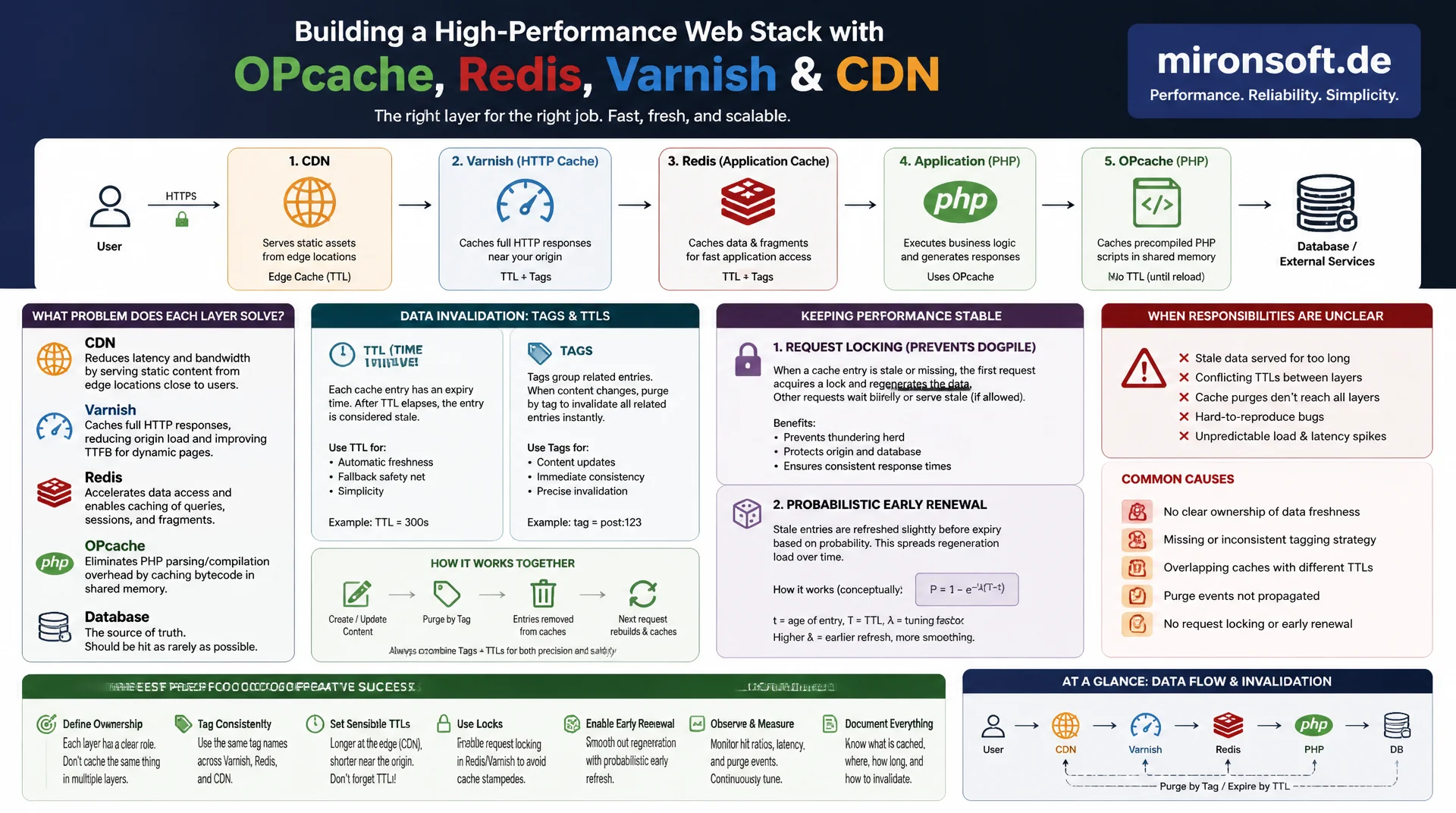
Running OPcache, Redis, Varnish and a CDN without a clear division of responsibility produces inconsistent load times and hard to reproduce bugs caused by stale data. This article explains how each layer solves a distinct problem, how invalidation works reliably across tags and TTLs, and how request locking and probabilistic early renewal prevent cache stampedes from overwhelming the origin.
Table of Contents
- 1. The cache layer hierarchy: OPcache, object cache, FPC and CDN at a glance
- 2. OPcache: configuring the bottom layer of bytecode caching correctly
- 3. Object/application caching with Redis: configuration and use cases
- 4. Full Page Cache (Varnish): caching entire HTML responses
- 5. CDN edge cache: the outermost layer in front of the origin
- 6. Cache invalidation across layers: tags vs. TTL strategy
- 7. Cache busting for static assets and versioning
- 8. Avoiding cache stampedes: locking, request coalescing and probabilistic renewal
- 9. The cache layers compared side by side
- 10. Summary
- 11. FAQ
1. The cache layer hierarchy: OPcache, object cache, FPC and CDN at a glance
Every cache layer in a Magento stack solves a different problem and operates at a different point in the request lifecycle. OPcache sits at the very bottom: it caches compiled PHP bytecode in shared memory and prevents every request from re-parsing and re-compiling hundreds of PHP files, a step that costs 20 to 40 milliseconds of parsing and compilation alone on an average Magento request without OPcache. Above that sits the object/application cache with Redis, which stores computed results such as EAV attributes, layout XML, block content and configuration data, sparing repeated database queries.
One level higher sits the Full Page Cache with Varnish, which holds complete rendered HTML responses and thereby skips the entire PHP process for repeat requests. At the very outside sits the CDN as an edge cache, holding responses at geographically distributed points of presence close to the user and preventing the origin server from ever being reached at all. The four layers build on each other: a cache miss in an outer layer falls back to the next layer in, until in the worst case every request lands on the database.
2. OPcache: configuring the bottom layer of bytecode caching correctly
OPcache is the one cache layer that should practically always be enabled, since it delivers measurable gains without much configuration effort. The critical setting is opcache.memory_consumption: Magento with its vendor directory and generated classes often spans over 60,000 PHP files, so the default of 128 MB quickly hits its limit and causes constant cache churn, where OPcache evicts entries while memory is still needed. 256 MB, together with opcache.max_accelerated_files set to at least 130,000, is a realistic starting point for a production Magento installation.
opcache.validate_timestamps=0 disables the check for whether a PHP file has changed since it was last compiled, saving one filesystem stat call per file per request. This makes sense in production, but only combined with a deploy process that explicitly resets OPcache via opcache_reset() or a PHP-FPM reload after every release. Without that step, old server processes keep serving stale bytecode for days. opcache.preload loads a defined class list permanently into memory when PHP-FPM starts; since Magento 2.4.x, bin/magento generate:preload generates a matching preload.php that eliminates most of the typical class-resolution overhead.
; php.ini / opcache.ini - Production OPcache configuration for Magento 2
opcache.enable=1
opcache.enable_cli=1
opcache.memory_consumption=256
opcache.interned_strings_buffer=16
opcache.max_accelerated_files=130000
opcache.validate_timestamps=0
opcache.revalidate_freq=0
opcache.save_comments=1
opcache.fast_shutdown=1
opcache.preload=/var/www/html/generated/preload.php
opcache.preload_user=www-data
3. Object/application caching with Redis: configuration and use cases
The object cache stores the result of expensive PHP operations: compiled layout XML, rendered block fragments, configuration trees and EAV attribute metadata. Without it, Magento would reassemble these structures from the database on every single request. Redis is the recommended backend choice over filesystem or Memcached, because it offers atomic operations, tag-based invalidation via native sets, and significantly higher throughput for large numbers of small keys. It's important to put the object cache, session storage and the optional Redis backend for Varnish on separate Redis databases or even separate instances, so a memory shortage in one area doesn't drag the others down with it.
The maxmemory-policy determines what happens once Redis hits its memory limit: allkeys-lru evicts the least recently used keys and is almost always the right choice for the object cache, since lost entries only cause a cache miss and a recomputation, not data loss. If noeviction is used instead, Redis throws write errors once memory is full, which can surface as visible errors in the store. compress_data in the backend configuration noticeably reduces the memory footprint of large layout and block entries, at the cost of CPU time during reads and writes.
<?php
// app/etc/env.php - Redis-backed cache configuration for Magento 2
return [
    'cache' => [
        'frontend' => [
            'default' => [
                'backend' => 'Cm_Cache_Backend_Redis',
                'backend_options' => [
                    'server' => '127.0.0.1',
                    'port' => '6379',
                    'database' => '0',
                    'compress_data' => '1',
                    'compression_lib' => 'gzip',
                ],
            ],
            'page_cache' => [
                'backend' => 'Cm_Cache_Backend_Redis',
                'backend_options' => [
                    'server' => '127.0.0.1',
                    'port' => '6379',
                    'database' => '1',
                    'compress_data' => '0',
                ],
            ],
        ],
    ],
];
4. Full Page Cache (Varnish): caching entire HTML responses
The Full Page Cache stores the complete rendered HTML response of a page, skipping not only database access but the entire PHP process, including object cache lookups. For a category or product page with an active cache hit, Varnish serves the response in 5 to 15 milliseconds, compared with 200 to 800 milliseconds for the same request going through the full Magento stack. The challenge lies in personalized content such as the mini cart, login status, or recently viewed products, which differ per user and must not end up in the cached HTML.
Magento solves this with hole punching via Edge Side Includes: most of the page stays cacheable, while private blocks are marked as separate ESI fragments that Varnish fetches individually on every request and stitches into the cached response. Every response also carries an X-Magento-Tags header with all the entity IDs that contributed to the HTML. This header is the foundation for later targeted invalidation, without having to invalidate the entire page just because a single referenced product changed.
// varnish.vcl - propagate Magento cache tags and support tag-based bans
sub vcl_backend_response {
    // Keep the tag header so it can be used for targeted bans later
    set beresp.http.X-Magento-Tags = beresp.http.X-Magento-Tags;
    set beresp.ttl = 86400s;
    set beresp.grace = 3h;
}

sub vcl_recv {
    if (req.method == "BAN") {
        // Ban all objects whose X-Magento-Tags header matches the given tag
        ban("obj.http.X-Magento-Tags ~ " + req.http.X-Magento-Tags-Pattern);
        return (synth(200, "Banned"));
    }
}
5. CDN edge cache: the outermost layer in front of the origin
A CDN replicates cached content across geographically distributed points of presence and answers requests where the user is physically closer, instead of passing every request through to the origin server. For a visitor in Australia whose origin server sits in Frankfurt, an edge hit cuts network latency from 250 to 300 milliseconds down to 10 to 40 milliseconds through geographic proximity alone, regardless of how fast Varnish or Redis operate at the origin. For static assets like CSS, JS and image files, the CDN is by far the most effective cache layer, since this content rarely changes and tolerates long TTLs of days or weeks.
For dynamic, cacheable HTML, running a CDN is more complex, because it doesn't natively understand Magento's cache tag system. Most CDN providers instead offer their own mechanisms, such as surrogate keys or cache tags exposed through a purge API, which have to be maintained separately from Varnish. A common mistake is applying the same TTL strategy used for Varnish, even though purge operations through the CDN API often take seconds to a few minutes to propagate across all edge nodes. For price-sensitive content, a shorter CDN TTL than the FPC TTL is therefore often the safer choice.
6. Cache invalidation across layers: tags vs. TTL strategy
Tag-based invalidation marks every cache entry with the IDs of the entities that contributed to its content: a product shows up on its own detail page, in category listings, in cross-sell blocks and in the search index, so the cache entry receives several tags accordingly. When the product is saved, Magento fires an event that removes only the entries carrying matching tags, while the rest of the cache stays warm. This is precise, but only as good as the completeness of the tags: if a tag is missing anywhere, stale content stays visible there without producing any error.
TTL-based invalidation is the blunt counterpart: an entry expires after a fixed period regardless of whether the underlying content actually changed. CDNs mostly use TTL as their sole strategy because they have no visibility into Magento's tag system. In practice, a combined strategy works best: precise tag-based invalidation at the Varnish layer for immediate correctness, combined with a short TTL of a few minutes at the CDN layer as a safety net in case a purge request gets lost or arrives late.
<?php
// Invalidate only the cache entries tagged with this product, not the whole FPC
final class ProductCacheInvalidator
{
    public function __construct(
        private readonly \Magento\Framework\App\CacheInterface $cache,
        private readonly \Magento\Framework\Indexer\CacheContext $cacheContext,
    ) {
    }

    /**
     * Clear cache entries tagged with the given product IDs after save.
     *
     * @param int[] $productIds
     * @return void
     */
    public function invalidateByProductIds(array $productIds): void
    {
        $tags = array_map(
            static fn (int $id): string => \Magento\Catalog\Model\Product::CACHE_TAG . '_' . $id,
            $productIds
        );

        // Only entries carrying these tags are purged, everything else stays warm
        $this->cache->clean(\Zend_Cache::CLEANING_MODE_MATCHING_ANY_TAG, $tags);
    }
}
7. Cache busting for static assets and versioning
Static assets like CSS and JS bundles should be served with as long a TTL as possible, ideally a year, since they're allowed to behave like immutable files as far as the browser and the CDN are concerned. That requires the URL to change along with every content change. That is exactly what Magento's static content versioning does, writing a new version timestamp into the asset path on every setup:static-content:deploy. When a single CSS file changes, the entire path structure changes with it, and old cached versions are never requested again, simply left orphaned in the cache until their TTL runs out.
A critical deploy mistake is failing to make the version switch atomic: if HTML referencing new asset paths is already being served to users while the corresponding files are still missing on part of the servers or CDN nodes, broken pages with 404 errors for CSS and JS result. Deploy strategies like blue-green deployment, or a CDN warmup step that pushes new assets to all edge nodes before the actual cutover, reliably close this window.
8. Avoiding cache stampedes: locking, request coalescing and probabilistic renewal
A cache stampede occurs when a popular cache entry expires for many concurrent requests at once, or gets invalidated by a cache flush: instead of a single request recomputing the value, hundreds of requests suddenly hit a miss at the same time and all trigger the same expensive database query or rendering operation in parallel. On a high-traffic Magento store, a single cache flush during peak hours can overload the database for seconds to minutes, even though the actual cache miss should only require real work once.
Locking solves this by letting only the first request that detects a miss acquire a short-lived lock and take over the recomputation, while every other request either waits briefly or serves a last-known, slightly stale value; this pattern is called request coalescing. In Redis, such a lock is easy to implement with SET NX EX: the first process gets the key, every other process fails the NX flag and falls back to a short retry or a stale value. A low lock TTL of a few seconds is important, so a crashed process doesn't hold the lock indefinitely.
Probabilistic early expiration, known as the XFetch algorithm, goes a step further and prevents stampedes proactively: instead of strictly recomputing at TTL expiry, the probability that a single request triggers early recomputation increases as the expiry time approaches, while every other request keeps receiving the still-valid value. Combined with a small random jitter on the TTL itself, this additionally prevents many related keys from expiring at exactly the same moment and triggering the same load spike together.
<?php
// Prevent cache stampede with a short-lived Redis lock around expensive regeneration
final class StampedeSafeCache
{
    public function __construct(private readonly \Redis $redis)
    {
    }

    /**
     * Fetch a value from cache, regenerating it under a lock on miss.
     *
     * @param string $key
     * @param callable $regenerate
     * @param int $ttl
     * @return string
     */
    public function get(string $key, callable $regenerate, int $ttl = 300): string
    {
        $value = $this->redis->get($key);
        if ($value !== false) {
            return $value;
        }

        $lockKey = $key . ':lock';
        // Only one process wins the lock; everyone else waits briefly and retries
        if ($this->redis->set($lockKey, '1', ['NX', 'EX' => 10])) {
            $value = $regenerate();
            $this->redis->setex($key, $ttl, $value);
            $this->redis->del($lockKey);
            return $value;
        }

        usleep(100_000);
        return $this->redis->get($key) ?: $regenerate();
    }
}
9. The cache layers compared side by side
Each of the four cache layers has its own profile of content, latency and invalidation mechanism. The table below summarizes the key differences.
| Layer | What it caches | Typical hit latency | Biggest risk | Invalidation trigger |
|---|---|---|---|---|
| OPcache | Compiled PHP bytecode | < 1 ms | Stale code after deploy | opcache_reset() / deploy hook |
| Object cache (Redis) | EAV data, layout, blocks, configuration | 0.5 to 2 ms | Eviction from a wrong maxmemory-policy | Tag clean on entity save |
| Full Page Cache (Varnish) | Complete HTML responses | 5 to 15 ms | Personalized content leaking into cache | BAN/PURGE via X-Magento-Tags |
| CDN edge cache | Static assets & cacheable HTML | 10 to 40 ms | Delayed purge propagation | TTL expiry or API purge |
In practice, the four layers only work reliably together: if one layer fails through misconfiguration, the next layer in automatically absorbs the extra load, unnoticed, until it too hits its limits. Treating OPcache, Redis, Varnish and CDN as one connected system instead of isolated individual measures is exactly what avoids this kind of slow, creeping failure under load.
Mironsoft
Caching architecture, Redis/OPcache tuning and stampede protection for Magento stores
Ready to layer your cache stack properly?
We analyze your Magento store's OPcache, Redis, Varnish and CDN setup, identify invalidation gaps and stampede risks, and implement a resilient cache architecture that stays stable even under load spikes.
Caching architecture review
Analysis of the entire cache hierarchy and invalidation logic
Redis/OPcache tuning
Configuring memory limits, eviction policies and preloading correctly
Stampede protection
Implementing locking, request coalescing and probabilistic renewal
10. Summary
Server-side caching in Magento only works as a deliberately layered system: OPcache eliminates compilation cost on every single request, the object cache with Redis spares repeated database queries and computations, the Full Page Cache skips the PHP process entirely for repeat page views, and the CDN reduces network latency through geographic proximity to the user. Each layer protects against a different source of cost, and a failure in one layer quietly shifts the load onto the next layer in, until the system as a whole slows down.
Invalidation is really where the difficulty lies: tag-based approaches deliver precision, but are only as complete as their tag coverage, while TTL-based approaches are robust but blunt. Catching cache stampedes with locking, request coalescing and probabilistic early expiration prevents a single cache flush during peak hours from overloading the database. Combining these building blocks deliberately, rather than treating them in isolation, produces a cache architecture that stays predictable even under load spikes.
Server-Side Caching Layers - The Essentials at a Glance
OPcache
256 MB of memory, validate_timestamps=0 with a deploy reset, preloading via generate:preload.
Object cache (Redis)
Separate databases for cache, session and the FPC backend, allkeys-lru as the maxmemory-policy.
Full Page Cache (Varnish)
ESI for personalized blocks, X-Magento-Tags for precise invalidation.
CDN & stampede protection
Short CDN TTL as a safety net, locking and probabilistic renewal against load spikes.