What Changes for Performance
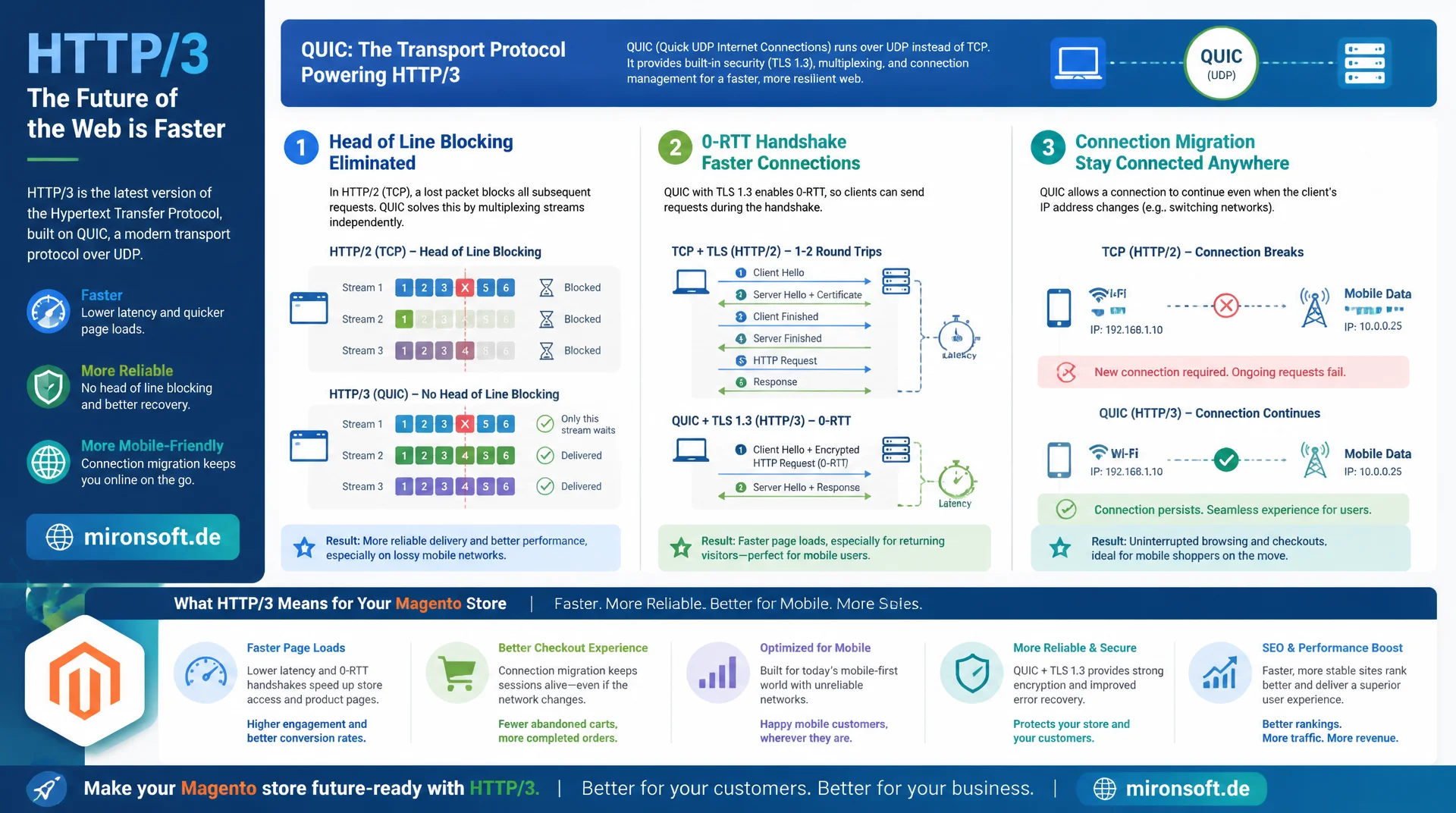
HTTP/3 replaces TCP with the new transport protocol QUIC, solving a problem HTTP/2 never fully fixed despite multiplexing. Understanding how head of line blocking, 0-RTT handshakes, and connection migration actually work technically lets you realistically judge what the new protocol really does for Magento stores and their mobile visitors.
Table of Contents
- 1. HTTP/1.1 head of line blocking: the original problem
- 2. HTTP/2 multiplexing over a single TCP connection
- 3. HTTP/2 server push: good idea, failed in practice
- 4. HPACK: header compression in HTTP/2
- 5. HTTP/3 and QUIC: transport over UDP instead of TCP
- 6. How QUIC solves TCP-level head of line blocking
- 7. 0-RTT, faster handshakes, and connection migration
- 8. Server and CDN support: Nginx, Varnish, Cloudflare, ALPN, Alt-Svc
- 9. HTTP/1.1, HTTP/2, and HTTP/3 compared side by side
- 10. Summary
- 11. FAQ
1. HTTP/1.1 head of line blocking: the original problem
HTTP/1.1 effectively allows only one outstanding request at a time per TCP connection, since pipelining was never reliably implemented and is barely used in practice. Browsers work around this by opening up to six parallel TCP connections per host, but every additional connection costs its own TCP and TLS handshake. Loading a product page with forty resources, CSS, JS, images, and fonts included, forces the browser to either wait or multiply connections, which noticeably increases connection setup overhead and server load.
The actual problem is called head of line blocking at the application layer: a slow resource at the front of the queue blocks every subsequent request on the same connection, even if those requests would otherwise be long finished. Domain sharding, artificially spreading resources across multiple subdomains, was a common workaround. It creates extra DNS lookups and TLS handshakes, though, and in practice often costs more than the parallelism it buys back.
2. HTTP/2 multiplexing over a single TCP connection
HTTP/2 solves the application-layer problem with true multiplexing: a single TCP connection per host is enough, because requests and responses are broken into small frames and transmitted in parallel over numbered streams. The browser can have hundreds of requests outstanding on the same connection at once, the server can answer them in any order, and the receiver reassembles frames into the correct resources using their stream ID.
In practice this means domain sharding becomes counterproductive, since it undoes the benefits of per-connection multiplexing and forces multiple TCP handshakes instead. For Magento stores with many small assets, icons, CSS fragments, and JS chunks, a single HTTP/2 connection is almost always faster than the old sharding pattern, because connection setup and the TCP window's slow-start phase only need to happen once instead of repeatedly.
3. HTTP/2 server push: good idea, failed in practice
Server push was meant to let servers proactively send resources before the browser had even requested them, for example CSS and critical JavaScript delivered right alongside the HTML response. The idea: the server knows the page's dependencies and can save the round trips that would otherwise be spent parsing the HTML and then requesting the referenced resources.
In practice, server push failed on several fronts at once. It ignored browser caches, so already-cached resources got needlessly pushed again. Servers had a hard time judging what the client actually still needed, which wasted bandwidth. Chrome removed support entirely in 2022, and other browsers soon followed. The replacement is <link rel="preload"> hints and the HTTP status code 103 Early Hints, which announces critical resources while the server is still computing the actual response, without the drawback of ignoring the cache.
<!-- Hyva phtml: replace Server Push with priority hints and preload -->
<!-- Server Push ignored the browser cache and was removed from Chrome in 2022 -->
<link rel="preload" href="{{$block->getViewFileUrl('css/critical.css')}}" as="style">
<link rel="preload" href="{{$block->getViewFileUrl('js/critical.js')}}" as="script">

<!-- Modern replacement for push: HTTP 103 Early Hints -->
<!-- Sent by the server before the full HTML response is ready -->
<!--
HTTP/1.1 103 Early Hints
Link: </css/critical.css>; rel=preload; as=style
Link: </js/critical.js>; rel=preload; as=script
-->
4. HPACK: header compression in HTTP/2
HTTP headers repeat almost identically on every request: user agent, cookies, accept headers, referer. Left uncompressed, this creates substantial overhead across many small requests, especially in cookie-heavy Magento sessions. HPACK solves this with a static table of common header name-value pairs and a dynamic table that remembers headers already transmitted over the connection. Repeated headers then get referenced as a short index instead of being sent as a full string.
For Magento stores with long session cookies and many XHR requests, such as mini cart updates or layered navigation filters, HPACK noticeably shrinks header size per request, since repeating cookie and accept values only need to be referenced after their first transmission. It's worth noting that HPACK doesn't compress the body, only the headers, a separate mechanism from actual content compression via Gzip or Brotli.
5. HTTP/3 and QUIC: transport over UDP instead of TCP
HTTP/3 isn't an incremental evolution of HTTP/2 at the application layer, it's a change of the underlying transport protocol. Instead of building on TCP, HTTP/3 builds on QUIC, which itself runs over UDP. QUIC was developed by Google and standardized as RFC 9000 in 2021. The reason for the switch: TCP is a kernel protocol whose behavior, congestion control, retransmission, and handshake, is baked into the operating system and can only evolve slowly over years.
QUIC implements reliability comparable to TCP, meaning ordering, acknowledgment, and retransmission of lost packets, entirely in user space, usually directly inside the application or library. That allows faster iteration, since new QUIC versions don't have to wait for kernel updates on millions of end devices. QUIC also integrates TLS 1.3 directly into the transport instead of layering it on top as a separate step, which saves a full round trip during connection setup.
# nginx.conf - enable HTTP/3 (QUIC) alongside HTTP/2
server {
    # HTTP/2 over TCP, still required as fallback
    listen 443 ssl;
    listen [::]:443 ssl;
    http2 on;

    # HTTP/3 over QUIC/UDP - requires nginx 1.25.0+ built with --with-http_v3_module
    listen 443 quic reuseport;
    listen [::]:443 quic reuseport;

    ssl_certificate     /etc/nginx/ssl/mironsoft.de.crt;
    ssl_certificate_key /etc/nginx/ssl/mironsoft.de.key;
    ssl_protocols TLSv1.3;

    # Advertise HTTP/3 to browsers already connected via HTTP/2 or HTTP/1.1
    add_header Alt-Svc 'h3=":443"; ma=86400' always;

    # QUIC needs its own congestion control tuning, not TCP's
    quic_retry on;
    ssl_early_data on;
}
6. How QUIC solves TCP-level head of line blocking
HTTP/2 solved head of line blocking at the application layer, but it still has a problem at the transport layer: TCP guarantees strict byte ordering. If a single TCP packet gets lost, the entire stream blocks until that packet has been retransmitted, even if the data belonging to several independent HTTP/2 streams is affected. A single lost packet on a mobile connection with packet loss suddenly stalls every parallel download at once.
QUIC treats every stream independently at the transport layer. If a packet belonging only to stream A gets lost, only stream A stalls, while streams B and C keep running undisturbed. That's the decisive architectural difference from HTTP/2 over TCP: multiplexing isn't just logical at the application layer, it's genuinely independent at the transport layer too. On connections with noticeable packet loss, such as mobile networks in dead zones or congested Wi-Fi, this difference shows up as measurably cleaner load times.
7. 0-RTT, faster handshakes, and connection migration
A classic TCP-plus-TLS-1.3 handshake typically needs two round trips before the first application data can flow on a new connection: one for the TCP SYN/SYN-ACK exchange, one for the TLS handshake. QUIC combines the transport and encryption handshake into a single round trip, that is 1-RTT, for new connections. For an already-known connection, where the client has previously connected before, QUIC even enables 0-RTT: the client sends application data directly with the very first packet, without waiting for a server response.
The practical effect for returning visitors to a Magento store: the first request after a connection drop, say from switching apps on a smartphone, arrives noticeably faster, since no extra round trip gets lost. The flip side matters, though: 0-RTT data is vulnerable to replay attacks, so it should only be used for idempotent requests like GET requests on static resources, never for checkout or payment requests.
Another QUIC benefit directly affects mobile users: connection migration lets an existing connection continue when the client's IP address changes, for example when switching from Wi-Fi to cellular while leaving the house. QUIC identifies connections by a connection ID rather than the classic four-tuple of source IP, source port, destination IP, and destination port. With TCP, an IP change forces a complete connection teardown and rebuild including a fresh handshake; with QUIC, the download simply keeps going, a noticeable difference for users who leave the building or step onto the subway mid-checkout.
# Force curl to negotiate HTTP/3 directly and show timing
curl --http3 -o /dev/null -s -w \
  "protocol: %{http_version}\nconnect: %{time_connect}s\nttfb: %{time_starttransfer}s\ntotal: %{time_total}s\n" \
  https://mironsoft.de/

# Verify 0-RTT session resumption on a second connection
# (requires a TLS session ticket from a prior connection)
curl --http3 --tlsv1.3 --tls-max 1.3 -v https://mironsoft.de/ 2>&1 | grep -i "early data\|0-RTT"
8. Server and CDN support: Nginx, Varnish, Cloudflare, ALPN, Alt-Svc
For a browser to actually use HTTP/3, client and server need to agree on the protocol. That happens via two mechanisms: ALPN, Application-Layer Protocol Negotiation, signals which protocols are supported during the TLS handshake, and the Alt-Svc response header announces over HTTP/2 or HTTP/1.1 that HTTP/3 is also available under the same domain. The first page load therefore practically always happens over HTTP/2, with only subsequent requests switching to HTTP/3 once the browser has seen the Alt-Svc header.
Server-side support has grown unevenly. Nginx has supported HTTP/3 natively since version 1.25.0, before that only via a separate QUIC branch. Cloudflare, Fastly, and most major CDNs have offered HTTP/3 in production for years. Varnish still doesn't speak native QUIC or HTTP/3 and doesn't terminate it itself, so in typical Magento setups HTTP/3 runs through a front-facing reverse proxy or CDN that falls back to HTTP/2 or HTTP/1.1 toward Varnish. That's not a real problem, because the biggest performance gain from QUIC happens on the last mile to the end device anyway, not between cache and application server inside your own data center.
# Check which protocols the server offers via ALPN during the TLS handshake
openssl s_client -alpn h3,h2,http/1.1 -connect mironsoft.de:443 </dev/null 2>&1 | grep "ALPN protocol"

# Confirm the server advertises HTTP/3 to HTTP/2 clients
curl -I --http2 https://mironsoft.de/ | grep -i "alt-svc"
# Expected: alt-svc: h3=":443"; ma=86400
9. HTTP/1.1, HTTP/2, and HTTP/3 compared side by side
Moving from HTTP/1.1 through HTTP/2 to HTTP/3 solves technical problems in clearly separated layers, but none of the three protocols replaces optimization work at the application layer. For a Magento or Hyvä store, the practical rollout is fairly unspectacular: if you run a CDN like Cloudflare or Fastly, enabling HTTP/3 usually takes a single dashboard toggle, without touching the Magento or Nginx configuration at all. If you want to terminate HTTP/3 directly at the origin server, you need to make sure UDP port 443 is open in the firewall, load balancer, and security groups, a point that's frequently overlooked in existing network rulesets built around TCP.
| Dimension | HTTP/1.1 | HTTP/2 | HTTP/3 |
|---|---|---|---|
| Transport protocol | TCP | TCP | QUIC (UDP) |
| Head of line blocking | Yes, at application layer | No at app layer, yes at TCP | No, not even at transport |
| Header compression | None | HPACK | QPACK |
| Connection setup | 2-3 RTT (TCP + TLS) | 2-3 RTT (TCP + TLS) | 1 RTT, 0-RTT possible |
| Network switch (mobile) | Connection drops | Connection drops | Connection migration |
| Server support | Universal | Widely established | Growing, still patchy |
The table also shows what HTTP/3 explicitly does not do: it doesn't speed up PHP rendering or database queries, doesn't compress images, and doesn't shrink JavaScript bundles. Realistically, the biggest measurable effect shows up for mobile visitors on unstable connections, while desktop users on a stable fiber connection barely notice a difference. Whether real visitors are actually connecting over HTTP/3, rather than it just being configured server-side, should be verified via the Resource Timing API in Real User Monitoring, not through one-off manual tests.
// Real User Monitoring: verify which protocol resources actually used
function reportProtocolUsage() {
  const entries = performance.getEntriesByType('resource');
  const byProtocol = {};

  entries.forEach((entry) => {
    // nextHopProtocol reports "h3", "h2", "http/1.1" per resource
    const protocol = entry.nextHopProtocol || 'unknown';
    byProtocol[protocol] = (byProtocol[protocol] || 0) + 1;
  });

  // Send to analytics backend to see real-world HTTP/3 adoption
  navigator.sendBeacon('/rum/protocol-usage', JSON.stringify(byProtocol));
}

window.addEventListener('load', () => setTimeout(reportProtocolUsage, 0));
Mironsoft
Network performance, server configuration, and infrastructure audits for Magento stores
Ready to roll out HTTP/3 without side effects?
We check your ALPN configuration, CDN settings, and firewall rules for UDP, enable HTTP/3 where it actually makes sense, and make sure your cache, images, and JavaScript bundles are solid first.
Protocol audit
Checking ALPN negotiation, Alt-Svc headers, and HTTP/3 rollout at CDN and origin level
Server configuration
Aligning Nginx, Varnish, and CDN settings cleanly for HTTP/2 and HTTP/3
RUM monitoring
Setting up resource timing tracking to measure real protocol usage and performance impact
10. Summary
The journey from HTTP/1.1 to HTTP/2 and HTTP/3 solves one problem after another in clearly separated layers. HTTP/2 fixes head of line blocking at the application layer through multiplexing over a single connection and compresses headers with HPACK, but still carries a structural problem at the TCP layer, where a single lost packet blocks every stream at once. HTTP/3 solves exactly that by replacing TCP with QUIC over UDP, multiplexing streams independently at the transport layer, cutting connection setup to 1-RTT or even 0-RTT, and enabling seamless network switches for mobile users through connection migration.
None of these protocols substitute for solid fundamentals. A store with unoptimized images, blocking JavaScript, or a poorly configured Full Page Cache stays slow over HTTP/3 too. The biggest measurable benefit shows up on connections with high latency, packet loss, and frequent network switches, meaning mainly mobile visitors. Server-side, enabling it today is usually straightforward through CDN settings, while Varnish as an origin cache still relies on HTTP/2 or HTTP/1.1.
HTTP/2 vs. HTTP/3 - The Essentials at a Glance
Transport switch
HTTP/3 runs over QUIC on UDP instead of TCP like HTTP/1.1 and HTTP/2, with an integrated TLS 1.3 handshake.
Head of line blocking solved
QUIC multiplexes streams independently at the transport layer, so a lost packet only blocks the affected stream.
0-RTT & connection migration
Faster reconnection for returning visitors and seamless switching between Wi-Fi and cellular without dropping the connection.
Rollout, not magic
HTTP/3 doesn't replace cache, image, or JavaScript optimization. Biggest effect for mobile users on unstable connections.