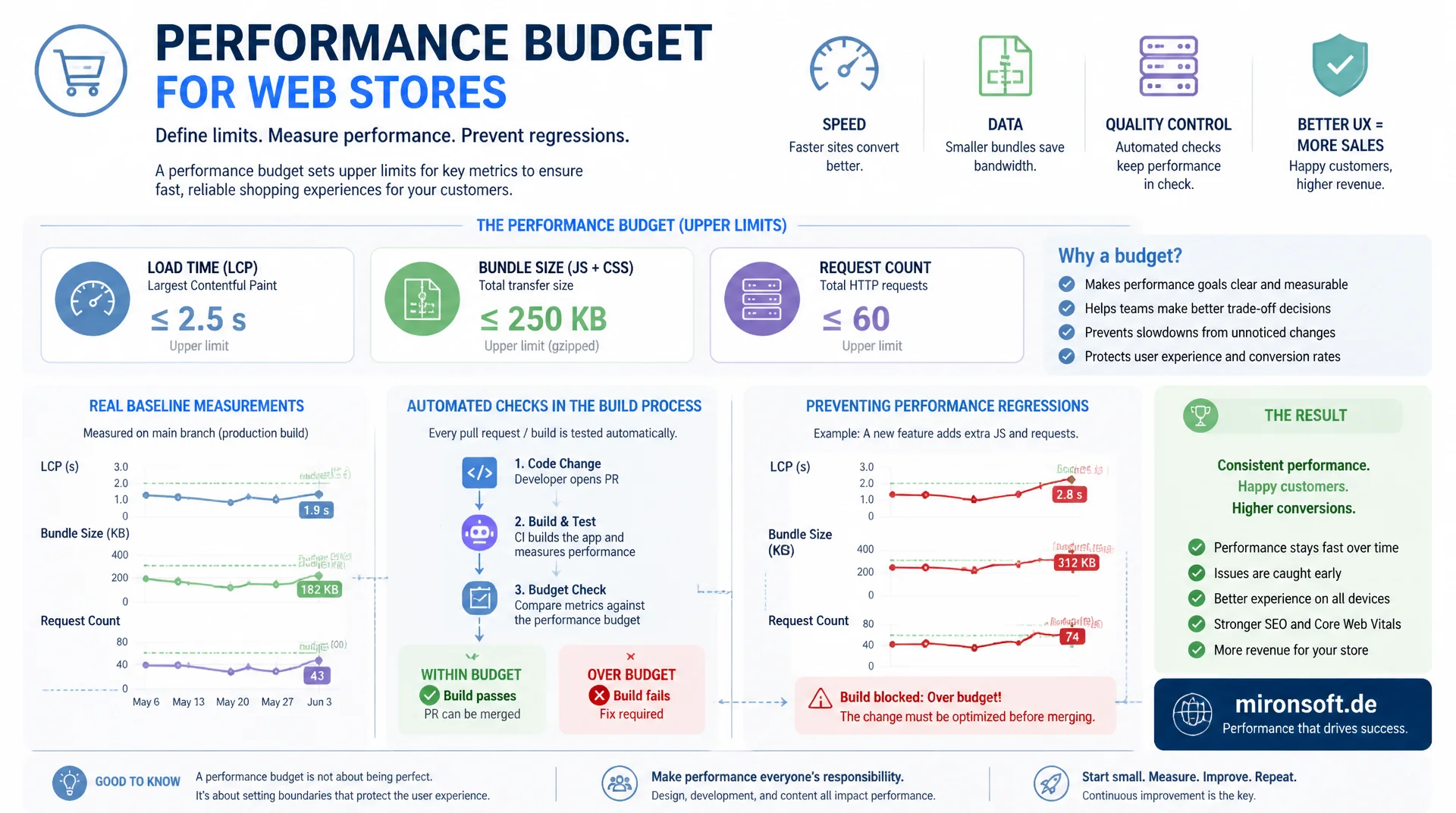
From baseline measurement to the CI gate
A performance budget sets clear upper limits for load time, bundle size, and request count before a store becomes slow, instead of reacting only after the fact. Deriving budgets from real baseline measurements and checking them automatically in the build prevents individual deployments or one extra script from quietly degrading performance without anyone noticing.
Table of Contents
- 1. What a performance budget actually is
- 2. Measuring a baseline instead of guessing numbers
- 3. Defining size budgets: JS, CSS, and images
- 4. Defining timing budgets: LCP, TTI, and friends
- 5. Quantity budgets: requests, fonts, third-party scripts
- 6. Enforcing budgets in CI: failing the build on regression
- 7. Tooling: Lighthouse CI and webpack performance hints
- 8. bundlesize and size-limit in the npm workflow
- 9. Communicating with stakeholders: protecting budgets
- 10. Summary
- 11. FAQ
1. What a performance budget actually is
A performance budget is a binding upper limit on a measurable technical value, not a vague goal like "the store should be fast". There are three categories: size budgets cap the file size of JavaScript, CSS, and images in kilobytes, timing budgets set upper limits for metrics such as LCP or TTI in milliseconds, and quantity budgets limit the number of requests, fonts, and third-party scripts per page.
The crucial difference from a plain recommendation: a budget is checked by machine and, ideally, blocks the build as soon as it's exceeded. Without that enforcement, a performance budget stays a good intention that gets quietly ignored the next time a deadline looms. Budgets turn performance into a non-negotiable quality requirement, exactly like a failing unit test in the same build.
2. Measuring a baseline instead of guessing numbers
A performance budget that isn't grounded in a real baseline measurement is pure guesswork. The right starting point is a multi-day measurement series with Lighthouse CI or WebPageTest across the most important page types: homepage, category, product detail, and checkout. The median and 75th percentile of those measurements produce a realistic picture of what the store actually delivers today, instead of an aspirational number copied from a blog post.
The budget itself is then set slightly above the current best value, not at the theoretical optimum. A store with a 2.8-second LCP first gets a budget of 2.9 seconds, not 1.5 seconds. That keeps the build green while targeted optimization work continues, and the budget is lowered incrementally with every successful improvement instead of being unreachable from day one.
#!/usr/bin/env bash
# capture-baseline.sh - measure current performance to derive realistic budgets
set -euo pipefail

readonly URLS=(
  "https://shop.example.com/"
  "https://shop.example.com/damen/kleider.html"
  "https://shop.example.com/produkt-slug.html"
)
readonly RUNS=5
readonly OUT_DIR="baseline/$(date +%Y%m%d)"
mkdir -p "$OUT_DIR"

for url in "${URLS[@]}"; do
  slug=$(echo "$url" | sed 's#[^a-zA-Z0-9]#_#g')
  echo "[INFO] Measuring $url ($RUNS runs)"
  npx lighthouse "$url" \
    --preset=desktop \
    --output=json \
    --output-path="$OUT_DIR/${slug}.json" \
    --chrome-flags="--headless" \
    --throttling-method=simulate \
    --quiet
done

# Aggregate median + p75 per metric from the JSON reports
node scripts/aggregate-baseline.js "$OUT_DIR" > "$OUT_DIR/baseline-summary.json"
echo "[OK] Baseline written to $OUT_DIR/baseline-summary.json"
3. Defining size budgets: JS, CSS, and images
Size budgets cap the compressed file size per resource type, usually split into JavaScript, CSS, and images. What matters is which compression the measurement uses: a budget based on uncompressed file size is irrelevant, since the browser downloads the gzip- or brotli-compressed version over the network. A realistic budget for a Hyvä store bundle is often 150 to 200 KB of compressed JavaScript for the critical entry point.
It's also worth distinguishing between an entry-point budget and a total budget: the entry-point budget caps what must load for the first render, the total budget caps everything a page loads over the course of an interaction. For images, a per-image budget is recommended, roughly 200 KB for a hero image, rather than one total budget across all images on a page, since individual oversized files otherwise disappear into the average.
4. Defining timing budgets: LCP, TTI, and friends
Timing budgets set upper limits for user-perceived metrics such as LCP, TTI, and Total Blocking Time. Unlike size budgets, timing values can't be read directly from the code, only determined through a simulated or real measurement. To keep values reproducible in CI, the measurement must run under fixed network and CPU throttling, for example the Slow 4G profile with 4x CPU slowdown, which is what Lighthouse simulates by default.
A timing budget should follow the known Core Web Vitals thresholds as a reference point, but always be adapted to your own baseline. A value of 2.5 seconds for LCP is sensible as a general target, but a store currently sitting at 4 seconds needs intermediate milestones, otherwise every build fails immediately and the budget gets ignored or removed entirely.
5. Quantity budgets: requests, fonts, third-party scripts
Quantity budgets don't cap size but the number of individual resources, because every additional request carries its own latency cost from DNS lookup, TLS handshake, and connection setup. A typical budget caps the total number of requests on a product page at roughly 60 to 80, limits loaded web fonts to at most two font families with two weights each, and caps the number of active third-party scripts at a fixed number, often no more than five.
Third-party scripts in particular are the most common cause of creeping regression, because each one looks small on its own but they add up: a tracking pixel here, a chat widget there, one more A/B testing tool. A quantity budget catches exactly this pattern of many small additions, which a pure size budget can miss when each individual script stays under its own threshold.
6. Enforcing budgets in CI: failing the build on regression
A performance budget only has teeth once it makes the build fail as soon as a threshold is exceeded, exactly like a failing test. Lighthouse CI reads a budget.json for this, defining resourceSizes, resourceCounts, and timings per resource type. The lhci autorun command loads the page in the pipeline, compares the results against the budgets, and returns a non-zero exit code as soon as a value falls outside tolerance.
It's important to place the budget as a gate before the merge, not as a reporting step tacked on afterward. A job that only leaves a warning in the log gets ignored in practice as soon as deadline pressure rises. A job that blocks the merge forces a conscious decision: either fix the regression or explicitly raise the budget with a documented justification.
[
  {
    "path": "/*",
    "resourceSizes": [
      { "resourceType": "script", "budget": 180 },
      { "resourceType": "stylesheet", "budget": 60 },
      { "resourceType": "image", "budget": 300 },
      { "resourceType": "font", "budget": 100 },
      { "resourceType": "total", "budget": 700 }
    ],
    "resourceCounts": [
      { "resourceType": "script", "budget": 12 },
      { "resourceType": "third-party", "budget": 5 },
      { "resourceType": "font", "budget": 4 },
      { "resourceType": "total", "budget": 75 }
    ],
    "timings": [
      { "metric": "interactive", "budget": 3500 },
      { "metric": "largest-contentful-paint", "budget": 2900 },
      { "metric": "total-blocking-time", "budget": 300 }
    ]
  }
]
# .github/workflows/performance-budget.yml
name: Performance Budget

on:
  pull_request:
    branches: [main]

jobs:
  lighthouse-budget:
    runs-on: ubuntu-latest
    steps:
      - uses: actions/checkout@v4

      - uses: actions/setup-node@v4
        with:
          node-version: '20'

      - name: Install dependencies
        run: npm ci

      - name: Build production assets
        run: npm run build

      - name: Run Lighthouse CI against budget.json
        run: npx lhci autorun --config=./lighthouserc.json
        env:
          LHCI_BUILD_CONTEXT__CURRENT_HASH: ${{ github.sha }}

      # lhci exits non-zero when a budget assertion fails,
      # which fails this job and blocks the merge automatically
7. Tooling: Lighthouse CI and webpack performance hints
Alongside Lighthouse CI, webpack ships its own ready-to-use budget feature: the performance configuration in webpack.config.js. performance.maxAssetSize and performance.maxEntrypointSize set byte-based upper limits for individual assets and for the entire entry point. The performance.hints option controls whether an overage merely shows as a warning in the build log or, with 'error', actually aborts the build.
The advantage of this approach: the budget is checked directly inside the build tool, not downstream in a separate CI stage, so developers see an overage locally while building, before the code is even pushed. The downside: webpack only checks bundle sizes, not timing or quantity metrics. For a complete picture, webpack performance hints and Lighthouse CI need to be combined, not used as a substitute for one another.
// webpack.config.js - fail the build on oversized bundles
module.exports = {
  // ...
  performance: {
    hints: 'error', // 'warning' | 'error' | false
    maxAssetSize: 180 * 1024,       // 180 KB per individual asset
    maxEntrypointSize: 250 * 1024,  // 250 KB for the critical entry point
    assetFilter: function (assetFilename) {
      // Only enforce the budget for JS and CSS, not source maps or fonts
      return /\.(js|css)$/.test(assetFilename) && !/\.map$/.test(assetFilename);
    }
  }
};
8. bundlesize and size-limit in the npm workflow
For projects without a full Lighthouse pipeline, the npm packages size-limit and bundlesize offer a faster path into enforced size budgets. Both read a configuration directly from package.json, where a maximum value in kilobytes is set per file or glob pattern. The npx size-limit command in the CI pipeline compares the built assets against these values and exits with an error code as soon as a limit is exceeded.
size-limit has an advantage over bundlesize in that it can additionally simulate execution time in the browser, not just raw file size, bringing it closer to a real timing budget. For a Hyvä theme, it's worth adding an entry per critical bundle, for example the Alpine.js bundle and the Tailwind CSS output, so an accidentally imported heavy library shows up immediately instead of only surfacing weeks later in the next Lighthouse report.
{
  "name": "hyva-theme-assets",
  "scripts": {
    "size": "size-limit",
    "size:ci": "size-limit --json > size-limit-report.json"
  },
  "size-limit": [
    {
      "name": "Alpine.js bundle",
      "path": "pub/static/frontend/**/js/alpine.min.js",
      "limit": "45 KB",
      "gzip": true
    },
    {
      "name": "Tailwind CSS output",
      "path": "pub/static/frontend/**/css/styles.css",
      "limit": "60 KB",
      "gzip": true
    },
    {
      "name": "Total critical entry point",
      "path": "pub/static/frontend/**/js/critical.min.js",
      "limit": "180 KB",
      "gzip": true
    }
  ],
  "devDependencies": {
    "@size-limit/preset-app": "^11.0.0",
    "size-limit": "^11.0.0"
  }
}
9. Communicating with stakeholders: protecting budgets
The most robust CI gate does little good if a product owner or marketing team can simply override the budget whenever "just one more script" is urgently needed. The most effective lever against this pattern is communicating the performance budget not as a technical detail, but as a fixed capacity, comparable to a weight limit in shipping: every kilobyte a new script adds must be saved somewhere else, there is no unlimited allowance.
In practice, this works through two measures. First, KB and milliseconds get translated into business metrics, for example "each additional second of LCP costs an estimated X percent conversion based on our data", instead of showing abstract technical numbers. Second, every exception to the budget needs a documented, visible approval in the same pull request process as a security exception, not a silent edit to budget.json. That turns every overage into a conscious, traceable decision instead of a quiet compromise.
The difference between a documented and an actually enforced performance budget shows up most clearly in the outcome once a team is under time pressure.
| Aspect | Without an enforced budget | With an enforced budget | Enforcement point |
|---|---|---|---|
| JS bundle size | Grows unnoticed, step by step | Stays within the defined KB limit | webpack performance.maxAssetSize |
| LCP time | Degrades over months | Stays stable within the target range | Lighthouse CI budget.json (timings) |
| Number of third-party scripts | Grows with every marketing request | Requires approval per new script | Quantity budget + code review |
| Regression detection | Only visible in the next audit | Build fails immediately | CI pipeline (lhci autorun) |
| Stakeholder communication | Technical discussion after launch | Documented approval before the merge | Pull request process |
Mironsoft
Performance budgets, CI/CD integration, and Hyvä optimization for Magento stores
Ready to roll out performance budgets properly?
We measure your Magento store's baseline, define realistic size, timing, and quantity budgets, and integrate them as a gate in your CI pipeline, so every regression is caught before the merge instead of in the next Lighthouse report.
Baseline audit
Multi-day measurement series with Lighthouse CI and WebPageTest as the basis for realistic budgets
CI integration
budget.json, webpack performance hints, and size-limit as a merge gate in your pipeline
Stakeholder playbook
Communication templates so budgets don't get quietly overridden by one more script
10. Summary
A performance budget solves a recurring problem: without a binding upper limit, bundle size, load time, and request count creep up until a store has become noticeably slower without any single commit being responsible. Size budgets cap JS, CSS, and images in kilobytes, timing budgets cap perceived metrics like LCP and TTI, and quantity budgets cap the number of requests, fonts, and third-party scripts. All three budget types should be derived from a real baseline measurement, not from arbitrary target numbers.
A budget only has an effect once it's enforced as a gate in the CI pipeline: budget.json for Lighthouse CI, performance.maxAssetSize in webpack, and size-limit in the npm workflow all fail the build as soon as a threshold is exceeded. Communicating with non-technical stakeholders matters just as much: framing performance budgets as a fixed capacity rather than a technical detail, and requiring every exception to go through documented approval, prevents budgets from being quietly bypassed under deadline pressure.
Defining and Enforcing Performance Budgets - The Essentials at a Glance
Size budgets
Cap compressed size per resource type, split into JS, CSS, and images, with a separate entry-point budget.
Timing & quantity budgets
Measure LCP/TTI under fixed throttling, count and cap requests and third-party scripts per page.
CI enforcement
budget.json, webpack performance.hints, and size-limit fail the build when a limit is exceeded.
Baseline & communication
Derive budgets from the median and 75th percentile of real measurements, require documented approval for exceptions.