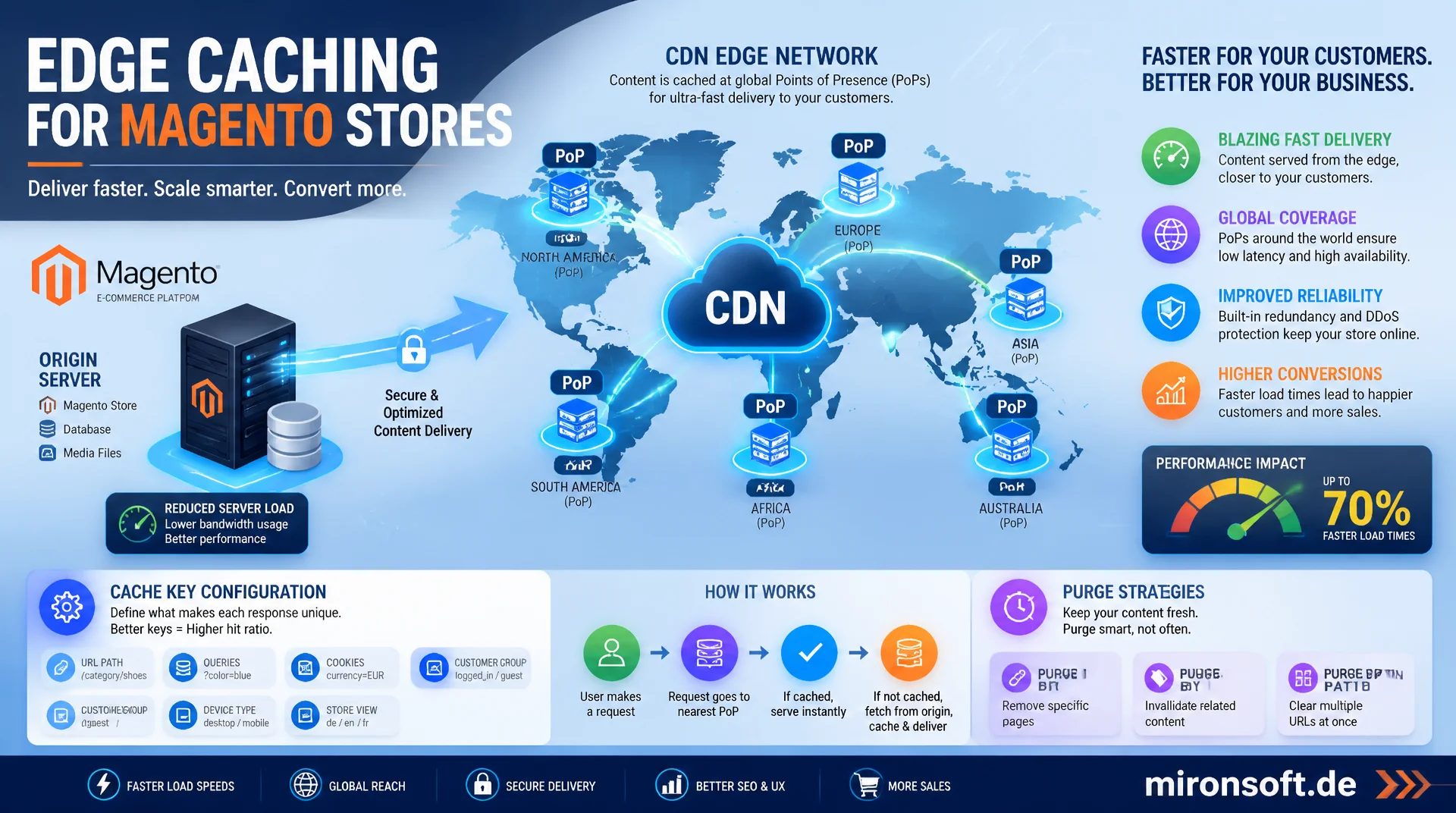
Edge PoPs, cache keys, and purge strategies explained
A Magento store without a well thought out CDN strategy gives away noticeable load time to every visitor located far from the origin server. This article explains the technical mechanics behind edge caching, from points of presence through cache key configuration to purge strategies, so delivery gets measurably faster and the origin server gets noticeably lighter load.
Table of Contents
- 1. Why CDN caching makes the difference for Magento stores
- 2. How edge caching works: PoPs, cache hit, and miss
- 3. Origin shield: protecting the origin server from load spikes
- 4. Cache key configuration: query strings, headers, and cookies
- 5. Instant purge and API-based invalidation
- 6. TTL-based expiry and stale-while-revalidate
- 7. Static vs. dynamic content: CDN strategy for Magento
- 8. Image optimization and transformation at the edge
- 9. Choosing a CDN for e-commerce: coverage, images, bot protection
- 10. Summary
- 11. FAQ
1. Why CDN caching makes the difference for Magento stores
The physics of a network connection cannot be optimized away: a request from Sydney to an origin server in Frankfurt takes roughly 140 milliseconds per direction just from the speed of light in fiber, about 280 milliseconds round trip time, before the server even starts processing it. A CDN (Content Delivery Network) places copies of content on servers geographically close to the visitor, known as Points of Presence (PoPs). That same request instead lands at a PoP in Sydney itself and often takes only 10 to 20 milliseconds round trip time instead of 280.
For a Magento store with an international customer base, this is not a nice-to-have, it is the single biggest lever for Time to First Byte (TTFB) for distant visitors. A well configured CDN typically achieves a cache hit ratio of 90% or higher for static assets, meaning the vast majority of requests never reach the origin server at all. That reduces not just latency but actual server load, and with it the number of application server instances needed to handle the same visitor volume.
2. How edge caching works: PoPs, cache hit, and miss
A CDN consists of a globally distributed network of PoPs reachable via anycast DNS: the same IP address is announced from many locations simultaneously, and network routing automatically delivers each request to the topologically nearest PoP, with no GeoDNS logic needed at the application layer. When a request arrives at a PoP, it first checks its local cache store, usually a combination of RAM for hot objects and SSD for the rest of the working set.
If the PoP finds a valid, unexpired copy, it serves it directly from edge storage: that is a cache hit. If the copy is missing or expired, that is a cache miss: the PoP must first fetch the response from the origin server (or an upstream origin shield), store it in edge storage, and then serve it. Response headers like X-Cache: HIT or Age make this behavior traceable per request and are the first debugging step in any CDN analysis.
# Inspect an edge server's cache behavior via response headers
curl -sI https://www.example-shop.com/media/catalog/product/hero.webp

# Typical response on a cache hit at the edge:
# HTTP/2 200
# cache-control: public, max-age=31536000, immutable
# x-cache: HIT
# x-cache-hits: 42
# age: 18734
# via: 1.1 varnish, 1.1 fastly-edge

# On a cache miss (first request after TTL expiry):
# x-cache: MISS
# age: 0
3. Origin shield: protecting the origin server from load spikes
A problem arises as soon as a popular object expires simultaneously at hundreds of PoPs: without a protection mechanism, every PoP independently sends a request to the origin server, an effect known as a cache stampede or thundering herd. With a CDN spanning 100 or more global PoPs, that can briefly mean a hundred concurrent origin requests for the same resource, even though a single response would have sufficed.
An origin shield solves this by making a single, typically origin-adjacent PoP the mandatory intermediary for all cache misses. Instead of every edge PoP connecting straight to the origin, all requests first pass through the shield PoP, which maintains its own cache and performs request collapsing: multiple identical requests arriving concurrently are merged into a single origin request, whose response is then distributed to all waiting clients. In practice, a correctly configured origin shield reduces actual origin load by 90% or more compared to a setup without one.
4. Cache key configuration: query strings, headers, and cookies
The cache key is the unique identifier under which a CDN stores and retrieves a response in edge storage. By default it consists of host and URL path, but query strings, certain request headers, and cookies can extend or corrupt it. If marketing parameters like utm_source or gclid are absorbed into the cache key unfiltered, the same product page ends up with a separate cached copy per campaign link, drastically lowering the effective cache hit ratio because practically every URL variant is treated as its own object.
Even more critical is how cookies are handled: if Magento's session cookie or a form key cookie ends up in the cache key, every session effectively produces its own, never-reusable cached copy, and the hit ratio collapses toward zero. The Vary header additionally controls which request headers influence the cache key; Vary: Accept-Encoding is usually reasonable, whereas a careless Vary: User-Agent with thousands of browser variants shatters the cache into countless fragments. The rule of thumb: whitelist query strings instead of blacklisting them, and exclude cookies from the cache key for static and semi-static content as a baseline.
{
  "cache_key_config": {
    "include_query_params": ["color", "size", "p"],
    "strip_query_params": ["utm_source", "utm_medium", "utm_campaign", "gclid", "fbclid"],
    "vary_headers": ["Accept-Encoding", "Accept"],
    "exclude_cookies_from_key": true,
    "normalize_url": {
      "lowercase_path": true,
      "sort_query_params": true,
      "remove_trailing_slash": true
    }
  }
}
5. Instant purge and API-based invalidation
When a price, stock level, or CMS page content changes in Magento, the stale edge copy needs to be removed before the TTL naturally expires. Modern CDNs solve this with cache tags, also called surrogate keys: every response is tagged on delivery with one or more identifiers, such as the product ID or category ID. When a product changes, the backend sends a purge request for exactly that tag, and the CDN removes every object carrying that tag worldwide, regardless of its URL.
Tag-based instant purges propagate globally in under 150 milliseconds with most major CDN providers, while single-URL purges without a tag system often take several seconds to minutes, since every affected URL has to be addressed individually. Magento's Full Page Cache can be wired to such a purge API via an event observer on catalog_product_save_after or similar events, so price changes in the admin panel invalidate the edge copy in real time instead of waiting minutes or hours for TTL expiry.
# Trigger a tag-based instant purge after a product change
curl -X POST "https://api.cdn-provider.example/purge/tag" \
  -H "Authorization: Bearer $CDN_API_TOKEN" \
  -H "Content-Type: application/json" \
  -d '{"tags": ["product-1234", "category-55"]}'

# Response confirms global propagation
# {"status":"ok","purge_id":"c9f2a1","propagated_pops":184}
6. TTL-based expiry and stale-while-revalidate
Alongside explicit purging, the classic Time to Live (TTL) remains the foundation of every caching strategy: a short TTL of a few minutes keeps content fresh but increases origin load through more frequent revalidations; a long TTL of days or weeks drastically lowers origin load but risks stale content between purges. The trick is setting TTL per content type instead of globally.
Stale-while-revalidate resolves the classic trade-off more elegantly: when the regular TTL expires, the edge server immediately serves the expired but still "acceptably stale" copy to the user and asynchronously triggers a background revalidation against the origin. The user notices no added latency, while the cache updates within milliseconds. Stale-if-error adds resilience on top: if the origin server is unreachable during revalidation, the edge keeps serving the last known good copy instead of showing an error, typically configured for a window of hours to days.
7. Static vs. dynamic content: CDN strategy for Magento
Static assets like CSS, JavaScript, and font files under pub/static are content-addressed and versioned after a setup:static-content:deploy run: if the content changes, the filename changes via a hash. Such files can sit at the edge for a full year with Cache-Control: public, max-age=31536000, immutable, needing no purge at all, because a new version automatically gets a new URL. Product images under pub/media follow the same principle with a somewhat shorter TTL, since images occasionally get swapped under the same URL.
HTML pages like category and product pages are semi-static: they change rarely but unpredictably, for instance on price changes. Here, combining Magento's Full Page Cache with a CDN using a medium TTL (15 to 60 minutes) plus tag-based instant purge is the right approach. Truly dynamic endpoints such as cart, checkout, and customer account should never be cached by the CDN at all: Cache-Control: private, no-store ensures personalized content always comes fresh from the origin, while fragments like the cart counter get loaded into otherwise cached HTML via AJAX or ESI.
<!-- config.xml: default values for CDN base URLs of static and media content -->
<config>
    <default>
        <web>
            <unsecure>
                <base_static_url>https://cdn.example-shop.com/static/</base_static_url>
                <base_media_url>https://cdn.example-shop.com/media/</base_media_url>
            </unsecure>
            <secure>
                <base_static_url>https://cdn.example-shop.com/static/</base_static_url>
                <base_media_url>https://cdn.example-shop.com/media/</base_media_url>
            </secure>
        </web>
    </default>
</config>
8. Image optimization and transformation at the edge
Many CDNs perform image transformations directly at the edge instead of serving pre-rendered variants from the origin. Based on the Accept header, the edge server detects whether a browser supports AVIF or WebP and automatically serves the smallest matching format; AVIF often saves 40 to 50% in file size over JPEG at comparable perceived quality. Query parameters or client hints like Sec-CH-Width can additionally determine the target width per device, so a smartphone never has to download a desktop-scaled original image.
The first request for a given format-size combination triggers the transformation and therefore costs a bit more time; every subsequent request for that same variant then hits a regular cache hit and is served without reprocessing. This shifts the computational load entirely away from the origin server, which would otherwise have to generate potentially thousands of image variants per product, onto the CDN edge, which generates them on demand and only once per variant.
// Edge function: pick format and width based on Accept header and client hints
export async function onRequest(request) {
  const accept = request.headers.get('Accept') || '';
  const width = request.headers.get('Sec-CH-Width') || '800';

  let format = 'jpeg';
  if (accept.includes('image/avif')) {
    format = 'avif';
  } else if (accept.includes('image/webp')) {
    format = 'webp';
  }

  const originUrl = new URL(request.url);
  originUrl.searchParams.set('format', format);
  originUrl.searchParams.set('width', width);

  // Edge cache key includes format and width so variants are cached separately
  return fetch(originUrl.toString(), {
    cf: { cacheKey: `${originUrl.pathname}-${format}-${width}` }
  });
}
9. Choosing a CDN for e-commerce: coverage, images, bot protection
When selecting a CDN for a Magento store, geographic PoP coverage relative to the actual customer base matters first: a provider with dense PoP coverage in the DACH region does little good if a meaningful share of customers access the store from North America or Asia. Second, built-in image optimization matters, since it can make a separate image processing service unnecessary. Third, bot and DDoS protection is a double-edged sword in practice: aggressive WAF rules reliably block volumetric attacks, but can also mistakenly lock out legitimate price comparison crawlers, payment provider checkout callbacks, or monitoring bots.
The pricing model also deserves attention: some providers charge by bandwidth delivered, others by request count, which plays out very differently for image-heavy product catalogs with high cache hit ratios. The table below compares typical caching strategies by content type as they coexist side by side in a production Magento setup.
| Content type | Recommended TTL | Typical mistake | Recommended strategy |
|---|---|---|---|
| Static assets (CSS/JS/fonts) | 1 year, immutable | Short TTL despite hashed filenames | Content hashing, no purge needed |
| Product images | 30-90 days | No format negotiation (AVIF/WebP) | Edge transformation + instant purge |
| Category/product pages (HTML) | 15-60 min. + tag purge | Session cookie in the cache key | FPC + tag-based instant purge |
| Cart/checkout/account | No edge cache | Personalized response gets cached | Cache-Control: private, no-store |
| Search/autocomplete API | 30-120 sec., SWR | Unfiltered query string in the cache key | Query whitelist + stale-while-revalidate |
In practice, all five strategies coexist within the same Magento store: a blanket "cache everything" or "cache nothing" approach leads either to stale prices or to needlessly high origin load. Cleanly separating content types, configuring TTL and cache key per type, and applying instant purge specifically to price- and stock-critical content gets you to a cache hit ratio of 90% or more without jeopardizing the freshness of personalized areas.
Mironsoft
CDN architecture, cache strategy, and edge performance for Magento stores
Ready to set up your CDN strategy properly?
We analyze your Magento store's current cache hit ratio, configure cache keys and purge workflows, and set up a clean separation between static, semi-static, and dynamic content at the edge.
CDN architecture audit
Cache hit ratio, PoP coverage, and origin load analysis
Cache key & purge setup
Wiring tag-based instant purges to Magento events
Edge image optimization
AVIF/WebP transformation and responsive variants at the edge
10. Summary
CDN caching for Magento stores addresses a fundamentally physical problem: the distance between visitor and origin server cannot be optimized away, but it can be routed around using edge PoPs placed close to users. A cache hit at the edge serves in a few milliseconds, while a cache miss, via origin shield and request collapsing, still keeps load on the origin server under control. Cleanly configured cache keys, free of session cookies and unfiltered marketing parameters, are the prerequisite for a cache hit ratio of 90% or higher.
Purge strategies and TTL configuration complement rather than replace each other: tag-based instant purge delivers immediate freshness on price and stock changes, while stale-while-revalidate keeps latency consistently low between purges, even during background refreshes. The consistent separation between static, semi-static, and truly dynamic content ultimately decides whether a CDN genuinely speeds up a Magento store or remains just another component with no measurable effect.
CDN Caching for Magento Stores - The Essentials at a Glance
Edge PoPs & origin shield
PoPs bring content close to users, origin shield consolidates cache misses and protects against cache stampede load spikes.
Cache key hygiene
Whitelist query strings, strip marketing parameters, exclude cookies from the cache key for static content.
Purge strategy
Tag-based instant purge for price/stock changes, stale-while-revalidate for consistently low latency.
Static vs. dynamic
Long TTL for versioned assets, medium TTL with purge for HTML, no edge cache for personalized endpoints.