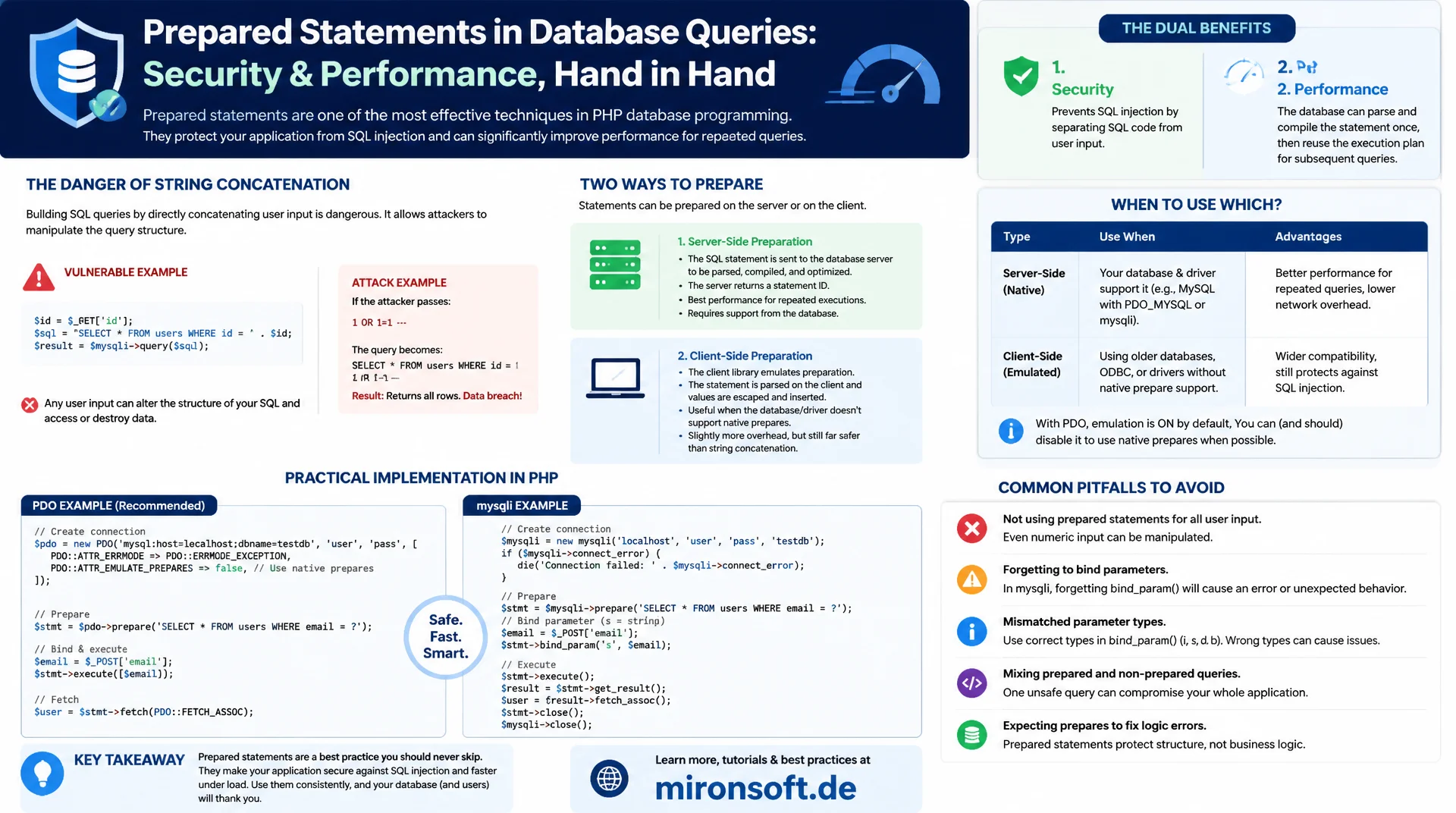
thought together, not traded off against each other
Prepared statements are often understood purely as a defense against SQL injection, but they are also a performance tool for repeatedly executed queries. This article explains why string concatenation is structurally unsafe, how prepared statements solve this problem, what the difference between server-side and client-side prepare is, and shows correct implementations with PDO and mysqli, including common pitfalls.
Table of Contents
- 1. Understanding SQL Injection: Why String Concatenation Is Dangerous
- 2. How Prepared Statements Structurally Prevent SQL Injection
- 3. Server-Side vs. Client-Side Prepare in MySQL
- 4. Using Prepared Statements Correctly with PDO
- 5. Prepared Statements with mysqli
- 6. Performance: Statement Caching and Repeated Execution
- 7. Pitfalls: Dynamic Identifiers, IN Clauses, Bulk Inserts
- 8. Prepared Statements and Their Interaction with the Plan Cache
- 9. String Concatenation and Prepared Statements Compared
- 10. Summary
- 11. FAQ
1. Understanding SQL Injection: Why String Concatenation Is Dangerous
SQL injection occurs when user input is inserted directly into a SQL string instead of being separated from SQL syntax as data. A login form that inserts a user's input unchecked into a WHERE clause does not interpret an input like ' OR '1'='1 as a text value, but as part of the SQL syntax itself, which bypasses the authentication logic entirely. Prepared statements solve this problem at the root, not through filtering dangerous characters, but through a structural separation of code and data.
The fundamental problem with string concatenation is that the database server can never distinguish between SQL syntax and user input once both are mixed into the same string. Escaping functions such as mysqli_real_escape_string() try to repair this problem after the fact, but they are error-prone, for example with certain character encodings or when a developer forgets a single spot in the code. Prepared statements make this class of error structurally impossible, because data and SQL structure use separate channels to the server.
-- VULNERABLE: user input concatenated directly into SQL string
-- If $username = "' OR '1'='1", the query becomes:
SELECT * FROM users WHERE username = '' OR '1'='1' AND password = '...';
-- Authentication bypassed entirely, regardless of the password

-- SAFE: prepared statement with a placeholder
-- The value is sent separately, never parsed as SQL syntax
PREPARE stmt FROM 'SELECT * FROM users WHERE username = ? AND password = ?';
SET @user = 'admin', @pass = 'hashed_value';
EXECUTE stmt USING @user, @pass;
DEALLOCATE PREPARE stmt;
2. How Prepared Statements Structurally Prevent SQL Injection
A prepared statement runs in two separate phases. In the prepare phase, the application sends the SQL structure with placeholders, typically question marks or named parameters, to the database server. The server parses this structure and creates an execution plan before any actual values are known at all. In the execute phase, the concrete values are transmitted separately and are only ever inserted as data into the already fixed placeholders, never interpreted as part of the SQL syntax.
This separation makes it impossible for a value such as ' OR '1'='1 to alter the SQL structure, because the structure is already final at the moment values are handed over. Even if an input contains SQL metacharacters such as quotes or semicolons, they are treated as plain text content of the parameter. Prepared statements thus provide structural protection that does not depend on the diligence of individual developers, unlike manual escaping, which would have to be applied correctly at every single spot in the code.
3. Server-Side vs. Client-Side Prepare in MySQL
MySQL supports two variants of prepared statements. With true server-side prepare, as used by default in the native MySQL protocol mode and mysqli, the client actually sends the prepare request to the server, which parses the structure, validates it, and prepares an execution plan that can be reused on repeated execution. This reduces parsing overhead when the same structure is executed multiple times with different values.
PDO, by default, uses client-side prepare instead, also called emulated prepares, where the PHP driver itself replaces the placeholders with escaped values and sends the finished string to the server, without going through a real server-side prepare cycle. The security benefit against SQL injection remains fully intact as long as PDO's own substitution is implemented correctly, but the performance benefit of server-side plan caching is lost. Using PDO::ATTR_EMULATE_PREPARES = false, true server-side prepare can be enforced.
<?php
declare(strict_types=1);

// Force real server-side prepared statements in PDO
$pdo = new PDO($dsn, $user, $password, [
    PDO::ATTR_EMULATE_PREPARES => false,
    PDO::ATTR_ERRMODE => PDO::ERRMODE_EXCEPTION,
]);

// Without this flag, PDO emulates prepares client-side by default,
// which is still safe against SQL injection but skips server-side plan caching
4. Using Prepared Statements Correctly with PDO
Correct use of prepared statements with PDO follows a fixed pattern: call prepare() with placeholders, then execute() with an array of the actual values. Named placeholders such as :username significantly improve readability over positional question mark placeholders, especially for queries with many parameters, because the mapping does not depend on exact order.
A common mistake is trying to use placeholders for table names or column names, which does not work, since prepared statements can only parameterize values, not the SQL structure itself. Dynamic identifiers must instead be checked against a strict allowlist and inserted directly into the SQL string, but never unvalidated from user input.
<?php
declare(strict_types=1);

final class UserRepository
{
    public function __construct(private readonly PDO $pdo)
    {
    }

    /**
     * Finds a user by email using a named-placeholder prepared statement.
     */
    public function findByEmail(string $email): ?array
    {
        $stmt = $this->pdo->prepare(
            'SELECT id, email, name FROM users WHERE email = :email'
        );
        $stmt->execute(['email' => $email]);
        $row = $stmt->fetch(PDO::FETCH_ASSOC);

        return $row === false ? null : $row;
    }

    /**
     * Sorting by a dynamic column: never interpolate user input directly,
     * validate against an allowlist since placeholders cannot parametrize identifiers.
     */
    public function findAllSorted(string $sortColumn): array
    {
        $allowed = ['id', 'email', 'created_at'];
        if (!in_array($sortColumn, $allowed, true)) {
            throw new InvalidArgumentException("Invalid sort column: {$sortColumn}");
        }

        // Safe: $sortColumn is validated against a strict allowlist, not user-controlled SQL
        $stmt = $this->pdo->query("SELECT id, email, name FROM users ORDER BY {$sortColumn}");
        return $stmt->fetchAll(PDO::FETCH_ASSOC);
    }
}
5. Prepared Statements with mysqli
The mysqli extension offers a somewhat more cumbersome, but equally safe API for prepared statements. After mysqli_prepare(), placeholders are bound via bind_param() with a type string, where i stands for integer, s for string, d for double, and b for blob. This type string must exactly match the number and order of placeholders, a common source of error when maintaining longer queries manually.
Since PHP 8.1, mysqli also supports execute() with direct value passing as an array, which removes the need for an explicit bind_param() call and brings the API closer to PDO. For new projects, PDO is usually the better choice due to its driver-independent API and cleaner named placeholder support, but mysqli remains relevant for legacy code and scenarios with specific MySQL features such as multiple result sets from stored procedures.
<?php
declare(strict_types=1);

$mysqli = new mysqli('db.internal', 'app_user', $password, 'shop');
$mysqli->set_charset('utf8mb4');

// Classic mysqli prepared statement with bind_param
$stmt = $mysqli->prepare('SELECT id, name, price FROM product WHERE category_id = ? AND price < ?');
$stmt->bind_param('id', $categoryId, $maxPrice); // i = int, d = double
$stmt->execute();
$result = $stmt->get_result();

while ($row = $result->fetch_assoc()) {
    echo $row['name'] . PHP_EOL;
}
$stmt->close();

// PHP 8.1+: execute() accepts parameters directly
$stmt = $mysqli->prepare('SELECT id FROM product WHERE sku = ?');
$stmt->execute(['A-100']);
6. Performance: Statement Caching and Repeated Execution
The performance benefit of true server-side prepared statements shows up when the same structure is executed repeatedly with different values. MySQL only has to parse the SQL syntax once, validate it, and build an execution plan; every subsequent execution then only uses the already prepared plan with new parameter values. In a loop that executes the same query thousands of times with different IDs, this saves measurable CPU time on the database server.
It is important that this benefit only applies within the same connection and session; a prepared statement is not automatically shared across different connections. Combined with connection pooling, where connections are reused across many requests, the benefit compounds, because the same prepared structure can be used for the entire lifetime of a reused connection instead of being re-parsed on every new request.
-- Server-side prepare once, execute many times within the same connection
PREPARE stmt FROM 'UPDATE inventory SET quantity = quantity - ? WHERE product_id = ?';

-- Each EXECUTE reuses the already parsed plan, only new parameter values are sent
SET @qty = 1, @pid = 100;
EXECUTE stmt USING @qty, @pid;

SET @qty = 2, @pid = 101;
EXECUTE stmt USING @qty, @pid;

DEALLOCATE PREPARE stmt;
7. Pitfalls: Dynamic Identifiers, IN Clauses, Bulk Inserts
A common trap with prepared statements is the IN (?) clause with a variable number of values. A single placeholder cannot stand for multiple values at once, which is why the number of placeholders must be adjusted dynamically to the number of actual values, for example by generating ?, ?, ? according to the array length, instead of incorrectly writing comma-separated values into a single placeholder.
For bulk inserts with many rows, it is more efficient to prepare a single INSERT statement with multiple value tuples and a correspondingly large number of placeholders, instead of calling execute() separately for every row. This drastically reduces the number of network round trips while remaining fully safe, since every individual value is still bound through a placeholder.
<?php
declare(strict_types=1);

// Dynamic IN clause: generate one placeholder per value
$ids = [12, 45, 78, 103];
$placeholders = implode(',', array_fill(0, count($ids), '?'));

$stmt = $pdo->prepare("SELECT id, name FROM product WHERE id IN ({$placeholders})");
$stmt->execute($ids);

// Bulk insert: one statement, multiple value tuples, still fully parameterized
$rows = [
    ['A-100', 'Widget', 9.99],
    ['A-101', 'Gadget', 19.99],
    ['A-102', 'Gizmo', 14.99],
];
$valuePlaceholders = implode(',', array_fill(0, count($rows), '(?, ?, ?)'));
$flatValues = array_merge(...$rows);

$stmt = $pdo->prepare("INSERT INTO product (sku, name, price) VALUES {$valuePlaceholders}");
$stmt->execute($flatValues);
8. Prepared Statements and Their Interaction with the Plan Cache
MySQL no longer has the classic query cache since version 8.0, which was removed in earlier versions, but the internal optimizer builds a reusable execution plan for every server-side prepared statement within the respective session. This plan persists as long as the connection stays active and the statement is not released with DEALLOCATE PREPARE, but it is kept separately per connection, not shared globally across the server.
With strongly varying data distributions, a once-created execution plan can become suboptimal if the statistics of the underlying tables have changed significantly in the meantime. MySQL accounts for this through adaptive re-optimization under certain conditions; in most web applications with an even data distribution, this effect is negligible compared to the performance gain from reusing the plan.
9. String Concatenation and Prepared Statements Compared
The following table compares string concatenation and prepared statements across the relevant dimensions.
| Criterion | String concatenation | Prepared statements |
|---|---|---|
| SQL injection protection | No structural protection | Structurally excluded |
| Repeated execution | Re-parsed every time | Plan is reused |
| Code readability | Values scattered in the string | Clean separation of structure and data |
| Dynamic identifiers | Directly possible, but risky | Cannot be parameterized, allowlist needed |
| Maintainability | Error-prone under changes | Robust against refactoring |
In practically every realistic scenario, the advantages of prepared statements are so clear that string concatenation for user input in production code should be considered a fundamentally flawed pattern, regardless of the application's size.
10. Summary
Prepared statements solve two problems at once that are often considered separately: SQL injection is prevented through the structural separation of SQL syntax and user data, and repeated executions of the same query structure benefit from the reused execution plan on the server side. PDO uses client-side prepare by default, which is sufficient for security, but only fully realizes the performance benefit of server-side plan caching with PDO::ATTR_EMULATE_PREPARES = false.
Common pitfalls such as dynamic IN clauses, bulk inserts, and the attempt to parameterize table names can be resolved cleanly with the right patterns, without giving up the security benefits. Anyone who consistently uses prepared statements for every query involving external values eliminates the most common and most dangerous vulnerability class in database-backed applications structurally, instead of merely avoiding it through discipline.
Prepared statements, security and performance, the essentials at a glance
Structural security
Placeholders separate SQL structure and data, SQL injection is excluded regardless of escaping.
Server-side prepare
Use PDO::ATTR_EMULATE_PREPARES = false to enforce real plan reuse on the server side.
Dynamic value lists
For IN clauses, generate the number of placeholders dynamically, never write comma-separated values into one placeholder.
Identifiers via allowlist
Table and column names cannot be parameterized, always validate against a fixed allowlist.