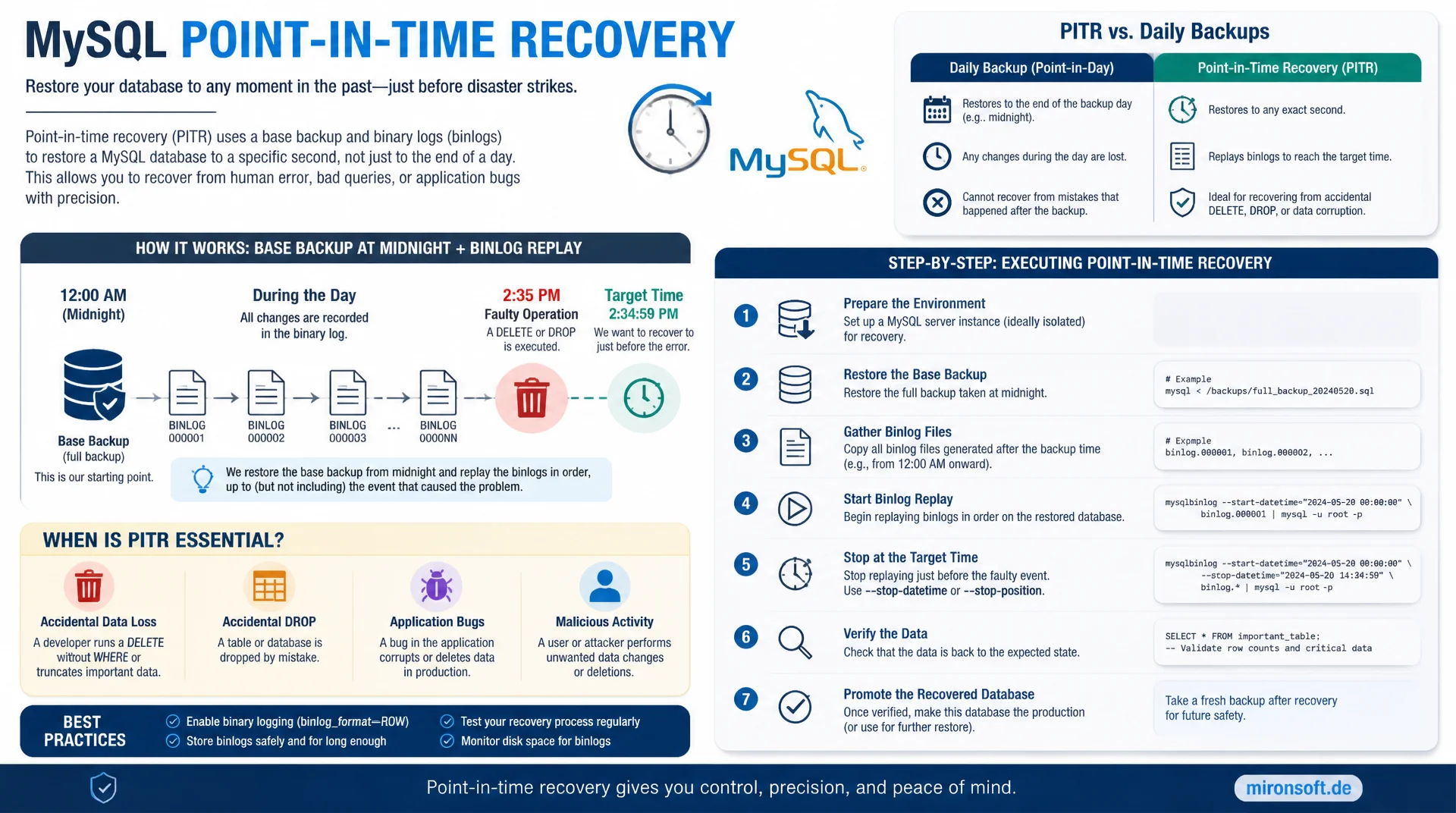
from the base backup to the exact second before the mistake
A daily backup alone only saves the state from midnight. Point-in-time recovery combines a base backup with a targeted replay of binlogs and restores a MySQL database up to the last correct transaction, right before a faulty DELETE or DROP.
Table of contents
- 1. What point-in-time recovery actually does
- 2. Enabling binary logging correctly
- 3. Creating a base backup as the starting point
- 4. Understanding binlog formats and events
- 5. mysqlbinlog: inspecting and filtering content
- 6. The recovery process in detail
- 7. GTID-based versus position-based recovery
- 8. Running a recovery drill step by step
- 9. Pitfalls and performance considerations
- 10. Summary
- 11. FAQ
1. What point-in-time recovery actually does
Point-in-time recovery solves a problem that a plain full backup cannot solve: restoring a database to an exact moment somewhere between two backups. If a faulty DELETE statement accidentally removes ten thousand orders at 2:37 PM, a backup from midnight only helps to a point: every transaction between midnight and the mistake would be lost. Point-in-time recovery closes exactly this gap by combining a base backup with the binlogs written since that backup.
The mechanism behind it sounds simple but is demanding in practice: first, the latest consistent backup is restored in full, then every binlog event from the backup moment up to just before the failure is replayed again. This combination of restore and replay is the core of every point-in-time recovery strategy and works regardless of whether the database belongs to a Magento installation, a Symfony application or any other system. Anyone who has not rehearsed this process beforehand loses valuable time under pressure and risks additional mistakes during a real incident.
2. Enabling binary logging correctly
Without binary logging enabled, point-in-time recovery is simply impossible, because there is no record at all of the changes made since the last backup. Binary logging is turned on through the configuration file and writes every data-changing operation as an event into a sequence of binlog files. The choice of binlog format matters here: ROW records the actual changed rows and is considerably more reliable for precise recovery than STATEMENT, which only stores the SQL statement that was executed.
Equally important is the retention period of the binlogs, controlled through binlog_expire_logs_seconds. If this value is set too low, old binlogs get purged before the next base backup exists, making point-in-time recovery for that period impossible. As a rule of thumb, retention must cover at least twice the backup interval, so enough history remains even when a backup run is delayed.
# my.cnf: enable binary logging for point-in-time recovery
[mysqld]
server-id               = 101
log_bin                 = /var/lib/mysql-binlogs/binlog
binlog_format            = ROW
binlog_row_image         = FULL
binlog_expire_logs_seconds = 604800   # 7 days retention
max_binlog_size          = 512M
sync_binlog               = 1
innodb_flush_log_at_trx_commit = 1

# GTID for more robust point-in-time recovery (recommended)
gtid_mode                = ON
enforce_gtid_consistency = ON
log_slave_updates        = ON
3. Creating a base backup as the starting point
Every point-in-time recovery starts with a consistent base backup whose exact binlog position must be known. Without that starting position, the recovery process has no way of knowing from which event the binlogs should be replayed, risking either duplicate application of already-saved changes or a gap in the restored data. Percona XtraBackup writes this position automatically into the file xtrabackup_binlog_info, mysqldump with the option --master-data=2 into the dump header as a comment.
In practice, a daily physical backup with XtraBackup is recommended, because it does not require long table locks and restores considerably faster on large databases than a logical mysqldump backup. Combining a daily base backup with continuously written binlogs shrinks the maximum data loss window to the time between two binlog flushes, often just a few seconds in practice.
# Create a base backup with Percona XtraBackup
xtrabackup --backup \
  --target-dir=/backup/base/$(date +%F) \
  --user=backup_user --password="$BACKUP_PW"

# Show the binlog position of the backup (needed for point-in-time recovery)
cat /backup/base/$(date +%F)/xtrabackup_binlog_info
# Output e.g.: binlog.000042    157      3E11FA47-...:1-928472

# Prepare the backup (apply redo log)
xtrabackup --prepare --target-dir=/backup/base/$(date +%F)
4. Understanding binlog formats and events
A binlog consists of a sequence of individual events: query events, row events, xid events for transaction commits and rotate events when switching to a new binlog file. For point-in-time recovery, it matters that every event is addressable either through a byte position within a file, or, with GTID enabled, through a globally unique transaction ID. Both addressing schemes allow the replay to stop precisely before a given event.
With SHOW BINARY LOGS and SHOW BINLOG EVENTS IN, the existing files and their content can be inspected directly in the MySQL shell before mysqlbinlog is used for the actual recovery. That is particularly useful for checking, before a recovery run, in which file and at which position the faulty statement is located, without having to search through the full text output of mysqlbinlog first.
-- List the existing binlog files
SHOW BINARY LOGS;

-- Inspect events of a specific binlog file
SHOW BINLOG EVENTS IN 'binlog.000042' LIMIT 20;

-- Determine the server current write position
SHOW MASTER STATUS;
-- File: binlog.000045 | Position: 738291 | Executed_Gtid_Set: 3E11FA47-...:1-931205
5. mysqlbinlog: inspecting and filtering content
The command line tool mysqlbinlog translates the binary binlog files into readable SQL and is the central tool of every point-in-time recovery. With the options --start-datetime and --stop-datetime a time window can be narrowed down, with --start-position and --stop-position an exact byte range. For the actual troubleshooting before a recovery, combining it with grep is practical to find the exact position of a faulty statement before the final stop point is set.
A common mistake is choosing the time window too broadly and thereby either accidentally replaying the faulty command as well, or leaving out too many legitimate transactions. It is therefore always advisable to first run a dry run with plain text output into a file that is searched manually, before the result is actually executed against the database. Only once the exact stop position is confirmed does the productive replay step follow.
# Output binlog content as readable SQL and search for the mistake
mysqlbinlog --base64-output=decode-rows -v \
  /var/lib/mysql-binlogs/binlog.000045 > /tmp/binlog_dump.sql

grep -n -B5 "DELETE FROM \`sales_order\`" /tmp/binlog_dump.sql

# Extract precisely up to just before the faulty command
mysqlbinlog --start-datetime="2026-07-23 14:00:00" \
  --stop-datetime="2026-07-23 14:36:59" \
  /var/lib/mysql-binlogs/binlog.000045 > /tmp/replay_safe.sql
6. The recovery process in detail
The complete process of a point-in-time recovery falls into three clearly separated phases. In the first phase, the prepared base backup is copied to a separate data directory path and the MySQL server is started with that dataset, ideally on an isolated instance rather than directly on the production server. In the second phase, mysqlbinlog extracts the range from the start position noted in the backup up to the determined stop position and applies it against that restored instance.
The third phase is verification: sample queries check whether the expected records are present again and that the faulty operation is indeed no longer included. Only after successful verification does the restored instance become the new production database, either by switching the application configuration or by selectively exporting the affected tables back into the running production database, if only a partial area was affected.
7. GTID-based versus position-based recovery
Before MySQL 5.6 and without GTID enabled, every point-in-time recovery had to work with exact file byte positions, which is error prone across multiple binlog files and rotations. With gtid_mode = ON enabled, every transaction receives a globally unique ID, independent of file boundaries. mysqlbinlog then supports options like --exclude-gtids to specifically exclude a single problematic transaction from the replay, without having to manually narrow down the whole time window.
GTID-based recovery is especially advantageous in replication setups with multiple servers, because the transaction ID remains identical across all nodes and a replay on a server other than the original master requires no position translation. In practice, GTID is therefore recommended for every new MySQL installation, while position-based recovery remains mostly relevant for legacy systems without GTID.
| Criterion | Position-based | GTID-based |
|---|---|---|
| Addressing | File plus byte offset | Globally unique transaction ID |
| Error proneness | High with rotations and multiple servers | Low, ID stays identical across servers |
| Excluding a single transaction | Only through manual position calculation | --exclude-gtids usable directly |
| Replay on a different server | Requires position translation | Possible without adjustment |
| Availability | Always available | Available from MySQL 5.6 with gtid_mode = ON |
8. Running a recovery drill step by step
A recovery plan that has never been rehearsed is only theory in a real incident. A regular point-in-time recovery drill on a test instance uncovers gaps before they become expensive: missing permissions for the backup user, too short binlog retention, outdated runbooks, or simply a team that has never run through the process under time pressure. A good drill deliberately simulates a faulty DELETE command, measures the time to full restoration and documents every step.
The sequence below shows a complete drill from simulating the failure to verification, the kind that can be repeated monthly in a staging environment. It is important to record the outcome of every drill in writing, including the time actually needed, so the recovery time objective can be assessed realistically instead of relying on assumptions.
# Complete recovery drill on an isolated test instance
set -euo pipefail

# 1. Simulate the mistake (test instance only!)
mysql -e "DELETE FROM sales_order WHERE created_at < '2026-07-20';"

# 2. Copy the base backup into the test data directory
rsync -a /backup/base/2026-07-23/ /var/lib/mysql-drill/
chown -R mysql:mysql /var/lib/mysql-drill/

# 3. Start a test instance with the restored base backup
mysqld --datadir=/var/lib/mysql-drill --port=3307 --socket=/tmp/drill.sock &

# 4. Replay binlogs up to just before the simulated mistake
mysqlbinlog --start-position=157 --stop-datetime="2026-07-23 14:36:59" \
  /var/lib/mysql-binlogs/binlog.000045 | \
  mysql --socket=/tmp/drill.sock -u root

# 5. Verify and document the measured time
mysql --socket=/tmp/drill.sock -e "SELECT COUNT(*) FROM sales_order;"
9. Pitfalls and performance considerations
The most common pitfall in point-in-time recovery is a binlog retention shorter than the interval between two base backups. If a backup is skipped, for example due to a full disk, and the binlogs have already rotated out, an unrecoverable gap appears. A second pitfall is missing log_slave_updates on replicas, causing changes replicated onto a replica not to be written again into its own binlogs, leaving them missing for a recovery on that node.
With very large volumes of binlogs, the replay itself can become the bottleneck, because mysqlbinlog sends events sequentially and individually to the server. For very long time windows, it is advisable to run the replay in several smaller sections and check checkpoints in between, instead of risking a single multi-hour run that would have to start over from the beginning on failure. innodb_flush_log_at_trx_commit and sync_binlog should also be set to safe values in production, otherwise even the binlog itself can show gaps against actually committed transactions.
Mironsoft
MySQL backup, recovery and operational safety for production databases
Point-in-time recovery that actually works when it counts?
We set up binary logging, backup strategy and recovery runbooks for your MySQL environment and rehearse the process together with your team before the first real incident happens.
Backup design
Base backups, binlog retention and retention periods sized to match your data volume
Recovery runbooks
Documented, tested processes for point-in-time recovery instead of improvisation during an incident
Recovery drills
Regular restoration exercises with time measurement and written evaluation
10. Summary
Point-in-time recovery closes the gap that a plain backup leaves open: restoration up to the last correct transaction before a mistake. It requires binary logging enabled in ROW format with sufficient retention, a regular base backup with a documented binlog start position, and the ability to run mysqlbinlog precisely for a given time window or GTID.
The biggest lever is not the technology alone but rehearsal: a recovery process run monthly as a drill uncovers missing permissions, too short retention periods and outdated documentation before a real incident affects the database. GTID-based recovery additionally reduces error proneness compared to purely position-based processes.
Point-in-Time Recovery with Binlogs: the essentials at a glance
Binary logging
ROW format, sufficient binlog_expire_logs_seconds and GTID enabled are the technical baseline.
Base backup
Daily physical backup with documented binlog start position, for example via XtraBackup.
mysqlbinlog
Narrow down by time window or GTID, always check as text output first, then replay.
Drill, not theory
Monthly exercise on a test instance with time measurement uncovers gaps before a real incident.