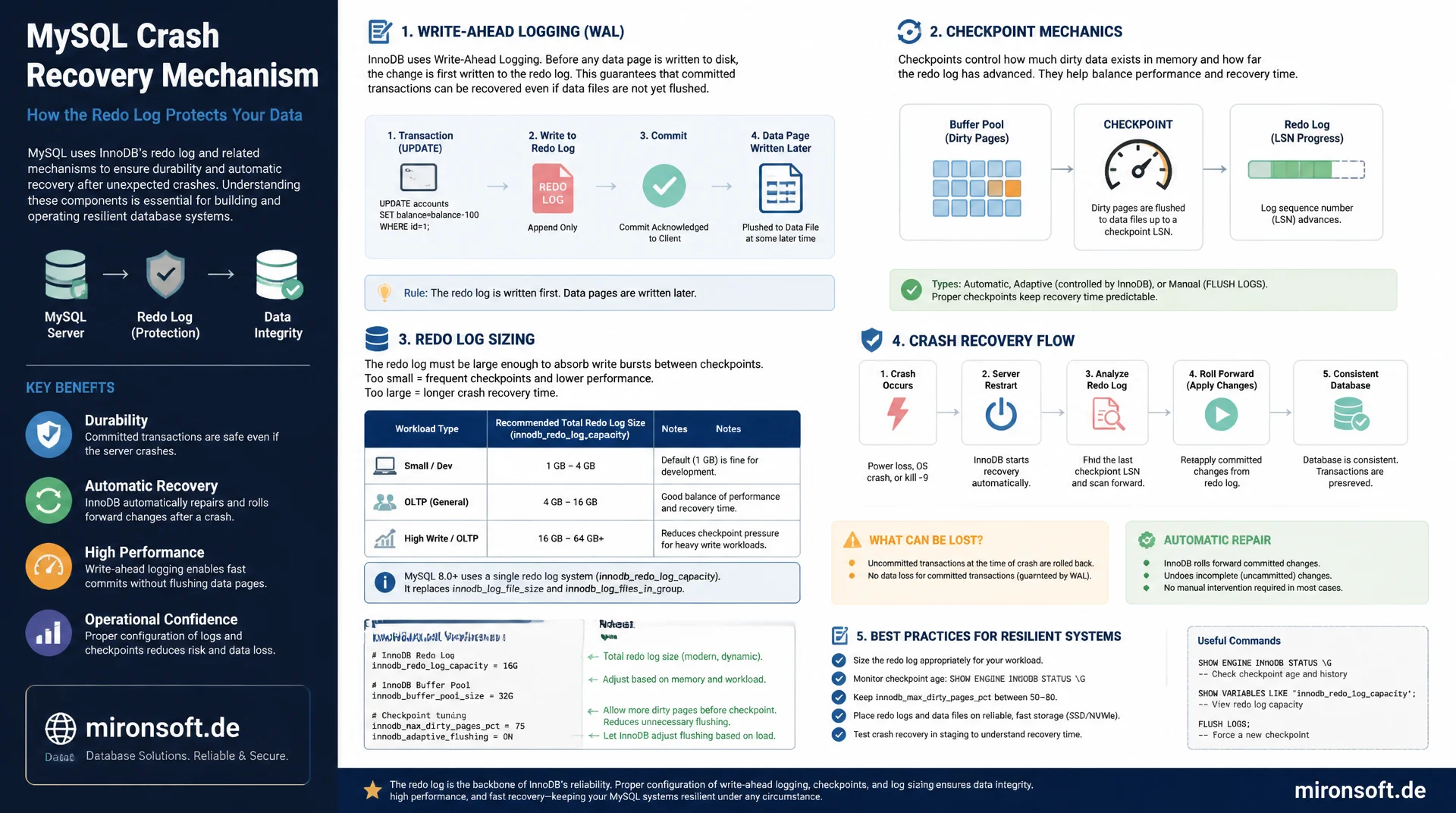
how InnoDB prevents data loss
When a MySQL server crashes in the middle of a write, the redo log decides whether data is lost or whether the database automatically repairs itself on the next start. Understanding write-ahead logging, checkpoint mechanics and log sizing is therefore not an academic exercise but the foundation for resilient production databases. This article explains the full mechanism with real configuration examples.
Table of Contents
- 1. What the redo log does: write-ahead logging
- 2. Structure: log buffer, log files and LSN
- 3. Sizing innodb_log_file_size correctly
- 4. Checkpointing: fuzzy checkpoints and checkpoint age
- 5. innodb_flush_log_at_trx_commit in detail
- 6. The crash recovery process step by step
- 7. Redo log vs. undo log vs. binlog
- 8. Monitoring and common problems
- 9. Flush strategies compared
- 10. Summary
- 11. FAQ
1. What the redo log does: write-ahead logging
The redo log is the core of InnoDB's crash safety and implements the principle of write-ahead logging. Before InnoDB actually writes a change into the affected data page in the buffer pool and later flushes that page to disk, the change is first persisted as a compact entry in the redo log. This entry does not describe the entire new state of the page, only the physical change itself, which makes writing to the redo log very fast, since it involves sequential, small writes instead of random access to scattered data pages.
The decisive advantage of this approach: as soon as a transaction commits, the actual data page does not need to be written to disk, only the corresponding redo log entry. InnoDB can write the data pages themselves later, batched and more efficiently, in the background. If the server crashes afterward, before the data page was actually persisted, InnoDB reconstructs the change from the redo log on the next start. This exact mechanism is what prevents committed transactions from being lost in a crash.
2. Structure: log buffer, log files and LSN
Before an entry is written to the redo log on disk, it first lands in the log buffer, a memory area controlled via innodb_log_buffer_size. The log buffer collects several changes and writes them to disk in batches, which reduces the number of expensive I/O operations. Every entry in the redo log receives a sequential log sequence number, or LSN, which serves as a unique timestamp for every physical change to the database and is used as a reference point during crash recovery.
Physically, the redo log consists of several files whose number and size are controlled via innodb_redo_log_capacity in current MySQL versions, or in older versions via the separate parameters innodb_log_file_size and innodb_log_files_in_group. These files are written to circularly: once the last file is full, InnoDB starts again at the beginning of the first file, provided the changes contained there have already been applied to the actual data pages via a checkpoint.
-- Inspect current redo log configuration
SHOW VARIABLES LIKE 'innodb_redo_log%';
SHOW VARIABLES LIKE 'innodb_log_buffer_size';

-- Current LSN position and checkpoint LSN
SHOW ENGINE INNODB STATUS\G
-- Look for the LOG section:
-- Log sequence number          123456789012
-- Log flushed up to            123456789012
-- Last checkpoint at           123456780000
3. Sizing innodb_log_file_size correctly
The size of the redo log directly affects two opposing factors: write performance and recovery time after a crash. A larger redo log lets InnoDB flush data pages less often, because more changes can accumulate in the log before a checkpoint is forced. This significantly improves write performance for write-heavy workloads, since fewer random I/O operations are needed to flush the data pages. The downside: a larger redo log potentially means more unsaved changes that have to be reapplied during crash recovery, which extends downtime after a crash.
For most production systems, a total redo log size between 1 and 4 GB is a solid starting point, and for very write-heavy systems with many large transactions, 8 GB or more can make sense too. An undersized configuration shows up as frequent warnings in the error log about too-short checkpoint intervals and as noticeable performance drops during write spikes, because InnoDB is forced to force flush operations instead of batching them.
# /etc/mysql/conf.d/innodb-redo-log.cnf
[mysqld]
# MySQL 8.0.30+: unified redo log capacity setting
innodb_redo_log_capacity = 4G

# Older MySQL versions: separate file size and count
# innodb_log_file_size = 1G
# innodb_log_files_in_group = 4

innodb_log_buffer_size = 64M
innodb_flush_log_at_trx_commit = 1
4. Checkpointing: fuzzy checkpoints and checkpoint age
A checkpoint marks the point up to which every change noted in the redo log has actually been applied to the persistent data pages. InnoDB uses fuzzy checkpointing instead of a full, blocking checkpoint: instead of flushing all changed pages at once, which would briefly freeze operations, InnoDB continuously flushes small batches of modified pages in the background and moves the checkpoint forward gradually.
The difference between the current LSN and the checkpoint LSN is called checkpoint age and is an important metric for the health of the system. As checkpoint age approaches the capacity limit of the redo log, InnoDB actively throttles new writes to give the checkpoint process time to catch up. For applications, this throttling shows up as a noticeable latency increase on write operations, and is often a symptom of an undersized redo log combined with a very write-heavy workload.
-- Monitor checkpoint age relative to redo log capacity
SHOW ENGINE INNODB STATUS\G
-- LOG section shows:
-- Log sequence number          145678900000
-- Log flushed up to            145678900000
-- Pages flushed up to          145670000000
-- Last checkpoint at           145660000000
-- Checkpoint age = Log sequence number - Last checkpoint at

-- History list length indicates unpurged undo, correlates with load
SELECT NAME, COUNT
FROM information_schema.INNODB_METRICS
WHERE NAME = 'trx_rseg_history_len';
5. innodb_flush_log_at_trx_commit in detail
The parameter innodb_flush_log_at_trx_commit controls how strictly InnoDB implements the durability guarantee of ACID and is one of the most important trade-offs between safety and performance in the entire redo log system. At value 1, the safe default, the redo log is written immediately on every commit and passed to disk with fsync. This guarantees that no committed transaction is lost in a crash, but costs a synchronous disk access on every single commit.
At value 2, the redo log is written on every commit, but only actually persisted with fsync once per second. A crash of the MySQL process itself is then uncritical, because the data sits in the operating system cache, but a crash of the entire server or a power outage can cost up to one second of committed transactions. At value 0, the redo log is only written once per second at all, which carries the highest risk but delivers the best performance. For production systems with real business data, value 1 is almost always the right choice; value 2 can be a sensible compromise for read replicas or non-critical reporting databases.
# /etc/mysql/conf.d/innodb-durability.cnf
[mysqld]
# 1 = safest, fsync on every commit (default, recommended for production)
# 2 = fsync once per second, tolerates mysqld crash but not OS/power loss
# 0 = fsync once per second, highest risk, highest throughput
innodb_flush_log_at_trx_commit = 1

# Benchmark comparison approach:
# SET GLOBAL innodb_flush_log_at_trx_commit = 2;
# Run sysbench write-heavy workload and compare commits/sec vs value 1
6. The crash recovery process step by step
When the MySQL server restarts after an uncontrolled crash, InnoDB first checks whether the last shutdown was clean. If not, the automatic crash recovery process begins. In the first step, InnoDB reads the redo log from the last checkpoint LSN onward and reapplies every change recorded in it to the data pages, regardless of whether the associated transaction was committed or not. This phase is called the redo phase and ensures that all physical changes already persisted in the log before the crash are restored.
In the second step, the undo phase, InnoDB identifies transactions that were not yet committed at the time of the crash and rolls them back using the undo logs. Only after both phases complete is the database back in a consistent state and ready to accept new connections. With a large redo log and high checkpoint age, this process can take several minutes, which is an important argument for not choosing the redo log arbitrarily large, but making a deliberate trade-off between write performance and recovery time.
# Observe crash recovery progress in the error log
tail -f /var/log/mysql/error.log
# Expected sequence during recovery:
# [Note] InnoDB: Starting crash recovery
# [Note] InnoDB: Restoring buffer pool pages from log
# [Note] InnoDB: Rolling back trx with id 12345, N rows to undo
# [Note] InnoDB: Rollback completed
# [Note] InnoDB: Crash recovery finished
7. Redo log vs. undo log vs. binlog
These three log types are frequently confused, but they serve fundamentally different purposes. The redo log is an InnoDB-internal structure that secures physical changes to data pages for crash recovery, is overwritten circularly, and is not directly visible to applications. The undo log stores the previous state of changed rows, is needed for rollbacks and for MVCC so other transactions get consistent reads of older row versions, and is purged once all relevant transactions have completed.
The binary log, or binlog, is a server-wide, logical record of every data-changing statement and primarily serves replication as well as point-in-time recovery from backups. Unlike the redo log, the binlog is not overwritten circularly but rotated and can be kept for extended periods for recovery purposes. A common mistake is assuming the redo log can replace the binlog or vice versa, when in fact both fulfill different, complementary purposes within the same durability strategy.
8. Monitoring and common problems
The most important monitoring signal for the redo log is the already mentioned checkpoint age relative to configured capacity. A second relevant signal is the number of redo log writes per second, visible via the status variable Innodb_os_log_written, which can indicate a changed workload or a problem with long-running transactions blocking checkpoint progress when it suddenly increases.
A classic real-world problem is a single, very long-running transaction, for example a forgotten manual BEGIN without COMMIT in an administrative session. As long as this transaction stays open, InnoDB cannot purge the associated undo information, which indirectly also limits the usable headroom in the redo log and grows the history list length. A regular look at information_schema.INNODB_TRX reliably reveals such forgotten transactions.
-- Find long-running transactions that block checkpoint progress
SELECT
    trx_id,
    trx_started,
    TIMESTAMPDIFF(SECOND, trx_started, NOW()) AS seconds_running,
    trx_query
FROM information_schema.INNODB_TRX
ORDER BY trx_started ASC
LIMIT 5;
9. Flush strategies compared
The choice of innodb_flush_log_at_trx_commit is a deliberate decision between data safety and throughput. The following table compares the three options.
| Value | Behavior | Risk on crash | Recommendation |
|---|---|---|---|
| 1 | fsync on every commit | No data loss | Production systems, default |
| 2 | Write on commit, fsync 1x/second | Up to 1s on OS crash | Read replicas, reporting |
| 0 | Write and fsync 1x/second | Up to 1s on any crash | Non-critical test systems only |
For business-critical databases with order or payment data, value 1 is non-negotiable. Only for systems where a data loss of a few seconds is acceptable to the business, for example pure read replicas for reporting, does value 2 come into question as a trade-off for higher throughput.
Mironsoft
Database resilience and recovery planning
Is your redo log ready for the worst case?
We review redo log sizing, checkpoint behavior and durability settings, and simulate crash recovery scenarios so a crash doesn't turn into a downtime disaster.
Recovery test
Controlled crash recovery simulation and timing
Log sizing
innodb_redo_log_capacity tailored to your workload
Durability audit
Set flush_log_at_trx_commit according to data criticality
10. Summary
The redo log is the mechanism that puts InnoDB in a position to automatically restore a consistent state after a crash, without manual repair or data loss on committed transactions. Write-ahead logging ensures changes are persisted before the actual data page is written, and fuzzy checkpointing keeps operations running even under load, without blocking full flushes.
The correct sizing of innodb_redo_log_capacity or innodb_log_file_size is a deliberate trade-off between write performance and recovery time. Combined with the right choice of innodb_flush_log_at_trx_commit, the balance between data safety and throughput can be tuned deliberately to the actual criticality of the data, instead of leaving it to chance.
Redo log and crash recovery, the essentials at a glance
Write-ahead logging
Changes are persisted to the redo log first, before the data page itself is written.
Sizing
1 to 4 GB for most systems, larger for write-heavy workloads with many large transactions.
Durability
innodb_flush_log_at_trx_commit=1 for production, guarantees no loss of committed transactions.
Crash recovery
Runs automatically on startup: redo phase followed by undo phase, no manual intervention.