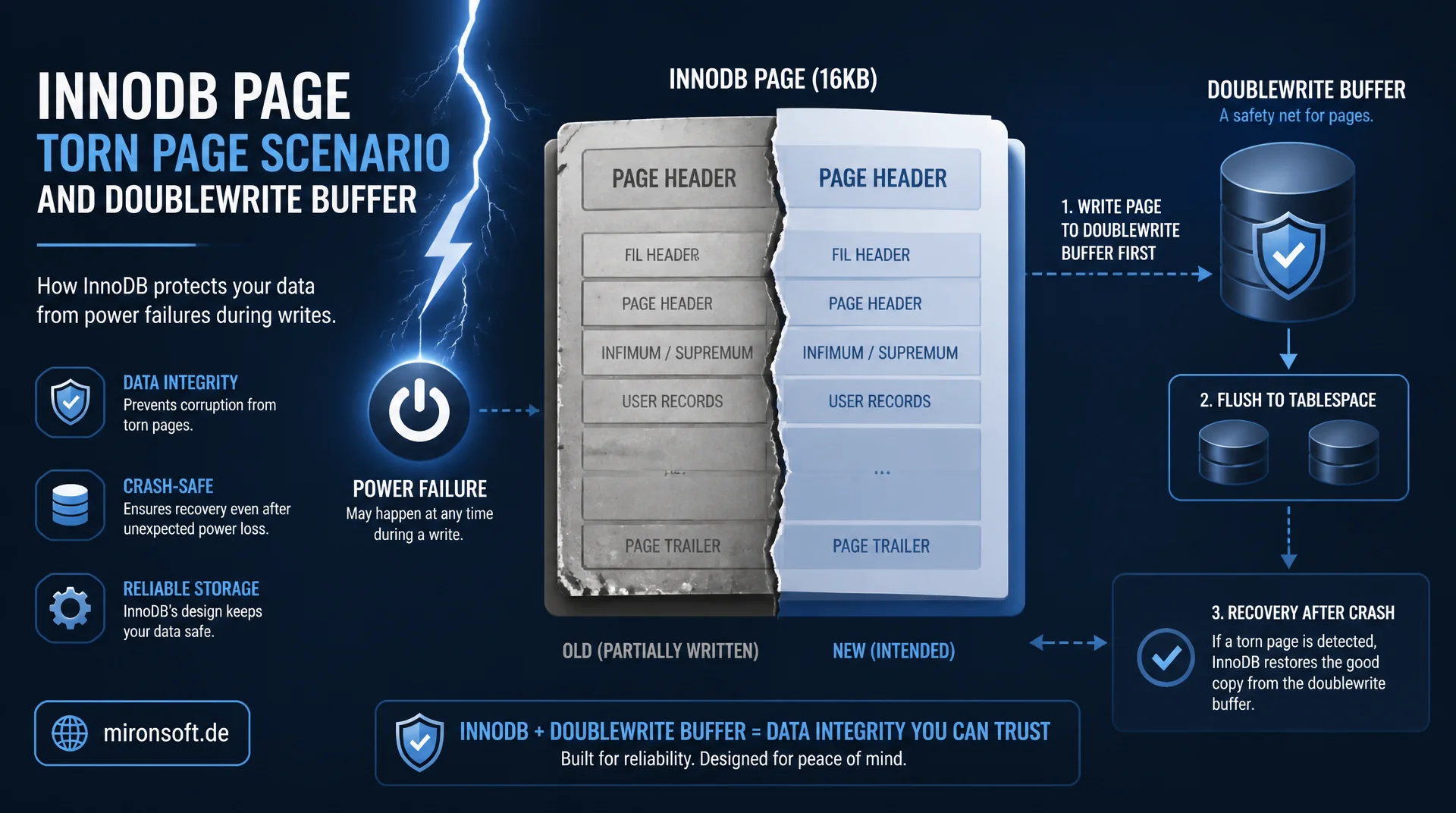
Protection Against Torn Pages Explained
An InnoDB page is larger than the atomic write block of most storage systems, meaning a power failure in the middle of a write can leave a page half old and half new. The doublewrite buffer is the mechanism that reliably prevents exactly this scenario, the torn page. This article explains how it works, what it costs in performance, and when disabling it is actually worthwhile.
Table of Contents
- 1. What a torn page write is
- 2. How the doublewrite buffer works
- 3. Structure since MySQL 8.0.20
- 4. Measuring the performance cost
- 5. When disabling makes sense: atomic writes
- 6. Interaction with the filesystem and storage
- 7. Monitoring doublewrite status variables
- 8. Pitfalls when disabling it
- 9. Doublewrite vs. atomic writes vs. COW filesystems
- 10. Summary
- 11. FAQ
1. What a torn page write is
An InnoDB data page is 16 KB by default, while most storage systems can only write significantly smaller units atomically, often 512 bytes or 4 KB. This discrepancy is the foundation of the problem the doublewrite buffer solves: if InnoDB writes a 16 KB page to disk and the server or storage system crashes in the middle of that write, for example due to a power failure, the page can end up partly with old and partly with new data on disk. This inconsistent state is called a torn page.
A torn page is catastrophic for InnoDB, because neither the redo log nor the crash recovery logic can handle it. The redo log assumes the page to be repaired is at least in a consistent, if outdated, state that redo entries can be applied to. A page made up of a mix of two different writes cannot be repaired this way, and the page's checksum fails. Without an additional protection mechanism, a single unluckily timed power failure could permanently corrupt a table.
The risk is by no means theoretical. In virtualized environments, where several layers of hypervisor, network storage and physical hardware sit between InnoDB's write call and actual persistence, the likelihood of an incomplete write increases further, because every layer brings its own buffers and its own failure modes. This is exactly why the doublewrite buffer has been a standard part of InnoDB since its early days and not an optional add-on.
2. How the doublewrite buffer works
The doublewrite buffer solves this problem by having InnoDB first write every page sequentially into a dedicated staging area, the doublewrite area, before writing it to its actual position in the tablespace files. This intermediate step happens in large, sequential writes, which significantly reduces the extra I/O overhead compared to random individual writes. Only after this intermediate step has completed successfully with fsync does InnoDB write the page to its final position in the actual tablespace file.
If the system crashes during the second write, a torn page can theoretically still occur at the final position, but InnoDB now has an intact copy of the page available in the doublewrite area. During crash recovery, InnoDB checks every page against its checksum. If InnoDB detects a corrupted page in the tablespace file, it simply replaces it with the intact copy from the doublewrite buffer before regular redo log recovery begins. This two-step approach guarantees that at least one consistent version of every page is always available in the end.
The order of operations matters here: the doublewrite area itself is also secured with its own checksum, so InnoDB can detect whether this intermediate step completed fully and correctly as well. Only a page whose checksum is valid within the doublewrite area is accepted as a repair source. This double layer of protection ensures the doublewrite buffer itself does not become the weak point, should the intermediate step ever remain incomplete.
-- Verify doublewrite buffer is active (default: ON)
SHOW VARIABLES LIKE 'innodb_doublewrite';

-- Conceptual write sequence for a single page update:
-- 1. Page modified in buffer pool
-- 2. Page written sequentially to doublewrite area (fsync)
-- 3. Page written to its final position in the tablespace file
-- 4. On crash between step 2 and 3: recovery restores page from
--    the doublewrite area before applying redo log entries
3. Structure since MySQL 8.0.20
Until MySQL 8.0.19, the doublewrite buffer physically resided in the system tablespace, which could cause contention under heavily parallelized workloads, since multiple threads competed for the same area. Since MySQL 8.0.20, the implementation has been fundamentally reworked: the doublewrite area now lives in separate files outside the system tablespace, by default in the data directory, configurable via innodb_doublewrite_dir. Additionally, the new implementation supports parallel doublewrite files per buffer pool instance, which significantly reduces contention under high concurrency.
The size of the doublewrite area is controlled via innodb_doublewrite_files and innodb_doublewrite_pages. In most cases the default values are sized sufficiently, but on very write-heavy systems with many parallel flush threads, adjusting the number of doublewrite files can improve performance, since fewer threads have to share the same area.
Another benefit of the reworked implementation is better observability: the separate doublewrite files can be inspected directly on the filesystem and their size monitored with normal operating system tools, which was not possible before MySQL 8.0.20, since the area was part of the monolithic system tablespace file.
# /etc/mysql/conf.d/innodb-doublewrite.cnf
[mysqld]
innodb_doublewrite = ON
innodb_doublewrite_dir = /var/lib/mysql-doublewrite
innodb_doublewrite_files = 2
innodb_doublewrite_pages = 128
innodb_doublewrite_batch_size = 120
4. Measuring the performance cost
The obvious downside of the doublewrite buffer is the extra I/O overhead: every page is effectively written twice, once to the doublewrite area and once to its final position. In benchmarks, the measured overhead typically ranges between 5 and 15 percent for write-heavy workloads depending on storage hardware, but can be noticeably higher on slow, rotating disks. On modern NVMe SSDs with high I/O bandwidth, the relative overhead is noticeably lower, because these devices handle the sequential doublewrite write very efficiently.
To measure the actual impact on your own system, a direct comparison with a benchmark tool like sysbench is recommended, once with the doublewrite buffer enabled and once disabled on a test system. Important: disabling it should never be tested without measurement and never against production data, since the risk of a torn page write then exists unprotected.
# Compare write-heavy throughput with and without doublewrite buffer
# Run on a disposable test instance only, never in production

sysbench oltp_write_only --mysql-db=bench --tables=10 --table-size=1000000 \
  --threads=16 --time=120 prepare

# Baseline: doublewrite enabled (default)
sysbench oltp_write_only --mysql-db=bench --tables=10 --table-size=1000000 \
  --threads=16 --time=120 run

# Compare: doublewrite disabled (test system only)
mysql -e "SET GLOBAL innodb_doublewrite = OFF;"
sysbench oltp_write_only --mysql-db=bench --tables=10 --table-size=1000000 \
  --threads=16 --time=120 run
Besides raw throughput, it's also worth looking at the latency distribution of individual writes, not just the average. The doublewrite buffer can, in rare cases, cause brief latency spikes when many flush threads access the same doublewrite area simultaneously, which shows up more clearly in percentile measurements like p99 than in a plain average.
5. When disabling makes sense: atomic writes
The doublewrite buffer is only necessary when the underlying storage system cannot guarantee atomic writes at page size. Some specialized storage solutions, such as certain enterprise SSDs with power loss protection, or filesystems like ZFS with copy-on-write semantics, already guarantee at the hardware or filesystem level that a write either arrives completely or not at all. In these cases a torn page write is technically impossible, meaning the doublewrite buffer offers no additional protection and only creates overhead.
MySQL supports the option innodb_doublewrite=OFF for such scenarios, combined with storage systems that guarantee atomic writes, for example Fusion-io cards with corresponding firmware support. Important: this decision must never be made on a hunch. Anyone who cannot demonstrate with absolute certainty that their storage system guarantees atomic page writes should keep the doublewrite buffer enabled, because the cost of a corrupted production system far exceeds the performance gain.
Solid proof usually requires consulting with the storage vendor or cloud provider as well as targeted crash tests under controlled conditions, for example abruptly cutting power to a test system under load. Only if these tests show not a single torn page across multiple repetitions is the atomic write guarantee considered sufficiently proven for a production deactivation.
6. Interaction with the filesystem and storage
The effectiveness of the doublewrite buffer is closely tied to the filesystem in use and how it handles fsync. On filesystems with copy-on-write semantics like ZFS or Btrfs, every change is never written in-place anyway, but always laid down as a new block, which already rules out a torn page write at the filesystem level. In such environments, the doublewrite buffer creates a double layer of protection, which is safe but redundant and costs noticeable performance without additional benefit.
On classic filesystems like ext4 or XFS without copy-on-write, the doublewrite buffer is essential, since these filesystems typically make changes in-place and offer no guarantee of atomic writes at InnoDB page size. Using O_DIRECT for file access, which InnoDB uses by default to bypass the operating system cache, does not change this necessity either, since O_DIRECT does not guarantee the atomicity of a write, it merely bypasses buffering layers.
RAID controllers with a battery-backed write cache, so-called BBWC controllers, also do not automatically substitute for the doublewrite buffer, even though they are often mentioned in this context colloquially. A BBWC primarily protects against losing data in the controller cache during a power outage, but does not necessarily guarantee that a single write arrives atomically at the disk at the page level.
7. Monitoring doublewrite status variables
InnoDB provides several status variables to observe the activity of the doublewrite buffer. Innodb_dblwr_pages_written shows the total number of pages written through the doublewrite mechanism, while Innodb_dblwr_writes counts the number of physical writes to the doublewrite area itself. The ratio between the two values indicates how efficiently InnoDB batches multiple pages into a single doublewrite write.
A noticeable increase in Innodb_dblwr_writes relative to normal write load can indicate an unfavorable flush parameter configuration, for example if innodb_doublewrite_batch_size was set too small for the current workload. Regularly checking these metrics as part of general I/O monitoring helps attribute performance issues early to the doublewrite mechanism instead of other causes.
-- Monitor doublewrite buffer activity
SELECT VARIABLE_NAME, VARIABLE_VALUE
FROM performance_schema.global_status
WHERE VARIABLE_NAME IN (
    'Innodb_dblwr_pages_written',
    'Innodb_dblwr_writes'
);

-- Ratio close to 1 means little batching; higher ratio means
-- multiple pages are bundled efficiently per doublewrite write
It's also worth checking the output of SHOW ENGINE INNODB STATUS, which provides additional context in the buffer pool and memory section, for example how many pending writes are currently waiting on the doublewrite area. A persistently high number of pending writes suggests the configured number of doublewrite files is no longer sufficient for the current write load.
8. Pitfalls when disabling it
The most common mistake when handling the doublewrite buffer is disabling it prematurely for a performance boost, without actually knowing the guarantees of the underlying storage system. Cloud environments are especially tricky here: a virtualized block storage service can behave outwardly like a normal block device but often provides no internal guarantee of atomic writes at InnoDB page size, even if the underlying physical hardware could theoretically do so.
A second pitfall concerns backup and replication scenarios: if the doublewrite buffer is disabled on a primary system but left enabled on a replica with a different storage backend, or vice versa, inconsistent safety guarantees arise within the same infrastructure. Disabling it should therefore always be decided and documented consistently for the entire topology, not as an isolated single-server optimization.
A third pitfall arises during storage migrations: if a system moves from hardware with guaranteed atomic writes to a new platform, for example as part of a cloud move, without the doublewrite configuration being reviewed again, protection may remain disabled even though the new platform no longer offers the necessary guarantees at all. Every storage migration should therefore include the doublewrite setting as a fixed item on the acceptance checklist.
9. Doublewrite vs. atomic writes vs. COW filesystems
The following table compares the three common strategies against torn pages.
| Strategy | Protection layer | Performance overhead | Prerequisite |
|---|---|---|---|
| Doublewrite buffer | InnoDB internal | 5 to 15 percent | None, works everywhere |
| Atomic writes | Hardware / firmware | Minimal | Special SSDs with power loss protection |
| Copy-on-write FS | Filesystem, e.g. ZFS/Btrfs | Low, depends on FS | CoW filesystem correctly configured |
For the vast majority of production systems, the doublewrite buffer remains the correct, universally working choice. Atomic writes and copy-on-write filesystems are optimizations for special infrastructures where the underlying guarantees are demonstrably present and documented, not for the standard case.
A sensible decision rule: as long as no documented, tested guarantee of atomic writes exists, the doublewrite buffer stays enabled. Only once this guarantee has been confirmed in writing by the storage provider and verified through your own crash tests does disabling it become a responsible optimization instead of an avoidable risk.
Mironsoft
Storage architecture and InnoDB data integrity
Is your storage setup really torn-page safe?
We check whether your storage backend actually guarantees atomic writes, benchmark the doublewrite overhead on your hardware, and document a solid decision basis.
Storage audit
Verify atomic write guarantees of the hardware in use
Performance benchmark
Measure doublewrite overhead under realistic load
Configuration review
Consistent doublewrite settings across the entire topology
10. Summary
The doublewrite buffer protects InnoDB from torn pages by writing every page sequentially into a dedicated staging area first, before it reaches its final position in the tablespace. If the system crashes during the second write, InnoDB can fall back on the intact copy from the doublewrite area during crash recovery and repair the corrupted page before regular redo log recovery begins.
The performance overhead of typically 5 to 15 percent is the price for this safety, and justified in the vast majority of cases. Only if the storage system demonstrably guarantees atomic page writes, for example through special hardware with power loss protection or a copy-on-write filesystem, is a well-considered deactivation worthwhile, always with benchmark evidence and never on a hunch.
Once you understand the mechanism, the doublewrite buffer stops looking like an annoying performance tax and starts looking like what it actually is: a targeted, well-designed safeguard against one of the most insidious failure modes in the database world, one that would be hard to reliably detect at all without this protection.
For teams planning new database infrastructure, it therefore pays off to treat the doublewrite question as a fixed part of storage selection early on, rather than clarifying it retroactively after an incident.
Doublewrite buffer, the essentials at a glance
What it prevents
Torn pages, meaning partially written data pages after a crash mid write.
Mechanism
Sequential intermediate write into a dedicated area before the final position is written.
Cost
Typically 5 to 15 percent I/O overhead on write-heavy workloads, depending on storage hardware.
Disabling it
Only with proven atomic writes or a copy-on-write filesystem, otherwise leave it enabled.