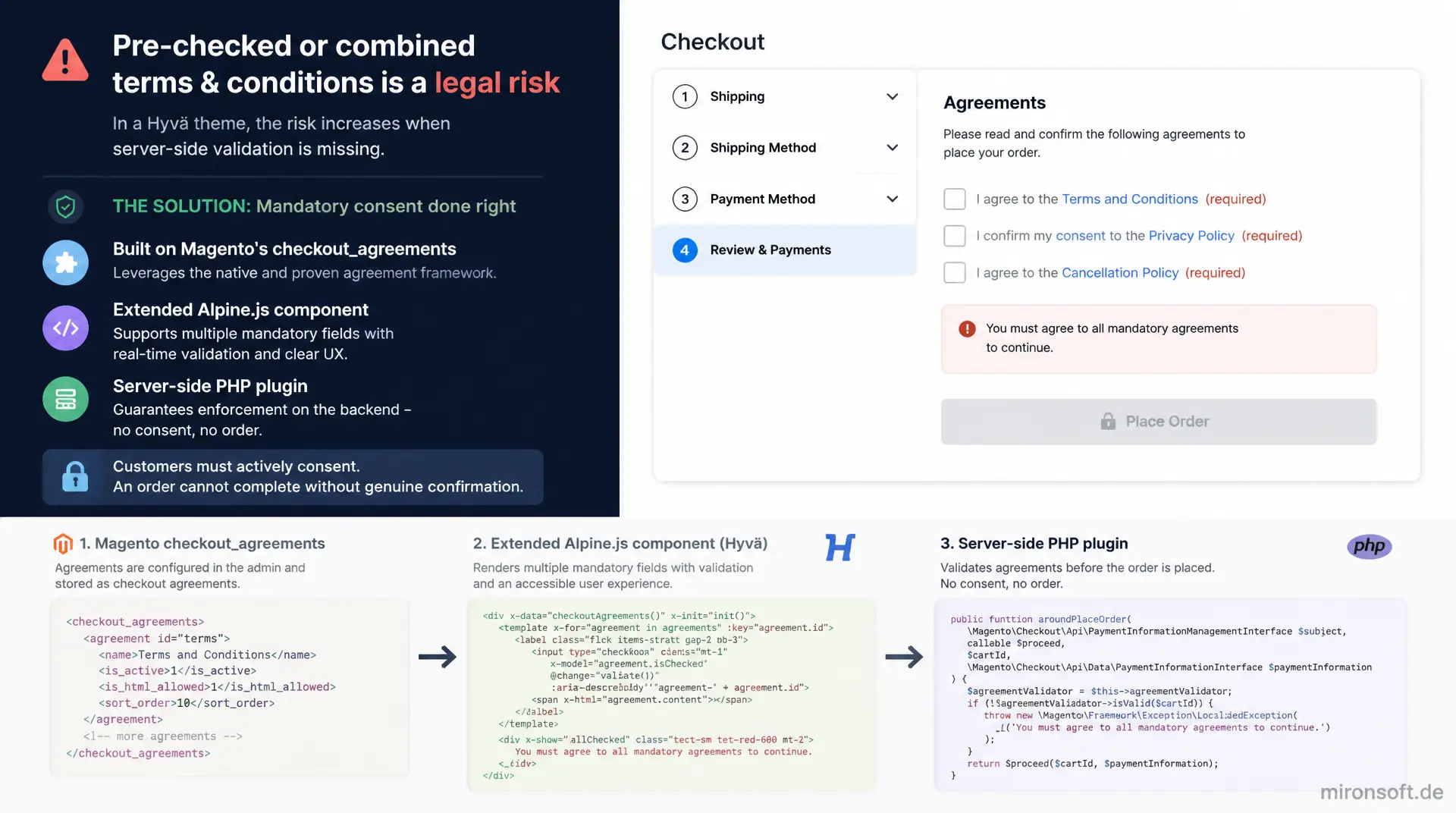
legally sound, split into multiple fields, verified server-side
A single, pre-checked, or combined terms and conditions checkbox at checkout is a legal risk that gets worse in a Hyvä theme when server-side validation is missing. This article shows how such a mandatory field is implemented on top of Magento's checkout_agreements mechanism, an extended Alpine.js component for multiple mandatory fields, and a server-side PHP plugin, so customers must actively consent and an order cannot complete without a genuine confirmation.
Table of Contents
- 1. Legal Background: the Button Solution and the Checkbox Requirement
- 2. The Magento Default: checkout_agreements in Detail
- 3. How Hyvä Renders the Terms and Conditions Checkbox via Alpine.js
- 4. Multiple Mandatory Fields: Terms, Privacy and Newsletter Separated
- 5. PHP Plugin: an Additional Checkbox via CheckoutAgreementsListInterface
- 6. Server-Side Validation: Reliably Preventing a Client Bypass
- 7. Layout XML: Placement in checkout_index_index
- 8. Error States: Tailwind Styling and CSP-Compliant Validation
- 9. Terms and Conditions Checkbox Patterns Compared
- 10. Summary
- 11. FAQ
1. Legal Background: the Button Solution and the Checkbox Requirement
The so-called button solution under German law (§ 312j BGB) requires that consumers can only trigger a paid order through a clearly labeled button, and that the essential contract information is presented clearly and understandably immediately before the order. A terms and conditions checkbox is the technical implementation of part of this requirement: the customer must actively, through a deliberate action, confirm that they have taken note of the terms and conditions, the withdrawal policy, and typically the privacy policy as well. A pre-checked checkbox does not satisfy this criterion because no active action by the customer has taken place, even if the customer could theoretically have unchecked it.
Technically, this creates concrete requirements for any such consent field at checkout: it must never be preset with the checked attribute, the linked documents must open in a new tab via target="_blank" and rel="noopener" so the customer does not lose a filled cart or already entered address data while reading, and order placement must only become possible after the checkbox is activated. Magento's default checkout block for agreements provides the foundation for this, but it must be deliberately adapted in a Hyvä theme, because the rendering layer has been fully switched from Knockout.js to Alpine.js and the validation logic therefore engages at a different point.
This article describes the technical and organizational implementation of a legally sound terms and conditions checkbox in the Hyvä checkout, but it does not replace individual legal advice. The exact wording of the consent texts, the scope of the privacy policy, and the question of which checkboxes are strictly required for a given business model should be reviewed before going live by legal counsel specialized in e-commerce law.
2. The Magento Default: checkout_agreements in Detail
Magento already ships a built-in mechanism for agreements with the Magento_CheckoutAgreements module, and any terms and conditions checkbox implementation should build on it instead of starting from scratch. The central piece is the CheckoutAgreementsListInterface with its getList(int $storeId): AgreementInterface[] method, which returns every agreement active for a store. Each AgreementInterface instance encapsulates name, content, checkbox text, display height, and above all the mode: MODE_MANUAL shows the checkbox at checkout and enforces active confirmation, while MODE_AUTO is treated as automatically accepted and never renders a checkbox.
For a legally sound consent field, only manual mode is relevant, because only it produces a visible checkbox that requires active confirmation. Automatic mode is essentially intended for uncritical notices and should not be used for terms, withdrawal policy, or privacy, even though it remains technically selectable in the admin configuration under Stores > Terms and Conditions. When the order is submitted, the checkout passes the IDs of every checked agreement as agreement_ids, and the server verifies via Magento\CheckoutAgreements\Model\AgreementsValidator that a matching ID was actually submitted for every active, manual agreement.
This built-in validator is the decisive advantage of the default mechanism: every additional mandatory checkbox registered through CheckoutAgreementsListInterface automatically benefits from server-side verification, with no extra validation code required. Only once a checkbox is deliberately modeled outside this mechanism, for instance because it represents a standalone consent independent from the terms text, is a dedicated validation plugin necessary.
3. How Hyvä Renders the Terms and Conditions Checkbox via Alpine.js
In Luma, a Knockout.js view-model binding renders the list of agreements and synchronizes the checkbox state with the place-order button through observables. Hyvä replaces this layer entirely with an Alpine.js component that injects the same data from CheckoutAgreementsListInterface into the template through a block view model, but keeps the activation state locally via x-data instead of using a global observable pattern. Each checkbox is looped individually from the template per active, manual agreement, and binds via x-model to its own field in the Alpine data object.
The following simplified excerpt shows the basic pattern as used in a typical Hyvä checkout-agreements.phtml: an Alpine store holds the combined state of all agreements, a computed property allChecked aggregates the status, and the place-order button binds its disabled attribute directly to this property instead of waiting for a separate click handler.
// checkout-agreements.phtml (Alpine data initialisation, adapted from Hyva's default pattern)
document.addEventListener('alpine:init', () => {
  Alpine.store('checkoutAgreements', {
    // One boolean per manual agreement id, keyed by agreement id
    checkedMap: {},

    // Called once per rendered agreement checkbox on init
    register(agreementId) {
      if (!(agreementId in this.checkedMap)) {
        this.checkedMap[agreementId] = false;
      }
    },

    toggle(agreementId) {
      this.checkedMap[agreementId] = !this.checkedMap[agreementId];
    },

    // Place-order button reads this getter to enable/disable itself
    get allChecked() {
      return Object.values(this.checkedMap).every(Boolean);
    }
  });
});
This basic structure is enough for a single, combined consent checkbox, but it reaches its limits once terms, privacy, and an optional newsletter opt-in need to be handled as separate, distinct fields. The store so far only knows an anonymous list of IDs, with no semantic distinction of which checkbox stands for which purpose, and accordingly delivers no individual error message per checkbox either.
4. Multiple Mandatory Fields: Terms, Privacy and Newsletter Separated
A combined checkbox that bundles terms acceptance and acknowledgement of the privacy policy into a single sentence and a single control is considered risky in practice, because it gives the customer no separate, deliberate decision over two substantively different declarations. Instead, a standalone terms and conditions checkbox for the terms of service and withdrawal policy is recommended, a second mandatory checkbox for acknowledging the privacy policy, and optionally a third, explicitly unchecked checkbox for a newsletter opt-in.
To map this in the Hyvä checkout, the simple Alpine store structure from section 3 is replaced with a dedicated Alpine component that models each mandatory field individually, tracks its own error state per field, and only releases order placement once every mandatory field has been actively confirmed. Important detail: error text is displayed exclusively via x-text, never through direct mustache interpolation in the markup, since Hyvä templates are rendered server-side in PHP and Alpine only resolves its bindings client-side.
// checkout-consent.phtml (extended Alpine component for multiple mandatory checkboxes)
document.addEventListener('alpine:init', () => {
  Alpine.data('checkoutConsent', () => ({
    termsChecked: false,
    privacyChecked: false,
    newsletterOptIn: false, // optional, never pre-checked
    showTermsError: false,
    showPrivacyError: false,

    // Both mandatory checkboxes must be actively checked before order placement
    get canPlaceOrder() {
      return this.termsChecked && this.privacyChecked;
    },

    // Called from @click.prevent on the place-order button wrapper
    validateBeforeSubmit() {
      this.showTermsError = !this.termsChecked;
      this.showPrivacyError = !this.privacyChecked;
      return this.canPlaceOrder;
    },

    termsErrorText() {
      return 'Please confirm the terms and conditions.';
    },

    privacyErrorText() {
      return 'Please confirm that you have read the privacy policy.';
    }
  }));
});
The call to validateBeforeSubmit() does not replace server-side validation, it purely improves the user experience: the customer immediately sees which mandatory field is still missing, without waiting for an error message after a failed server round trip. The actual safeguard against a bypass must happen server-side, as described in section 6.
5. PHP Plugin: an Additional Checkbox via CheckoutAgreementsListInterface
For mandatory fields that fit the content model of a classic agreement, such as a separate privacy checkbox, it makes sense to register them as a regular agreement through CheckoutAgreementsListInterface rather than building a fully independent mechanism. The advantage: this additional privacy checkbox is automatically picked up by Hyvä's standard rendering and benefits from the already mentioned AgreementsValidator, with no extra code needed for the baseline server-side check.
An afterGetList plugin on CheckoutAgreementsListInterface programmatically appends another AgreementInterface instance to the returned array. The instance is created through its factory so it carries exactly the same data structure as agreements maintained through the admin panel, and receives a unique ID that is negative or outside the admin value range, to avoid collisions with administratively managed entries.
<?php

declare(strict_types=1);

namespace Mironsoft\CheckoutCompliance\Plugin;

use Magento\CheckoutAgreements\Api\CheckoutAgreementsListInterface;
use Magento\CheckoutAgreements\Api\Data\AgreementInterface;
use Magento\CheckoutAgreements\Api\Data\AgreementInterfaceFactory;

/**
 * Adds a dedicated, always-required privacy consent checkbox to the checkout agreements list.
 */
class AddPrivacyAgreementPlugin
{
    private const PRIVACY_AGREEMENT_ID = -101;

    public function __construct(
        private readonly AgreementInterfaceFactory $agreementFactory
    ) {
    }

    /**
     * Appends a synthetic, non-admin-managed privacy agreement to the native agreement list.
     *
     * @param CheckoutAgreementsListInterface $subject
     * @param AgreementInterface[] $result
     * @return AgreementInterface[]
     */
    public function afterGetList(CheckoutAgreementsListInterface $subject, array $result): array
    {
        /** @var AgreementInterface $privacyAgreement */
        $privacyAgreement = $this->agreementFactory->create();
        $privacyAgreement->setAgreementId(self::PRIVACY_AGREEMENT_ID);
        $privacyAgreement->setName('privacy-consent');
        $privacyAgreement->setContent('Reference to the applicable privacy policy.');
        $privacyAgreement->setCheckboxText('I have read and understood the privacy policy.');
        $privacyAgreement->setMode(AgreementInterface::MODE_MANUAL);
        $privacyAgreement->setIsHtml(false);
        $privacyAgreement->setIsActive(true);

        $result[] = $privacyAgreement;

        return $result;
    }
}
This approach is deliberately limited to agreements that fit the AgreementInterface schema. An optional newsletter checkbox does not semantically belong on this list, because it is precisely not a mandatory consent field in the narrower sense, but a voluntary opt-in that should be managed separately through its own field.
6. Server-Side Validation: Reliably Preventing a Client Bypass
Any Alpine.js validation, however carefully implemented, can be bypassed on the client side: a technically savvy customer can send the place-order request directly against the REST or GraphQL interface and completely ignore any JavaScript check in the browser. For every mandatory field that is not covered by the native agreement_ids mechanism from section 5, for instance because it was modeled as a standalone extension attribute on the payment object, a server-side plugin is therefore mandatory to block order completion.
The natural point to hook in is a before plugin on Magento\Checkout\Api\PaymentInformationManagementInterface::savePaymentInformationAndPlaceOrder. The plugin reads the supplied PaymentInterface object, checks its extension attributes against a flag previously declared through extension_attributes.xml, and throws a LocalizedException as soon as a mandatory field was not actively confirmed. This makes it irrelevant whether the request comes through the regular Hyvä checkout, a mobile app, or a manually constructed REST payload: without a confirmed terms and conditions checkbox, the order is rejected server-side.
<?php

declare(strict_types=1);

namespace Mironsoft\CheckoutCompliance\Plugin;

use Magento\Checkout\Api\PaymentInformationManagementInterface;
use Magento\Framework\Exception\LocalizedException;
use Magento\Quote\Api\Data\PaymentInterface;

/**
 * Blocks order placement server-side when a mandatory consent checkbox was not submitted,
 * preventing any client-side-only bypass of the terms and privacy checkboxes.
 */
class ValidateConsentBeforePlaceOrderPlugin
{
    /**
     * Rejects the request before it reaches core order-placement logic.
     *
     * @param PaymentInformationManagementInterface $subject
     * @param int $cartId
     * @param PaymentInterface $paymentMethod
     * @param mixed $billingAddress
     * @return void
     * @throws LocalizedException
     */
    public function beforeSavePaymentInformationAndPlaceOrder(
        PaymentInformationManagementInterface $subject,
        int $cartId,
        PaymentInterface $paymentMethod,
        $billingAddress = null
    ): void {
        $extensionAttributes = $paymentMethod->getExtensionAttributes();

        // getPrivacyConsent() is generated from extension_attributes.xml for PaymentInterface
        $privacyConfirmed = $extensionAttributes !== null
            && $extensionAttributes->getPrivacyConsent() === true;

        if (!$privacyConfirmed) {
            throw new LocalizedException(
                __('Please confirm the privacy consent checkbox before placing the order.')
            );
        }
    }
}
An important detail: this plugin does not replace the already existing AgreementsValidator, it complements it. Both mechanisms typically run in parallel, because a regular consent field is secured through agreement_ids, while additional, standalone consents secured through extension attributes form a second, independent line of defense.
7. Layout XML: Placement in checkout_index_index
The additional checkbox is, like every Hyvä customization required by project guidelines, controlled exclusively through layout XML and never hard-coded into an existing core template. A dedicated block is positioned via referenceBlock relative to the existing agreements block, so that the additional field appears visually and in the DOM directly next to or below the native checkboxes. The existing iteration over $block->getChildNames() in the parent container remains unchanged.
In the associated template, the Alpine wrapper from section 4 is embedded, error display is handled through conditional Tailwind classes, and every inline script block is immediately followed by a call to $hyvaCsp->registerInlineScript() to clear it for the Content Security Policy, as required by the theme's CSP rules.
<!-- app/design/frontend/Mironsoft/default/Mironsoft_CheckoutCompliance/layout/checkout_index_index.xml -->
<?xml version="1.0"?>
<page xmlns:xsi="http://www.w3.org/2001/XMLSchema-instance"
      xsi:noNamespaceSchemaLocation="urn:magento:framework:View/Layout/etc/page_configuration.xsd">
    <body>
        <referenceBlock name="checkout.root">
            <block name="checkout.consent.checkboxes"
                   template="Mironsoft_CheckoutCompliance::checkout/consent-checkboxes.phtml"
                   after="checkout.payment.agreements"/>
        </referenceBlock>
    </body>
</page>

<!-- app/design/frontend/Mironsoft/default/Mironsoft_CheckoutCompliance/templates/checkout/consent-checkboxes.phtml -->
<div x-data="checkoutConsent()" class="mt-4 space-y-3">
    <label class="flex items-start gap-2">
        <input type="checkbox"
               x-model="termsChecked"
               :class="showTermsError ? 'border-red-500 ring-1 ring-red-500' : 'border-gray-300'"
               class="mt-1 rounded" />
        <span>I accept the
            <a class="underline" href="/terms" target="_blank" rel="noopener">Terms and Conditions</a> and the
            <a class="underline" href="/withdrawal-policy" target="_blank" rel="noopener">Withdrawal Policy</a>.
        </span>
    </label>
    <p x-show="showTermsError" x-text="termsErrorText()" class="text-sm text-red-600"></p>
</div>

<script>
    // Alpine.data('checkoutConsent', ...) is registered in the JS module shown in section 4
</script>
<?php /* @noEscape */ echo $hyvaCsp->registerInlineScript(); ?>
Since the template only ships the Alpine wrapper and checkbox markup, while the actual logic lives in a separate, versioned JavaScript file, maintainability stays high: changes to the consent logic require no fresh static-content deployment of the phtml template, only a rebuild of the JavaScript bundle.
8. Error States: Tailwind Styling and CSP-Compliant Validation
A terms and conditions checkbox with no visible error feedback tempts customers into clicking the order button repeatedly without success, without understanding why nothing happens. In the template shown above, the class :class="showTermsError ? 'border-red-500 ring-1 ring-red-500' : 'border-gray-300'" drives the visual error highlight, while the text underneath appears through x-show and x-text only once validateBeforeSubmit() has flagged that particular field as missing. It is important to consistently use x-text instead of a direct mustache interpolation in the markup, because Hyvä templates are delivered server-side in PHP and unescaped double curly braces can conflict with the PHP rendering context.
For accessibility, every mandatory checkbox should additionally receive aria-invalid="true" once the error state is active, and focus should automatically jump to the first invalid checkbox via x-effect when the customer tries to submit without confirmation. Every inline script block used to control these states must be immediately followed by a call to $hyvaCsp->registerInlineScript(), since Hyvä's Content Security Policy otherwise blocks every unregistered inline script in production and the entire validation logic silently fails.
Since the actual check logic is already fully captured in the JavaScript module from section 4 and the template from section 7, no further code is added here. What matters is the consistent combination of visual feedback on the frontend and the independent server-side safeguard of the same mandatory field described in section 6.
9. Terms and Conditions Checkbox Patterns Compared
The following overview contrasts common, legally risky implementations of a consent field with the recommended, legally sound Hyvä patterns. The difference is rarely in the visuals, it is almost always in whether an active action is enforced and validated server-side.
| Aspect | Legally risky approach | Legally compliant Hyvä pattern | Benefit |
|---|---|---|---|
| Default state | Checkbox pre-checked with checked |
Always unchecked, active confirmation required | Meets the requirement for an active action |
| Terms and privacy | One combined checkbox for both | Separate checkboxes for terms and privacy | Separate, deliberate individual decision |
| Link behavior | Link without target="_blank", checkout state lost |
target="_blank" rel="noopener", checkout state preserved |
No data loss while reading the linked page |
| Validation | Client-side Alpine.js check only | Additional server-side PHP plugin | No bypass through direct API requests |
| Error display | No visible feedback when unchecked | Red border, inline error text, focus jump | Customer immediately understands why it failed |
In practice, it rarely suffices to implement just one row of this table. Only the interplay of no default pre-checking, separated checkboxes, correct link behavior, double validation, and clear error display makes a terms and conditions checkbox in the Hyvä checkout actually robust.
10. Summary
A legally sound terms and conditions checkbox in the Hyvä checkout is not a single checkbox attribute, it is the interplay of several layers: the legal framework of the button solution requires an active, never pre-checked confirmation. Magento's checkout_agreements mechanism provides, through CheckoutAgreementsListInterface and the built-in AgreementsValidator, the foundation for server-verified agreements. Hyvä replaces the Knockout.js binding with an Alpine.js component that can be extended to handle several separate mandatory fields such as terms, privacy, and an optional newsletter opt-in, without touching the Hyvä block structure or $block->getChildNames().
The decisive point missing in many implementations is the server-side safeguard for additional checkboxes not covered by agreement_ids: a plugin on PaymentInformationManagementInterface reliably prevents a manipulated API request from bypassing the client-side Alpine validation of the mandatory field. Layout XML placement and Tailwind-driven error states round out the implementation, but they do not replace a final review of the actual texts and mandatory fields by legal counsel specialized in e-commerce law.
Terms and Conditions Checkbox in the Hyvä Checkout: the Key Points at a Glance
Legal framework
The button solution under § 312j BGB requires an active, never pre-checked confirmation before a paid order.
Magento mechanism
CheckoutAgreementsListInterface and AgreementsValidator deliver server-verified agreements in manual mode.
Alpine.js component
Separate mandatory fields for terms and privacy, its own error state per field, output exclusively through x-text.
Server-side validation
A plugin on PaymentInformationManagementInterface blocks the order if a mandatory checkbox was not confirmed.
11. FAQ: Terms and Conditions Checkbox in the Hyvä Checkout
1What is the button solution?
2Can the checkbox be pre-checked?
3One checkbox for terms and privacy?
4How does checkout_agreements work?
5How does Hyvä render the checkbox?
6Add an extra mandatory checkbox?
7Is client-side validation enough?
8Prevent a client-side bypass?
9Display errors accessibly?
10Does this replace legal advice?
Mironsoft
Hyvä checkout customization, compliance and Alpine.js components
Getting the terms and conditions checkbox watertight at checkout?
We audit your existing Hyvä checkout, review the current terms and conditions checkbox implementation, and build separate mandatory fields with server-side PHP validation, with no Knockout.js and no extra JavaScript frameworks.
Compliance review
Reviewing the existing checkbox and agreement logic at checkout
Alpine.js implementation
Multiple mandatory fields, error states and CSP-compliant inline scripts
Server-side hardening
PHP plugins against client-side bypass of checkout validation