Company accounts, approvals and requisition lists without Knockout
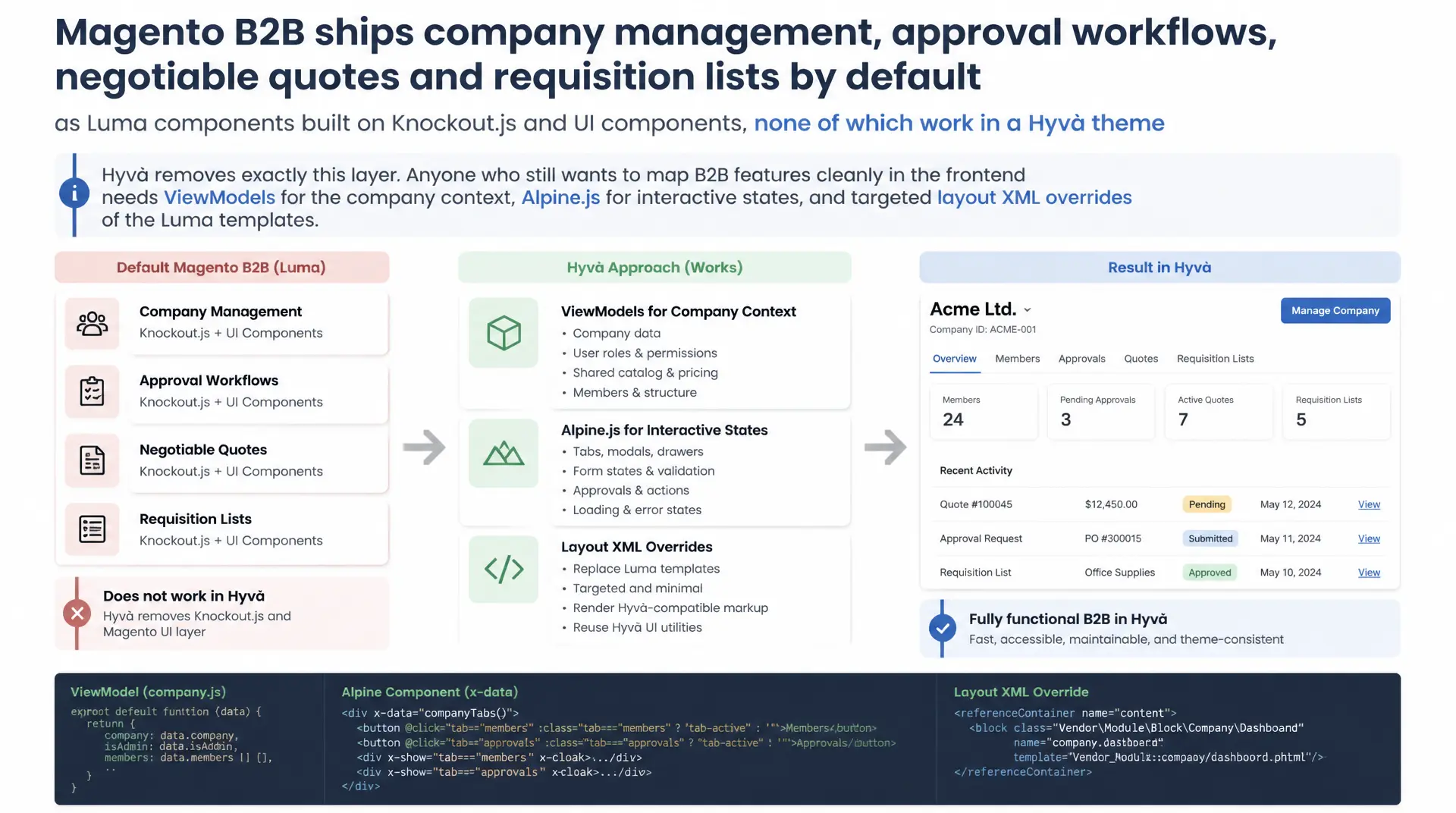
Magento B2B ships company management, approval workflows, negotiable quotes and requisition lists by default as Luma components built on Knockout.js and UI components, none of which work in a Hyvä theme because Hyvä removes exactly this layer. Anyone who still wants to map B2B features cleanly in the frontend needs ViewModels for the company context, Alpine.js for interactive states, and targeted layout XML overrides of the Luma templates.
Table of Contents
- 1. B2B features in the Hyvä theme: starting point
- 2. ViewModels for the company context
- 3. Alpine.js instead of Knockout for approval workflows
- 4. Layout XML overrides for the B2B templates
- 5. Requisition lists in the Hyvä frontend
- 6. Negotiable quotes: mapping price negotiation
- 7. Permission checks as UI states
- 8. CSP and registerInlineScript for B2B components
- 9. B2B patterns compared
- 10. Summary
- 11. FAQ
1. B2B features in the Hyvä theme: starting point
Magento B2B (Commerce) brings company accounts, approval workflows for orders, negotiable quotes, requisition lists, shared catalogs and the assignment of sales representatives. All of these features are built by default as Luma modules: grids and forms for company management run on UI components, the approval status of an order is rendered through a Knockout.js binding, and requisition list management uses ui/grid components with XML declarations. This is exactly the layer Hyvä deliberately and completely removes, because UI components and Knockout.js are neither loaded nor initialized in Hyvä themes. The effect: a Hyvä theme with the B2B module enabled shows empty containers, missing bindings, or JavaScript errors in the console in many areas, because the referenced Knockout templates simply do not exist.
For B2B features in the Hyvä theme this means: the underlying PHP service contracts, repositories and GraphQL endpoints of the B2B module remain usable and stable, only the presentation layer needs to be rebuilt entirely. That is not a drawback, it follows exactly the Hyvä principle: business logic stays in PHP and service contracts, rendering moves into phtml templates with Alpine.js. Anyone planning this rebuild should separate from the start between data that is loaded server side through a ViewModel, and state that needs to react client side, for example expanding and collapsing an approval history.
In practice, implementing Hyvä B2B features turns out to be more or less effort depending on the use case. A simple company switcher can be built with one ViewModel method and a bit of Alpine state in a few hours. Negotiable quotes with their multi-step negotiation process, on the other hand, require a careful analysis of the original Knockout view model to translate every state correctly into phtml and Alpine.
2. ViewModels for the company context
The first building block of any implementation is a ViewModel that recognizes the currently logged in company user and provides their context. Instead of overloading block classes with business logic, you inject Magento\Company\Api\CompanyManagementInterface and Magento\Customer\Api\CustomerRepositoryInterface into a ViewModel that implements ArgumentInterface. A customer's company affiliation does not live directly on the customer object, but in its extension attributes, specifically in getExtensionAttributes()->getCompanyAttributes(). From there the company id can be resolved, and CompanyManagementInterface::getById() loads the full company object, including structure, roles and the assigned sales representative.
This ViewModel is bound as an argument via layout XML to exactly the blocks that need company information in the template, for example the header switcher or the approval banner on the order overview. This keeps B2B in the Hyvä theme consistent with the rest of the theme structure: no block classes with business logic, just lean ViewModels that are simply called in the phtml. For performance critical pages such as the product listing, it is worth giving the ViewModel a simple in memory cache per request, so company resolution does not run through the repository layer again on every block call.
<?php

declare(strict_types=1);

namespace Mironsoft\B2bTheme\ViewModel;

use Magento\Company\Api\CompanyManagementInterface;
use Magento\Company\Api\Data\CompanyInterface;
use Magento\Company\Model\Company;
use Magento\Customer\Api\CustomerRepositoryInterface;
use Magento\Customer\Model\Session as CustomerSession;
use Magento\Framework\Authorization;
use Magento\Framework\View\Element\Block\ArgumentInterface;

/**
 * Supplies company context and permission flags to phtml templates instead of Knockout view models.
 */
class CompanyContextViewModel implements ArgumentInterface
{
    /**
     * @param CompanyManagementInterface $companyManagement Loads the full company entity by id
     * @param CustomerRepositoryInterface $customerRepository Reads the customer and its extension attributes
     * @param CustomerSession $customerSession Provides the currently logged in customer id
     * @param Authorization $authorization Evaluates Company::PERMISSION_* resources for the session
     */
    public function __construct(
        private readonly CompanyManagementInterface $companyManagement,
        private readonly CustomerRepositoryInterface $customerRepository,
        private readonly CustomerSession $customerSession,
        private readonly Authorization $authorization,
    ) {
    }

    /**
     * Returns the company entity for the current customer, or null for B2C guests.
     *
     * @return CompanyInterface|null
     */
    public function getCurrentCompany(): ?CompanyInterface
    {
        if (!$this->customerSession->isLoggedIn()) {
            return null;
        }

        $customer = $this->customerRepository->getById(
            (int) $this->customerSession->getCustomerId()
        );

        // Company data lives in extension attributes, never on the customer entity itself
        $companyAttributes = $customer->getExtensionAttributes()?->getCompanyAttributes();

        if ($companyAttributes === null || !$companyAttributes->getCompanyId()) {
            return null;
        }

        return $this->companyManagement->getById((int) $companyAttributes->getCompanyId());
    }

    /**
     * Checks whether the current customer may approve pending orders for the company.
     *
     * @return bool
     */
    public function canApproveOrders(): bool
    {
        return $this->getCurrentCompany() !== null
            && $this->authorization->isAllowed(Company::PERMISSION_ORDER_ALL);
    }
}
3. Alpine.js instead of Knockout for approval workflows
The order approval workflow is the area where the difference between Luma and Hyvä B2B features becomes most visible. In the Luma default, a Knockout view model reactively binds the approval status to a template, including observable chains for approvers, history and comments. In Hyvä, Alpine.js takes over this role, with one important difference: the initial state does not come from an asynchronous store, it is written directly server side by the ViewModel into the x-data object. That saves an entire request cycle, because the approval status is already known on the first render.
For states that can change after the initial load, for example when an approver releases the order during the session, you combine the static x-data with an Alpine.store that is updated through a GraphQL mutation. It is important to never use Knockout style double curly brace syntax in phtml, since Magento template directives use the same character sequence and it would otherwise cause rendering conflicts. Alpine solves this cleanly with x-text and x-show, without any mustache syntax at all.
<?php
/** @var Mironsoft\B2bTheme\ViewModel\CompanyContextViewModel $companyViewModel */
$companyViewModel = $block->getCompanyContext();
/** @var Mironsoft\B2bTheme\ViewModel\OrderApprovalViewModel $approvalViewModel */
$approvalViewModel = $block->getApprovalContext();
?>
<div x-data="{
        isPendingApproval: <?= (int) $approvalViewModel->isPendingApproval() ?> === 1,
        approverName: '<?= $escaper->escapeJs($approvalViewModel->getApproverName()) ?>'
     }"
     x-show="isPendingApproval"
     class="rounded-xl border border-amber-300 bg-amber-50 p-4 mb-6"
>
    <p class="font-semibold text-amber-800">Order pending approval</p>
    <p class="text-sm text-amber-700" x-text="'Waiting for release by ' + approverName"></p>

    <?php if ($companyViewModel->canApproveOrders()): ?>
        <button type="button"
                class="mt-3 bg-amber-600 text-white text-sm font-semibold px-4 py-2 rounded-lg"
                @click="$dispatch('b2b-approve-order')"
        >
            Approve now
        </button>
    <?php endif; ?>
</div>
4. Layout XML overrides for the B2B templates
Magento B2B declares its frontend blocks like any other module through layout XML, which makes integration into Hyvä considerably easier, because you do not need to register new blocks, only override existing references. The most reliable approach is a dedicated module, for example Mironsoft_B2bTheme, that uses referenceBlock to reach the existing B2B block names and replaces the Luma/Knockout template with your own Hyvä phtml through setTemplate. The associated ViewModels are injected as arguments in the same layout handle, so block and template remain loosely coupled.
For areas that rely entirely on UI components in the Luma default, for example the requisition list overview, a plain template swap is often not enough, because the whole block tree is built on grid components. Here it is cleaner to remove the original block with remove="true" and place a new, lean block with its own Hyvä template in the same container. This approach to B2B features in the Hyvä theme stays strictly within Magento's declarative nature and avoids hardcoding in the PHP code.
<?xml version="1.0"?>
<page xmlns:xsi="http://www.w3.org/2001/XMLSchema-instance"
      xsi:noNamespaceSchemaLocation="urn:magento:framework:View/Layout/etc/page_configuration.xsd">
    <body>
        <referenceBlock name="negotiable_quote_view">
            <!-- Replace the Luma/Knockout template with an Alpine.js based Hyvä template -->
            <action method="setTemplate">
                <argument name="template" xsi:type="string">Mironsoft_B2bTheme::quote/view.phtml</argument>
            </action>
            <arguments>
                <argument name="company_context" xsi:type="object">Mironsoft\B2bTheme\ViewModel\CompanyContextViewModel</argument>
                <argument name="quote_context" xsi:type="object">Mironsoft\B2bTheme\ViewModel\NegotiableQuoteViewModel</argument>
            </arguments>
        </referenceBlock>

        <!-- Remove the UI-Components grid entirely, it has no Knockout runtime to bind to -->
        <referenceBlock name="requisition-list-view" remove="true" />

        <referenceContainer name="content">
            <block class="Magento\Framework\View\Element\Template"
                   name="mironsoft.requisition.list.view"
                   template="Mironsoft_B2bTheme::requisition/list.phtml">
                <arguments>
                    <argument name="requisition_context" xsi:type="object">Mironsoft\B2bTheme\ViewModel\RequisitionListViewModel</argument>
                </arguments>
            </block>
        </referenceContainer>
    </body>
</page>
5. Requisition lists in the Hyvä frontend
Requisition lists let B2B customers save recurring carts as templates and reorder them later with a single click. In the Luma default, all of the management, creating, renaming, adding items, runs through a grid built on UI components and AJAX calls orchestrated by Knockout bindings. For B2B features in the Hyvä theme you replace this grid with a server rendered list whose state, for example which list is currently expanded, is handled entirely by Alpine. The actual write operations, meaning adding items to a list, run through the existing GraphQL mutations of the B2B module, which remain usable unchanged.
It matters that the requisition list ViewModel does not just load the list itself, but also checks the current user's permission, because not every company user is allowed to see or edit requisition lists belonging to someone else. This check belongs in the ViewModel and not in the template, so it stays testable and is not accidentally duplicated across several phtml files. Only once the permission is settled in the ViewModel does the template decide, via x-show, whether the "add to list" button is visible at all.
6. Negotiable quotes: mapping price negotiation
Negotiable quotes form the most complex use case among the Hyvä B2B features, because a quote passes through several states: requested, in negotiation, answered by the merchant, accepted or declined by the customer, and finally converted into an order. Each of these states has its own set of visible actions in the Luma default, controlled through Knockout computed properties. When porting to Hyvä, you translate this state machine into a ViewModel that provides a clear, testable method for every quote status, for example isAwaitingMerchantResponse() or canAcceptOffer(), instead of building a single generic status check.
For the comment and negotiation history, which loads live via a Knockout list in the original, server side rendering on page load plus a simple Alpine toggle for expanding and collapsing older messages is sufficient in most cases. Only when the customer actually sends a new message during the session is it worth using a targeted GraphQL mutation followed by an Alpine update of the affected list item, rather than reloading the entire page.
7. Permission checks as UI states
Company permissions in Magento B2B are granular: a user may be allowed to approve orders for their own team but not for the entire company, or to create requisition lists but not view shared catalogs. These permissions are internally mapped through Magento\Company\Model\Company::PERMISSION_* constants and the authorization layer. For B2B in the Hyvä theme, it is essential that every permission check sits exactly once in the ViewModel and is passed from there to the template as a simple boolean, never as a scattered if check across several phtml files.
In the template itself, the permission translates into a concrete UI state: a disabled button with the disabled attribute and reduced opacity, a CTA completely hidden via x-show, or a hint text explaining why an action is currently unavailable. These three patterns, disabled, hidden, explained, should be used consistently across the project so B2B users can tell whether a missing action is due to their role or an actual error.
{
  "data": {
    "customer": {
      "company": {
        "id": "42",
        "role": {
          "name": "Buyer",
          "permissions": [
            "Magento_NegotiableQuote::negotiable_quote",
            "Magento_Company::requisition_list_view",
            "Magento_Company::order_actions_place_order"
          ]
        },
        "structure": {
          "items": [
            { "id": "1001", "name": "Sales Rep Team", "roleName": "Approver" }
          ]
        }
      }
    }
  }
}
8. CSP and registerInlineScript for B2B components
Hyvä themes run by default with a strict Content Security Policy that blocks inline scripts without registration. Every Alpine component that needs additional inline logic for B2B features in the Hyvä theme, for example the server side prefilled x-data block of an approval banner component, must therefore be registered through the $hyvaCsp ViewModel. Without this registration, the browser reports a CSP violation and the component stays non functional even though the code is syntactically correct.
For reusable logic like the Alpine store from section 3, it is worth extracting a separate JavaScript file instead of an inline block, because it is loaded only once per page and bundled through the Hyvä watcher. Inline stays reserved for the dynamic, per order values that come server side from the ViewModel. After every remaining inline block, $hyvaCsp->registerInlineScript() must be called immediately, otherwise delivery fails in production with CSP enabled.
// Registered once via registerInlineScript, reused by every approval banner on the page
document.addEventListener('alpine:init', () => {
    Alpine.store('b2bApproval', {
        pending: [],

        // Populated server-side from the ViewModel, avoids an extra GraphQL round trip on load
        init(initialPending) {
            this.pending = initialPending;
        },

        isPending(orderId) {
            return this.pending.includes(orderId);
        },

        approve(orderId) {
            // Optimistic UI update, reconciled once the GraphQL mutation resolves
            this.pending = this.pending.filter((id) => id !== orderId);
        }
    });
});
9. B2B patterns compared
The following table compares the standard Luma implementation of Magento B2B with the recommended approach for B2B in the Hyvä theme. The difference is not in the underlying business logic, which stays identical, but exclusively in the rendering and state layer.
| Area | Luma B2B UI | Hyvä B2B Implementation | Benefit |
|---|---|---|---|
| Company switcher | Knockout binding | ViewModel + Alpine x-data | No Knockout runtime required |
| Approval status | Observable chain | Prefilled server side, x-show | No flicker on first render |
| Requisition lists | UI components grid | Server rendered list + GraphQL mutation | Less JS overhead, faster TTI |
| Negotiable quotes | Computed properties | ViewModel status methods | Testable, clearly named, no observable overhead |
| Permission checks | Scattered across templates | Centralized in the ViewModel | One source of truth per permission |
| Inline scripts | No CSP restriction | registerInlineScript() required | CSP compliant, production safe |
Taken together, the comparison shows that a clean port of B2B features in the Hyvä theme does not mean losing functionality, it means delivering the same business logic through a leaner, server first architecture. The most effort arises wherever Luma relies heavily on client side reactivity, for example with negotiable quotes, while simple visibility logic like the company switcher can be migrated with little effort.
Mironsoft
Magento B2B, Hyvä Themes and Alpine.js integrations
B2B features in the Hyvä theme that actually work?
We port company accounts, approval workflows, negotiable quotes and requisition lists from the Luma default into your Hyvä theme, with ViewModels, Alpine.js and CSP compliant inline scripts.
B2B Audit
Analysis of which Luma B2B components are missing or broken in your Hyvä theme
Implementation
ViewModels, layout XML overrides and Alpine components for all B2B workflows
CSP Hardening
registerInlineScript() cleanly integrated, production safe delivery
10. Summary
Implementing B2B features in the Hyvä theme always solves the same underlying problem: Magento B2B ships its frontend layer as Luma components with Knockout.js and UI components, which Hyvä consistently removes. ViewModels take on the role of resolving the company context, permissions and quote status server side. Alpine.js replaces Knockout for everything that genuinely needs client side reactivity, for example expanding and collapsing an approval history. Layout XML overrides swap the Luma templates for your own Hyvä phtml files, without touching the underlying service contracts.
The biggest lever is consistently bundling permission checks in the ViewModel and using them in the template only as simple booleans for UI states, disabled, hidden or explained. Anyone who additionally registers every inline Alpine component correctly through registerInlineScript() ships Hyvä B2B features that run stably in production even with the Content Security Policy enabled.
B2B features in the Hyvä theme, the key points at a glance
Company Context
A ViewModel with CompanyManagementInterface and customer extension attributes loads company, role and permissions server side.
Alpine Instead of Knockout
Approval status, negotiation state and requisition list UI run through x-data, x-show and x-text, never with double curly brace syntax.
Layout XML Overrides
Redirect existing B2B blocks to your own Hyvä phtml files via referenceBlock and setTemplate, remove and replace UI components grids.
CSP Compliance
Every inline Alpine component with dynamic ViewModel values needs $hyvaCsp->registerInlineScript() right after the script block.