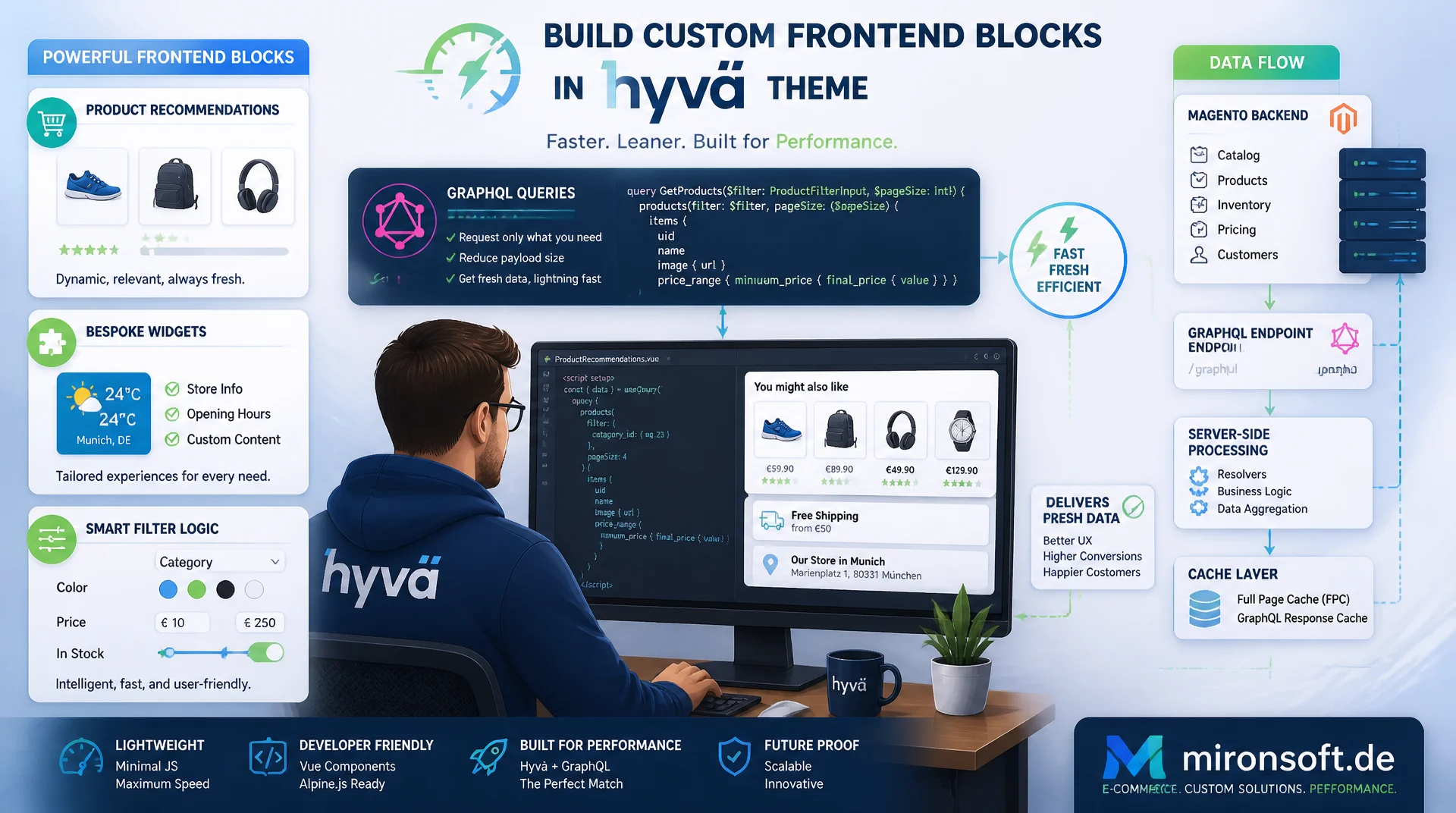
from the .graphql file to the cache header
Anyone building custom frontend blocks in a Hyvä theme, product recommendations, bespoke widgets or filter logic, will eventually need custom Hyvä GraphQL queries. Structured correctly, preloaded server-side and cached on multiple layers, they deliver fresh data quickly without putting the Full Page Cache or page speed at risk.
Table of contents
- 1. Why custom GraphQL queries in Hyvä templates are needed at all
- 2. Structuring custom GraphQL query files in a Hyvä module
- 3. Writing a concrete query
- 4. Integrating it into a phtml template with Alpine.js
- 5. Server-side preloading via a ViewModel as a hybrid approach
- 6. Server-side caching of GraphQL responses
- 7. Client-side caching in the frontend
- 8. Performance optimization
- 9. Security for custom GraphQL queries
- 10. Summary
- 11. FAQ
1. Why custom GraphQL queries in Hyvä templates are needed at all
Hyvä replaces classic PHP data loading through repositories with direct GraphQL calls from the browser for many standard blocks, think search, the cart or product listings. As soon as a project needs custom frontend blocks, though, individual product recommendations, a widget with filtered categories or a live stock update, plain block injection is no longer enough. This is exactly where Hyvä GraphQL queries come in: they let data be fetched asynchronously and on demand, without a full page reload or an extra PHP controller.
The key difference from a classic repository injection in a block or ViewModel is that Hyvä GraphQL queries can be fetched directly from the client, independent of the page's cache state. That is particularly valuable for content that changes more often than the rest of the page, such as stock levels, personalized recommendations or prices with customer-group-specific conditions. Where a fully server-rendered solution would have to invalidate the Full Page Cache, a page built around a custom GraphQL query stays cacheable while only the affected fragment remains dynamic.
Custom GraphQL queries in Hyvä templates are therefore not an end in themselves, they are a tool for a deliberate separation of static and dynamic content. The following sections show how such a query is structured, wired into a template, preloaded server-side and cached on several layers, turning a single example into a pattern the whole project can reuse.
2. Structuring custom GraphQL query files in a Hyvä module
A clean structure for Hyvä GraphQL queries starts with a physical separation between the query definition and the component that calls it. Instead of hiding a query as a string inside JavaScript or a phtml template, it is stored as a standalone .graphql file inside the module, for example under view/frontend/web/graphql/. That gives IDE syntax highlighting, keeps diffs readable in code review, and lets the same query be reused from several components without duplicating it.
The query is then executed against Magento's /graphql endpoint, either via a direct fetch() call from Alpine.js or through a small shared JavaScript wrapper that centralizes headers, store context and error handling. This separation between the pure query definition and the component that invokes it is the core of a maintainable approach to Hyvä GraphQL queries: when the schema changes, only the .graphql file needs updating, not every individual Alpine component that uses it.
For larger projects it also pays off to adopt a naming convention that reveals the module and purpose, such as relatedProducts.graphql or categoryTeaser.graphql. That makes it easier for teammates to find an existing query instead of accidentally writing a second, slightly different one for the same use case.
3. Writing a concrete query
A realistic example of a Hyvä GraphQL query is loading related products including a custom EAV attribute and their associated category data. The query deliberately requests only the fields the component actually renders, no wildcard, no unused sub-objects. That keeps the response small and reduces server load, because Magento only executes the resolvers that were actually requested.
In the example below the query returns, per SKU, name, URL, image, price range, a custom is_handmade attribute and the assigned categories with UID, name and URL path. The $pageSize variable has a default value so callers can override it when needed without having to set it explicitly in every component.
# Custom Hyvä GraphQL query for a related-products block
# File: view/frontend/web/graphql/relatedProducts.graphql
query RelatedProductsWithCategories($skus: [String!]!, $pageSize: Int = 6) {
  products(filter: { sku: { in: $skus } }, pageSize: $pageSize) {
    items {
      uid
      sku
      name
      url_key
      small_image {
        url
        label
      }
      price_range {
        minimum_price {
          final_price {
            value
            currency
          }
        }
      }
      # Custom EAV attribute exposed via graphql_schema.graphqls
      is_handmade
      categories {
        uid
        name
        url_path
      }
    }
    total_count
  }
}
This query is deliberately kept narrow: every additional field, especially nested objects such as categories, costs resolver time on the backend. When this kind of query runs repeatedly on category pages or in a product listing, an overly generous field selection quickly adds up to noticeable server load.
4. Integrating it into a phtml template with Alpine.js
In the template, the query is wired up through an Alpine.js component that wraps a fetch() call, a loading state and an error state. It is essential to never write the double-curly-brace Alpine mustache syntax directly in the markup, because Magento's own template parser interprets double curly braces as a directive. Values must instead be bound consistently through x-text and x-show.
The snippet below shows a complete integration: the Alpine component holds items, loading and error as reactive state, calls refresh() when needed and renders the product list with x-for. Since Hyvä GraphQL queries run asynchronously, the loading state has to be visible before the first data arrives, otherwise the page briefly looks empty or broken.
<?php
/** @var \Magento\Framework\View\Element\Template $block */
/** @var \Hyva\Theme\Model\ViewModelRegistry $viewModels */
/** @var \Mironsoft\GraphQlWidgets\ViewModel\RelatedProducts $relatedProductsViewModel */
$relatedProductsViewModel = $viewModels->require(\Mironsoft\GraphQlWidgets\ViewModel\RelatedProducts::class);
$hyvaCsp = $viewModels->require(\Hyva\Theme\ViewModel\HyvaCsp::class);
?>
<div
  x-data="relatedProductsGraphql({
    skus: <?= /* @noEscape */ $relatedProductsViewModel->getRelatedSkusJson() ?>,
    initialItems: <?= /* @noEscape */ $relatedProductsViewModel->getInitialItemsJson() ?>
  })"
  class="my-8"
>
  <p class="text-lg font-bold mb-4">You might also like</p>

  <template x-if="loading">
    <p class="text-sm text-slate-500">Loading recommendations ...</p>
  </template>

  <template x-if="error">
    <p class="text-sm text-red-600" x-text="error"></p>
  </template>

  <div class="grid grid-cols-2 sm:grid-cols-3 lg:grid-cols-6 gap-4" x-show="!loading && !error">
    <template x-for="item in items" :key="item.uid">
      <a :href="item.url_key" class="block border border-slate-200 rounded-xl p-3 hover:shadow-md transition-shadow">
        <img :src="item.small_image.url" :alt="item.small_image.label" class="w-full h-auto mb-2" loading="lazy">
        <p class="text-sm font-semibold" x-text="item.name"></p>
        <p class="text-sm text-slate-600" x-text="item.price_range.minimum_price.final_price.value"></p>
      </a>
    </template>
  </div>
</div>

<script>
function relatedProductsGraphql({ skus, initialItems }) {
  return {
    items: initialItems,
    loading: false,
    error: null,
    // Fetch fresh data from the /graphql endpoint on demand
    async refresh() {
      this.loading = true;
      this.error = null;
      try {
        const response = await fetch('/graphql', {
          method: 'POST',
          headers: { 'Content-Type': 'application/json', 'Store': 'default' },
          body: JSON.stringify({
            query: window.relatedProductsQuery,
            variables: { skus, pageSize: 6 }
          })
        });
        const { data, errors } = await response.json();
        if (errors) {
          throw new Error(errors[0].message);
        }
        this.items = data.products.items;
      } catch (e) {
        this.error = 'Could not load recommendations';
      } finally {
        this.loading = false;
      }
    },
    init() {
      // SSR data is already present, only refresh on an explicit event
      window.addEventListener('wishlist-updated', () => this.refresh());
    }
  };
}
</script>
<?= $hyvaCsp->registerInlineScript() ?>
This structure cleanly separates what is delivered server-side as the initial state from what is refreshed via GraphQL later on. The component never starts empty and does not fire a request right away, it uses initialItems from the ViewModel as an immediately visible state.
5. Server-side preloading via a ViewModel as a hybrid approach
A client-only approach to Hyvä GraphQL queries has one noticeable drawback: the user sees a loading state on first render, before any data has arrived. The more robust hybrid approach preloads the initial data server-side through a ViewModel and passes it as JSON into the Alpine component. GraphQL is then only used for later refreshes, for example after the user updates the wishlist or toggles a filter option.
The ViewModel below uses constructor property promotion and loads the initial product data through the existing product repository, not through GraphQL itself. That keeps the first page load fully server-rendered and cacheable, while GraphQL only comes into play for later refreshes.
<?php

declare(strict_types=1);

namespace Mironsoft\GraphQlWidgets\ViewModel;

use Hyva\Theme\Model\ViewModelInterface;
use Magento\Catalog\Api\ProductRepositoryInterface;
use Magento\Framework\Exception\NoSuchEntityException;
use Magento\Framework\Serialize\Serializer\Json;

/**
 * Hybrid view model: preloads related products server-side for the first
 * render, GraphQL is only used later to refresh the block on the client.
 */
class RelatedProducts implements ViewModelInterface
{
    /**
     * @param ProductRepositoryInterface $productRepository Repository used for the initial SSR load.
     * @param Json $json Serializer used to pass data safely into Alpine.js.
     * @param string[] $relatedSkus SKUs of the related products for the current product.
     */
    public function __construct(
        private readonly ProductRepositoryInterface $productRepository,
        private readonly Json $json,
        private readonly array $relatedSkus = []
    ) {
    }

    /**
     * Returns the SKUs of related products as a JSON string for Alpine.js.
     *
     * @return string
     */
    public function getRelatedSkusJson(): string
    {
        return $this->json->serialize($this->relatedSkus);
    }

    /**
     * Loads the initial related-product items server-side so the block
     * renders immediately without waiting for a client-side GraphQL request.
     *
     * @return string
     * @throws \Magento\Framework\Exception\LocalizedException
     */
    public function getInitialItemsJson(): string
    {
        $items = [];
        foreach ($this->relatedSkus as $sku) {
            try {
                $product = $this->productRepository->get($sku);
                $items[] = [
                    'uid' => (string) $product->getId(),
                    'sku' => $product->getSku(),
                    'name' => $product->getName(),
                    'url_key' => $product->getProductUrl(),
                ];
            } catch (NoSuchEntityException $e) {
                continue;
            }
        }

        return $this->json->serialize($items);
    }
}
This hybrid approach combines the strengths of both worlds: the first render is fully server-side and therefore covered by the Full Page Cache, while GraphQL takes on the role of a targeted refresh layer that only becomes active when it is actually needed.
6. Server-side caching of GraphQL responses
Magento's GraphQL endpoint respects the same cache infrastructure as the rest of the shop, provided the query does not contain customer-group- or session-dependent fields. For cacheable Hyvä GraphQL queries, Magento sets appropriate Cache-Control and X-Magento-Tags headers that let the Full Page Cache store the response and invalidate it precisely through the matching tags when a product changes, instead of flushing the entire cache.
For queries that repeat with the same shape, persisted queries are worth adopting: instead of transmitting the full query string on every request, a hash is registered for each known query at deployment time, and the client only sends that hash afterwards. This reduces payload size and lets the server maintain a whitelist of allowed queries, which is also a security win, since arbitrary ad-hoc queries from the client are no longer possible.
{
  "version": 1,
  "queries": {
    "a3f8c2e19b7d4f0a2c8e5b6d1f9a0c3e": {
      "operationName": "RelatedProductsWithCategories",
      "query": "query RelatedProductsWithCategories($skus: [String!]!, $pageSize: Int = 6) { products(filter: { sku: { in: $skus } }, pageSize: $pageSize) { items { uid sku name } total_count } }",
      "cacheable": true,
      "ttl": 3600
    }
  }
}
An important detail for the interplay with the Full Page Cache: as soon as a query contains personalized fields, such as customer-specific prices, Magento automatically marks the response as non-cacheable. Anyone planning Hyvä GraphQL queries should therefore deliberately split personalized and generic fields into separate queries, rather than mixing them into a single request and turning the whole response uncacheable by accident.
7. Client-side caching in the frontend
Server-side caching alone does not prevent several components rendered on the same page from firing the same query multiple times, for example when a product carousel and a recommendation widget happen to request the same SKUs. A simple but effective pattern for Hyvä GraphQL queries is a central in-memory cache built on Alpine.store(), which stores results keyed by query name and variables and attaches a TTL to each entry.
If a second component requests the same query with the same variables within the TTL window, the result is served straight from the store without triggering another network request. If a request for the same key is already in flight, the second component can wait on that request's promise instead of starting a duplicate one. That noticeably reduces the number of concurrent GraphQL requests on pages with several similar widgets and eases the load on both the backend and the user's network connection.
A TTL of a few seconds to a few minutes is sufficient in practice for most use cases, since genuine price or stock changes rarely matter on a sub-second timescale. For truly time-critical data, such as the last available stock count right before checkout, the cache should be deliberately bypassed or its TTL set to zero.
8. Performance optimization
The single most important lever for Hyvä GraphQL queries is field selection: every additional requested field costs resolver time on the backend and bytes in the response. Instead of fetching a complete product object with every available field, each component should request exactly the fields it actually renders. This matters especially for nested relations such as categories or configurable_options, which can trigger additional resolver calls internally.
A second, often overlooked problem is N+1 behavior in nested fields: if a separate sub-query with its own resolver call is triggered for every element of a list, that adds up to noticeable latency on larger lists. Magento's GraphQL resolvers are built for batch resolution, provided the query is written so that related data is loaded in one pass instead of being resolved over multiple round trips.
Because the native Magento GraphQL endpoint does not support HTTP batching of independent operations, several logically separate Hyvä GraphQL queries can be bundled into a single request using GraphQL aliases. The example below loads a category teaser and product suggestions in one request instead of firing two separate HTTP requests:
# Batching two logically separate Hyvä GraphQL queries via aliases
# in a single HTTP round trip
query BatchedHomeWidgets($categoryId: String!, $skus: [String!]!) {
  categoryTeaser: categories(filters: { category_uid: { eq: $categoryId } }) {
    items {
      uid
      name
      image
    }
  }
  relatedTeaser: products(filter: { sku: { in: $skus } }, pageSize: 4) {
    items {
      uid
      name
      small_image {
        url
      }
    }
  }
}
This batching technique saves an entire HTTP round trip and noticeably lowers perceived load time, especially on mobile connections with higher latency. Combined with minimal field selection and a client-side cache, this results in a set of custom queries that goes easy on both the backend and the network.
9. Security for custom GraphQL queries
An open /graphql endpoint without protective measures is an attractive target for query-based denial-of-service attacks: a deeply nested query with many repetitions can put far more strain on the backend than a single REST request. Magento offers query complexity limits and depth limiting for exactly this reason, and they should be configured before custom Hyvä GraphQL queries go live, especially when users can influence variables such as filter values or pagination sizes themselves.
Introspection, the ability to query the entire schema, should be disabled in production environments. It is useful during development but in production it unnecessarily exposes details about internal structures that make it easier for attackers to find weakly protected fields. ACL-protected fields, such as internal calculation data or B2B-specific pricing information, should also be consistently secured through Magento's resolver-level permissions rather than relying solely on frontend logic.
Rate limiting at the web server level or on a reverse proxy in front of it complements these measures by capping the number of requests per IP or session. For Hyvä GraphQL queries that are whitelisted via persisted queries, rate limiting can even be configured per query hash, which is more targeted than a blanket limit across the entire endpoint.
| Task | Unsafe / Inefficient | Recommended Pattern | Benefit |
|---|---|---|---|
| Introspection | Left enabled in production | Disable via graphql.xml |
Prevents schema fingerprinting |
| Field selection | Fetching the full object | Requesting only needed fields | Smaller payloads, less server load |
| Duplicate requests | Each component fetches independently | Alpine.store() as in-memory cache |
No duplicate network calls |
| Nested relations | One query per child element (N+1) | Batched query with aliases in one request | One round trip instead of N |
| Cache invalidation | No cache tags set | Respecting X-Magento-Tags |
FPC-compatible, targeted invalidation |
| Query floods | No protection against deep nesting | Complexity and depth limits | Protects against denial-of-service |
Mironsoft
Hyvä frontend development, GraphQL architecture and caching for Magento 2
Custom GraphQL queries that do not slow down your Full Page Cache?
We design and implement custom Hyvä GraphQL queries for individual frontend blocks, with clean field selection, a ViewModel hybrid approach and multi-layer caching that works across both server and client.
GraphQL architecture review
Analysis of existing queries for field selection, N+1 issues and security gaps
Hyvä frontend development
Alpine.js components and ViewModel hybrid approaches for custom widgets
Performance & caching audit
Server- and client-side caching strategies working together with the Full Page Cache
10. Summary
Custom Hyvä GraphQL queries solve a concrete problem: they let dynamic content be refreshed on demand without sacrificing the Full Page Cache for the rest of the page. Getting there requires a clean separation between the query file and the component, a deliberately narrow field selection, and a hybrid approach that preloads the first data server-side through a ViewModel while GraphQL only handles later updates.
Caching decides whether the whole approach succeeds or fails: server-side through cache tags and persisted queries, client-side through a simple Alpine.store()-based in-memory cache with a TTL that avoids duplicate requests from several concurrent components. Add query complexity limits, disabled introspection in production and ACL-protected fields, and the result is a set of queries that is performant, maintainable and secure.
Applying these building blocks consistently from the start, rather than retrofitting them later, saves painful refactoring under time pressure. A well-structured set of Hyvä GraphQL queries is also easy to carry over to further widgets in the same project, because the structure, the caching pattern and the security measures are already in place.
Hyvä GraphQL queries in the frontend: the key takeaways
Structure
Queries as standalone .graphql files inside the module, separated from the Alpine.js component that calls them.
Hybrid approach
A ViewModel preloads the initial data server-side, GraphQL only handles later refreshes and updates.
Caching
Server-side through cache tags and persisted queries, client-side through Alpine.store() with a TTL.
Security & performance
Minimal field selection, alias-based batching, complexity limits and disabled introspection in production.