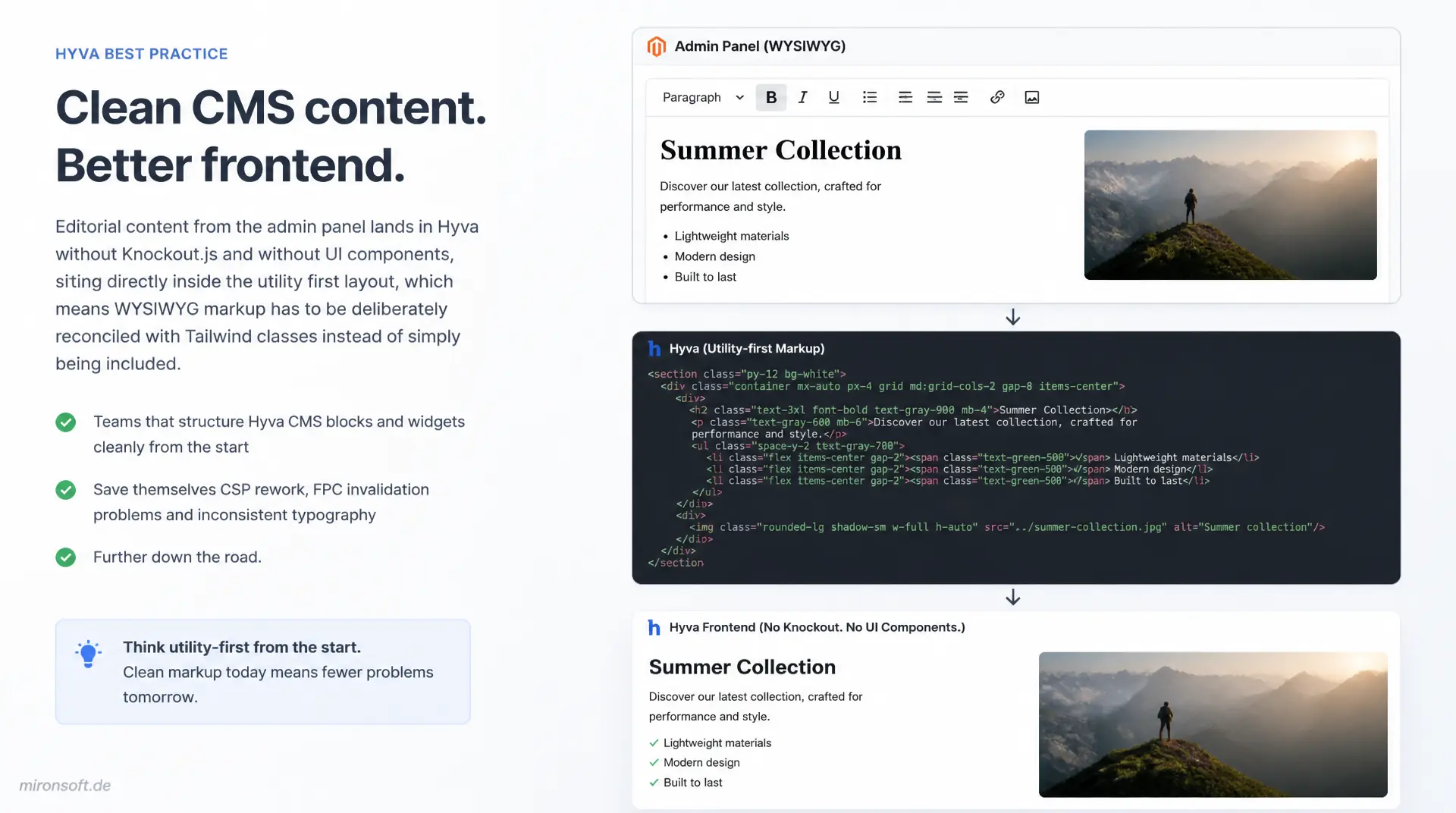
without Luma leftovers, with Tailwind instead of inline chaos
Editorial content from the admin panel lands in Hyva without Knockout.js and without UI components, sitting directly inside the utility first layout, which means WYSIWYG markup has to be deliberately reconciled with Tailwind classes instead of simply being included. Teams that structure Hyva CMS blocks and widgets cleanly from the start save themselves CSP rework, FPC invalidation problems and inconsistent typography further down the road.
Table of Contents
- 1. Why CMS blocks and widgets behave differently in Hyva
- 2. Basics: embedding a CMS block widget in Hyva
- 3. Styling WYSIWYG content with Tailwind Typography
- 4. Registering custom widget types for Hyva
- 5. Injecting a CMS block via ViewModel instead of hardcoding
- 6. Dynamic and static blocks for reusable content snippets
- 7. Full Page Cache and cache tags for CMS blocks
- 8. Responsive behavior of images in WYSIWYG content
- 9. CSP security for CMS blocks and widgets
- 10. Summary
- 11. FAQ
1. Why CMS Blocks and Widgets in Hyvä Work Differently Than in Luma
Anyone coming from a Luma project expects Hyvä CMS blocks to follow a similar rendering chain, but finds a fundamentally different foundation instead. Hyva drops Knockout.js and UI components entirely, which means a CMS block is no longer wired into a web of data-bind attributes, Knockout templates and RequireJS modules. Instead, the rendered WYSIWYG content lands as plain HTML in the server side markup, sitting right next to Tailwind utility classes with no client side post-processing by JavaScript frameworks.
This simplification creates a tension: editors maintain content in the TinyMCE editor using classic inline styles and generic Luma CSS classes such as .pagebuilder-column, while the theme itself consistently relies on utility first Tailwind. Without deliberate countermeasures, WYSIWYG markup collides unfiltered with a design system that knows none of these legacy classes. Hyvä CMS blocks therefore need to be either normalized through Tailwind Typography classes or replaced with dedicated templates, so that font sizes, spacing and link colors match the rest of the theme.
The practical effect: teams that embed Hyvä CMS blocks the naive Luma way end up with either unstyled body text or broken layouts as soon as editors add tables, images or nested lists. The following sections show how to cleanly integrate CMS blocks, widgets and WYSIWYG content into a Hyva theme, from the basic embedding pattern through custom widget types to caching strategy and CSP security.
2. Basics: Embedding a CMS Block Widget in Hyvä
The standard way to display a CMS block in Hyva runs through the Magento\Cms\Block\Widget\Block widget, usable both inside Page Builder content and directly in layout XML. In the admin WYSIWYG or in static CMS content, the call looks like this: {{widget type="Magento\Cms\Block\Widget\Block" block_id="footer-trust-badges"}}. Magento resolves this placeholder at runtime, loads the referenced block through the BlockRepositoryInterface, and renders its content field as HTML at exactly that spot in the body text.
What matters for Hyvä CMS blocks is that this rendering path works independently of the frontend framework, because widget resolution happens server side inside Magento\Widget\Model\Template\Filter, long before Alpine.js or Tailwind ever come into play. In the theme itself the block usually ends up rendered via getChildBlock() or as an embedded widget call inside CMS page content, with the surrounding phtml template staying responsible for setting the correct Tailwind context around the block.
A common beginner mistake: the block is included via layout XML as a standalone cms/block.phtml, but rendered directly inside a prose element without a not-prose wrapper, causing Tailwind Typography to unintentionally affect structural divs that are not actually body text. For Hyvä CMS blocks that contain pure layout elements such as banners or trust badge strips, a deliberate distinction should therefore be made between body text blocks (wrapped in prose) and layout blocks (wrapped in not-prose).
3. Styling WYSIWYG Content with Tailwind Typography
The @tailwindcss/typography plugin is the central bridge between editorial WYSIWYG content and a consistent Hyva theme. Instead of styling every possible HTML structure an editor might produce in TinyMCE individually with utility classes, you apply the prose class to the container and automatically get sensible default formatting for headings, paragraphs, lists, blockquotes and tables. For Hyvä CMS blocks with mixed content this is the only practical approach, because editors can insert new elements at any time without a developer having to add classes retroactively.
The default prose colors rarely match the corporate design exactly, which is why theme specific overrides via the Tailwind configuration are necessary. With prose-headings:text-slate-900, prose-a:text-orange-700 and prose-a:no-underline, link colors and heading colors can be adjusted to the theme without losing the rest of the typography logic. For Hyvä CMS blocks in the footer or in sidebar widgets, a more compact variant such as prose-sm is also recommended, since the full prose scale often brings font sizes that are too large for narrow columns.
A detail that is often overlooked in practice: images from the WYSIWYG editor come without a max-width constraint and without height: auto, which is usually corrected inside prose, but has to be explicitly added in custom not-prose wrappers. The following structure shows a typical phtml fragment embedding a CMS block widget call inside a typographically correct container.
<!-- template: Magento_Cms::block/wysiwyg-wrapper.phtml -->
<!-- Wrap widget-rendered CMS content in Tailwind Typography classes -->
<div class="prose prose-slate max-w-none
            prose-headings:text-slate-900 prose-headings:font-bold
            prose-a:text-orange-700 prose-a:no-underline hover:prose-a:underline
            prose-img:rounded-xl prose-img:shadow-sm
            prose-table:text-sm prose-th:bg-slate-100">
  <?= /* @noEscape */ $block->getChildHtml('cms-content-block') ?>
</div>

<!-- Sidebar variant: compact typography for narrow widget columns -->
<aside class="prose prose-sm prose-slate max-w-none prose-a:text-orange-700">
  <?= /* @noEscape */ $block->getChildHtml('sidebar-trust-block') ?>
</aside>
4. Registering Custom Widget Types for Hyvä
The generic block widget renderer stops being sufficient the moment a widget needs its own parameters, its own logic, or its own template, for example a "current offers" banner with a configurable category ID. For cases like this you register a custom widget type via widget.xml in the module directory, define the parameters there with type, label and source, and point to a dedicated phtml template instead of the standard block renderer. For Hyvä CMS blocks and widgets this means the template can be written with Tailwind classes from the outset instead of Luma widget CSS.
It is important that the template attribute in widget.xml points directly to the Hyva theme template and does not carry along any extra fallback logic for Luma widget templates. Parameters such as category_id or display_mode are populated with options via a source_model, so editors can conveniently select them in the Page Builder or WYSIWYG widget dialog instead of typing IDs by hand.
<!-- File: app/code/Mironsoft/CmsWidgets/etc/widget.xml -->
<!-- Custom widget type for Hyva: category promo banner -->
<widgets xmlns:xsi="http://www.w3.org/2001/XMLSchema-instance"
         xsi:noNamespaceSchemaLocation="urn:magento:module:Magento_Widget:etc/widget.xsd">
    <widget id="mironsoft_category_promo" class="Mironsoft\CmsWidgets\Block\CategoryPromo"
            template="Mironsoft_CmsWidgets::widget/category-promo.phtml"
            is_email_compatible="false">
        <label translate="true">Category Promo Banner (Hyva)</label>
        <description translate="true">Promo banner for a category, styled with Tailwind.</description>
        <parameters>
            <parameter name="category_id" xsi:type="block" required="true" visible="true">
                <label translate="true">Category</label>
                <block class="Magento\Cms\Block\Adminhtml\Wysiwyg\Widget\Chooser">
                    <data>
                        <item name="button" xsi:type="array">
                            <item name="open" xsi:type="string" translate="true">Choose Category...</item>
                        </item>
                    </data>
                </block>
            </parameter>
            <parameter name="display_mode" xsi:type="select" required="true" visible="true">
                <label translate="true">Display Mode</label>
                <options>
                    <option name="banner" value="banner"><label translate="true">Banner</label></option>
                    <option name="card" value="card"><label translate="true">Card</label></option>
                </options>
            </parameter>
        </parameters>
    </widget>
</widgets>
5. Injecting a CMS Block via ViewModel Instead of Hardcoding in the Template
A common antipattern in Hyva projects is loading a CMS block directly via Magento\Cms\Model\BlockFactory right inside the phtml template. That couples presentation tightly to data retrieval and can neither be unit tested nor cleanly overridden via layout XML. Instead, a Hyva CMS block should be provided through a ViewModel injected as an ArgumentInterface via layout XML into the relevant block, matching the project's coding standard.
The ViewModel encapsulates access to BlockRepositoryInterface, handles NoSuchEntityException cleanly, and returns only the needed, already prepared data to the template. The template itself stays free of business logic and only queries $viewModel->getBlockContent('trust-badges'). This separation also allows the layout XML handle to be varied per project without touching the ViewModel code.
<?php
declare(strict_types=1);

namespace Mironsoft\CmsWidgets\ViewModel;

use Magento\Cms\Api\BlockRepositoryInterface;
use Magento\Framework\Api\SearchCriteriaBuilder;
use Magento\Framework\Exception\NoSuchEntityException;
use Magento\Framework\View\Element\Block\ArgumentInterface;
use Psr\Log\LoggerInterface;

/**
 * ViewModel providing safe access to a CMS block's content by identifier.
 */
class CmsBlockContent implements ArgumentInterface
{
    /**
     * @param BlockRepositoryInterface $blockRepository CMS block repository
     * @param SearchCriteriaBuilder $searchCriteriaBuilder Builder for identifier-based lookups
     * @param LoggerInterface $logger Logger for missing-block diagnostics
     */
    public function __construct(
        private readonly BlockRepositoryInterface $blockRepository,
        private readonly SearchCriteriaBuilder $searchCriteriaBuilder,
        private readonly LoggerInterface $logger,
    ) {
    }

    /**
     * Returns the rendered HTML content of a CMS block by its identifier.
     *
     * @param string $identifier CMS block identifier
     * @return string Block content or empty string if not found or inactive
     */
    public function getBlockContent(string $identifier): string
    {
        $criteria = $this->searchCriteriaBuilder
            ->addFilter('identifier', $identifier)
            ->addFilter('is_active', 1)
            ->create();

        $items = $this->blockRepository->getList($criteria)->getItems();
        $block = reset($items);

        if ($block === false) {
            $this->logger->warning(sprintf('CMS block "%s" not found or inactive.', $identifier));
            return '';
        }

        return (string) $block->getContent();
    }
}
6. Dynamic and Static Blocks for Reusable Content Snippets
Trust badges, shipping notices, seasonal banners and legal disclaimers change more often than the code surrounding them, which is why they are ideally maintained as static blocks in the admin panel rather than hardcoded in the template. For Hyva CMS blocks of this kind the rule is: the block itself contains only the editorial content, while layout, grid structure and responsive behavior are defined with Tailwind classes in the surrounding phtml template. That way marketing can change the text in the static block without requiring a deployment.
Dynamic blocks, which Magento links via the widget mechanism with conditions, are suited to audience specific content, for example different banners for new customers and returning customers. Here too the basic principle holds: the condition logic lives in the widget or the segment rule, not in the template. The template only renders what it is given via the widget renderer or the ViewModel, and thereby stays maintainable independent of marketing decisions.
In practice a clear convention pays off: static blocks for globally valid, rarely changing snippets such as footer certificates, dynamic blocks for time bound or audience bound campaign content. Teams that stick to this separation from the start avoid editors accidentally writing campaign copy into globally embedded Hyva CMS blocks, which then stay live site wide long after the campaign has ended.
<!-- template: Mironsoft_CmsWidgets::block/static-banner.phtml -->
<!-- Static block content is maintained in Admin, layout structure stays fixed -->
<div class="not-prose bg-orange-50 border border-orange-200 rounded-xl px-4 py-3 mb-8 flex items-start gap-3">
  <svg class="w-5 h-5 text-orange-600 flex-shrink-0 mt-0.5" fill="none" stroke="currentColor" viewBox="0 0 24 24">
    <path stroke-linecap="round" stroke-linejoin="round" stroke-width="2" d="M13 16h-1v-4h-1m1-4h.01M21 12a9 9 0 11-18 0 9 9 0 0118 0z"/>
  </svg>
  <div class="prose prose-sm max-w-none prose-a:text-orange-700">
    <?= /* @noEscape */ $block->getChildHtml('shipping.notice.block') ?>
  </div>
</div>
7. Full Page Cache and Cache Tags for CMS Blocks
CMS blocks get tagged in Magento's Full Page Cache by default with the cache tag cms_b_<id>, which means that a change to the block in the admin panel invalidates only the pages carrying that tag, instead of flushing the entire cache. For Hyva CMS blocks embedded via widgets across multiple CMS pages or in static block content, this invalidation works transparently as long as the block is loaded through the standard renderer rather than through a custom, untagged data source.
A critical point with custom widget types: if a custom widget references data from a CMS block but does not set its own cache tag, the page can end up stale after a block change in the admin panel, because the surrounding Full Page Cache object never learns about the referenced block's tag. In that case the widget, or the underlying block object, has to override getIdentities() so that it also emits the relevant cms_b_<id> tag.
In interplay with Hyva's client side block cache, which keeps individual blocks cached independently of the full page cache via ttl directives in layout XML, it is important to understand that both mechanisms are invalidated independently. A Hyva CMS block running through its own Hyva block cache therefore needs the same tag logic as the FPC, otherwise the block cache serves stale content even though the full page cache was already correctly invalidated.
{
  "cache_warmup": {
    "cms_blocks": [
      { "identifier": "footer-trust-badges", "tag": "cms_b_42", "warm_on_deploy": true },
      { "identifier": "shipping-notice", "tag": "cms_b_57", "warm_on_deploy": true },
      { "identifier": "homepage-banner", "tag": "cms_b_12", "warm_on_deploy": false }
    ],
    "warmup_urls": [
      "/",
      "/checkout/cart",
      "/customer/account"
    ]
  }
}
8. Responsive Behavior of Images in WYSIWYG Content
Images that editors insert through the WYSIWYG editor come without srcset, without explicit width/height attributes and without loading="lazy", because the default TinyMCE image dialog does not set these attributes automatically. For Hyva CMS blocks with many editorial images this leads to layout shift without post-processing, because the browser has no reserved height before the image loads, and to unnecessarily large image transfers on mobile devices.
A robust solution is a plugin on the WYSIWYG renderer, or a post-processing step in the template, that automatically applies loading="lazy" and decoding="async" to all img tags inside a CMS block, unless they already sit above the fold. For above the fold images in hero blocks, loading="eager" and a fetchpriority="high" should be set explicitly instead, so the Largest Contentful Paint is not delayed by lazy loading.
The Tailwind Typography class prose-img:rounded-xl takes care of the visual styling but does not solve the problem of missing dimension attributes. It is therefore worth injecting the actual image dimensions as attributes, either in the media storage upload workflow or via post-processing, so the browser reserves the space before the image loads, keeping CLS in Hyva CMS blocks from becoming a recurring performance problem.
9. CSP Security for CMS Blocks and Widgets
Hyva ships with a strict Content Security Policy by default via its CSP module, blocking inline scripts without a nonce and thereby ruling out many classic XSS vectors from the start. For Hyva CMS blocks this means in practice: editors who accidentally insert a <script> tag or an onclick attribute in the WYSIWYG editor either see nothing at all on the frontend, or a CSP violation reported in the browser console, instead of the code silently executing.
Inline styles in WYSIWYG content are usually not blocked by the default CSP, but should still be avoided because they cannot be versioned or adjusted theme wide through Tailwind utility classes. Offering editors in TinyMCE only a limited set of predefined CSS classes, rather than unlocking the free form inline style editor, reduces the risk of inconsistent formatting while ensuring all Hyva CMS blocks stay visually aligned with the rest of the theme.
Caution is required with custom widget parameters as soon as a parameter is placed directly into HTML attributes or into href values without being escaped first. Parameters coming from the widget dialog are ultimately editorially entered strings and have to be consistently handled in the template with $escaper->escapeHtml() or $escaper->escapeUrl() before they land in the markup, so that even a manipulated widget parameter cannot open an XSS hole.
The following overview summarizes the recurring decisions around Hyva CMS blocks and widgets: which pattern stays unsafe in practice and which alternative has established itself as the robust choice.
| Task | Unsafe / Unclean | Recommended Pattern | Benefit |
|---|---|---|---|
| Embedding a CMS block | Direct BlockFactory use in the template |
ViewModel as ArgumentInterface via layout XML |
Testable, cleanly separated, layout controllable |
| Styling WYSIWYG content | Inline styles set individually per editor | Tailwind Typography with prose overrides |
Consistent, no editor training needed |
| Building a custom widget | Repurposing the generic block widget renderer | Custom type via widget.xml with its own template |
Clean parameters, no hack |
| Cache invalidation | Custom widget without its own cache tag | Override getIdentities() with cms_b_<id> |
FPC invalidates reliably |
| Images in WYSIWYG | No width/height, no lazy loading |
Inject dimensions, set loading deliberately |
No layout shift, better LCP |
| Outputting widget parameters | Writing unchecked directly into markup | $escaper->escapeHtml() / escapeUrl() consistently |
No XSS hole via widget parameters |
Mironsoft
Hyva themes, CMS architecture and Magento 2 development
CMS blocks and widgets that work with your Hyva theme instead of against it?
We analyze existing CMS structures, replace Luma leftovers with clean Hyva CMS blocks, build custom widget types, and make sure cache tags and CSP compliance are handled correctly.
CMS Block Redesign
Migrating existing blocks from Luma CSS to Tailwind Typography
Widget Development
Custom widget.xml types with Hyva compliant phtml templates
WYSIWYG Styleguide
Editorial guidelines and CSP safe editor configuration
10. Summary
The recurring theme with Hyva CMS blocks is always the same: editorial content and utility first CSS need to be thought through together, not patched one after the other. Tailwind Typography normalizes WYSIWYG markup without editors having to learn any classes. Custom widget types with a dedicated widget.xml and their own template replace the generic renderer wherever parameters and layout logic get more complex. ViewModels instead of direct block instantiation keep templates testable and layout controllable.
Cache tags such as cms_b_<id> have to be explicitly passed through via getIdentities() for custom widgets, otherwise FPC invalidation stays incomplete. Responsive image attributes and CSP compliant escaping discipline round out the technical safeguards, so that editorially maintained content causes neither performance problems nor security holes.
Teams that consistently apply these points end up with Hyva CMS blocks and widgets that feel like a natural part of the theme, instead of a foreign body grafted on from the Luma era. That reduces day to day support effort and makes the theme usable for new editors without deep technical knowledge.
Hyva CMS Blocks and Widgets: The Key Takeaways
Typography instead of Luma CSS
@tailwindcss/typography with prose-a/prose-headings overrides normalizes WYSIWYG content without editor training.
Custom widget types
widget.xml with a dedicated phtml template instead of the generic block renderer for complex parameters.
ViewModel instead of hardcoding
ArgumentInterface injected via layout XML keeps templates free of block instantiation.
Cache tags & CSP
Pass cms_b_<id> through via getIdentities(), escape widget parameters consistently.